 −52%
−52%
Laravel Project
Shilpo – Digital Product Selling Website Script for Creative Goods in Laravel
৳14,500
৳30,500Save −52%
2 products
−52%
 −59%
−59%
A digital product selling script lets you sell things that are delivered online, such as software licence keys, e-books, templates, fonts, graphics or courses, from a website you own. This category has two Laravel digital shops, Kunji and Shilpo. Both come with full source code, an admin panel and a web installer for cPanel, and both deliver the product to the buyer automatically after the order is approved.
Selling digital goods is different from selling a box. There is no courier, but the buyer expects to get the file or key right away, and you need to be sure only paying customers can reach it. In both shops you attach a download link or a licence key to each product. When an order is paid and confirmed, the item appears in the customer account, ready to download or copy. Licence keys are stored encrypted, so they are not visible in the database as plain text, and each key is handed out once.
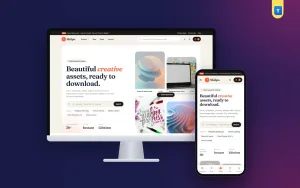
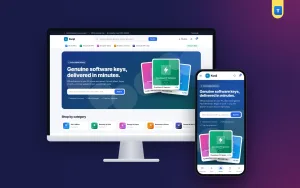
Kunji is designed for software sellers. Its clean, tech-style layout suits antivirus keys, office licences, game codes, gift cards and subscription accounts, with clear platform and validity labels on each product. Shilpo is a creative market with a warm cream and coral look and elegant serif headings. It suits designers, writers and studios who sell templates, presets, illustrations, fonts, printables or e-books and want their work to look like it belongs in a gallery.
Customers in Bangladesh are used to paying with bKash or Nagad, and both shops support them, so a buyer can pay from a phone in a minute. Each order shows up in the admin with its status, and once you approve it the delivery happens on its own. Customers keep everything they bought in their account, so they can download a file again later or find a key they lost, which saves you many support messages.
Good product pages sell digital items. You can show preview images, a short list of what is included in plain sentences, file format and size, and the platform or validity of a key, so buyers know exactly what they get. Clear refund and support notes, and an easy way to contact you, give first-time buyers the confidence to pay.
Upload the files to your hosting, open the web installer and follow the steps. You can import demo content to see a full shop with sample products, then add your own items, keys and files. Each licence covers one domain, and you get documentation in English and Bangla that explains products, delivery settings, payments and orders in plain words. Because the code is Laravel and fully yours, you can extend it later as your catalogue grows.
Kunji and Shilpo each have a live demo at their own demotheme.xyz address. Browse as a buyer, open a product page and see how the shop presents digital items on a phone and on a computer. Think about what you sell, keys or creative files, and choose the shop that fits. Our team is glad to help you decide or set up the delivery settings.
