 −27%
−27%
News Themes
Premium Bangla News Theme – News Portal Website Design WordPress Theme
৳550
৳750Save −27%
✦ Key features
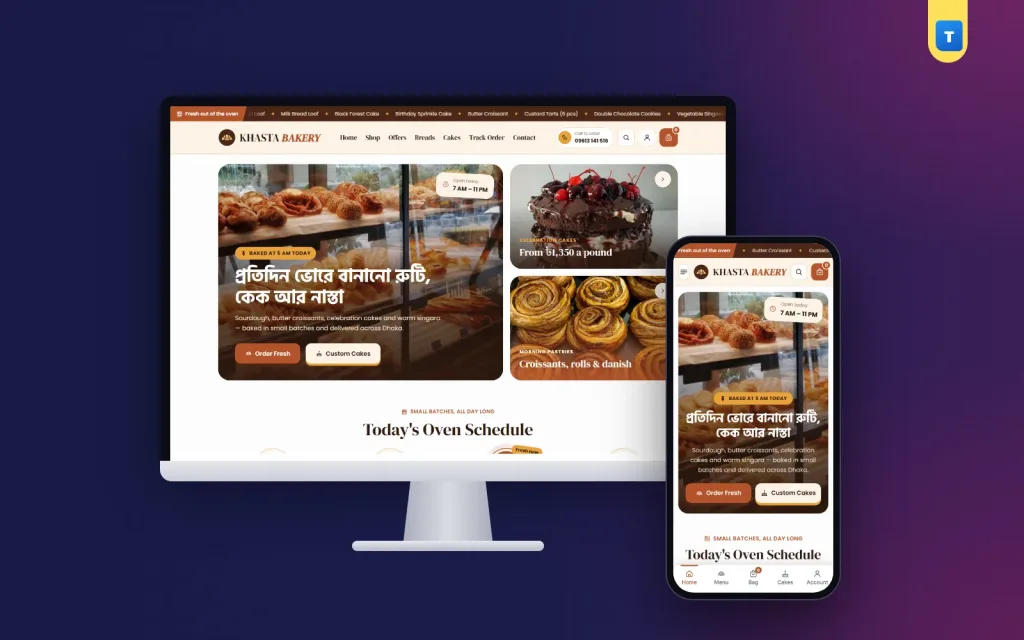
Khasta is a bakery WordPress theme for bakeries, cake shops and snack makers that want to sell bread, cakes, pastries, cookies and tea-time snacks online. It has a warm crust-and-chocolate look on a cream background, with scalloped edges that feel like a paper cake box.
Buyers choose a cake or a box of singara, pick Regular or Large, add it to the cart and pay cash on delivery. Khasta runs on the free WooCommerce plugin, so stock, coupons, orders and payments work the normal way, and any WooCommerce plugin can be added later.
The one-click demo brings 33 bakery products in six categories (Breads, Cakes, Pastries, Cookies & Brownies, Savoury Snacks and Donuts & Cupcakes), ready pages and blog posts.
A bakery sells smell, warmth and timing: what came out of the oven, and when. Khasta shows exactly that. It fits:
If you have been comparing a cake shop website template with a working shop, the difference is that Khasta takes real orders: cart, checkout, coupons, accounts and order history are all built in.
The page opens with a thin "Fresh out of the oven" ticker that scrolls your latest bakes. The header carries the logo, the menu, search and the cart, and the search shows matching products as the buyer types "croissant" or "chocolate cake".
The colours are golden crust, dark chocolate and cream, with soft scalloped edges on badges and the footer. The look is cosy without being childish, so this bakery WordPress theme works for a cake studio as well as an old family bakery.
Cake orders are often planned at night on a phone. The phone layout has one main banner, cards two per row, large buttons, a menu sheet from the left and a bottom tab bar with Home, Shop, Cart and Account. A bakery WordPress theme should feel as easy as calling the shop, and this one does.
Every block has an on/off switch and its own fields in Theme Options, and you can change the order. No code and no page builder.
One big photo card with your headline, such as "Baked at 5 AM today", and two buttons (Order Fresh and Custom Cakes), plus two smaller side cards for a second product and a promise. An "Open today, 7 AM – 11 PM" pill tells buyers you are taking orders.
Today's baking times in a row, such as bread at 6 AM, pastries at 10 AM and snacks at 4 PM. The current slot lights up, so buyers know what is coming out of the oven now. It is a small block that makes the shop feel alive.
"What Are You Craving?" shows each category as a round photo badge with a scalloped edge, like a cupcake case.
Filter pills for Breads, Cakes, Pastries and Savoury Snacks above a product grid. Buyers switch between them without leaving the page.
A photo, three simple steps (flavour, size, message) and a WhatsApp button for custom orders, plus a link to all your cakes. Birthday and wedding cakes are planned in a chat, and this block starts that chat with one tap.
A sideways rail of savoury snacks and cookies for evening tea, then three party box cards with prices, for office meetings, birthdays and family events.
Three review cards, a FAQ block with a call and WhatsApp help line, and your latest three posts from "From the Bakery". The demo reviews are placeholder text, so replace them with real ones.
Every demo product is a variable product with Regular and Large sizes, each with its own price. The card button reads "Choose Size". You can add more options, such as 1 pound, 2 pounds and 3 pounds for cakes, or 6, 12 and 24 pieces for cookies.
Description, Additional information and Reviews tabs sit below, with an average score card above the reviews, and related products close the page. All of it uses WooCommerce's own templates, so a plugin that adds a cake message field or a delivery date picker hooks in without changes to the theme.
The cart and checkout show a three-step bar (Shopping cart, Delivery & payment, Order placed), a free-delivery progress bar and a row of trust notes.
Cakes and fresh bread usually stay inside one city, while dry cookies and rusks can travel. WooCommerce zones and shipping classes let you set this per product.
Guests can order by default. If you want fewer fake orders on expensive cakes, switch on "Orders need an account". Buyers then sign in or sign up in a pop-up with a Bangladeshi mobile number or an email and a password, and go straight back to checkout. Signed-in buyers get a My Account dashboard, a wishlist and their past orders.
The shop page has a filter sidebar: search, categories, a price range in taka, average rating, stock status and on-sale items, with Apply and Reset. A buyer can find "cakes under ৳1,500, in stock" in seconds. Wishlist hearts sit on every card, and a Track Order page is included.
Those filters matter more in a bakery WordPress theme than most people think. A shop with 30 or more items, from bread to brownies, needs a quick way to narrow the list.
WooCommerce and your plugins still load their own files; the theme leaves them alone, so every plugin works. Cake photos are the heaviest part of any bakery site, so compress them to 800–1200 pixels wide before upload.
You work in the normal WordPress and WooCommerce dashboard, with one Khasta menu for the theme's own pages.
Orders arrive in WooCommerce → Orders. Sort them by delivery time, bake, pack and mark them completed. When a cake runs out, mark it out of stock and it stops taking orders.
Colours or a ready palette, fonts, button shape, the ticker, the oven times, every homepage block, checkout and accounts, company details, hours, payment logos and footer, all on one page with a section sidebar.
Contact form messages are emailed and also saved under Khasta → Enquiries, so a wedding cake request is never lost. Newsletter sign-ups are listed under Subscribers. Activate your licence once and updates arrive in the dashboard.
Delivery date pickers, product add-ons for cake messages, SMS, courier and payment plugins use WooCommerce's normal hooks, so they work with this bakery WordPress theme as they do on any shop.
Photograph cakes at eye level for layers and from above for decoration. Bread looks best on a wooden board in morning light. Keep the same background across a category so the grid looks tidy.
Khasta runs on WooCommerce, the free shop plugin used by millions of stores. See all our WordPress themes for more food and grocery designs.
The demo has 33 bakery products in six categories and the WELCOME200 coupon. A cake shop website template gives you a picture of a shop; this bakery WordPress theme gives you one that takes orders with WordPress and the free WooCommerce plugin.
No reviews yet — be the first to share your experience after buying.
Bakeries, cake shops, home bakers, pastry kitchens, snack makers, cloud bakeries and caterers.
Yes. Every product has a cart, checkout, coupons and order history through WooCommerce.
Yes. The custom cake band opens WhatsApp, and you can add a cake message field with any WooCommerce add-ons plugin.
No. Every block is edited in Theme Options. It needs only WordPress and the free WooCommerce plugin.
Yes, by default. You can switch on a rule that asks buyers to sign in with a mobile number or email first.
Cash on delivery works out of the box. Add bKash, Nagad or cards with any WooCommerce payment plugin.
Yes. The demo uses ৳80 inside Dhaka and ৳120 outside Dhaka, and you can change both.
No. Import the demo, then change photos, prices and texts from the dashboard.
You get a refund when the product does not work as described and we cannot fix it, when your license will not activate your website, or when a manually delivered product is late and you cancel before delivery. A working license, or a single license already used on a live domain, is not refundable. Approved refunds go back to the number you paid from within one working day, minus the Send Money charge.
−27%
 −34%
−34%
 −30%
−30%
 −15%
−15%
