
Choosing a skincare website template is a bigger decision than it looks when you sell Korean serums next to local sunscreens and body care. This guide is for importers of K-beauty, home-grown skincare labels and pharmacy beauty counters in Bangladesh that want to move from Facebook posts to a proper shop. It explains what skincare buyers need before they order, and how a shop can guide them to the right product.
Skincare is not bought like a T-shirt. A buyer with oily, acne-prone skin will not order a heavy cream just because the photo is nice. She wants to know the ingredients, the order of use and whether the bottle is original. That is why the template matters: the right layout answers these doubts on the page, while the wrong one leaves you replying to the same questions in Messenger every evening.
As a working example, we use Komol – Skincare Shop WordPress Theme, a gentle, green and apricot theme built for stores that sell cleansers, serums and toners, moisturisers, sunscreen, masks and body care. The first sections, though, are about running the shop itself.
Why Korean and Local Skincare Need a Different Shop
Korean skincare became popular in Bangladesh through YouTube, Instagram and friends who brought products back from abroad. The buyers are curious and well read. They know words like niacinamide, centella and hyaluronic acid, and they follow multi-step routines. At the same time, they have heard stories of fake snail creams and repacked sunscreens. Their first question is often not "how much?" but "is it original?"
Local brands face a different challenge. A Dhaka-made aloe gel or a vitamin C serum mixed in small batches must prove that it is safe and effective, often against imported names that buyers already trust. Mixing both in one store can work well, because a buyer building a routine needs a cleanser, a treatment, a moisturiser and a sunscreen, and those can come from different origins as long as each one fits her skin.
So a skincare shop needs two things that a general online cosmetics store often skips: guidance by skin type and concern, and clear signs of authenticity. Everything else, from banners to colours, comes after those. If a shopper cannot quickly see what suits her skin and why she can trust the bottle, a pretty homepage will not save the sale.
Planning Your Skincare Catalogue and Supply
Start with suppliers. For Korean products, buy from distributors who can show import papers, or from the brands' official sellers abroad. Keep invoices, and photograph batch codes and expiry dates when stock arrives. For your own label, keep a simple record of each batch: the date made, the ingredients used and any test results. This record protects you when a customer has a reaction and asks questions.
Organise by step, skin type and concern
Set your main categories as routine steps: cleansers, serums and toners, moisturisers, sunscreen, masks, and body and lips. Then tag each product by skin type, such as oily, dry, combination and sensitive, and by concern, such as acne, dullness, dryness, sun and spots. Shoppers rarely search by brand first. They search by problem, and good tags let the shop answer that.
Write product pages that teach
For each product, write the size, the key ingredients, who it suits and who should avoid it, how to use it and when it fits in a routine. For Korean items, translate the main claims on the label into plain English or Bangla. Add a patch-test reminder for strong actives such as acids and retinol. A short, honest page sells better than a long list of promises.
What a Good Skincare Website Template Should Include
A good skincare website template helps the buyer choose. Look for a way to build a routine by skin type, a way to browse by ingredient, and cards for common concerns. Product cards should show the size clearly, since a 30 ml serum and a 100 ml toner are very different purchases. Reviews matter more here than in most categories, because buyers trust other people with the same skin type.
The store also needs simple trust pages: About, Delivery, Returns, FAQ and a Track Order page. A blog or skin school section lets you explain routines and ingredients in your own words, which helps search traffic and saves time in the inbox. Finally, the layout must be calm. Skincare buyers spend time reading, and a noisy page full of flashing badges makes products look cheap.
How Komol Works as a Skincare Website Template
Komol starts with the buyer's skin rather than a wall of bottles. The design is clean and soft in warm white, deep green and soft apricot, with Fraunces headings. In the demo, a top bar mentions original sealed products and dermatologist-checked formulas next to a Track order link, and the menu lists Cleansers, Serums & Toners, Moisturisers, Sunscreen, Masks & Mists, and Body & Lips.
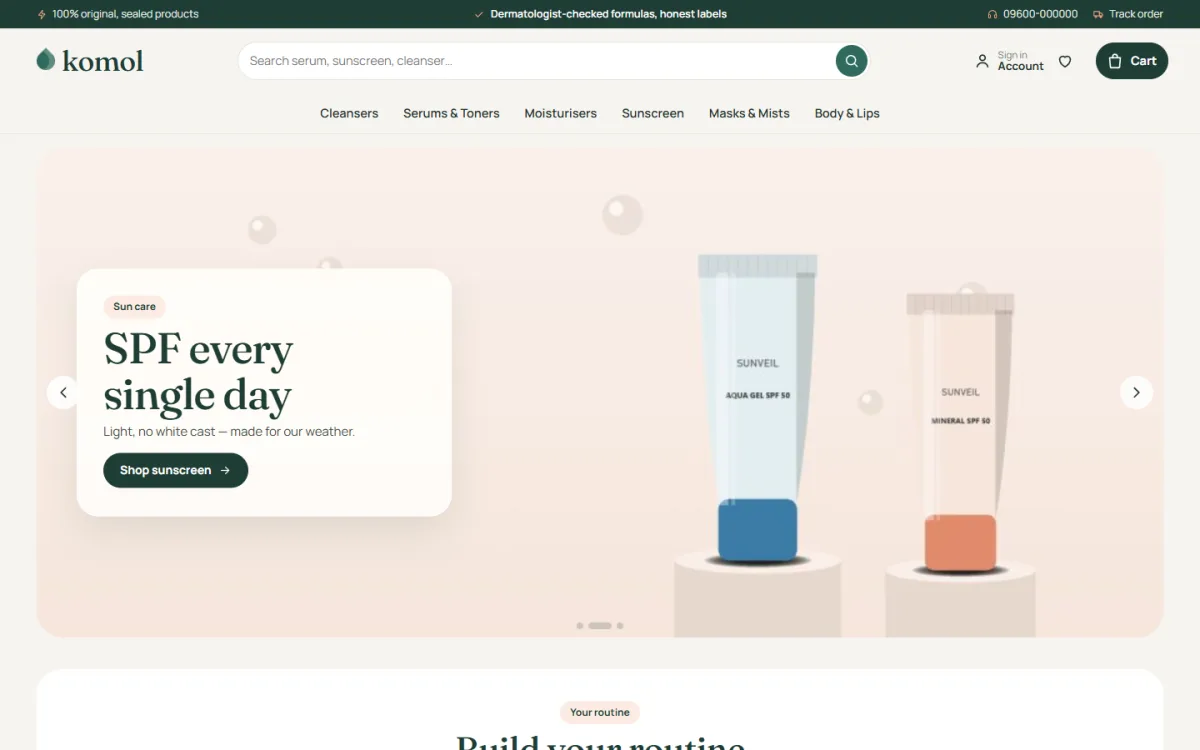
The hero slider sets a soft text card on top of a picture. The slide shown in the demo promotes daily SPF with a Shop sunscreen button, a good example of a seasonal message for our hot, humid months. Just below it, the Build your routine block begins.
Build your routine
This block has tabs for oily, dry, combination and sensitive skin. Each tab lines up one product for every step: cleanse, treat, moisturise and protect. The block shows the total for the whole routine, so one click can fill a basket. Steps are your product categories and skin types are product tags, both set in Theme Options, so the routine always uses your real stock.
Shop by ingredient and by concern
Ingredient tiles for niacinamide, hyaluronic acid, vitamin C, centella, salicylic acid and ceramides explain what each one does, and each tile shows how many of your products contain it. You can edit the list. Shop by concern adds four cards for acne, dullness, dryness, and sun and spots. For a K-beauty shop, these two blocks replace a lot of inbox questions.
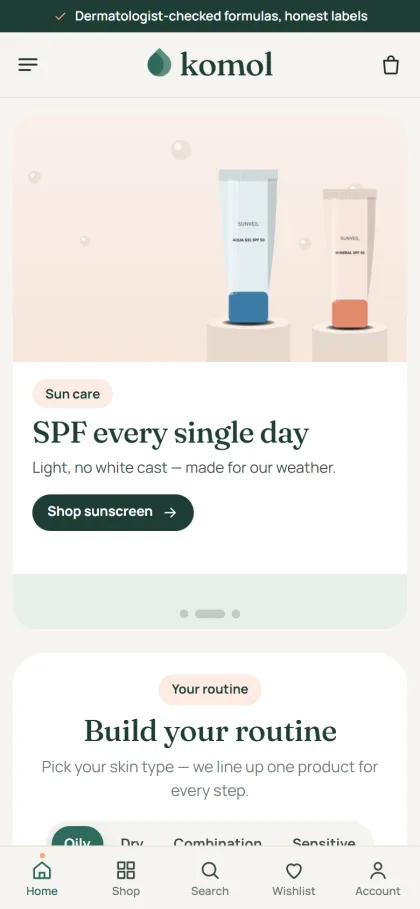
On phones, the header keeps to menu, logo and cart, and product cards stay compact at two per row. The mobile screenshot also shows a bottom bar with Home, Shop, Search, Wishlist and Account in the demo. Komol cards are rounded, with a pastel photo well, a second picture on hover, a size pill such as 30 ml or 50 g, ratings and a pill-shaped Add to cart button.
The Rest of the Homepage and the Buying Path
Komol has 24 homepage blocks. Fourteen are on in the demo and ten more wait in Theme Options, and any block can be switched off or moved. Shop by step shows category tiles, New in gives two rows of the newest products, Bestsellers come in tabs, and Offers adds a countdown with stock bars. Brands is a logo row, which suits a store that carries several Korean labels.
Skin school shows your latest three posts, and the promise strip lists original, delivery, COD and returns. Extra blocks include brand spotlight, a trending row, top rated and a large More to explore grid. Shoppers sign in or register in a popup without leaving the product, add items to a wishlist, and get back-in-stock alerts for the serum everyone wants.
Reviews sit in a fold, and a popup invites the first one. Checkout runs on one page and ends with an Order placed popup, and a Track Order page is ready for every buyer. For a new skincare shop, that first review popup matters, because buyers trust other people with the same skin type.
Setting Up Komol Step by Step
Komol runs on WordPress 6.0 or newer with PHP 7.4 or newer, tested up to WordPress 7.1. Upload the zip under Appearance, Themes, Add New, Upload Theme, and activate it. Open Komol, Setup and install the bundled Themeve Commerce plugin in one click. Then add the licence key from My Account, Licenses on Themeve under Komol, License so updates arrive through your account.
Run Komol, Demo Import to load 38 sample products from 6 brands, Skin School posts, menus and pages: About, Contact, Delivery, FAQ, Returns, Skin School, Track Order, Wishlist, Our Stores, Terms and Privacy Policy. Brand names and artwork are invented, so replace them with your own range. In Theme Options, set routine steps, skin types and the ingredient list, then choose one of five palettes such as Green tea and apricot, Rose clay or Lavender.
Before you commit, open the live demo on your phone and try the routine tabs as a buyer with oily or sensitive skin would. Then look around the demo admin to see how Theme Options are laid out. The WordPress documentation covers menus, pages and posts if you are new to the dashboard.
Selling Skincare in Bangladesh: Payments, Delivery and Ads
Buyers can pay by bKash, Nagad, SSLCommerz, cash on delivery or manual payment, and Steadfast and Pathao courier handle delivery. Coupons suit sample sales and routine bundles. You also get invoices, SMS and OTP, Telegram alerts for new orders, and the Facebook Pixel with Conversion API. All orders sit under one Shop menu in your dashboard.
Heat is a real issue for skincare parcels. Avoid leaving sunscreens and creams in hot storage, pack them with padding, and keep seals intact so buyers can see the product is untouched. For cash on delivery, confirm larger orders by phone. Many skincare buyers in Bangladesh order a single product first to test you, so a smooth first delivery matters more than a big discount.
Facebook and Instagram remain the main channels for any online cosmetics store here. Short videos showing texture, a before-and-after routine, or a simple explanation of an ingredient in Bangla tend to work well. Link ads to a concern or ingredient page instead of the homepage, so a buyer worried about acne lands on acne products straight away.
Common Mistakes When Choosing a Skincare Website Template
The most common mistake is choosing a template made for a general online cosmetics store, makeup or fashion and then forcing skincare into it. Those layouts focus on colour and looks, while skincare buyers need steps, skin types and ingredients. Another mistake is hiding product sizes. When a buyer cannot tell if a serum is 15 ml or 50 ml, she either asks or leaves.
Sellers also skip authenticity proof, copy product descriptions from foreign sites without checking them, and keep expired or near-expiry stock on sale. Each one damages trust quickly in a market where buyers talk to each other. Finally, many owners never test checkout on a phone with mobile data, even though most orders will come that way.
Frequently Asked Questions
Can I sell both Korean and local brands in Komol?
Yes. Komol is described as suitable for a home-grown serum brand, an importer of Korean skincare or a pharmacy beauty counter. Brands appear in a logo row, and because routines use your categories and tags, products from any brand can sit in the same routine.
How does the routine block choose products?
Each step is a product category and each skin type is a product tag. You set both in Theme Options, and the block shows one product per step with the routine total. When you change stock or tags, the routine follows.
Is there a theme for a bigger beauty shop or makeup?
If you plan a large store across many beauty categories, compare Poush – Cosmetics Megastore WordPress Theme. If lipsticks and palettes are your main line, Rongin – Makeup Store WordPress Theme is built for makeup. Komol stays the best fit when skincare routines are the heart of your shop.
Do I need coding skills?
No. Blocks, palettes, fonts, routine steps, skin types and ingredients are all set from Komol, Theme Options, which includes a settings search, a sticky save bar, reset and export or import. The Live Customizer is there for visual tweaks with a preview.
Final Thoughts
A skincare shop wins when buyers feel guided and safe: they find a routine for their skin, understand the ingredients and trust that each bottle is original. Plan your suppliers, tags and product pages first, then choose a skincare website template that puts that guidance on the homepage. For a Korean and local skincare store, Komol – Skincare Shop WordPress Theme is a calm, practical place to start.