A good T shirt store WordPress theme decides how quickly a buyer can answer three questions on your site: will it fit, is the cotton thick enough, and do you have it in black? This guide is for plain-tee labels in Bangladesh, from a small seller working through a Facebook page to a freelancer building a shop for a client. It covers how to plan the label, how to show fits and fabric online, and how to take orders and ship them.
Plain tees look like an easy product, and in some ways they are. They ship flat, and a buyer who likes your fabric comes back for more colours. The hard part is that every shop sells a white tee. With no print to set you apart, buyers compare fabric weight, fit, stitching and how honest your photos are. A t shirt store website has to put those details in plain sight, or the shopper asks on Messenger and often never orders.
In this guide we use Rasta – Plain T-Shirt WordPress Theme as the example. It is made for classic and heavyweight tees, oversized cuts, women’s tees, polos, stripes and multi-packs, dressed in chalk white, ink black, tomato red and yolk yellow. First, though, the business side, because a theme only works as well as the plan behind it.
Planning a Plain-Tee Label Before You Build the Site
Start with a short range. Pick two or three fits you can make well, such as a classic fit, an oversized fit and a women’s fit, and a handful of colours that sell all year: white, black, grey and one or two seasonal shades. A small, deep range is easier to keep in stock in every size than a wide one where the medium black is always sold out.
Next, settle your fabric. Ask your knitting or garment supplier for the GSM, the cotton type and whether the fabric is pre-shrunk, and test a few pieces yourself. Wash them, dry them in the sun and measure them again. Write the numbers down. Those notes become your product descriptions, your size chart and the answer to the question every plain-tee seller hears most: is this one thick or thin?
Then measure the finished garments. Lay one tee flat for each size and record chest width, body length and sleeve length. Do this on real pieces from the batch, not the paper pattern, because cutting and shrinkage change things. A size chart built from real measurements cuts exchange requests more than any return policy can.
Finally, think about bundles and paperwork. Multi-packs of three tees raise the order value and suit buyers who want basics for the whole week. Keep your trade licence in order, open merchant accounts for mobile payments, and decide your exchange rules before the first order arrives.
What a T Shirt Store WordPress Theme Needs for Plain Tees
A T shirt store WordPress theme for plain tees should be quieter than one for graphic tees. The product itself is simple, so the site has to do the explaining: which fits exist, what each fabric weight feels like, which colours are in stock and which sizes are left. Big photos matter, but so do small details, such as sizes printed on the product card and a clear size chart on every product page.
It also has to work on a phone first. Most plain-tee orders in Bangladesh come from people who saw a post or an ad and tapped through. They want to pick a colour, check a size and order in about a minute, with a payment method they already use and a parcel they can track. Some start with a fit, some with a fabric weight, and many with a colour, so each needs its own place on the homepage.
How Rasta Shows Fits, Fabric and Colour
The Rasta demo opens with a black top line for offer messages and a white header with a heavy wordmark, the fit categories in the middle and a rounded search field. In the demo the menu reads Classic Tees, Oversized, Women’s Tees, Polos, Stripes and Multi-packs. The hero sets a big headline and two buttons beside three photos, one tall and two square, with a round yellow price sticker on the tall one.
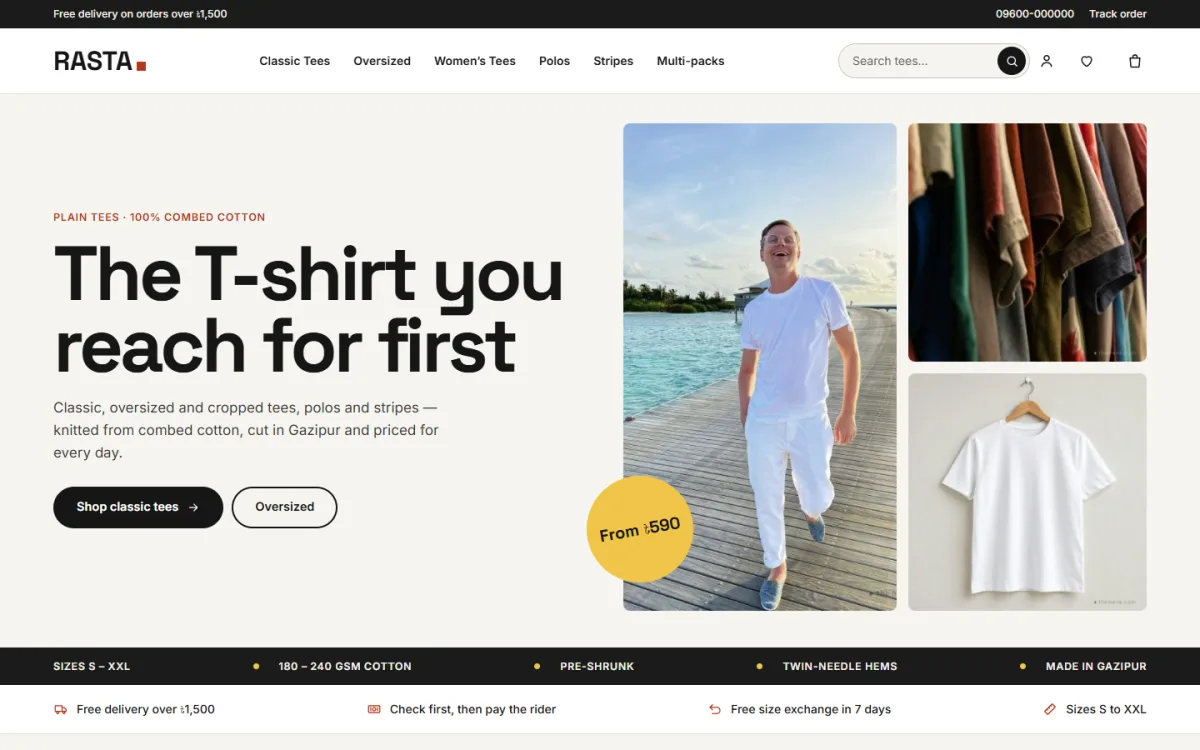
Under the hero, a black strip lists facts such as sizes, GSM and pre-shrunk cotton, and a promise line covers delivery, cash on delivery and exchange. Pick your fit follows with category tiles, so a shopper goes straight to the cut they want. Just dropped then shows the newest tees in a grid.
Shop by colour and the 3-pack band
Shop by colour shows colour chips, and each chip links to a colour tag, so white, black, grey, pastel or earth tones open as their own list. The 3-pack block is a wide photo band with a small line, an offer, a short text and a button. That is where your multi-pack deal lives.
Know your cotton
This is the block plain-tee sellers will like most. Know your cotton shows three fabric weights, each with a name, its GSM number, a one-line note and a link. In the demo the three weights link to classic tees, the heavyweight tag and oversized. You type in the names and numbers from your own supplier notes, so the fabric homework from the planning stage becomes something buyers can read before they order.
Fifteen blocks you can switch and move
Rasta has 15 homepage blocks, and each one can be switched off or moved. Besides the ones above, there are Most worn tabs by category, Two edits with two wide photo links, a deal with a countdown timer, Shop by price with four price links and a row of products, a Why Rasta band on black with a photo and a short note, five-star reviews, a More tees grid with Load more, and Notes with your latest three posts.
Product Cards, Size Charts and the Phone View
Product cards are rounded photo cards with the sizes printed under the name. On hover the sizes rise up, and one tap adds that size to the cart. Colour dots, a star rating, the category and a second photo on hover can each be switched on or off. Every product carries a size chart, and the size guide feature is switched on.
The product page can show delivery charges and times from your store settings, your return and exchange text, default care instructions and a Frequently bought together row that picks items with the same tags from other categories. Reviews sit in a fold, with a popup inviting the first review. A wishlist and back-in-stock alerts are built in.
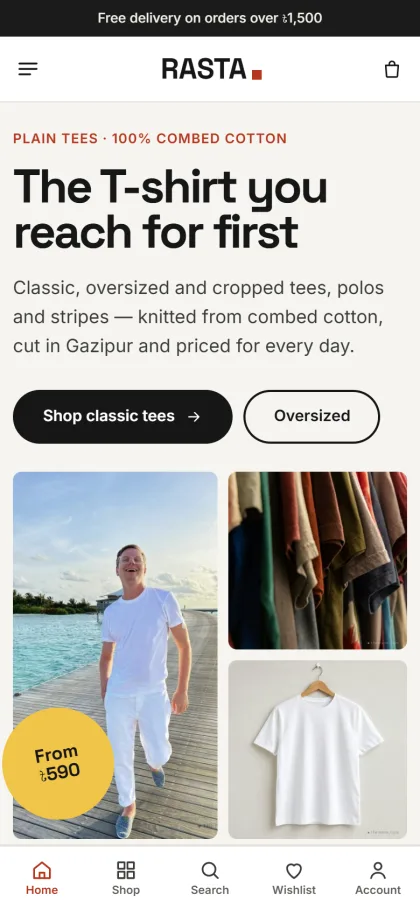
On a phone, the header turns into a menu icon, the logo and a cart, with the top line still showing an offer. The headline and buttons sit above the photos, the price sticker stays on the tall photo, and a bottom bar holds Home, Shop, Search, Wishlist and Account. Product cards turn compact, so buyers flick through more tees with less scrolling.
Setting Up Your T Shirt Store Website With Rasta
Rasta needs WordPress 6.0 or newer and PHP 7.4 or newer, and it is tested up to WordPress 7.1. Upload the zip under Appearance, Themes, Add New, Upload Theme and click Activate. Open Rasta, Setup and install the bundled Themeve Commerce plugin in one click; it runs the cart, checkout, payments, couriers and orders. Then activate Rasta under Rasta, License from your Themeve account (My Account, Licenses), so updates reach your dashboard.
Run Rasta, Demo Import to load the “Rasta — Plain Tees” demo: 48 tees, polos, stripes and packs with sizes, colour tags, size charts, notes posts, menus and every page, including About Rasta, Delivery, Returns & Exchange, Our Stores and Track Order. The demo photos are free samples and every product name is invented, so swap them for your own photos and products before launch. The WordPress documentation helps if menus and pages are new to you.
Styling happens in Rasta, Theme Options, which also works well on a phone with its own bottom bar. Homepage layout lets you switch blocks on or off and drag them into order, or move them with arrows on a phone. Pick one of four palettes, Chalk & tomato, Cobalt, Forest or Night & lime, or set each colour yourself, and choose from six font pairs, starting with Space Grotesk and Inter. A settings search, a sticky save bar, reset, and settings export and import are built in.
Before you decide, open the live demo on your own phone and try to buy a black tee in your size, the way a customer would. Then look around the demo dashboard to see where products, orders and Theme Options sit.
Payments, Couriers and Facebook Sales in Bangladesh
Rasta’s checkout fits on one page, with sign in and registration in a popup and an Order placed popup at the end. Buyers can pay with bKash, Nagad, SSLCommerz, cash on delivery or manual payment. Orders ship through Steadfast or Pathao courier, and a Track Order page shows where each parcel is. Coupons, invoices, offers and returns are included too.
Cash on delivery stays popular for clothing because buyers like to feel the fabric before they pay. Call to confirm larger cash orders, pack each tee folded in a clean polybag, and state your exchange rules clearly on the Returns & Exchange page. SMS and OTP messages reach your buyers, new-order alerts land on Telegram, and the Facebook Pixel with Conversion API shows which posts and ads actually bring orders.
Plain tees sell well through short videos. Stretch the fabric towards the camera, show the hem stitching up close, and lay the tee next to a measuring tape. Link each ad straight to the right colour or fit rather than the homepage. Bangla captions that state the GSM and the size range answer the first questions before anyone types them.
Mistakes Plain-Tee Sellers Make Online
The most common mistake is a missing or copied size chart. A chart taken from another brand will not match your cutting, and every wrong size becomes a return trip by courier. Another is hiding the fabric weight. If your tees are heavy, say so in numbers; if they are light and breezy, say that too.
Sellers also add too many colours too soon, then run out of the sizes that matter. Keep the range small until you know your best sellers. Shoot your own photos in daylight, both worn and laid flat, and keep the background plain. A t shirt store website that looks honest earns repeat orders. Google’s Search Central documentation has simple advice on page titles and descriptions for when you write your product pages.
Last, do not choose a T shirt store WordPress theme on looks alone. Check that sizes, fabric and colours are easy to reach on a phone, that checkout is short, and that the payment and courier options match your buyers.
Frequently Asked Questions
Is Rasta only for plain tees?
It is built around classic and heavyweight tees, oversized cuts, women’s tees, polos, stripes and multi-packs. If your label is mostly graphic tees and hoodies with numbered drops, Chhap – T-Shirt Brand WordPress Theme is the closer fit. For a quieter minimal clothing label with off-white pages, look at Shada – Minimal Clothing WordPress Theme.
Can I show the GSM of each fabric?
Yes. The Know your cotton block shows three fabric weights, each with a name, a GSM number, a short line and a link. You fill them in under Rasta, Theme Options, so the numbers match the fabric you actually stock rather than the demo text.
Can buyers add a size straight from the product card?
Yes. Sizes are printed under each product name, and on hover they rise up so one tap adds that size to the cart. You can turn this off in the Product cards settings.
Is the store plugin included with the theme?
Yes. Themeve Commerce comes bundled with Rasta and installs in one click from Rasta, Setup. It handles the cart, checkout, payments, couriers and orders.
Final Thoughts
Selling plain tees online comes down to honest fabric details, real size charts, a short range kept in stock, and payment and delivery options your buyers already trust. Get those right and the right T shirt store WordPress theme simply puts them in front of people. For a plain-tee label that wants fit tiles, colour chips, a 3-pack band and a cotton guide ready on day one, start with Rasta – Plain T-Shirt WordPress Theme and list your first colours.