Choosing a clothing website template is easy when you sell twenty pieces a month. It gets serious when you sell T-shirts, polos, panjabi, kurtis, jerseys and kidswear to hundreds of buyers, and the week before Eid turns your inbox into a flood. This guide is for busy local clothing shops in Bangladesh, and for the freelancers who build their stores, that need a site which keeps up with real order volume instead of slowing it down.
We start with what a high-volume shop actually needs: sizes and colours handled properly, fast browsing on mobile data, a short checkout, cash on delivery with protection against fake orders, and courier booking that does not eat your evening. Then we walk through planning your catalogue, setting up the store and avoiding the mistakes that hurt busy sellers most when the rush arrives.
The example we use is Fabri Bazer – Clothing Store WordPress Theme. It is a clean, light theme for Bangladeshi fashion brands, with size and colour swatches, a size guide, a mega menu, combo offers and a one-page checkout. It does not need WooCommerce, because its store side runs on the bundled Themeve Commerce plugin.
What Makes a Local Clothing Shop Busy
A busy clothing shop is not just one with many orders. It is one with many small decisions per order. A buyer wants a polo in medium, navy, delivered to a thana outside Dhaka, paid in cash. Another wants three T-shirts in different sizes and asks whether a combo price applies. A third ordered the wrong size last week and wants an exchange. Multiply that by a festival season and the pressure is easy to see.
Most of that pressure lands in Facebook messages and phone calls. Staff copy addresses by hand, check stock in a notebook and book couriers one by one. Mistakes creep in: the wrong size goes out, a sold-out colour is promised, a fake cash on delivery order wastes a delivery trip. A good clothing website moves these decisions onto the page, so the buyer makes them and your team only confirms and ships.
The Clothing Website Template Checklist for High Volume
Sizes come first. One shirt in four sizes and three colours is really twelve separate items, and each one needs its own stock, otherwise you will sell a size you do not have. A clothing website template for a busy shop should let every size and colour pair carry its own price, stock, SKU and photo, and it should force a size choice before anything reaches the bag.
Browsing comes second. A shop with men, women, kids and sports sections needs a menu that shows categories at a glance on a computer and a simple category sheet on a phone. Third is the checkout: one page, with district and thana, the delivery charge calculated automatically, and the payment methods buyers here actually use. Fourth is the back office, where order alerts, courier booking and fake order checks save the most time.
Finally, speed. Many buyers browse on mobile data in a crowded market or on a bus, so heavy pages lose sales before the first photo loads. Light images, few external requests and compact product cards matter more than fancy animation. Google's own Search documentation explains why fast, mobile-friendly pages also help you get found in search.
Planning Your Catalogue Before Launch
Before you touch any clothing website template, map your catalogue on paper. Write your top departments, such as Men, Women, Kids and Sports, then the groups under each, such as Topwear and Bottomwear, then the actual categories like polo, T-shirt, panjabi, kurti or jersey. Keep names short and familiar. Buyers search for 'panjabi', not for a creative collection name they have never heard before.
Variants, SKUs and photos
Give every size and colour its own SKU and count the real stock for each before you upload. Photograph each colour separately, because a buyer who picks maroon wants to see maroon. Measure garments yourself and build a size guide per product type. This planning feels slow, but it is what stops wrong orders and angry calls once a few hundred orders arrive in a single week.
How Fabri Bazer Handles Sizes, Menus and Busy Days
As a clothing website template, Fabri Bazer was made for exactly this kind of store. It looks clean, stays light on mobile data and treats sizes and colours seriously. Shoppers choose from size buttons and colour swatches, with a size guide popup right beside them. If someone adds an item straight from a product card, a size chooser popup appears, so a size is always picked before the item reaches the bag.

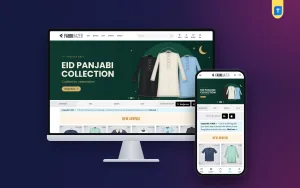
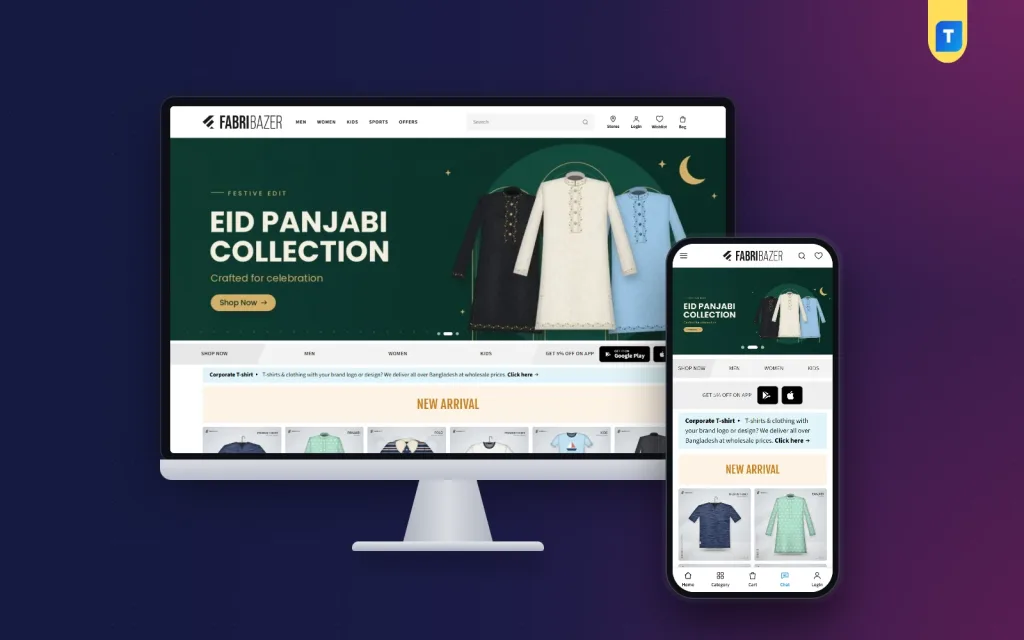
The desktop screenshot shows a busy shop layout. The demo header holds Men, Women, Kids, Sports and Offers next to a wide search box, with Stores, Login, Wishlist and Bag icons on the right. A large Eid panjabi banner leads, followed by a quick strip of Shop Now, Men, Women and Kids links, a Corporate T-shirt notice for branded orders, and a New Arrival row of framed product tiles. A round chat button floats in the corner.
A mega menu that sells while it guides
The header carries an inline mega menu. Each top item, such as Men or Women, opens groups like Topwear and Bottomwear with their categories, plus product cards for the newest arrivals in that section. You build it in Appearance, Menus with a top item, a group item and the categories under it. If you skip that step, Fabri Bazer fills the menu from your top product categories on its own.
A homepage you can reshuffle by season
The demo homepage is built from photo tiles: New Arrival tiles, then collection rows such as Designer Polo, Kurti and Tops, Premium Panjabi, Jerseys and Sportswear, and Little Ones. A Bulk Order and Wholesale block invites company, school and event orders, and a store locator shows where buyers can visit. Everything sits in a drag-and-drop builder under Fabri Bazer, Homepage, so the panjabi row can move to the top before Eid.
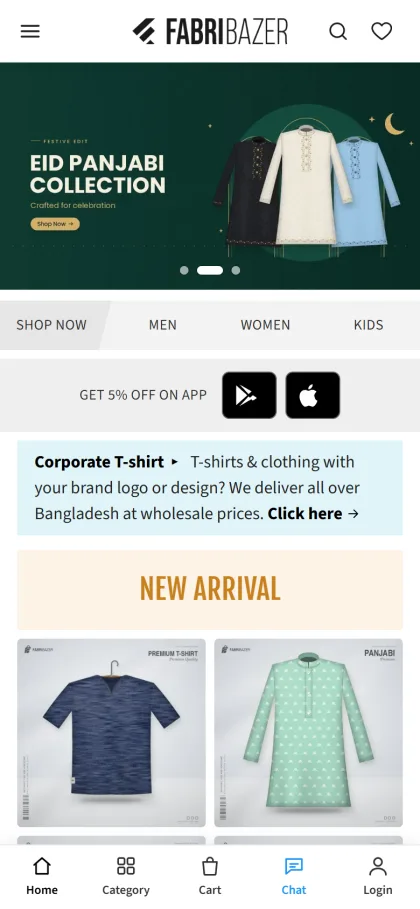
On phones, a category sheet and a full-screen search take over, so browsing works with one thumb. The mobile screenshot shows the product tiles in two neat columns and a bottom bar in the demo with Home, Category, Cart, Chat and Login. Shop and category pages add a category sidebar, a special offers area and a Filters bar on mobile, and a More Products button loads 16 more items at a time.
Orders, Payments and Couriers Without the Chaos
A cart drawer slides in after each add, and checkout fits on one page. It asks for district and thana, sets the delivery charge on its own and ends with an Order placed popup. Customers pay with cash on delivery, bKash, Nagad or SSLCommerz, or send a manual bKash, Nagad, Rocket or Upay payment with a transaction ID for you to check.
For a busy shop, the back office matters just as much. You book Steadfast or Pathao with one click once your courier API keys are added, and the tracking code is saved to the order. Fake order protection, SMS OTP and incomplete-order capture keep time-wasters out and help you win back buyers who left halfway. New orders can reach you on Telegram, by SMS or by email, and the admin works well on a phone.
The admin itself stays short. Store menus come down to Dashboard, Orders, Marketing, Customers and Settings, while theme work sits in one Fabri Bazer menu with Setup, Theme options, Homepage, Demo Import and License. Customers can request exchanges from their account instead of calling, and a built-in support chat saves each conversation as a ticket, which keeps busy days far more organised.
Setting Up Fabri Bazer Step by Step
Upload the Fabri Bazer zip from Appearance, Themes, Add New, Upload Theme and activate it. Click Install & activate Themeve Commerce in the notice that appears, since the plugin comes with the theme. Then open Fabri Bazer, License and enter the key from your Themeve account. The theme needs WordPress 6.0 or higher and PHP 7.4 or higher and is tested up to WordPress 6.8. The WordPress documentation covers the basics if you are new.
Go to Fabri Bazer, Demo Import, choose Fashion Store and click Import to set up products, categories, menus, pages and the homepage like the live demo. Later, Remove demo deletes only the demo items and keeps your own content. Swap in your banners under Fabri Bazer, Homepage and your logo and colours under Customize. You can also explore the demo dashboard to see the order screens first.
Fabri Bazer bundles its fonts, Source Sans 3, Fjalla One, Rubik and Hind Siliguri, so pages make no Google Fonts requests. WebP demo images, minified files and page-specific CSS keep things quick. Theme options come in tabs with a media picker, colour presets and a settings search, so logo, colours, phone number and social links all change without code.
Growing the Basket and Bringing Buyers Back
Busy shops grow by raising the size of each order, not only the number. Combo offers let you sell bundles, such as any three T-shirts for one fixed amount, and a free-delivery progress bar shows buyers how close they are to free shipping. Coupons cover other campaigns. Bulk orders from offices, schools and events can be a steady second income, so keep that block visible outside festival seasons.
Reviews build trust with new buyers who found you through an ad. Fabri Bazer shows a star summary with customer photos and a Write a review popup with a star picker. Ask happy buyers for a photo review after delivery. For ads, Facebook Pixel with Conversion API and Google Tag Manager keep tracking accurate, so you can send Eid campaign traffic straight to the panjabi category and see what sells.
Mistakes Busy Clothing Shops Make Online
The first mistake is uploading one product with a single stock number for every size, then selling sizes you do not have. The second is a long checkout that asks for too much, which loses phone buyers halfway. The third is ignoring fake orders until return charges pile up. Busy sellers also forget to update the homepage after a festival, so last month's Eid banner greets this month's winter shoppers.
Another common mistake is choosing a heavy theme because the demo looks impressive on a fast office connection. Test any clothing website template on a mid-range phone with mobile data before you commit. Check the menu, search, size picker, cart and checkout as a buyer would. If any step feels slow or confusing on your own phone, it will feel worse for a customer in a busy market.
Frequently Asked Questions
Do I need WooCommerce for Fabri Bazer?
No. Products, cart, checkout, orders, payments and couriers run on Themeve Commerce, which comes with the theme and installs with one click from the notice after activation. That keeps the store side in one place and avoids stacking several separate shop plugins together.
Can each size and colour have its own stock?
Yes. Every size and colour pair can carry its own price, stock, SKU and photo, and shoppers see a size guide popup beside the size buttons. When stock for one pair runs out, back-in-stock alerts let interested buyers know when it returns.
Which themes suit sports or minimal clothing brands?
For gym and sports clothing sold by activity, look at Dour – Activewear WordPress Theme. For a small label with a pared-back style, Shada – Minimal Clothing WordPress Theme is a quieter option. Fabri Bazer suits a busy shop with many categories and a steady stream of daily orders.
Build a Store That Keeps Up
A busy clothing shop wins online when the website handles sizes, browsing, payments and couriers so your team can focus on packing and answering real questions. Plan your categories and variants first, keep checkout short and test everything on a phone. When you want a clothing website that is ready for the Eid rush, start with Fabri Bazer – Clothing Store WordPress Theme.