A gift card online store sells something unusual: a present that the buyer will never use. Someone buys a card for a sister's birthday, a staff Eid bonus or a friend's wedding, and what they really pay for is a nice moment for another person. That changes how the shop should work. It has to be quick to buy from, it has to get the code out fast, and it has to let the buyer say something personal.
This guide is for shop owners and brands in Bangladesh who want to sell their own store cards, for resellers who sell cards from many partner shops, and for freelancers building such stores for clients. We cover how the business works, how to set up partners and code delivery, how to plan around occasions, and which mistakes cost new gift card sellers their buyers' trust.
The design we use as an example is Uphar – Gift Card Store WordPress Theme, built for shops that sell shopping, food, style and care, fun and travel cards, plus their own multi-store card. Uphar means gift, and the theme looks like a boutique envelope: blush paper, plum and gold foil, rounded cards and serif headings.
How a Gift Card Online Store Makes Money
There are two common models. In the first, you are the brand: a restaurant group, a fashion chain or a salon sells its own cards, which bring in cash before the service is used and bring new customers through the door. In the second, you are a reseller: you agree terms with partner stores, sell their cards on your site and earn a margin or commission on each one.
Many shops mix both, selling partner cards next to a card of their own that works across several stores. Either way, revenue comes in waves. Eid, Pohela Boishakh, Mother's Day, year-end and wedding season bring most of the year's orders, while birthdays keep a steady trickle in between. Planning stock, partners and promotions around those dates is half the work.
Planning Partners, Codes and Delivery
Start with written agreements. For every partner store, agree how codes are issued, how they are checked at the counter, how long they stay valid, what happens if a code is lost, and how and when you settle money with the partner. Small misunderstandings here turn into angry customers at a shop counter, and the customer will blame you, not the partner.
Keep codes safe
Codes are cash. Store them where only one or two trusted people can see them, never paste batches into group chats, and record which code went to which order. When a buyer says the code did not work, you need to check in seconds whether it was already redeemed and by whom. A simple, well-kept spreadsheet is enough at the start.
Make delivery fast and personal
Buyers on a gift card website usually expect the code within minutes, often because they remembered the occasion late. Decide who sends codes, during which hours, and how quickly payments are checked. Write a clear How Delivery Works page and keep to it. If you only deliver during the day, say so plainly, because a vague promise of instant delivery causes more complaints than an honest time window.
Turning Each Card Into a Present
The best gift card stores sell the feeling, not just the code. Uphar's Make it personal block works like a small card studio on the homepage. The shopper picks a card, taps a value and writes To, From and a message. A live card and a handwritten note update as they type, so they see the gift before paying, and the message travels with the order into the checkout note.
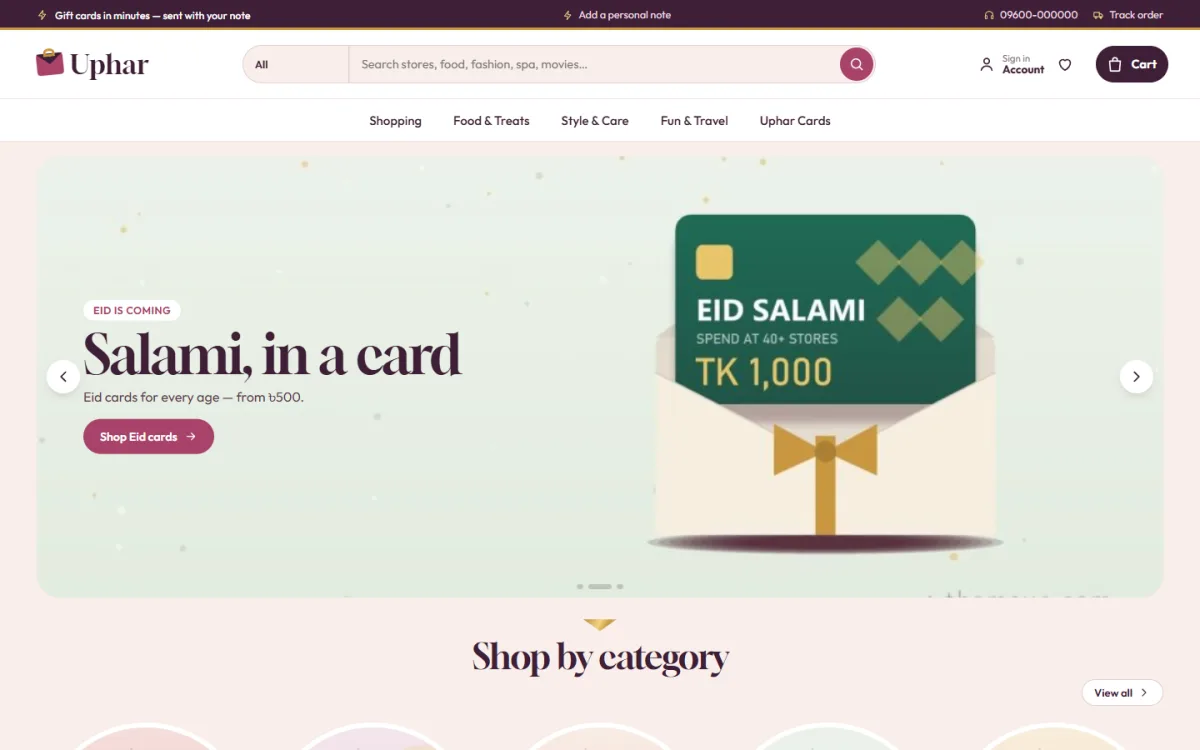
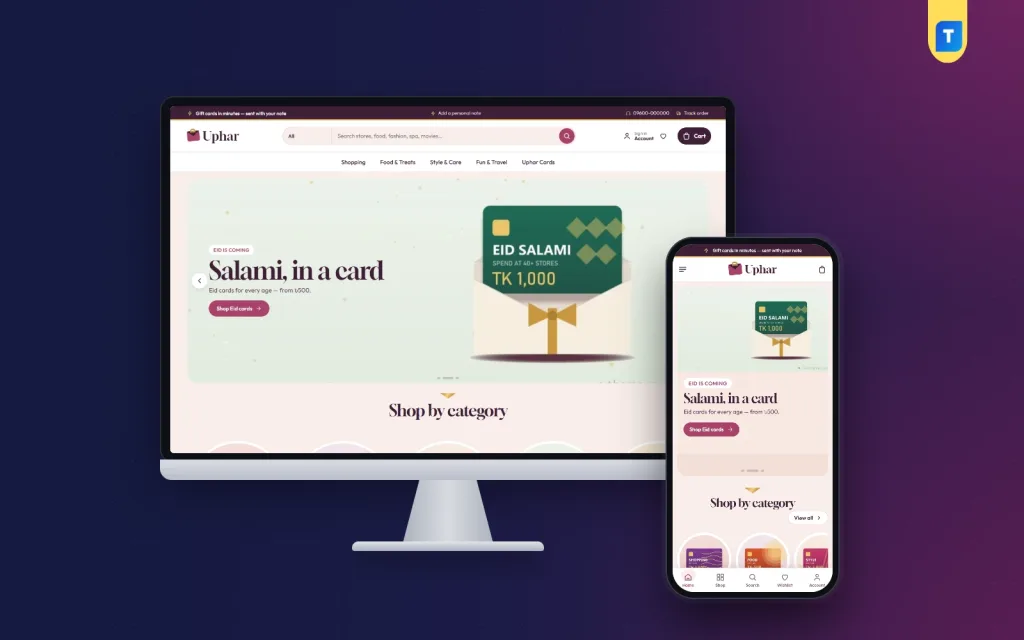
The screenshot shows the envelope style in practice. The demo hero promotes Eid cards, with a green card slipping out of a cream envelope, and the menu splits the range into Shopping, Food and Treats, Style and Care, Fun and Travel and the store's own cards. Below it, Shop by category starts with round tiles. Envelope slides, category tiles and the card studio are the first three things a buyer meets.
At checkout, a gift card lives in an inbox, so there is no address and no delivery charge. Buyers give a delivery email and can add an optional recipient email for the person receiving the card. That one field saves a round of messages asking who the card is for, and it lets you send the code straight to the right person.
Selling Around Eid and Other Gifting Days
Occasions sell gift cards, and Uphar has a block built for them. Gifting days ahead lists upcoming dates such as Eid, Pohela Boishakh and Mother's Day, shows how many days are left for each and puts the matching cards right below. You set the dates in Theme Options, so the block stays current all year, and watching the days count down gives shoppers a reason to buy early.
Two more blocks help buyers who do not know what to choose. Gift by person offers four cards for browsing by who the present is for, while Gift by budget pairs price tiles with products. Bonus value runs a countdown with stock bars, which fits limited extra-value offers before a big holiday. Partner stores shows the logos of the brands behind your cards.

Most gift buyers here shop on a phone, often late at night. On small screens Uphar's header narrows to menu, logo and cart, and product cards turn compact so more of them fit. Sign in and register open in a popup, so nobody has to leave the card they were writing just to log in. Wishlist and a one-page checkout are included.
Setting Up the Store
Upload Uphar under Appearance, Themes, Add New, Upload Theme and activate it. Open Uphar, Setup to install the bundled Themeve Commerce plugin in one click. Then run the demo import, which adds 20 cards from 15 invented partner stores, the card studio, gifting days, gift ideas, menus and pages such as How Delivery Works, Swaps and Refunds, Gifting Ideas, Our Stores, Track Order and Wishlist.
Look through the live demo and the demo dashboard to see how everything connects. Every brand and picture in the demo is a sample, so replace them with your real partners and card designs. If you are new to WordPress, the official documentation explains themes, pages and menus step by step.
In Uphar, Theme Options, set your gifting dates first, then choose one of five palettes, such as Plum and gold or Teal ribbon, and one of four font pairs. The 17 homepage blocks can be switched off, dragged into a new order or moved with arrows on a phone. The dashboard works on a phone too, which helps when you want to change a banner the night before Eid.
Payments and Trust in Bangladesh
Gift cards attract scammers, so trust signals matter even more than in a normal shop. bKash and Nagad Send Money are ready in Uphar from the start, and the bundled plugin adds SSLCommerz and manual payment, coupons, invoices, SMS and OTP and new-order alerts on Telegram. An Order placed popup confirms each purchase, and the Track Order page lets buyers check where things stand.
Show a phone number, your business address and clear refund terms on the site. For corporate orders, such as a company buying fifty cards for staff before Eid, offer invoices and confirm the order by phone. On Facebook, run occasion campaigns two to three weeks before each holiday. Uphar has Facebook Pixel with Conversion API built in, which helps you see which ads lead to real orders.
Write card descriptions in plain words: which stores accept the card, how long it is valid, and whether it can be used in parts. A good gift card website answers these questions before they are asked. Adding a short Bangla line for older buyers, who often purchase for family members, can also lower the number of questions in your inbox.
Mistakes That Hurt a Gift Card Business
The most damaging mistake is a code that fails at the shop counter. It embarrasses the person who received the gift and the person who gave it. Test new partner codes yourself, keep validity dates on every product, and settle with partners on time so they never refuse your cards. The second mistake is promising instant delivery without staff to deliver.
Other errors include leaving sample brand names on a live gift card online store, forgetting to update the gifting dates after Eid passes, and hiding the refund policy. Also avoid listing partner stores you have no agreement with. A logo on your site tells buyers that the partner stands behind the card, so only show partners who really do.
Frequently Asked Questions
Can buyers add a personal message to a card?
Yes. In the Make it personal block they write To, From and a message, see it on a live card and handwritten note, and the message goes with the order into the checkout note. You can then copy it into the email that carries the code.
Can the card be sent to someone else's email?
Yes. Checkout asks for the buyer's delivery email, and there is an optional field for the recipient's email, so you know where to send the code. Confirm both addresses before sending, because a typing mistake can delay a birthday surprise.
How do I set the dates for Eid or Pohela Boishakh?
Enter the occasions and their dates in Uphar, Theme Options. The Gifting days ahead block then shows the days left and the cards for each one. Update the dates once a year, since both Eids move with the lunar calendar.
Can I sell my own store card next to partner brands?
Yes. The demo mixes partner cards for shopping, food, style and care, fun and travel with multi-store cards, so both fit in the same gift card online store. Give your own card a clear department so buyers see it next to the partner brands.
Final Thoughts
A gift card business runs on trust, timing and a personal touch: codes that work, delivery that matches your promise, and a store ready before every big occasion. If you want a gift card website with a card studio, gifting-day countdowns and an address-free checkout with bKash and Nagad, explore the Uphar – Gift Card Store WordPress Theme and plan your first Eid campaign around it.