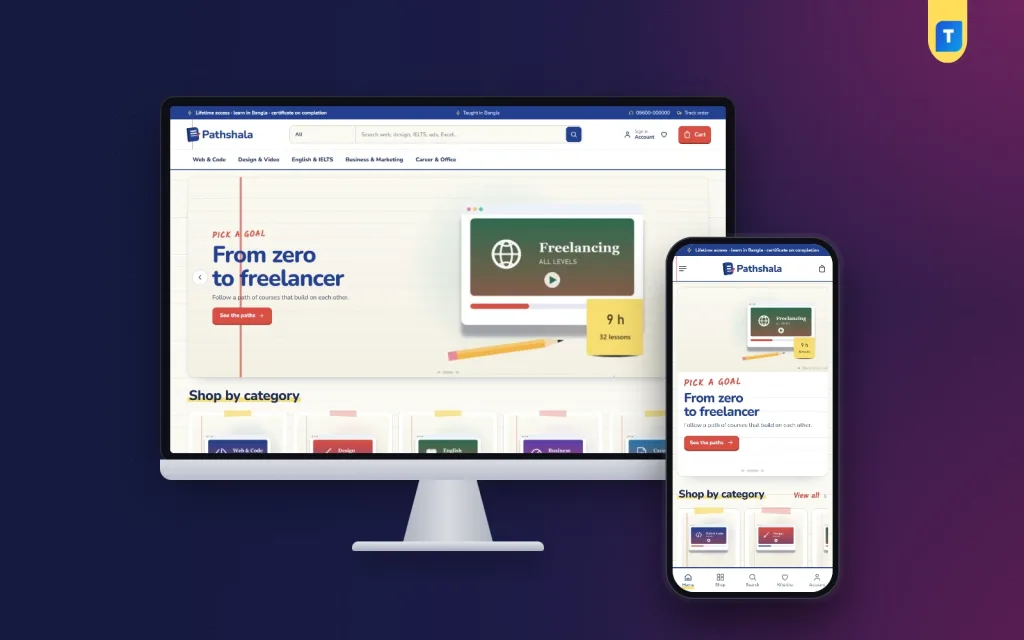
If you teach a skill people pay for, such as web design, video editing, spoken English, IELTS or Excel, this guide explains how to sell online courses in Bangladesh step by step. It is written for individual teachers with a few recorded courses, training centres moving their batches online, and freelancers who build course shops for clients. We cover choosing what to sell, planning learning paths, setting prices, taking payments and giving students access without a pile of manual work.
Online learning has become normal for Bangladeshi students and young professionals. Many want a freelancing skill, a better IELTS band or a job-ready certificate, and they are happy to learn in Bangla from a teacher they trust. The challenge for teachers is not demand. It is turning a Facebook group or a YouTube channel into a shop where people can see what they get, pay safely and start learning the same evening.
As the example shop we use Pathshala – Online Course WordPress Theme. Pathshala means a village school, and the theme is designed like an exercise book, with ruled paper, a red margin, ink-blue text, highlighter marks and taped cards. It is built around goals and syllabus previews, two things students care about before they pay.
Start With a Goal Students Already Have
Students rarely buy a course for its own sake. They buy a result: a first freelance client, a Band 7 in IELTS, a job in digital marketing or a growing online shop. So start by writing down the goals your students talk about in comments and inbox messages, then match each goal to the courses that lead there. That list becomes your catalogue and your marketing message at the same time.
Next, check that each course can stand on its own and also fit into a longer road. A beginner HTML course, a WordPress course and a client-handling course can each sell alone, but together they form a path to building websites for clients. Paths raise the value of each order and keep students with you longer, which matters more than a single big launch.
Planning Your Online Course Website
Decide where lessons live
Your online course website is the shop front: it describes each course, takes payment and sends access to the student. Before launch, decide where the lessons themselves will be watched and how a student logs in, then explain that clearly on a How Access Works page. Students forgive a simple setup, but not confusion about where to find the class they just paid for.
Write course facts and a syllabus
For every course, note its length, level, language, format and how long access lasts. Then write the syllabus as modules and lessons, and pick one lesson you are happy to give away free. A free preview answers the question every student asks, which is whether your teaching style suits them. It also cuts down on the what will I learn messages that eat your evenings.
Set fair prices and batch offers
Price single courses so that a student can start small, and make the full path the better deal. Plan early-bird offers for new batches and referral codes for students who bring friends. Keep the rules simple and visible. A student who feels tricked by a hidden condition will say so in your Facebook group, and that costs more than any discount.
How to Sell Online Courses With Pathshala
Pathshala's homepage is built from 17 blocks. Each can be switched off or dragged into a new place, and on a phone, arrows do the same job. Notebook hero slides start the page, subject tiles show your categories, and Most enrolled sorts popular courses into tabs. New courses fills two rows with the latest, and Enrolment offers adds a countdown with stock bars for early-bird deals.
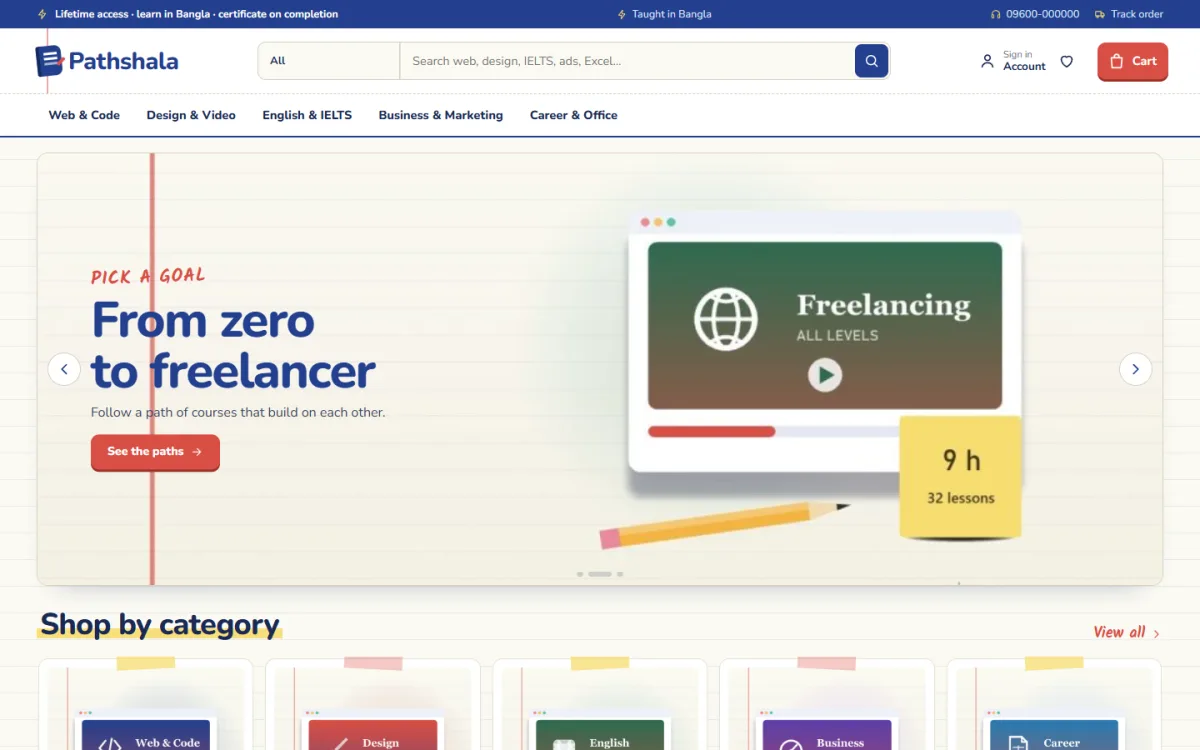
In the demo, the menu shows Web & Code, Design & Video, English & IELTS, Business & Marketing and Career & Office, and the search suggests web, design, IELTS, ads and Excel. The first slide has a handwritten Pick a goal note, the heading From zero to freelancer and a See the paths button, next to a sample freelancing course card. The top bar in the demo mentions learning in Bangla, which you can change to suit your school.
Pick your goal
This block has tabs for goals such as build websites, freelance design, Band 7 in IELTS or grow an online shop. Each goal becomes a numbered road of courses, in the order you set per course, and every stop shows its hours and level. At the end of the road the student sees the total hours and total price, with one button that enrols them in the whole path in a single checkout.
Peek inside
Peek inside has course tabs, and each course opens as folding modules with their lessons, a free-preview lesson and the course facts. It is the online version of flipping through a textbook at the shop counter. Each course page also lists quick facts for length, level, language, format and validity, then explains how access works, with reviews in a fold and a popup inviting the first one.
Lower on the homepage, three department blocks each pair a banner with eight courses. Learn by level offers four cards, Shop by budget uses price tiles, Trending now is a sliding row and Top rated lists the highest-rated courses. Our teachers shows logos, which suits a group of instructors sharing one shop, Study notes brings in your latest three posts, and the promise strip covers instant access, certificate, pay your way and help.
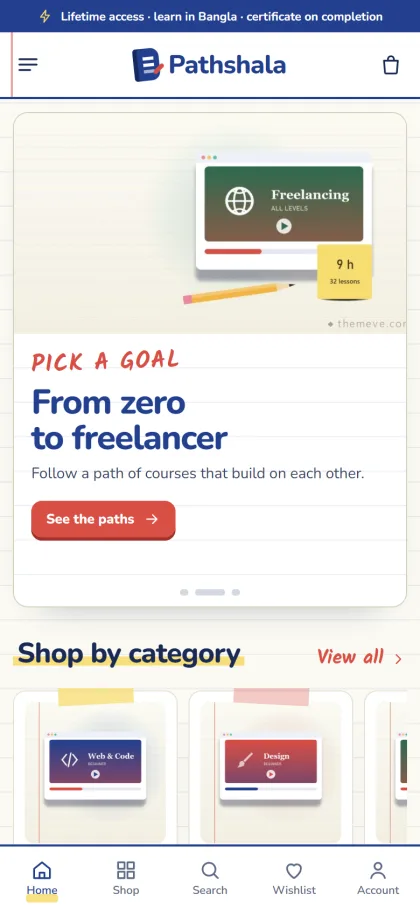
On phones, the header keeps menu, logo and cart, course cards turn compact, and the whole site stays fully responsive. The demo also shows a bottom bar with Home, Shop, Search, Wishlist and Account. Sign in and register open in a popup, so a student can log in without losing the syllabus they were reading, and the wishlist holds courses saved for next month's budget.
Setting Up Your Course Shop
Pathshala needs WordPress 6.0 or newer and PHP 7.4 or higher, and it is tested up to WordPress 7.1. Upload the zip in Appearance, Themes, Add New, Upload Theme, and press Activate. Visit Pathshala, Setup to install the bundled Themeve Commerce plugin with one click, then activate your license in Pathshala, License using My Account, Licenses in your Themeve account so updates arrive.
Run Pathshala, Demo Import to add 21 sample courses from 5 invented teachers, with learning paths, syllabus previews, study notes, menus and every page, including How Access Works, FAQ, Track Order and the policy pages. Replace the samples with your own courses, then set your goals, previews and block order in Pathshala, Theme Options. The WordPress documentation is a good reference for pages, menus and users.
For the look, choose one of five palettes (Exercise book, Chalk green, Red pen, Graph paper and Purple ink) or set each colour by hand, and pick from four font pairs, including Kalam notes with Nunito. A settings search, sticky save bar, and export, import and reset sit in the same dashboard, which also works on a phone. Spend some time in the live demo and the demo dashboard before you start.
Payments, Access and Student Support
Students pay through Themeve Commerce with bKash, Nagad, SSLCommerz or manual payment. Checkout is online on one page and never asks for an address. Instant access goes to the student by email, and an Order placed popup confirms the order on screen. The order tracking page shows where each enrolment stands, which helps when a manual payment is still being checked.
Coupons work well for batch discounts and referral codes, and invoices are built in for parents or employers who pay for a course. You also get SMS and OTP, Telegram alerts for new enrolments, and Facebook Pixel with the Conversion API. Reply to new students quickly in the first week. A short welcome message with the access steps and a support contact prevents most refund requests before they start.
Marketing Courses in Bangladesh
Most course sales here start on Facebook and YouTube. Post short, useful lessons for free, then point viewers to a learning path rather than to a single course. Live sessions before a new batch build trust, and student results, shared with permission, do more than any advert. Point paid ads at the Pick your goal block so viewers land on a path that matches the promise in the ad.
Search matters too, especially for skills like Excel or IELTS that people look up every day. Write study notes on common questions and link each one to the course that goes deeper. Google's Search documentation explains the basics. Over time, an online course website with helpful notes earns visitors who never saw your Facebook posts at all.
Mistakes New Course Sellers Make
The most common mistake is recording too much before testing demand. Launch one solid course, collect feedback, then build the path around it. Another is a vague course page with no syllabus, no level and no access details, which turns every sale into a chat. Selling recorded classes that you did not create, or reusing someone else's material, is a fast way to lose your reputation and your shop.
Teachers also underestimate support. Students forget passwords, miss emails and pay from the wrong number. Write a clear access page, keep your reply times short, and test the full path from payment to first lesson on a phone using mobile data. Knowing how to sell online courses is only half the job; keeping students happy after they pay is what brings the next batch.
Frequently Asked Questions
Can students see the syllabus before buying?
Yes. Peek inside shows each course as folding modules with lessons, a free-preview lesson and the course facts. Students can judge the content and your teaching style before they pay, which usually means fewer refunds and fewer questions.
Do I need coding skills to run Pathshala?
No. Paths, syllabus previews, colours, fonts and the order of the 17 homepage blocks are all set in Pathshala, Theme Options. The demo import builds the pages in one click, so you mainly replace text, images and course details.
What if I sell monthly app plans as well?
Pathshala is made for courses and learning paths. If your main business is monthly software or AI plans, Megh – AI Subscription Store WordPress Theme is the closer match.
Final Thoughts
Selling courses well comes down to a clear goal, an honest syllabus, fair prices, easy payment and quick access. Get those right and students will follow you from one course to the next. If you want a course shop that shows students the whole road from first lesson to final goal, start with Pathshala – Online Course WordPress Theme and open your first batch.