
If you design templates, write plugins or draw icon sets, a marketplace website template lets you sell them from a shop you own instead of a crowded platform that takes a large cut and sets the rules. This guide is for Bangladeshi designers, developers and small studios who want to sell downloadable work, and for curators who want to list items from several makers under one name.
Digital goods behave differently from parcels. There is no courier and no stock, but there are licences, versions, previews, file lists and support questions. Buyers want to try before they pay, understand exactly what they may do with the files, and download the moment payment goes through. We will cover how to plan all of that, then look at how a theme built for this kind of shop handles it.
The example in this guide is Jhuli – Digital Marketplace WordPress Theme, made for shops that sell WordPress themes and plugins, HTML templates, landing pages, UI kits, icons, fonts and scripts. Jhuli means a maker's bag, and the design reads like a well-made print catalogue: warm paper, a deep-ink shelf menu, serif headings with a mustard full stop and ruled sections.
Who Needs a Marketplace Website Template
Three kinds of seller get the most from a marketplace website template. A design studio selling its own landing pages and UI kits wants a storefront that looks as careful as its work. A developer with a handful of plugins needs version numbers, changelogs and compatibility notes on every product. A curated shop that lists items from several makers needs each maker's name and logo shown clearly, so buyers know whose work they are buying.
What they share is the need to explain a product that cannot be held. A buyer cannot touch a font or a theme, so the page must show it working, list what is inside the download and explain the licence in plain words. A general online store design, made for clothes or groceries, rarely does any of that well.
Planning a Digital Product Store That Sells
Decide what you sell and in which formats
Group your catalogue the way buyers search: WordPress themes, Elementor kits, HTML templates, Figma files, plugins, icons and fonts. Note the tools each item needs and the version it is built for. A buyer who uses Elementor should reach Elementor items in one tap, and a developer looking for HTML should not wade through WordPress themes to find them.
Write licences people understand
Licence confusion stalls more digital sales than price. Most shops use three tiers. A regular licence covers one end product for the buyer or one client, an agency licence covers several client projects, and an extended licence allows use in a product that is itself sold. Write your own terms in short sentences with real examples, and price each tier so the jump makes sense.
Promise updates and support you can keep
Buyers of code expect updates when WordPress or a browser changes. Decide how long you will support each item and how updates reach buyers, then keep a public changelog. Be careful with big promises such as lifetime updates or long support windows; if you make them, plan the hours. A smaller promise you honour builds a better reputation than a large one you quietly drop.
Inside Jhuli: A Shelf for Every Maker
The heart of the Jhuli homepage is a live-preview showcase. Tabs by format open a large browser-window preview with the maker, rating, sales, version, last update, tools and price, plus Live preview and Buy buttons. A strip of more items below swaps the preview in place, so a visitor can flip through several templates without leaving the page.
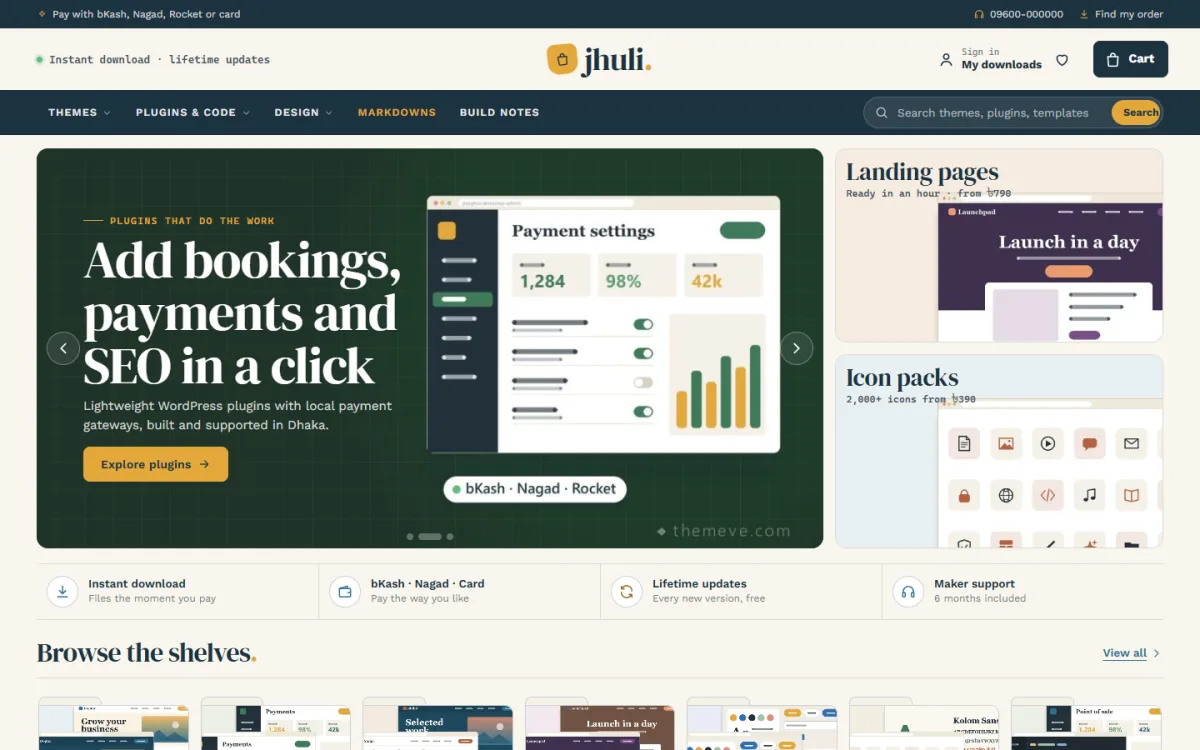
The desktop screenshot shows a slim ink strip on top, a paper masthead with the serif wordmark in the middle, and a shelf bar with menus for Themes, Plugins & Code, Design, Markdowns and Build Notes, plus a search box. The hero slide shown in the demo promotes plugins beside a mock settings window, with Landing pages and Icon packs cards on the right and a strip of shop promises underneath.
A licence guide on the page
Jhuli answers licence questions up front. A licence guide sets Regular, Agency and Extended side by side, with who each is for and what it includes, and you write that text yourself in Theme Options. On every product, each licence is a variation with its own price, and cards show a From price with a Choose licence button. For returning buyers, Fresh updates keeps a changelog of recently updated items with the version, how long ago it changed and what is new.
Product pages that read in a minute
Each product page shows the licence plans with prices and quick facts for tools, version, last update, compatibility, files and delivery. An Open the live preview button, a What's inside file list and download steps follow, then reviews in a fold with a popup for the first one. You fill it all with plain specification lines such as Version, Files or Demo followed by the preview link, so there are no custom fields to learn.
29 homepage blocks
Blocks can be switched off, dragged into place or moved with arrows on a phone. Highlights include Browse the shelves with folder tiles, Built for your stack with WordPress, Elementor, HTML and Figma tabs, Markdowns with a countdown and stock bars, Download in under a minute, Item of the month, Maker spotlight, Our makers logos, Before you buy questions, Build notes, Shop by budget, Trending this week and a large grid with Load more.
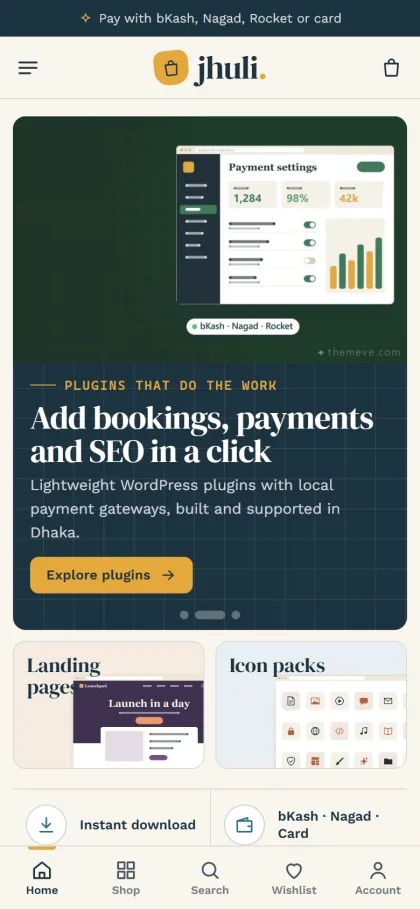
On phones, the header keeps menu, logo and cart, cards stay compact and a bottom bar gives quick access to Home, Shop, Search, Wishlist and Account, as the mobile screenshot shows. Sign in and register open in a popup, and the wishlist keeps items a buyer wants to come back to, which is handy for designers who browse on the bus and buy later at their desk.
Setting Up Your Marketplace Website Template
Upload Jhuli under Appearance, Themes, Add New, Upload Theme and activate it. Go to Jhuli, Setup and install the bundled Themeve Commerce plugin in one click. Activate your license under Jhuli, License with the details from My Account, Licenses in your Themeve account. If you are new to WordPress, the WordPress documentation explains themes, pages and menus clearly.
Run Jhuli, Demo Import to load 31 items from 8 invented makers with licences, versions, changelogs and file lists, plus the showcase, licence guide, build notes, menus and every page, including How Downloads Work. Then open Jhuli, Theme Options to set the showcase tabs, licence guide texts, cards, header, product page, checkout note, steps and questions. Settings search, a sticky save bar, export and reset make the work quick.
Pick one of six palettes, Blueprint & mustard, Forest & brass, Plum & peach, Graphite & lime, Terracotta or Ocean ink, and a font pair built on DM Serif Display, Fraunces, Playfair Display or Space Grotesk. Jhuli needs WordPress 6.0 and PHP 7.4 or newer and is tested up to WordPress 7.1. Click through the live demo as a buyer, then see the admin side in the demo dashboard.
Checkout, Payments and Instant Delivery
A digital product store should never ask for a house address. Jhuli's checkout has no address and no delivery charge: buyers give their name, mobile number and a download email, then receive the files as an instant download. Fewer fields mean fewer abandoned carts, especially on phones, and the download email gives you a clean list of customers to tell about updates.
Payments run through the bundled Themeve Commerce plugin with bKash, Nagad, SSLCommerz and manual payment, which suits local buyers who rarely use cards. The demo's top strip also mentions Rocket and card, so check your own gateway setup before you copy that line. Coupons, invoices, a Track Order page, SMS and OTP, Telegram alerts for new orders and Facebook Pixel with Conversion API come with it.
For marketing, share short build notes about how you made an item, post preview videos in Bangla and English, and run small Facebook campaigns to a single product rather than the homepage. Developers and designers trust makers who show their process, and a regular Build notes post gives both buyers and search engines a reason to come back.
Mistakes Digital Sellers Make
The first mistake is hiding the licence terms on a separate page nobody reads. Put a short summary next to the price. The second is selling without a working preview; screenshots alone make buyers suspicious. The third is letting items go stale. A plugin last updated three years ago looks abandoned, even if it still works, so update and log changes regularly.
Watch out for copied or resold work too. In a multi-maker shop, ask every maker to confirm they own what they upload, and remove items quickly if a complaint is valid. Finally, do not overload the homepage. A marketplace website template with 29 blocks does not mean you need all of them; switch on the ones that suit your catalogue and keep the rest for campaigns.
Frequently Asked Questions
How do buyers get their files?
Checkout asks only for name, mobile and a download email, with no address or delivery charge. Once payment is confirmed, the files are available as an instant download, and the How Downloads Work page explains the steps for anyone buying for the first time.
How do I set Regular, Agency and Extended prices?
Add the licences as variations named Regular licence, Agency licence and Extended licence. Product pages list each one with its price, and product cards show a From price with a Choose licence button. Your own licence guide text explains the difference between them.
What if I sell software licence keys rather than downloads?
Then look at Chabi – Software Key Store WordPress Theme, built around platforms, delivery promises and edition compare. If you sell monthly or yearly app plans, Megh – AI Subscription Store WordPress Theme is made for subscriptions. Jhuli fits files that buyers download and keep.
Do I need coding skills?
No. Item details come from simple specification lines such as Version, Files or Demo, and every block, colour, font and text is set in Jhuli, Theme Options. If you can write a product description, you can fill in a full product page.
Final Thoughts
Selling digital work well means clear previews, licences anyone can understand, honest update promises and a download that arrives the moment payment clears. Get those right and your shop becomes a place makers want to be listed and buyers return to. If you want a marketplace website template that treats your templates, plugins and fonts like a well-kept shelf, start with Jhuli – Digital Marketplace WordPress Theme.