Running a phone marketplace with seven brands and dozens of models is mostly a sorting job. Buyers rarely ask for a model by name; they ask for features and a budget, then expect you to narrow it down. The right mobile phone website template does that sorting on screen, so your staff spend their day packing orders instead of answering the same question again. This guide is for multi-brand phone shops in Bangladesh and the people who manage their stores online.
We will treat the website as a working shop floor rather than a brochure. That means a system for tagging stock, a clear set of price bands, a weekly rhythm for launches and flash sales, and a routine for confirming and shipping orders. Our working example is Jogajog – Phone Marketplace WordPress Theme, a bold, busy layout whose name means connection, built for shops selling smartphones, keypad phones, tablets, gadgets and accessories.
How Online Phone Shopping Works in Bangladesh
Online phone shopping here usually starts on a phone, often from a Facebook ad or a friend's link. The buyer has a short list of must-haves: 5G, a big battery, a good camera, enough RAM for games, and a ceiling on price. They will open three or four shops, compare quickly and order from whoever makes the choice clearest and the delivery most believable. Brand loyalty matters less than you might expect.
That tells you what a marketplace store must do. It has to show breadth, so buyers know you carry their brands. It has to filter by features, because features are how people think. And it has to answer trust questions fast: is it official, what warranty comes with it, can I pay on delivery, when will it arrive. A store that answers all four on the first screen wins far more of those quick comparisons.
Setting Up Your Stock System Before Launch
Before you build anything, decide how you will describe every phone. Pick a fixed list of feature tags, such as 5G, high refresh screen, 8 GB RAM or more, large battery, high-resolution camera, AMOLED and fast or wireless charging. Tag every phone with every feature it truly has, and nothing it does not. Over-tagging to appear in more filters will bring returns and bad reviews faster than anything else.
Define your price bands once
Next, set four or five price bands that match how your buyers talk about budgets, and keep them stable. When bands change every month, regular customers lose their bearings. Note which brands you carry in each band. Gaps are useful information: if you have no mid-range phones from a popular brand, that is a buying decision, not just a website issue.
Decide what lives in each department
A clean top menu might read Smartphones, Feature Phones, Tablets, Gadgets and Accessories, which is the menu shown in the Jogajog demo. Keypad phones still sell well to older buyers and as second handsets, so give them their own space rather than burying them. Accessories such as cases, glass, chargers and power banks deserve a full department, because they lift order value on almost every phone sale.
How Jogajog Turns Buyer Requests Into Taps
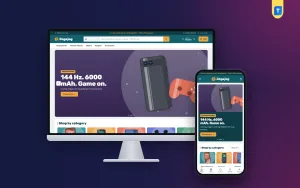
Jogajog is loud on purpose: deep teal, amber and coral with Rubik headings, bold colour slides and tight cards that pack information in. In the live demo, a dark teal strip carries warranty and cash on delivery messages with a support line and Track order link. The header pairs a category dropdown with a search that invites brand, model or feature queries, plus account, wishlist and an amber Cart button.

The hero slider uses bold colour slides. In the screenshot, a Gaming phones slide shows a phone and a coral game controller on purple with a Shop gaming button, followed by Shop by category on colour tiles. Demo photos show tilted phone pairs on bold colours with spec pills, plus back views, in-the-box views and camera close-ups, ready to be swapped for your own.
Filter by what matters
This block is what makes Jogajog different. Shoppers tap spec chips, and results update instantly. The chips cover 5G, 120 Hz+ screens, 8 GB RAM+, 5000 mAh+ batteries and 50 MP+ cameras, along with AMOLED, fast or wireless charging and budget chips. Buyers can sort by popularity, price or battery, and only phones with every chosen feature stay on screen. The chips come from your product tags, so your tagging system from the planning stage feeds it directly.
Every brand, every budget
The second signature block is a grid. Brands run down the side, price bands across the top, and each cell shows how many phones you have there and the lowest price, linking straight to that brand inside that band. A student on a tight budget sees at a glance which brands you carry in their range. You set the brands and price bands in Theme Options, so the grid matches the bands you defined earlier.

On phones the header keeps to menu, logo and cart, and the mobile screenshot also shows a bottom bar with Home, Shop, Search, Wishlist and Account. Cards are tight and white with three spec bullets, a teal price and an amber Add to cart, and storage and colour options come as variants. The product page adds key-spec tiles, the warranty, a 0% EMI line and a delivery date, with reviews in a fold.
A Weekly Routine for a Busy Phone Store
A marketplace store needs a rhythm. On Monday, check prices on your top twenty models and update anything that moved. Midweek, add new launches and tag them fully before they go live; Jogajog's New launches row will pick them up. Toward the weekend, run a Flash sale, which adds a countdown and stock bars, on a handful of models you have in good numbers. Stock bars feel urgent only when they are honest.
The homepage has 24 blocks, 17 on by default and seven in reserve, and they can be switched, dragged or moved with arrows on a phone. Use that flexibility for the calendar. Push Pick by need and its four need cards forward when students return to classes, bring Shop by budget up front before Eid, and give Phone tips more space when a big launch has everyone asking questions.
Orders, Payments and Courier Delivery
The bundled Themeve Commerce plugin is the store engine, installed from Jogajog, Setup in one click. Customers sign in through a popup and pay on a one-page checkout with bKash, Nagad, SSLCommerz, cash on delivery or manual payment. Steadfast and Pathao courier deliver, each order ends with an Order placed popup, and the Track Order page lets buyers follow it. Coupons, invoices, SMS, OTP and Telegram alerts are included.
Turn those Telegram alerts into a routine. One person confirms every new phone order by call within the hour, and anything unconfirmed by evening is held, not shipped. For high-value handsets, ask for a delivery charge or small advance by mobile payment before dispatch. Facebook Pixel with the Conversion API lets you see which ads produce confirmed orders, so you can stop paying for clicks that only bring fake ones.
Setting Up the Mobile Phone Website Template Step by Step
Jogajog needs WordPress 6.0 or newer and PHP 7.4 or higher, and is tested up to WordPress 7.1. Open Appearance, Themes, Add New, Upload Theme, choose the zip and activate. Install Themeve Commerce from Jogajog, Setup, then activate your licence in Jogajog, License with the key from My Account, Licenses on Themeve. If you are new to WordPress, the WordPress documentation covers the basics.
Run Jogajog, Demo Import to load a working phone marketplace: 36 products from 7 invented brands, including 5G flagships, camera and gaming phones, budget and keypad phones with variants, tablets, earbuds, watches, speakers, chargers, power banks, cases and glass. It includes an Our Stores page. You can also explore the demo dashboard to see how products and tags are set up before replacing them with yours.
Finally, open Jogajog, Theme Options, which works on a phone, so you can tweak a flash sale from the shop floor. Set the spec filter category, brand rows and price bands, then choose a palette: Teal & amber, Royal & lime, Berry, Forest or Charcoal, or set colours by hand. Fonts include Rubik with Inter, Barlow, Figtree and DM Sans. A mobile phone website template only feels like your shop once your own brands and bands are in.
Mistakes That Slow Down a Phone Marketplace
The first mistake is careless tagging. If a 4G phone carries the 5G tag, every buyer who filters for 5G and orders it becomes a return. Check tags whenever you add a model. The second is letting the brand and budget grid show empty or misleading cells; if a band is empty for a brand you once carried, restock or remove the brand. The third is running flash sales on stock you do not have.
Another common slip is neglecting search engines. Use full model names and storage sizes in titles, and write short phone tips that answer common comparisons. Google's Search Central documentation explains how product pages are found. Lastly, do not judge a mobile phone website template only by its demo photos; judge it by how fast a buyer with three must-haves reaches a short list.
Frequently Asked Questions
How do I add a phone to the spec filter?
The filter chips come from product tags. Tag a phone with the right features and it appears when shoppers tap those chips. Keep your tag list short and fixed so staff use the same words every time they add a new model.
Can I choose my own price bands?
Yes. The brands and price bands for the grid are set in Jogajog, Theme Options. Each cell then shows how many phones a brand has in that band and the lowest price, and a click opens that brand filtered to the band.
Is Jogajog right for a small, calm phone boutique?
Jogajog is built for busy multi-brand shops that make online phone shopping quick. If you prefer a quieter single-brand boutique with a trade-in estimator, look at Alap – Mobile Phone Shop WordPress Theme instead.
Can I sell accessories too?
Yes. The demo already mixes phones with tablets, earbuds, watches, speakers, chargers, power banks, cases and glass. Accessories added to a phone order are one of the easiest ways to raise the value of each sale.
Final Thoughts
A phone marketplace runs well when stock is tagged honestly, price bands stay steady, sales follow a weekly rhythm and every order is confirmed before it ships. The website should do the sorting your best salesperson does, at any hour. If you want a store that turns buyer must-haves into a short list in a few taps, set it up on Jogajog – Phone Marketplace WordPress Theme and connect buyers to the right phone faster.