 −29%
−29%
Grocery
Ruchi – Grocery Ecommerce Website in Bangladesh, Bangla WooCommerce Theme
৳2,500
৳3,500Save −29%
✦ Key features
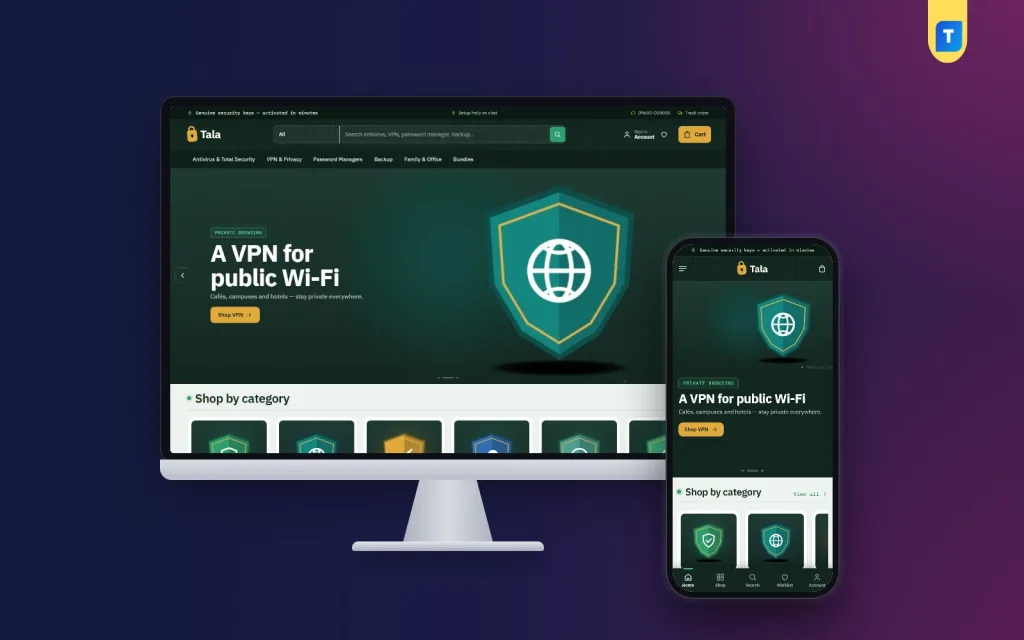
Tala is a digital product marketplace wordpress theme for shops that sell licences, keys and files online. You can list antivirus and VPN plans, office software, password managers, backup tools, subscriptions, gift cards, ebooks and courses. The buyer pays with bKash, Nagad or a card, and the order reaches them by email and WhatsApp. No address, no parcel.
The theme runs on Themeve Commerce, our own shop plugin. It is bundled and installs in one click, so you do not need WooCommerce. The look is a forest vault: deep green, a fine line grid, mint and amber accents and monospace labels. It suits a seller whose customers want to trust the shop, and you can change every colour if you prefer something lighter.
The demo sells security software, but the theme is for any seller of products delivered online. Typical users are:
If you wanted a digital downloads website template, this covers it. You can mix all of these in one shop. Each product has its own details lines, so a key shows platform, validity and devices while an ebook shows format and pages.
Many buyers browse on a phone with a weak signal, so this digital product marketplace wordpress theme keeps pages small. The code in this package keeps pages small:
The How many devices? block has four steppers: Windows PCs, Macs, Android phones and iPhones. A family might set two PCs, one Mac and three phones. The theme picks the cheapest plan that covers them all and supports those platforms. It shows the price per device and one button to buy. Nobody pays for a ten-device plan when five will do, and you stop answering the same question in chat all day.
The same idea works for any product sold by seats or devices, such as team licences or multi-user subscriptions.
The How safe are you online? block asks five yes or no questions. The answers fill a score ring, and each risky answer comes with a fix. It is a friendly way to start a sale, because the shopper sees the problem before the price. You can switch it off if your shop sells something else.
Every block can be turned off and moved. On a computer you drag it, on a phone you use arrows. Each block has its own settings.
Every look and layout setting is in one screen, and it works on a phone. A search box finds any setting, a sticky save bar stays in view, and you can export, import or reset your settings.
The logo goes in Appearance, Customize, Site Identity. Menus are edited in the Tala menu screen.
Switch on only what you use: Flash Sale, Combo and Bundle Offers, Loyalty Points with refer a friend, Upsell and Cross-sell, Recently Viewed, Back in Stock Alerts, Pre-orders, Bulk Order and Corporate Quotes, Reseller and Wholesale Prices, Exchange and Returns, Sales and Signup popups, an Affiliate Program and a Marketplace module.
Used as a digital product marketplace wordpress theme, Tala saves you time in several places.
The theme needs WordPress 6.0 or newer and PHP 7.4 or newer, and it is tested up to WordPress 7.1.
A plain digital downloads website template gives you a front page and leaves the rest to you. You then add a cart, a payment gateway, invoices and coupons from different makers, and hope they agree. Tala is a digital product marketplace wordpress theme built as one piece. The checkout is made for online delivery, the product page explains licences, and the dashboard shows orders, payments and customers together.
The demo is only an example. Every brand and picture is a sample for you to replace with your own range.
You can see Tala working on the live demo, and browse more ready-made designs in our WordPress themes collection.
No reviews yet — be the first to share your experience after buying.
Anything delivered online: antivirus and VPN keys, office software, subscriptions, gift cards, game top-ups, ebooks, courses and templates. You can mix them in one shop.
No. The demo sells security software as an example. Switch off the planner and safety check if they do not fit your range.
No. It runs on Themeve Commerce, which is bundled and installs in one click from the Setup screen.
The buyer sets how many Windows PCs, Macs, Android phones and iPhones they have. The theme picks the cheapest plan that covers them and shows the price per device.
No. It asks for name, mobile number and a delivery email. There is no delivery charge.
bKash, Nagad, card and mobile payment through SSLCommerz, and manual Send Money for bKash, Nagad, Rocket and Upay with a transaction ID.
Yes. Product details lines cover format, pages and language, so ebooks, courses and files fit as well as keys.
Yes. Choose from five palettes or set each colour yourself, and pick one of four font pairs.
You get a refund when the product does not work as described and we cannot fix it, when your license will not activate your website, or when a manually delivered product is late and you cancel before delivery. A working license, or a single license already used on a live domain, is not refundable. Approved refunds go back to the number you paid from within one working day, minus the Send Money charge.
−29%
 −29%
−29%
 −27%
−27%
 −20%
−20%
