Opening an online menswear store is a smart move for tailors, outlet owners and small labels who already know their customers by collar size. Men tend to buy fewer pieces than women, but they reorder what fits, stay loyal to a shop that gets the cut right and spend well on occasions such as Eid and weddings. This guide is for Bangladeshi shop owners and freelancers planning a men's store for shirts, trousers, blazers, waistcoats, panjabi, shoes and leather goods.
Men shop differently. Many decide by fit first and colour second, skip long descriptions and want straight answers: will it fit, can it be altered, how fast will it arrive and can I pay on delivery? A good shop puts those answers in plain view and gets out of the way. We look at how to plan such a shop, stock it, price it sensibly and deliver it, before showing how one theme handles the storefront.
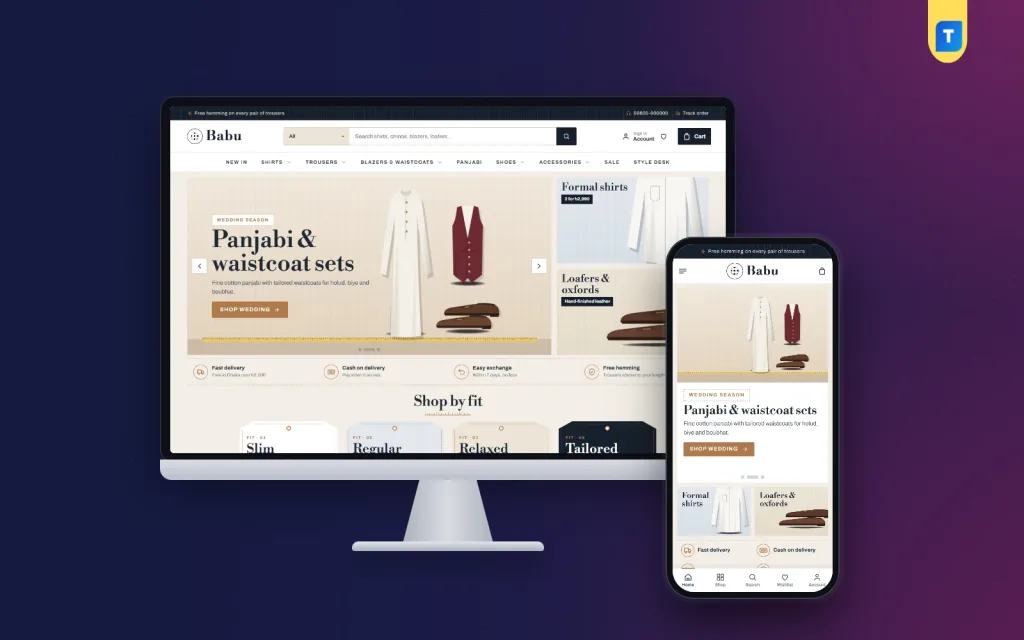
Our example is Babu – Menswear WordPress Theme, which looks like a good tailor's counter: paper and navy with tan leather, Bodoni headings, stitch lines and pinstripes. It is built for buyers who care about fit and fabric. First, though, the planning that comes before any design choice.
Why Men's Clothing Works Well Online
Menswear has a useful advantage on the web: the core range changes slowly. A white formal shirt, navy chinos and brown loafers sell all year, so photos and product pages you create today keep working for months. Seasonal pieces such as panjabi for Eid, waistcoats for wedding season and blazers for winter sit on top of that steady base. That makes stock planning calmer than in fast-moving women's fashion.
The challenge is trust. A man who has bought from the same tailor for ten years needs a good reason to order a shirt from a screen. Clear measurements, honest fabric details, an exchange promise and a simple alterations policy give him that reason. An online menswear store that handles fit well usually earns repeat orders without much advertising, because satisfied buyers come back for the same size in another colour.
Planning Your Online Menswear Store
Pick your core categories
Start with what you can supply reliably: shirts, trousers, panjabi and perhaps shoes. Add blazers, waistcoats and accessories such as belts and wallets when you have steady suppliers. Use a menu that mirrors how men think, by garment type, with a new-in section and a sale section. Too many categories at launch make a small shop look empty, so grow the menu as the range grows.
Decide your fits and write them down
Agree on fit names, such as slim, regular and relaxed, and use them the same way across every shirt and trouser. Measure chest, shoulder, sleeve and length for shirts, and waist, hip, thigh and inseam for trousers. Publish a size guide per category. Consistent fit names mean a buyer who likes your regular shirt can order your regular trousers without guessing.
Plan alterations and exchanges
Trousers almost always need hemming, and many men want sleeves shortened. Decide whether you offer alterations before delivery, how buyers send their length, and what an exchange looks like if the size is wrong. Write these rules once and keep them short. Men rarely read long policy pages, but they do notice when a shop has a clear answer ready.
Stock, Photos and Product Pages
Photograph each shirt flat and on a person, with a close-up of the collar, cuff and buttons and one shot of the fabric weave. Show trousers from the front and side so the cut is visible. Keep the background and light the same for every product, which makes your shop look organised and lets buyers compare pieces quickly. For shoes, show the sole and the stitching as well as the top.
On each product page, state the fabric, the fit name, care instructions and what the model is wearing in which size. Add delivery charges and the expected arrival time if you can. These details answer most questions that would otherwise arrive by phone, and they make your menswear website feel professional even when it is run by two or three people from a small outlet.
How Babu Sets Up the Storefront
Babu puts the fit-first habit up front with a Shop by fit block of four hang-tag cards, placed right after the slider. Slim, regular, relaxed or whatever names you use, each card opens the matching shirts and trousers. Under the slider, a promise strip answers the four questions every men's shop hears daily: delivery, cash on delivery, exchange and hemming. You write the words, so they match your real service.
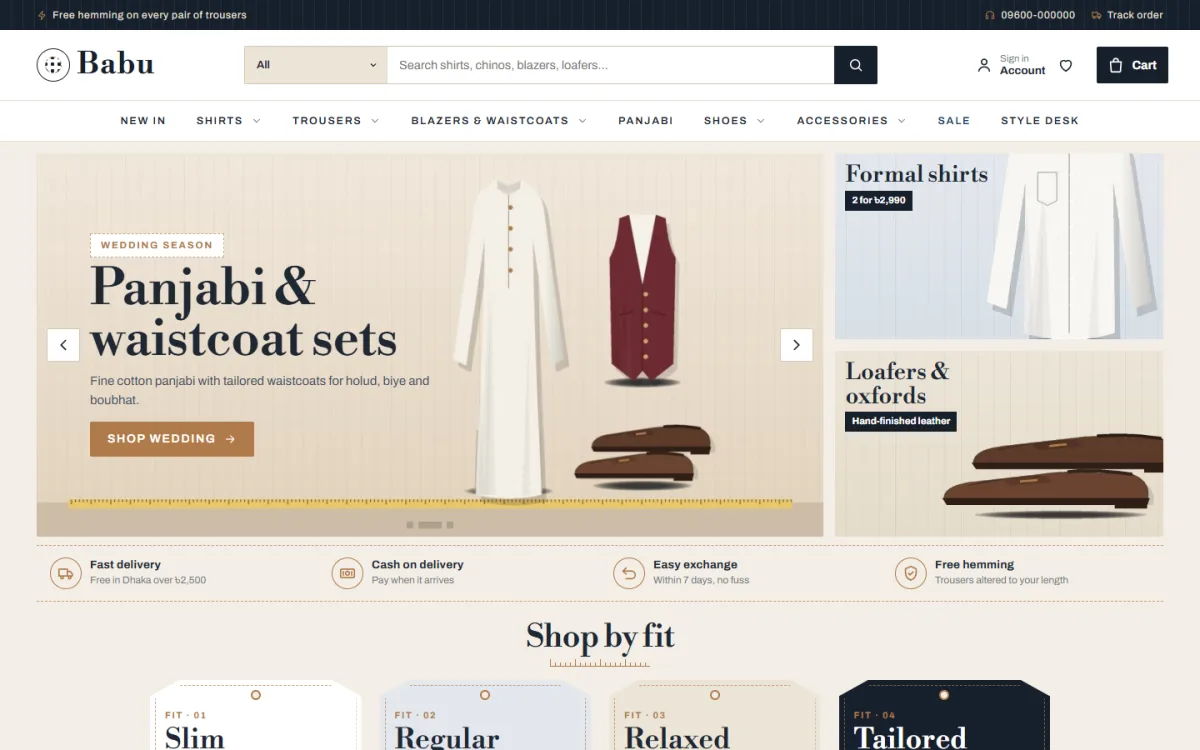
The desktop screenshot shows the demo's tailor-shop style. The search box suggests shirts, chinos, blazers and loafers, and the menu runs New In, Shirts, Trousers, Blazers and Waistcoats, Panjabi, Shoes, Accessories, Sale and Style Desk. The main slide promotes panjabi and waistcoat sets for wedding season, with a tape measure along its base, and two side cards show formal shirts and loafers. Below sit the promise strip and four numbered hang tags, the first three reading Slim, Regular and Relaxed.
Twenty blocks in your own order
The homepage is built from 20 blocks, each of which can be switched off and dragged into any order. Deal of the day adds a countdown and stock bars, Best sellers sits in category tabs, and Suit up is a banner with a tailoring row for blazers and waistcoats. Smart buys shows price tiles, Occasions gives four picture cards, House in focus puts one brand on stage, and The style desk shows your latest three blog posts.
The Shopping Experience on a Phone
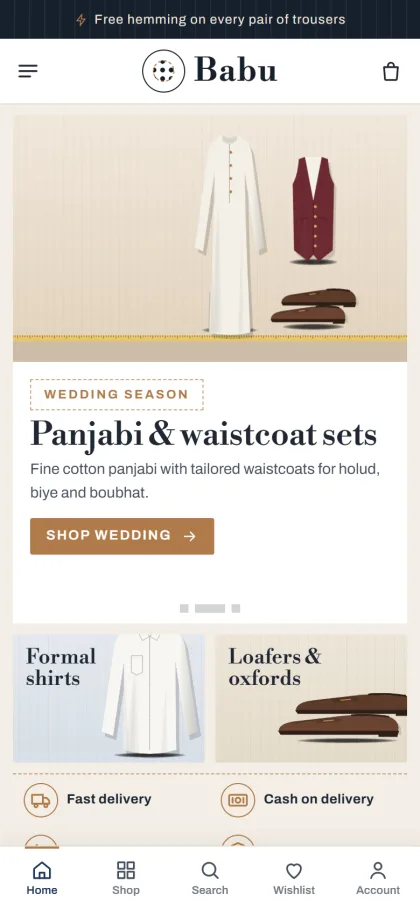
On phones, the header keeps only menu, logo and cart, and product cards stay compact, so a buyer sees more shirts per scroll. The mobile screenshot of the demo shows the side cards for formal shirts and loafers sitting side by side under the slide, the promise strip folding into two columns and a bottom bar with Home, Shop, Search, Wishlist and Account.
Product cards show the house name, stars, units sold and sizes on hover, with an add-to-cart button. On the product page a shopper picks size and colour, opens the size guide and checks delivery charges before buying. Reviews sit in a neat fold, and a popup invites the first review. Customers sign in from a popup, save pieces to a wishlist and pay on a one-page checkout, then follow the parcel on the Track Order page.
Setup, Payments and Delivery
Babu works on WordPress 6.0 and newer, tested up to 7.1, with PHP 7.4 or newer. Upload the zip in Appearance, Themes, Add New, Upload Theme, and activate. Install the bundled Themeve Commerce plugin from Babu, Setup, add your licence in Babu, License, and run Babu, Demo Import. If menus and pages are new to you, start with the WordPress documentation.
The demo, Babu Classic Menswear, adds 39 products from 6 sample houses, three menus and pages including About Babu, Delivery, Exchange and Alterations, Size Guide, Our Stores, Style Desk, FAQ and Track Order. Replace every sample house and picture with your own stock. In Babu, Theme Options, choose a palette, Navy and tan, Charcoal, Bottle green, Oxblood or Linen, and a font pair such as Tailor, which pairs Libre Bodoni with Archivo.
Buyers pay by bKash, Nagad, SSLCommerz, cash on delivery or manual payment, and you book parcels with Steadfast or Pathao courier. You can print invoices, send SMS and OTP messages, get new-order alerts on Telegram and measure ads with Facebook Pixel and the Conversion API. Size guide, offers, returns and a store locator are switched on, which suits a brand with an outlet where buyers like to try a blazer first.
Before buying, browse the live demo on your phone and click through the hang tags, then open the demo dashboard to see where orders and products sit under Shop.
Selling Menswear in Bangladesh
Eid and the wedding months are the biggest seasons for panjabi, waistcoats and formal shoes, so prepare stock and photos weeks in advance. Many men buy for themselves only a few times a year, while wives, mothers and sisters often shop for them, so write product pages that a gift buyer can follow, with clear size advice. Coupons work well for end-of-season sales on shirts and trousers.
Cash on delivery remains the default for many buyers, so confirm high-value orders such as blazers and leather shoes by phone before dispatch. On Facebook, show the same shirt on men of different builds, post short videos of fabric and fit, and send ads to a single category or fit page instead of the homepage. Offering hemming to the buyer's length is a strong reason to order from your shop rather than a marketplace.
Mistakes to Avoid
Using different fit names for different suppliers confuses buyers and leads to returns. Skipping alteration rules leads to arguments about trouser length. Showing only flat-lay photos hides the cut, and leaving demo text and sample houses on the site makes even a good shop look unfinished. Finally, do not turn on every block at once. Begin with the slider, shop by fit, best sellers and the promise strip, and add more when your range is ready.
Frequently Asked Questions
Do I need coding skills to build an online menswear store with Babu?
No. You upload the theme, install the plugin from Babu, Setup, import the demo and change everything else from Babu, Theme Options. A search box finds any setting, and a sticky save bar keeps Save within reach.
Is there a size guide for shirts and trousers?
Yes. The size guide feature is switched on and the demo includes a Size Guide page. Shoppers can open the guide from the product page while choosing a size, which helps cut down wrong-size orders.
Which theme suits a women's or luxury shop instead?
For a young women's fashion label, see Ura – Women's Fashion WordPress Theme. For a high-end boutique, compare Shaaj – Luxury Boutique WordPress Theme.
Dress the Part Online
A men's shop wins on fit, fabric, clear alterations and dependable delivery. Plan your fits, measure every size, write short policies and photograph the cut honestly, and your menswear website will earn the repeat orders that keep a small brand going. When you are ready to open your online menswear store with a storefront that feels like a good tailor's counter, start with Babu – Menswear WordPress Theme.