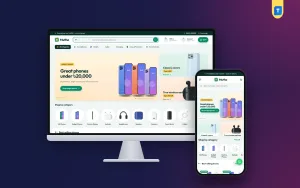
A phone accessories website lets a small mobile shop sell chargers, cases, cables and earbuds to buyers all over Bangladesh, not only to the people who walk past the counter. This guide is for accessory sellers who already have a shop or a Facebook page, new sellers starting with small capital, and freelancers who build stores for phone shops. It covers what to stock, how to organise it online, and how to take payments and ship parcels without headaches.
Accessories are a good business because almost everyone needs them again and again. A cable frays, a case cracks, a charger stops working, or someone buys a new phone and wants protection for it the same day. These are small, light items that travel well by courier. The catch is compatibility. Every buyer wants to know whether this charger suits their phone, so your site has to answer that question faster than a shop assistant could.
In this guide we use Mutho – Phone Accessories WordPress Theme as the example. It is a fresh, mint-green theme for shops that sell official smartphones, tablets, earbuds, chargers, power banks, cables, cases, screen glass and smartwatches. First, though, the business side, because a good store starts with a clear plan rather than a theme.
How to Start a Mobile Shop Business Online
If you are wondering how to start a mobile shop business on the internet, begin by choosing your focus. Some shops sell handsets plus accessories, others sell accessories only. Accessories need less capital, carry less risk of theft and damaged stock, and suit a beginner well. Handsets bring bigger orders but also bigger questions about warranty, official stock and EMI. Many sellers start with accessories, build trust and a buyer list, and add phones later.
Next, line up your suppliers. Talk to wholesalers in your nearest market, compare quality across two or three, and test samples yourself before you list anything. Keep your trade licence and business papers in order, and open a merchant account for mobile payments. Decide how much stock you will hold and what you will order on demand. Writing these decisions down early saves you from rushed choices when the first orders arrive.
Then plan the online side: your shop name, a simple logo, clear photos and a list of categories. A phone accessories website does not need hundreds of products on day one. Forty well-described items with real photos sell better than four hundred copied listings. Start small, learn what sells in your area, and grow the range around the products people actually reorder.
Organising Chargers, Cases and Audio So Buyers Find Them
Accessory buyers usually arrive with one job in mind: find the right item, check it fits, pay and leave. Your categories should follow that habit. Group items by type, such as chargers, power banks, cables, cases, screen glass, earbuds, headphones, speakers and smartwatches. Within cases and glass, let people filter or search by phone model, because nobody wants to scroll past fifty cases for phones they do not own.
Compatibility details that stop returns
For chargers and cables, put the connector type and wattage in the product title, not only in the description. For cases and screen glass, list every phone model the item fits. For earbuds, mention battery life, the charging case and whether they support calls clearly. These short facts answer the questions that otherwise fill your inbox, and they cut the returns that eat into the small margin on each accessory.
Small add-ons that raise every order
Accessories sell well together. A buyer ordering a phone case may also want screen glass, and someone buying a power bank may need a fresh cable. Place related items near each other, run small offers on pairs, and use free delivery thresholds wisely. On a phone accessories website, a few extra items per order often decide whether the delivery charge leaves you any profit at all.
What Mutho Brings to a Phone Accessories Website
The Mutho demo opens with a slim dark green strip for an offer line, a phone number and a Track order link. The white header holds the logo, a rounded search box, Offers and Account links and a green cart pill. In the demo, the search also has an All category drop-down beside it. Underneath, an All categories button sits next to icon links for Smartphones, Tablets, Audio, Charging, Cases & Protection and Smartwatches.
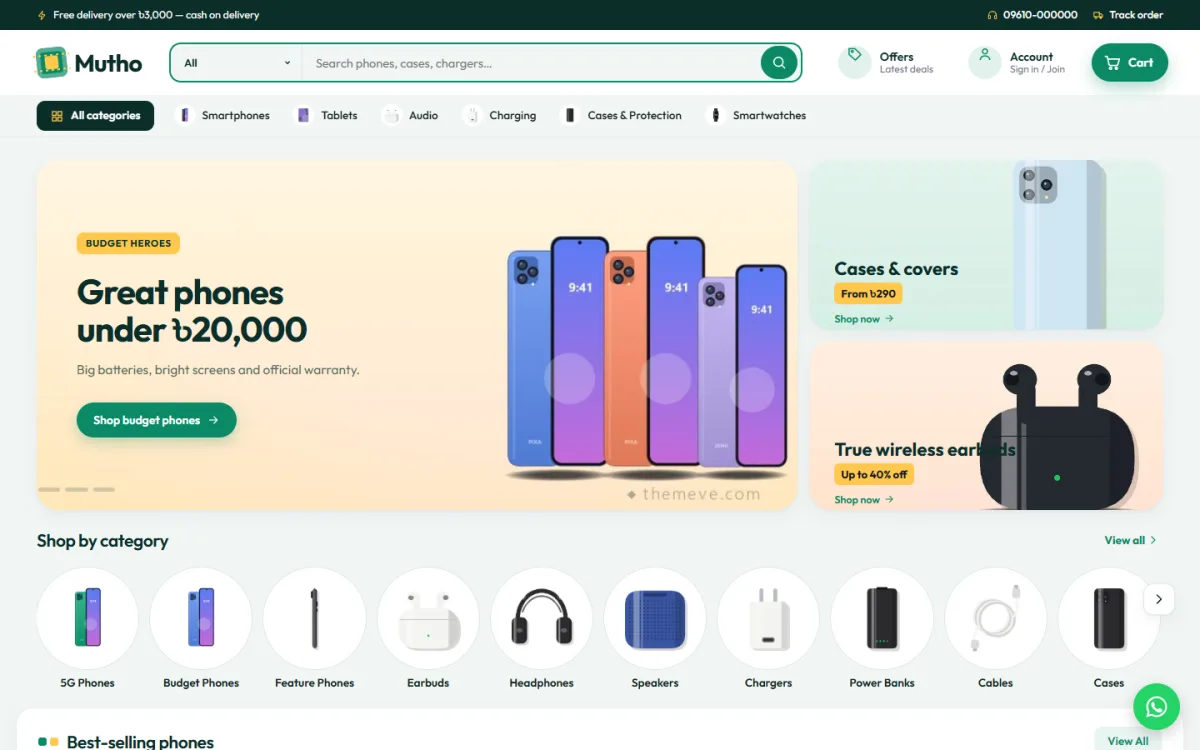
The hero in the demo shows a Budget heroes slide for phones, with two side banners for cases and covers and for true wireless earbuds. Below it, a Shop by category slider lines up round picture tiles for 5G phones, budget phones, feature phones, earbuds, headphones, speakers, chargers, power banks, cables and cases, with a View all link. A Best-selling phones row follows, and each product row has its own title, View all link and sliding cards.
Budget tiles, brand spotlight and best sellers
Three blocks set Mutho apart. Shop by budget shows price tiles together with products, so a shopper can start from what they want to spend. Brand spotlight gives one brand the stage, with its products beside it, which suits a launch month or your best-selling brand. Best sellers shows top items in tabs by category, so phones, earbuds and chargers each get a tab while the block stays short. If you sell accessories only, you can switch the budget tiles off.
Eighteen blocks in the order you choose
Mutho has 18 homepage blocks, and you can switch any of them off or move them, using arrows when you edit on a phone. Alongside the big slider, side banners and category slider, there are seven product rows, a flash sale for today's deals with a countdown, two wide banners that promote trade-in and phone protection offers in the demo, a promise strip for delivery, warranty, EMI and payments, a brand logo row and a Latest products grid with Load more.
Cards, Product Pages and Shopping on a Phone
Product cards carry a savings ribbon, a compare button and Add to cart. On product pages, specs are grouped so details like screen, camera, battery or wattage are easy to find, and warranty and EMI information sits on the same page. Reviews open in a fold, with a popup inviting the first review. A Compare page puts two items next to each other, which helps the buyer stuck between two power banks or two pairs of earbuds.
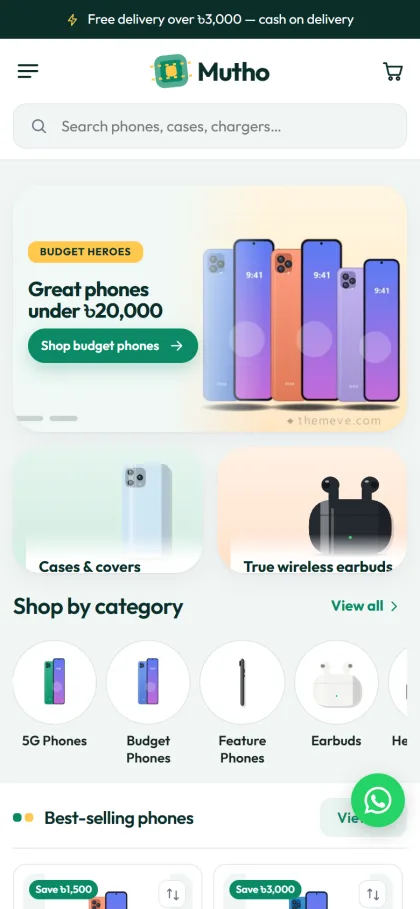
On a phone, the demo header becomes a menu icon, the logo and a cart, with a full-width search box underneath. The side banners for cases and earbuds drop below the slider as two tiles, and the category circles become a sideways swipe. Further down, the Best-selling phones cards turn compact with savings ribbons and a compare icon, so shoppers flick through more items with less thumb work. A round WhatsApp button also appears in the demo.
Setting Up Mutho Step by Step
Mutho needs WordPress 6.0 or newer and PHP 7.4 or higher, and it is tested up to WordPress 7.1. Upload the zip under Appearance, Themes, Add New, Upload Theme and click Activate. Open Mutho, Setup and install the bundled Themeve Commerce plugin in one click; it runs the cart, checkout, payments, couriers and orders. Then activate your licence under Mutho, License with the key from My Account, Licenses on Themeve, so updates reach your dashboard.
Run Mutho, Demo Import to load 24 products from 6 invented brands, from 5G and budget phones to tablets, earbuds, headphones, chargers, power banks, cables, cases, glass and smartwatches. Banners, budget tiles, the brand spotlight, menus and pages such as Phone Guides, Delivery Information, Return & Exchange, Warranty Policy, Compare and Track Order come with it. Replace every sample brand and picture with your own before launch. The WordPress documentation helps if menus and pages are new to you.
Styling happens in Mutho, Theme Options. Homepage layout comes first, followed by colours, typography, header and menu, product cards, the product page and the footer. Choose one of five palettes, Mint, Ocean, Grape, Tangerine or Graphite, or set each colour yourself, and pick from eight font pairs, including Manrope, Rubik and Fraunces with DM Sans. A settings search, export and import, reset and a sticky save bar keep long sessions tidy.
Before buying, open the live demo on your own phone and try to find a charger, a case and a pair of earbuds as a customer would. Then look around the demo dashboard to see where products, orders and theme settings sit. A short test like this shows whether the layout matches the way your buyers shop.
Payments, Couriers and Facebook Sales in Bangladesh
Mutho's checkout is one page, with sign in and registration in a popup and an Order placed popup at the end. Buyers can pay with bKash, Nagad, SSLCommerz, cash on delivery or manual payment. Orders ship through Steadfast or Pathao courier, and a Track Order page shows where each parcel is. A wishlist, coupons, invoices, offers, back-in-stock and returns are included too.
Cash on delivery is common for small accessory orders, and so are fake orders. Confirm larger COD orders by phone, pack items in bubble wrap, and include a small card with your page name and a thank-you note. Back-in-stock alerts are useful when a popular cable or case sells out. SMS and OTP help with customer messages, and Telegram alerts tell you the moment a new order lands, even when you are at the counter.
Most accessory buyers still discover shops on Facebook. Mutho includes Facebook Pixel and the Conversion API, so you can see which posts and ads turn into orders. Post short videos showing a case on a real phone or a charger with its wattage on screen, and link each ad to the right category rather than the homepage. Bangla captions that name the phone model clearly tend to bring the right buyers.
Mistakes to Avoid With a Phone Accessories Website
The biggest mistake is vague product titles. A title like Fast Charger tells the buyer nothing, while one that names the wattage and connector answers the main question at once. Another is using supplier photos only. Shoot your own pictures on a plain background, ideally with the item on a real phone. Sellers also forget to update stock, then cancel orders, which hurts trust more than a sold-out label ever would.
Some owners try to copy the giant marketplaces and add too much at once. A focused phone accessories website with clear categories and honest descriptions often beats a cluttered one. Finally, test checkout on a cheap Android phone with mobile data before launch, and read Google's Search Central documentation for simple advice on page titles and descriptions.
Frequently Asked Questions
Can I run Mutho as an accessories-only shop?
Yes. Product rows, best sellers in tabs and the category slider work well for chargers, cables, cases and earbuds. If you do not sell handsets, switch off the Shop by budget block and keep the rest. The brand spotlight still works nicely for a featured accessory brand.
Can I show warranty and EMI on product pages?
Yes. Product pages group the specs and show warranty and EMI details, and the homepage promise strip mentions delivery, warranty, EMI and payments. You decide the actual terms, so keep them short, honest and the same for similar products across the shop.
Is the store plugin included with the theme?
Yes. Themeve Commerce comes bundled with Mutho and installs in one click from Mutho, Setup. It covers the cart, checkout, payments, couriers and orders, so you do not need extra shop plugins to get started or to keep updated later.
Which theme suits a handset shop or a charger specialist?
If you mostly sell handsets in a calm boutique style, look at Alap – Mobile Phone Shop WordPress Theme. If chargers, cables and power banks are your main line, Shokti – Tech Accessories WordPress Theme has a charger matcher. Mutho sits between the two, with room for both phones and accessories.
Final Thoughts
Selling accessories online comes down to clear compatibility details, honest photos, quick delivery and payment options your buyers already use. Once you know how to start a mobile shop business on a small budget, the right theme simply makes the work easier. For a friendly, fresh phone accessories website with budget tiles, a brand spotlight and local payments ready, start with Mutho – Phone Accessories WordPress Theme and list your first forty products.