 −50%
−50%
Courier Intelligence – Courier Delivery History Plugin
 −50%
−50%
✦ Key features
- Delivery records per customer phone number
- Courier, tracking number, status, date and note
- Six statuses from delivered to unknown
- Delivered versus returned count lookup
- Add records by hand or by CSV
- Sample CSV file included
- Export all records as CSV
- History box on every order screen
- Numbers stored as hash plus last 4 digits
- Duplicate tracking numbers refused
- Administrators only
Overview
Courier Intelligence is a courier delivery history plugin for WooCommerce and Themeve Commerce. Record delivered and returned parcels per phone number and check before you ship.
Courier Intelligence is a courier delivery history plugin that keeps a simple record of what happened to every parcel, sorted by the buyer's phone number. Before you hand a new order to the courier, look up the number and see how many earlier parcels were delivered and how many came back.
It works with WooCommerce and Themeve Commerce, and only store administrators can open it.
Why delivery history matters more than order history
Your shop knows when an order was placed. Your courier knows whether the buyer actually took the parcel. For a cash on delivery business, the second fact is the one that decides profit. A buyer with five orders and five returns is very different from a buyer with five orders and five deliveries.
Many owners keep this in a notebook or a spreadsheet. It works until two staff members use two different files. Courier Intelligence puts the record inside your store admin, next to the orders.
What each record holds
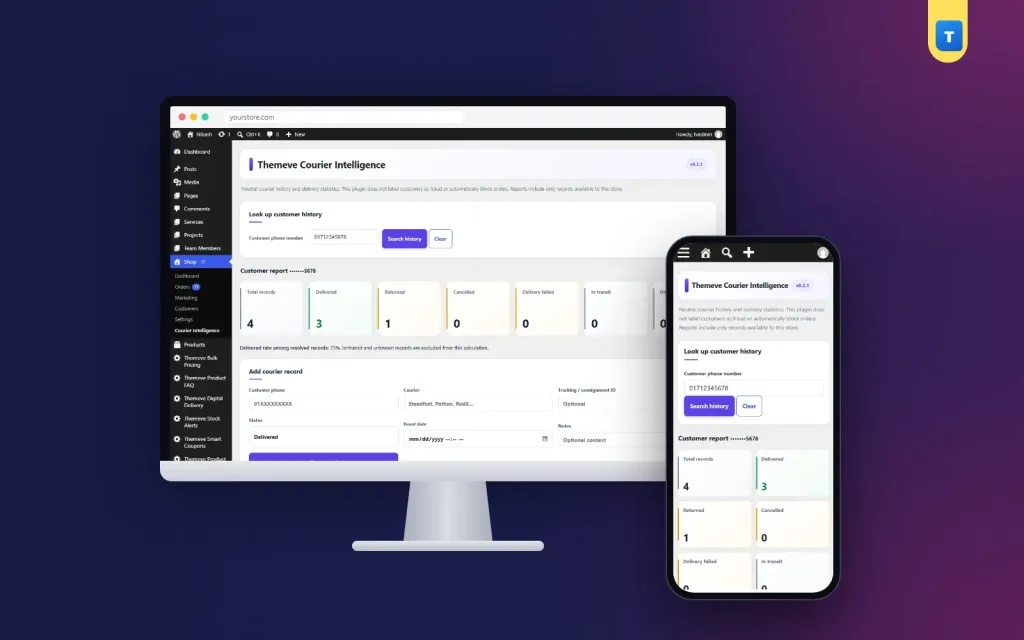
Each record stores the courier name, the tracking number, the delivery status, the date and a short note. The status can be delivered, returned, cancelled, in transit, failed or unknown, which covers what most Bangladeshi couriers report on their slips and dashboards.
Duplicate tracking numbers are refused, so the same parcel cannot be counted twice by mistake. The note field is useful for details such as buyer not reachable or wrong address.
Add records by hand or by CSV
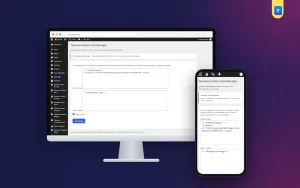
For a few parcels a day, add records by hand from the plugin screen. For larger volumes, import a CSV file. A sample CSV comes with the plugin so you can see the columns before you prepare your own file from your courier report.
CSV import is new in this version, so start with the included sample and a small batch of your own rows before importing a full month. You can also export every record as CSV whenever you need a report.
Look up a number before you dispatch
Type a phone number and the courier delivery history plugin shows the delivered count against the returned count, together with the matching records. A quick look tells you whether to ship as normal, call the buyer first, or ask for an advance payment.
A history box on every order
You do not need to open a separate screen for each order. A history box appears on every WooCommerce and Themeve Commerce order screen, showing the buyer's delivery record. Your packing team sees it at the moment they confirm the order.
A typical week with Courier Intelligence
On Saturday morning the manager downloads last week's courier report and imports the rows. On Sunday a new order arrives from a number with two returns in the past month. The history box on the order screen shows it at once, so the team calls the buyer and asks for a small bKash advance before packing.
Another order comes from a buyer with eight deliveries and no returns. That parcel ships the same day without a call. Over a few weeks the shop spends less on return charges and less time on doubtful orders.
Privacy built in
Phone numbers are personal data, and a list of them is worth protecting. Courier Intelligence stores each number as a secure hash plus its last four digits only. The full number is not kept in its records, and the CSV export never contains full numbers.
Only store administrators can open the plugin, so delivery data stays with the people who run the shop.
Where this courier delivery history plugin fits
Courier Intelligence works from records you enter or import. It does not connect to courier company systems, so you stay in control of what goes in. That also means it works with any courier you use, including Steadfast, Pathao and smaller local services.
On Themeve Commerce stores the screen sits inside the Themeve Commerce menu. On WooCommerce sites it has its own menu.
It pairs well with Fraud Shield, which counts completed and refused orders on your own site, and Order Analytics, which shows sales, order health and top products for any date range.
To learn how orders and order screens work in WooCommerce, see the WooCommerce documentation.
Licence, updates and setup
Courier Intelligence needs an active Themeve licence key. Without it, the plugin stays off and only its lock screen and License screen open. Enter the key from My Account › Licenses and every feature starts working. Updates arrive in Dashboard › Updates while the licence is active.
Then open the plugin, add a few records from your latest courier report, and look up one of those numbers. From that day on, every new order shows the buyer's delivery history, and your courier delivery history plugin grows more useful with every parcel you record.
Reviews
0.0
Write a review
★★★★★
0 reviews from buyersNo reviews yet — be the first to share your experience after buying.
Frequently Asked Questions
01Does Courier Intelligence connect to Steadfast or Pathao?
No. Records come from you, by hand or by CSV from your courier report. That is why it works with any courier you use.
02Which statuses can I record?
Delivered, returned, cancelled, in transit, failed and unknown, plus a date and a short note.
03Are full phone numbers stored?
No. Each number is stored as a secure hash plus the last four digits, and the CSV export never contains full numbers.
04Where do I see the history while confirming orders?
A history box appears on every WooCommerce and Themeve Commerce order screen.
05Can I import a whole month of parcels?
Yes, by CSV. Start with the included sample file and a small batch of your own rows, then import the rest.
06Who can open the plugin?
Only store administrators.
07Does it need a licence?
Yes. Without an active Themeve licence key it stays off and only its lock and License screens open.
Delivery & Support
1Place your orderAdd to cart, sign in and pay with bKash, Nagad or Rocket.
2Payment verified automaticallyEnter your Transaction ID — the payment is matched automatically, usually within seconds.
3Get your productYour license key and download appear in My Account → Licenses.
- Secure automatic payment verification
- Delivery to your account & e-mail
- Friendly WhatsApp support
Refund Policy
This policy applies to every product in our store.
You get a refund when the product does not work as described and we cannot fix it, when your license will not activate your website, or when a manually delivered product is late and you cancel before delivery. A working license, or a single license already used on a live domain, is not refundable. Approved refunds go back to the number you paid from within one working day, minus the Send Money charge.
More items
View all →