 −20%
−20%
Josh – Digital Products Selling WordPress Theme
✦ Key features
- Top up in 3 steps: game, Player ID, pack
- Player ID remembered for checkout and next visit
- Best value bars by price per 100 units
- Cheapest pack marked with its saving
- Checkout with no address or delivery charge
- bKash and Nagad Send Money ready
- 17 homepage blocks to switch and re-order
- Night slate look with cut-corner cards
- 5 colour palettes and 4 font pairs
- Sign in and register in a popup
- Theme Options dashboard that works on phones
- Themeve Commerce plugin included
- One-click demo with 25 sample products
Overview
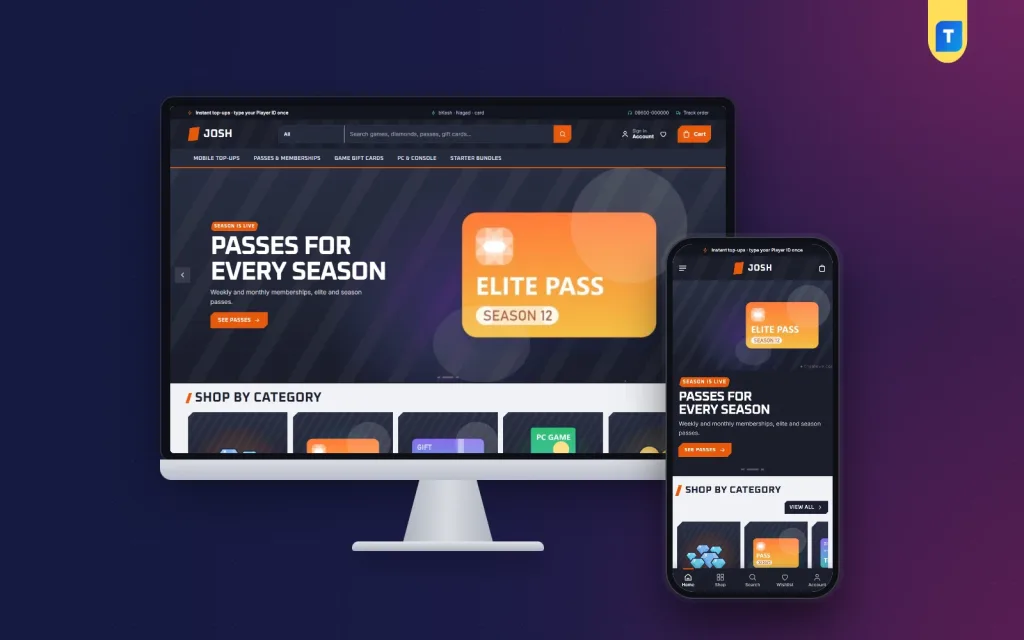
Josh is a digital products selling WordPress theme for top-ups, gift cards, keys, subscriptions and downloads. It has a 3-step top-up block, price-per-100 value bars, a saved Player ID, a dark arena look and checkout with no address.
Josh is a digital products selling WordPress theme for shops where the buyer needs one small detail before paying, such as a Player ID, an account email or a phone number. It was designed around game top-ups, and it works just as well for gift cards, software keys, subscriptions, ebooks, course access and other items delivered online.
The demo is a gaming store website template with a dark "arena" look. That is only an example. Everything that makes the theme useful, the three-step buying block, the saved ID, the value bars and the address-free checkout, is useful for any digital goods. This page lists every front-end and back-end option in plain terms, so you know what you are getting.
Who can use this digital products selling WordPress theme
Any seller whose goods are delivered by code, link, email or chat can use it. For example:
- Game top-up shops: diamonds, coins, gems, passes and starter bundles.
- Game gift card and voucher sellers.
- PC and console key resellers.
- Subscription sellers for streaming, music, VPN and design tools.
- Software and licence resellers.
- Ebook, course and template sellers.
- Mobile recharge and wallet top-up services.
One store can hold several of these. Three department blocks on the homepage let you split them, for example mobile top-ups, gift cards and keys. The sample products and studio names in the demo are only placeholders for your own.
Built to load fast on a phone
Many buyers order from a phone on mobile data. Josh loads one theme stylesheet and one theme script. The script does not need jQuery and loads in the footer. The theme prints lazy loading on images, product cards turn compact on small screens, and the phone header shrinks to menu, logo and cart.
Front-end features of the digital products selling WordPress theme
This is what a visitor sees and uses.
Top up in 3 steps, on the homepage
This block is the centre of the theme. A shopper picks a game tile, types the Player ID once and taps a pack. The total follows every choice, and one button adds the pack to the bag. The ID is remembered, so it is already filled in at checkout and on the next visit. Returning buyers top up again in seconds. If you sell something other than game packs, use the same steps for any item that needs an ID or account detail.
Best value packs as bars
- A tab for each game or product group.
- Every pack is drawn as a bar of its price per 100 units.
- The cheapest pack is marked with how much it saves.
- Big spenders see the smart choice at a glance.
Player ID on the product page
- The ID field must be filled before the pack can go into the bag.
- Quick facts show game, platform, region and delivery right above it.
- A short part explains how delivery works.
- You never receive an order you cannot deliver.
17 homepage blocks
Switch any block off, drag it into place, or use the arrows on a phone. The blocks are:
- Arena slides at the top.
- Game tiles for each category.
- New drops, with two rows of the newest products.
- Best sellers, tabbed by category.
- Flash deals, with a countdown and stock bars.
- Top up in 3 steps.
- Best value packs.
- Shop by platform, with four cards.
- Shop by budget, with price tiles and products.
- Trending now, a sliding row.
- Three department blocks, each with a banner and eight products.
- Top rated, with the items players score highest.
- Studios, a row of publisher logos.
- Game guides, which shows your latest three posts. It suits articles like "where to find a Player ID".
- A promise strip with four short promises: instant, genuine, pay your way and help. Rewrite it so it says only what your shop really does.
Header, cards and account
- Cut-corner product cards in one style across every grid and sliding row.
- Compact cards and a menu, logo and cart header on phones.
- Sign in and register in a popup, so a buyer never loses the pack they were about to buy.
- A wishlist.
- Reviews in a fold on the product page, with a popup that invites the first review.
Checkout without an address
Checkout asks for a name, a mobile number, a delivery email and the Player ID when the product needs one. There is no address field and no delivery charge, because a digital pack never leaves the screen. The delivery email tells you where to send the code or details. bKash and Nagad Send Money are ready from day one, and an "Order placed" popup confirms each purchase. A Track Order page shows progress.
Look and feel
- Night slate backgrounds with tangerine and aqua highlights.
- Oxanium headings over Inter text by default.
- Five colour palettes: Arena, Jungle, Royal, Ember and Ice.
- Four font pairs: Oxanium with Inter, Saira, Russo One with Rubik, and DM Sans.
Back-end: Theme Options and the store dashboard
Two places run the shop. Josh → Theme Options controls the look and the homepage. The bundled Themeve Commerce plugin runs the store. You do not need WooCommerce.
Josh → Theme Options
- Settings grouped in clear sections, from homepage layout and colours to the product page and footer.
- Show, hide and re-order the 17 homepage blocks.
- Pick a palette, or set each colour yourself.
- Pick one of four font pairs.
- A search box that finds any setting.
- A sticky save bar that stays in reach.
- Export, import and reset.
- A dashboard that works on a phone, so you can fix a banner from anywhere.
- The logo goes in Appearance → Customize → Site Identity. The main menu and two footer columns are under Josh → Menus.
Products
Each pack or item can carry variations with their own price, stock, SKU and photo. Categories, brands and tags have separate menus. Product facts such as game, platform, region and delivery come from simple specification lines.
Orders, invoices and payments
- A dashboard with today's sales, the last seven days, the month so far and a two-week chart.
- Orders with statuses, printable invoices and a payments box with refunds.
- Incomplete Orders, which lists people who left checkout.
- bKash and Nagad Send Money, SSLCommerz and manual payment with a transaction ID.
- Coupons.
- Transactions with every payment and refund.
- A customer list grouped as new, repeat, VIP, inactive or risky.
Alerts and protection
- New-order alerts by email and on Telegram.
- SMS updates and phone verification by OTP.
- Fake order protection.
- An automatic review request after delivery.
- SMS campaigns for past buyers.
Marketing and tracking
- Facebook Pixel with the Conversion API.
- Google Analytics 4 and Google Tag Manager.
- SEO settings for descriptions and sharing previews.
- Sales and signup popups.
Optional modules
You switch modules on from one screen, so the store stays light:
- Flash Sale, Combo and Bundle Offers, and Upsell and Cross-sell.
- Loyalty Points with refer a friend.
- Affiliate Program with commissions.
- Reseller and Wholesale Prices for sub-sellers.
- Bulk Order and Corporate Quotes.
- Back in Stock Alerts and Recently Viewed.
- Support tickets, Testimonials and Offers.
- A REST API with signed webhooks.
The plugin also has courier tools for physical parcels. A digital shop can ignore them.
How a digital products selling WordPress theme helps you sell
Selling digital goods through a Facebook page or chat app takes time. You ask for the ID, wait for a screenshot, check the payment and then deliver. Josh moves the asking and the pricing to the page.
- No missing details. The ID is required before the cart.
- Quick repeat sales. A remembered ID makes the second order take seconds.
- Clear prices. The value bars show which pack costs least per unit.
- A bigger basket. Departments, bundles and upsells let you sell gift cards and keys beside the top-ups.
- Trust. Reviews, invoices and a Track Order page make a small shop look settled.
Say you sell game gift cards and streaming plans. Put gift cards in one department and subscriptions in another. Use the value bars to show the best plan per month. Buyers choose, pay and wait for your delivery email.
Setup in six steps
- Install the theme on a fresh WordPress site (6.0 or newer, PHP 7.4 or newer).
- Activate it, then open Josh → Setup and install Themeve Commerce in one click.
- Import the one-click demo to see the full layout with sample content.
- Open Josh → Theme Options and choose a palette and a font pair.
- Replace the sample products with your own.
- Switch on your payment methods and alerts, then publish.
Why choose it over a plain gaming store website template
A plain gaming store website template gives you a layout. You still have to add payments, orders, invoices, ID fields and alerts by yourself. Josh is different in a few ways.
- The ID rules and the three-step buying block are built in.
- The store plugin is made for this theme, so there are fewer clashes between plugins.
- Local payments are ready from the start.
- The demo import gives you real pages, not empty boxes.
- The options panel works on a phone.
It is made for digital goods. If your main business is shipping parcels, pick a theme for that instead.
What is included
- The Josh theme (PHP, CSS and JS), version 1.0.0.
- The Themeve Commerce plugin, installed from Josh → Setup.
- One-click demo "Josh — Game Top-ups": 25 sample products, game guides, menus and every page, including How Delivery Works, Track Order, Our Stores, FAQ, Game Guides and Wishlist.
- Documentation.
- Six months of support, with updates.
- Works with WordPress 6.0 or newer, tested up to 7.1, and PHP 7.4 or newer.
Josh is a digital products selling WordPress theme for sellers who want every pack priced clearly and every ID right the first time. Load the demo, add your own products and open your store.
You can see Josh working on the live demo, and browse more ready-made designs in our WordPress themes collection.
Reviews
0.0
Write a review
★★★★★
0 reviews from buyersNo reviews yet — be the first to share your experience after buying.
Frequently Asked Questions
01Is this digital products selling WordPress theme only for games?
No. The demo is a gaming store, but you can sell gift cards, software keys, subscriptions, ebooks, courses and other downloads. The demo items are samples.
02Why choose a digital products selling WordPress theme over a plain template?
It already includes the ID field, the three-step buying block, the value bars, an address-free checkout and a bundled store plugin, so you add less on your own.
03Does the buyer have to type the Player ID every time?
No. They type it once in the Top up in 3 steps block or on the product page, and it is remembered for checkout and the next visit.
04Can a pack go into the bag without a Player ID?
No. On the product page the field must be filled before the pack can be added.
05What does checkout ask for?
Name, mobile, a delivery email and the Player ID when needed. There is no address field and no delivery charge.
06Which payments can buyers use?
bKash and Nagad Send Money are ready out of the box. SSLCommerz and manual payment are available through the bundled Themeve Commerce plugin.
07Can I change the dark look?
Yes. Choose Arena, Jungle, Royal, Ember or Ice, or set each colour yourself, then pick one of four font pairs in Josh → Theme Options.
Delivery & Support
1Place your orderAdd to cart, sign in and pay with bKash or Rocket.
2Payment verified automaticallyEnter your Transaction ID — the payment is matched automatically, usually within seconds.
3Get your productYour license key and download appear in My Account → Licenses.
- Secure automatic payment verification
- Delivery to your account & e-mail
- Friendly WhatsApp support
Refund Policy
This policy applies to every product in our store.
You get a refund when the product does not work as described and we cannot fix it, when your license will not activate your website, or when a manually delivered product is late and you cancel before delivery. A working license, or a single license already used on a live domain, is not refundable. Approved refunds go back to the number you paid from within one working day, minus the Send Money charge.
More items
View all →You may also like
−20%
 −27%
−27%
 −12%
−12%
 −34%
−34%
