A good digital store website design template saves you weeks of planning, because the hard decisions about layout, checkout and product pages are already made. If you sell game top-ups, gift cards, software keys, subscriptions or ebooks, you do not need a parcel-style shop. You need a site where a buyer finds the item, gives one small detail and pays in a minute.
This guide explains what a digital store needs, how to plan the pages, what to look for in a template and how to launch without wasting money. It is written for small sellers in Bangladesh who now take orders through Facebook, Messenger or WhatsApp and want to move to a proper website.
What a digital store website really is
A digital store sells things that are delivered online. Nothing is packed, weighed or sent by courier. The buyer gets a code, a link, a file or a top-up on their account.
Common examples are:
- Game top-ups such as diamonds, coins and passes.
- Gift cards and vouchers.
- Software and antivirus licence keys.
- Streaming, music and VPN subscriptions.
- Ebooks, courses, templates and printables.
- Mobile recharge and wallet top-ups.
Because nothing is shipped, a digital store works differently from a clothes or grocery shop. It has no address form, no delivery charge, no weight and no courier. What it needs instead is speed, trust and a clear way to collect the one detail the order depends on, such as a game ID or an email address.
Why a digital store website design template is a smart start
Designing a shop from a blank page sounds free, but it costs time. You have to decide where the search bar goes, how a product card looks, what the cart shows and how checkout flows on a phone. A template gives you these answers on day one.
A digital store website design template is useful in four ways:
- Faster launch. You replace the sample products and text, not the whole layout.
- Lower cost. One purchase replaces weeks of a designer's time.
- Fewer mistakes. A good template has already been tested on small screens and slow connections.
- Easy changes later. Colours, fonts and homepage blocks can be changed from the dashboard without code.
The risk is picking a template built for the wrong kind of shop. A fashion template with sizes, colours and delivery zones will fight you all the way. Pick one made for digital goods.
Plan products before you choose a digital store website design template
Open a spreadsheet and list what you want to sell. This takes an hour and shapes every later choice.
- Write each product name the way customers say it, not the way the supplier writes it.
- Add the price in taka and the smallest and largest pack.
- Note what the buyer must give you: a player ID, an email, a phone number or nothing.
- Note how you deliver: code on screen, email, WhatsApp, or a direct top-up.
- Group products into three to six categories.
The third point matters most. If every order needs a player ID, your site must ask for it before the item goes into the cart. If an order needs only an email, you can keep the form very short. A template that handles this well saves you from typing "please send your ID" a hundred times a day.
The pages every digital store needs
Keep the site small. Buyers on mobile data do not want to read ten pages. These are the pages that matter:
- Homepage with search, top categories, best sellers and offers.
- Category pages that list products with clear prices.
- Product page with pack options, price, delivery time and the field for the buyer's detail.
- Cart and checkout with as few fields as possible.
- Order tracking or confirmation so the buyer knows the order was received.
- Help or FAQ page that answers refund, delay and wrong-ID questions.
- About and contact page with a phone number, a WhatsApp link and your page address.
Add a refund and delivery policy page too. Buyers of digital goods worry about being cheated, and a clear policy removes much of that worry.
What to look for in a digital store website design template
When you compare options, check these points one by one. Do not judge by the homepage picture alone.
No address at checkout
A digital order has nothing to deliver to a door. If the checkout still asks for a street, district and postcode, buyers give up. Look for a checkout that asks only for name, mobile number and email.
A field for the buyer's detail
Top-up sellers need a player ID. Software sellers may need an email for the key. The template should let you add this field to the product page and carry it into the order.
Local payments
In Bangladesh most buyers pay with bKash or Nagad. Some use cards or Rocket. Check that these are supported without extra custom work, including a way to enter the transaction ID when payment is by Send Money.
Mobile-first design
Most of your visitors will arrive from a phone, often from a Facebook link. Open the template demo on your own phone. Check that the menu, cart and buttons are easy to tap with a thumb.
Speed
Heavy scripts and large images slow a page on mobile data. Look for lazy loading of images, a small number of files and no unneeded libraries.
Flexible homepage blocks
You should be able to switch blocks on or off and change their order. A seller of only gift cards does not need a top-up block, and the reverse is also true.
Gaming store website design: what is different
Game sellers face the same basics as other digital shops, and a few extra needs. A good gaming store website design reflects how players actually buy.
- Quick path to the pack. Players know the game they play. Let them choose the game, enter the ID and pick a pack in three short steps.
- A remembered ID. Typing a long ID on a phone is slow and easy to get wrong. A site that remembers it for the next visit saves a lot of repeat orders and refund requests.
- Clear value. Players compare packs. Showing the price per 100 units makes the best-value pack obvious and removes the need to do the sum.
- A look that fits. A dark theme with bold headings feels natural to gamers. It should still stay readable in daylight on a phone.
- Trust signals. Show delivery time, support hours and a visible way to reach you if a top-up is late.
The same ideas help other sellers. A gift card shop also benefits from a short path to the right card and a clear price.
Build the checkout around a one-minute purchase
Most lost sales in a digital store happen at checkout. People abandon it because it is long, confusing or asks for things they do not understand. Aim for a purchase that takes about a minute.
- Ask for name and mobile number.
- Ask for an email only if the item is delivered by email.
- Ask for the player ID or account detail only when the product needs it.
- Show the payment methods with clear steps and the number to pay to.
- Show a confirmation page that repeats the order and the expected delivery time.
Keep optional boxes to a minimum. A coupon box is fine if it is collapsed. A long note field is rarely needed.
If you accept manual Send Money, ask for the sender number and the transaction ID, and say clearly that the order is confirmed after you verify it. This prevents arguments later.
Set up payments the way Bangladeshi buyers pay
Your payment setup decides whether people trust you enough to pay. Offer the methods your buyers already use.
- bKash and Nagad Send Money. Easy to start, but you must verify each transaction ID.
- Card and mobile payment through a gateway. Orders confirm on their own, but a gateway account takes time to get approved.
- Rocket and Upay. Useful as extra choices for part of your audience.
Whichever digital store website design template you pick, check how it records the transaction ID. Start with Send Money if you are new, and add a gateway once orders grow. Always write the payment steps on the page in simple words, with the exact number and a reminder to include the order number in the reference.
A ready-made option for game and digital sellers
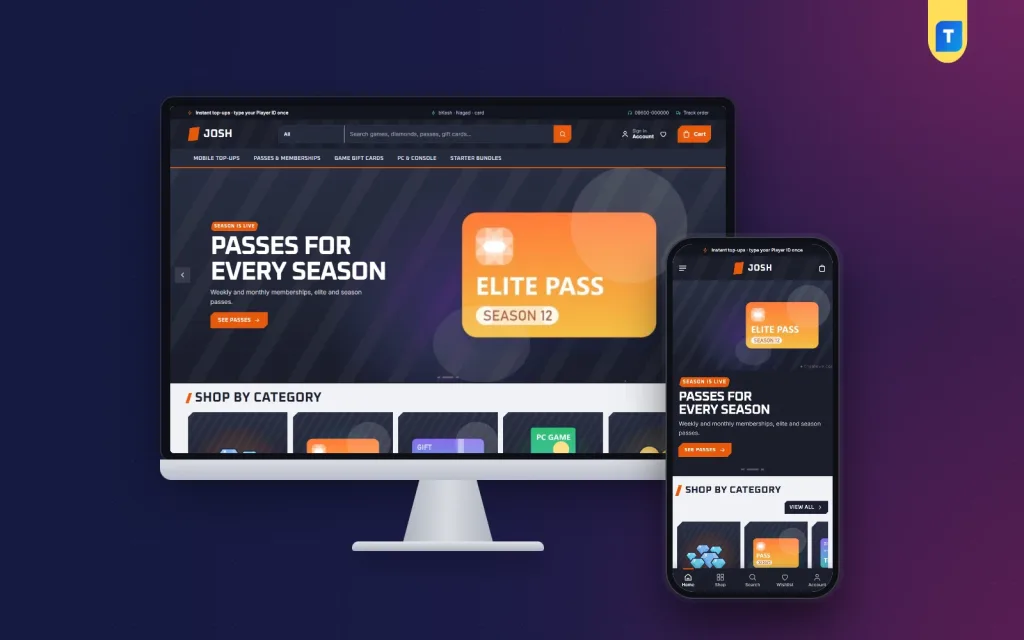
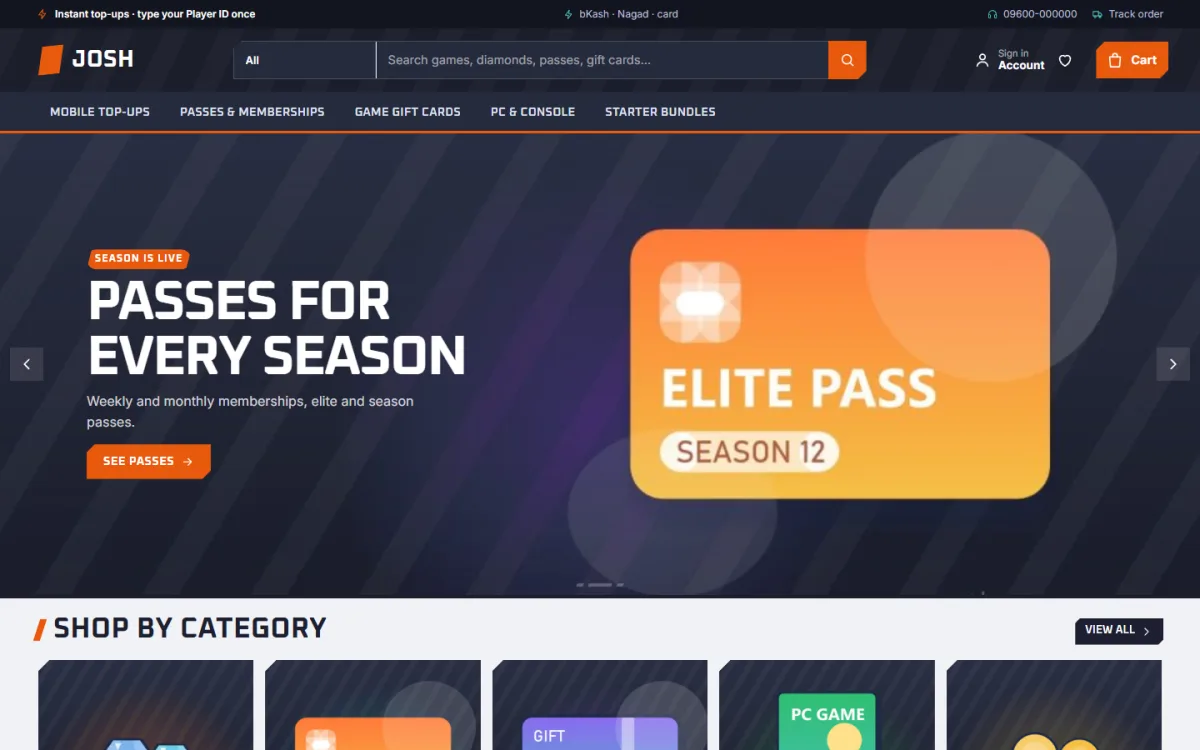
If you want to skip the layout work, Josh – Digital Products Selling WordPress Theme is built for this kind of shop. It started as a gaming store, and it works for gift cards, software keys, subscriptions and downloads as well.
Here is what it includes:
- A top-up block with three steps: game, player ID, pack.
- A player ID that is remembered for checkout and the next visit.
- Value bars that show the price per 100 units, with the cheapest pack marked.
- Checkout with no address and no delivery charge.
- bKash and Nagad Send Money ready, with the Themeve Commerce plugin included.
- 17 homepage blocks you can switch on or off and re-order.
- Five colour palettes, four font pairs and a one-click demo with sample products.
Josh also shows how gaming store website design can stay fast on a phone. The demo is a gaming store, but the sample products are only examples. You replace them with your own. You can see the live demo before you decide, and read the full feature list on the Josh product page.
Write product pages that sell without pressure
A product page for a digital item should answer four questions fast: what is it, what do I get, how long will it take and what do I need to give you.
- Use a short, plain title: game name and pack size, or software name and plan.
- Put the price near the top and show any saving.
- State the delivery time honestly, for example "usually within 10 minutes during support hours".
- List what the buyer needs to provide.
- Add two or three lines on validity, region and device where it applies.
- Add a short note on what to do if the order is late.
Avoid long descriptions copied from the supplier. Buyers want facts, not praise.
Move your Facebook buyers to the website
Many sellers in Bangladesh build their first customers on a Facebook page. The website should not replace that page. It should make the page easier to run.
- Pin a post with the website link and a short line on how to order.
- Put the link in your page bio, WhatsApp profile and Messenger greeting.
- When someone asks for a price in chat, reply with the product page link.
- Post offers on the page and link each one to its product.
- Share real delivery screenshots only with the buyer's permission and with private details hidden.
Over a few weeks, repeat buyers learn that ordering on the site is faster than waiting for a chat reply. That frees your time for support.
A launch checklist for your first week
Before you tell anyone the site is live, go through this list.
- Place a test order on your own phone from start to finish.
- Check every payment method, including the transaction ID step.
- Check the confirmation email arrives and does not go to spam.
- Read each product page for wrong prices or typos.
- Open the site on a slow connection and see how long it takes.
- Add your phone number, WhatsApp link and support hours in the footer.
- Publish the refund and delivery policy.
- Back up the site and set a regular backup.
- Set up a way to be alerted when a new order arrives.
Soft-launch to a few regular customers first. After launch, review orders weekly, update prices when your supplier changes them and take a backup before every update.
Ask what confused them, fix it and then announce to everyone.
Common mistakes to avoid
- Choosing a design for looks only. A pretty digital store website design template with a long checkout will lose sales.
- Too many product categories. Three to six is enough at the start.
- No stated delivery time. Silence makes buyers message you again and again.
- Hiding contact details. Trust drops when buyers cannot find a phone number.
- Using stock photos of products you do not sell. Use real logos and clear names where you have the right to.
- Ignoring mobile. Test every change on a phone first.
- Skipping legal basics. Check that you are allowed to resell the products you list and follow the supplier's terms.
If you want to read more on the technical side, the official WordPress documentation is a good, reliable reference.
Frequently asked questions
What is a digital store website design template?
It is a ready-made design for a shop that sells items delivered online, such as top-ups, keys and ebooks. It includes the layout, product pages and checkout, so you only add your content and prices.
Can I use a digital store website design template for more than games?
Yes. The same layout works for gift cards, software keys, subscriptions, courses and downloads. You can switch off blocks you do not need and keep the ones that fit.
Do I need a developer to launch?
Not usually. With a ready-made theme you install it, import the demo, replace the sample products and set your payment details. Basic computer skills are enough.
Which payment methods should a Bangladeshi digital store offer?
Start with bKash and Nagad Send Money, since most buyers already use them. Add card and mobile payment through a gateway when your order volume grows.
Does a gaming store website design need a special checkout?
It helps. Players must give a player ID, so the best checkout asks for it once, remembers it and does not ask for an address.
How many products should I list at the start?
Start with the 15 to 25 items you sell most. A smaller, clear catalogue is easier to keep correct than a large one with stale prices.
Is a website better than selling only on Facebook?
A website takes orders any time, saves chat time and looks more trustworthy. Keep your Facebook page for reach and support, and send buyers to the site to order.