−40%
−40%
Kone – Bridal Wear Ecommerce Website Template
✦ Key features
- Dress every event: holud, mehndi, biye, bou-bhat
- Book a fitting with a 14-day date picker
- Fitting requests sent to WhatsApp
- Fit meter, weave details and delivery date
- 24 homepage blocks to switch on or off and re-order
- Wedding season offers with countdown and stock bars
- Themeve Commerce shop plugin included
- bKash, Nagad, SSLCommerz and cash on delivery
- Steadfast and Pathao courier with order tracking
- Login popup, reviews fold, wishlist
- Five palettes and four font pairs led by Cinzel
- Theme Options panel that works on a phone
- One-click demo import
Overview
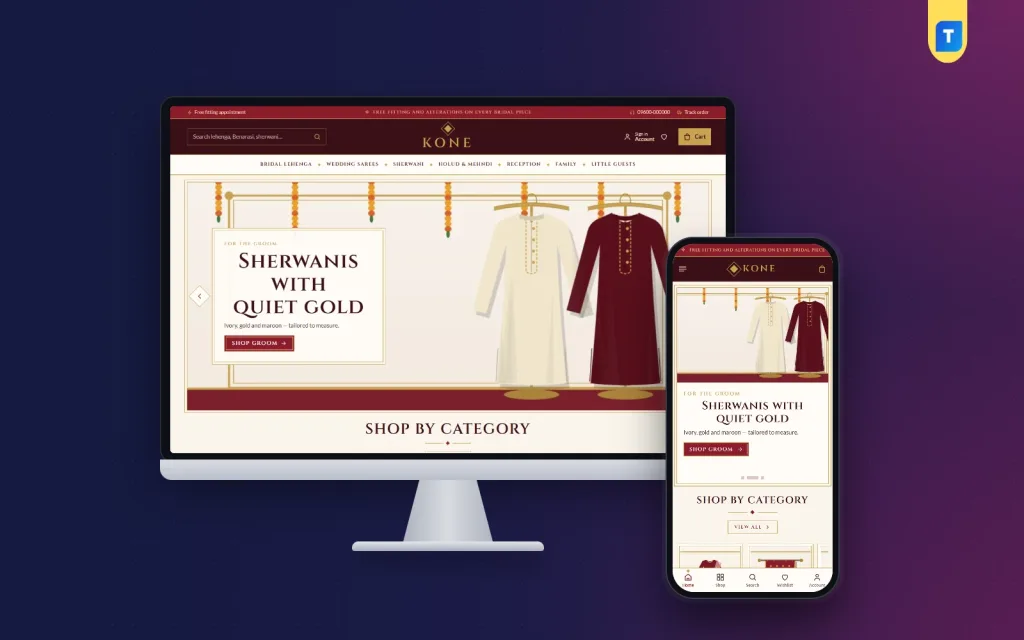
Kone is a bridal wear ecommerce website template for WordPress. It adds wedding-week event tabs, fitting bookings that open on WhatsApp, 24 homepage blocks, bKash and Nagad payments and courier booking, and suits any festive clothing shop.
Kone is a bridal wear ecommerce website template for WordPress, built for wedding houses that sell lehengas, sarees, sherwanis and festive clothes online. It gives you a complete shop: a homepage, product pages, one-page checkout, local payments, courier booking and a dashboard for orders. The shop plugin is included, so you do not need WooCommerce.
The crimson and gold look suits a wedding card, but the design is not limited to weddings. Any formal or festive clothing store can use it, from Benarasi sarees to party wear. The demo is only an example, so replace the sample houses and pictures with your own.
Who can use this bridal wear ecommerce website template
A wedding in Bangladesh is a week of events, and many shops serve more than the bride. Kone is made for sellers across that whole range.
- Bridal houses selling lehengas, Benarasi, Katan and Jamdani sarees
- Sherwani and groom wear shops
- Holud, mehndi and reception outfit sellers
- Family and kids wedding wear stores
- Boutiques that take fitting appointments
- Handloom and weaving houses with a retail site
- Festive wear shops that sell for Eid and puja as well
If you do not take fittings or plan by event, switch off those blocks and use the rest of the page.
Keeping the site light
Kone loads one stylesheet and one script file on the front end. The options panel files load only inside the dashboard. Images are set to load as the visitor scrolls, and only the homepage blocks you switch on are drawn. Google Fonts can be turned off if you want fewer outside requests.
Brides and their families often browse on a phone late in the evening. A site that opens fast helps them keep going.
Front-end features of the bridal wear ecommerce website template
Dress every event
A wedding is never one outfit. This block walks through the week in four tabs: gaye holud, mehndi, biye and bou-bhat. Each tab shows:
- The colours of the day
- Notes on what the bride wears
- Notes on what the groom wears
- The pieces you have tagged for that event
A mother shopping for her daughter can open the holud tab and choose from the right pieces without searching the whole catalogue.
Book a fitting
Bridal outfits are rarely bought in one tap. Brides want to try, measure and talk it over. The Book a fitting block gives them:
- A 14-day date picker
- Time slots
- A choice of who the fitting is for
- A field for how many people are coming
When they send it, the request opens on WhatsApp, where most wedding shops already talk to customers. You get a clear message with the date, time and group size.
Homepage blocks
There are 24 blocks. Seventeen are active in the demo and seven stay off until you need them. Homepage layout lets you switch each one on or off and drag it into order, with arrow buttons on a phone.
- Hero slider in crimson and gold
- Shop by category in framed tiles
- Dress every event
- New in the bridal room, in two rows
- Best sellers in tabs by category
- Wedding season offers with a countdown and stock bars
- For the whole family, with four picture cards
- Book a fitting
- Shop by budget with price tiles and products
- Three department blocks, each with a banner and eight products
- Trending now and Most loved
- A Weaving houses logo row
- Wedding journal, showing your latest three posts
- A promise strip for handwoven pieces, fittings, alterations and delivery
The spare blocks are Our promise, Quick links, Four cards, Banner + row, Promo cards, Brand spotlight and More to explore.
Look and feel
- Double gold frames
- Marigold garland details
- Crimson, wine, gold and ivory colours
- Cinzel headings in the default font pair
Header and mobile layout
- Header with logo, menu, search and cart
- Mega menu items with a picture
- Phone header with menu, logo and cart only
- Compact cards, so a bride can compare several lehengas on one screen
- A fully responsive layout
Product page
- Fit meter
- Weave and work details
- Expected delivery date, which matters when the wedding date cannot move
- Size guide support
- Back-in-stock and offers
- Reviews in a fold, plus a popup that asks for the first review
- Wishlist, so a family can shortlist outfits together
Account, cart and checkout
- Sign in or register in a popup, without leaving the page
- One-page checkout with an Order placed popup
- Track Order page
- Coupons and invoices
- Returns and alterations page, ready to edit
The demo also adds About Kone, Delivery, FAQ, Our Stores, Wedding Journal and Track Order pages.
Back-end options of the bridal wear ecommerce website template
The dashboard has two parts, the theme options and the shop tools. You can use both without code.
Kone Theme Options
Open Kone, then Theme Options, or use the Live Customizer if you like a preview. The panel works on a phone too.
- Homepage layout: switch the 24 blocks on or off and drag them into order
- Colours: five palettes, Crimson and gold, Emerald, Royal blue, Rose gold, and Ivory and wine, with each colour adjustable
- Fonts: Cinzel with Lato, Cormorant SC with Lato, Marcellus SC with Mulish, or DM Sans alone
- Header and menu
- Hero slider
- Wedding events
- Fittings
- Product rows
- Footer
- Settings search, a sticky save bar, reset, and export or import of settings
- Google Fonts on or off
Setup, demo and licence
- Kone, then Setup: installs the shop plugin in one click
- Kone, then Demo Import: loads the full demo
- Kone, then License: activates your key for updates
Themeve Commerce: the shop dashboard
The plugin installs during setup and runs the cart, checkout, payments and delivery. Its tools are under the Shop menu.
- Sales overview: today, the last seven days, the month so far, orders waiting and a two-week chart
- Orders: status, printable invoice, and a payments box that records advances, dues and refunds, which is useful for costly outfits paid in parts
- Incomplete orders: shoppers who began checkout and left, worth a follow-up call
- Products: a full-page editor where each size or colour keeps its own price, stock, SKU and photo
- Categories, brands and tags: separate menus
- Payments: cash on delivery, bKash and Nagad payment, card payment through SSLCommerz, and manual Send Money for bKash, Nagad, Rocket and Upay with a transaction ID
- COD advance: a fixed amount, the delivery charge or a percentage
- Delivery charges: by district, plus extra zones
- Couriers: Steadfast and Pathao from the order screen, with courier automation
- COD money: shows what the courier still owes you for delivered orders, with a payment sheet import
- Customer accounts: sign in by password, phone code, Google or Facebook; orders, delivery tracking, wishlist and exchange or return requests
- Alerts: new orders by email, Telegram or WhatsApp
- SMS and OTP: order updates, review requests after delivery, phone checks and SMS campaigns
- Fake order protection: checks on suspicious cash-on-delivery orders
- Marketing: Facebook Pixel with Conversion API, Google Analytics 4, Google Tag Manager and product feeds for Facebook and Google shopping
- SEO: descriptions, sharing previews and product rich results
- Transactions and customers: every payment and refund with monthly totals, and customers grouped as new, repeat, VIP, inactive or risky
Optional modules
Turn on only the modules you plan to use.
- Pre-orders, useful for made-to-order pieces
- Delivery date and time
- Bulk orders and corporate quotes
- Reseller and wholesale prices
- Combo and bundle offers
- Flash sale
- Loyalty points with refer a friend
- Upsell and cross-sell
- Recently viewed
- Back-in-stock alerts
- Exchange and returns
- Store locations, for your showrooms
- Sales and signup popups
- Affiliate program
- Marketplace
Support tickets, testimonials and offers each have a menu. Developers get a REST API with signed webhooks.
How it helps you sell
People spend a lot on wedding clothes, and they want to be sure. They ask about the colour, the work, the fitting and the delivery date. Each of those questions has a place on the page.
- The event tabs help a family shop one day at a time
- The fitting form turns a vague "are you open?" message into a booked slot
- The delivery date on each product reduces last-minute worry
- Advance payments can be recorded in the order, so part-paid outfits stay clear
- Wedding season offers add a real deadline
- The wishlist lets a bride, her mother and her sister agree on a shortlist
- Telegram alerts tell you at once when an order arrives
Setup steps
- Install WordPress 6.0 or newer on hosting with PHP 7.4 or newer.
- Upload and activate the Kone theme.
- Activate your key under Kone, then License.
- Install Themeve Commerce from Kone, then Setup.
- Load the sample site from Kone, then Demo Import.
- Choose a palette and font pair in Theme Options.
- Arrange the homepage blocks and set your fitting hours.
- Replace the sample outfits with your own, then add your payment and courier details.
No developer is needed to launch this bridal wear ecommerce website template.
Why choose it over a plain template
A plain template gives you a picture of a page. Kone gives you a shop that takes orders. Payments, couriers, accounts and reports come in the same package, and they match how people pay and ship in Bangladesh.
- bKash, Nagad, SSLCommerz, cash on delivery and manual payment are built in
- Steadfast and Pathao are ready in the dashboard
- Event tabs and fitting bookings are made for wedding wear
- One plugin runs the shop, so there is no pile of add-ons to keep updated
- Demo content loads in one click
If you want a bridal wear ecommerce website wordpress theme that also runs the business side, Kone covers both.
What is included
- Kone theme files
- The Themeve Commerce plugin
- Demo content with 26 sample products from 3 weaving houses, plus sample pages
- Documentation
- A licence key with lifetime updates through your Themeve account
- Six months of support
Kone needs WordPress 6.0 or newer and PHP 7.4 or newer, and is tested up to WordPress 7.1. As a bridal wear ecommerce website wordpress theme, it ships with invented house names and artwork, ready to be replaced.
You can see Kone working on the live demo, and browse more ready-made designs in our WordPress themes collection.
Reviews
0.0
Write a review
★★★★★
0 reviews from buyersNo reviews yet — be the first to share your experience after buying.
Frequently Asked Questions
01What is a bridal wear ecommerce website template?
It is a ready-made WordPress design for an online wedding clothes shop. Kone includes the homepage, product pages, checkout, payments and courier tools, so you only add your outfits.
02Can I use this bridal wear ecommerce website template for other clothes?
Yes. The demo is a wedding house, but the design suits any festive or formal clothing shop. Switch off the event and fitting blocks if you do not need them.
03How does the wedding-week guide work?
The Dress every event block has four tabs for gaye holud, mehndi, biye and bou-bhat. Each shows the colours of the day, notes for the bride and groom, and the pieces you tag for that event.
04Can brides book a fitting from the website?
Yes. The Book a fitting block offers a 14-day date picker, time slots, who it is for and how many are coming. The request opens on WhatsApp so you can confirm it there.
05Is the shop plugin included?
Yes. Themeve Commerce installs from Kone, then Setup, in one click. WooCommerce is not needed.
06Can customers pay by bKash or on delivery?
Both work, along with Nagad, SSLCommerz and manual Send Money. Orders can go with Steadfast or Pathao.
07Can I sell groom and family outfits too?
Yes. The demo covers sherwanis, reception wear, family and kids, and the For the whole family block shows four cards for them.
08How do I get updates?
Activate your licence in Kone, then License, and new versions arrive through your Themeve account.
Delivery & Support
1Place your orderAdd to cart, sign in and pay with bKash or Rocket.
2Payment verified automaticallyEnter your Transaction ID — the payment is matched automatically, usually within seconds.
3Get your productYour license key and download appear in My Account → Licenses.
- Secure automatic payment verification
- Delivery to your account & e-mail
- Friendly WhatsApp support
Refund Policy
This policy applies to every product in our store.
You get a refund when the product does not work as described and we cannot fix it, when your license will not activate your website, or when a manually delivered product is late and you cancel before delivery. A working license, or a single license already used on a live domain, is not refundable. Approved refunds go back to the number you paid from within one working day, minus the Send Money charge.
More items
View all →