 −43%
Blogger Templates
Bangla News Portal – News Portal Blogger Template for Bangla Newspapers
৳2,000
৳3,500Save −43%
✦ Key features
Latest News is a blogger template for news website owners who want a modern Bangla daily on free Blogger hosting. It has a white, airy front page with a centred logo, a red accent colour, many category sections and ad places, and it fills itself from your post labels. Upload one XML file, set your gadgets, and start publishing.
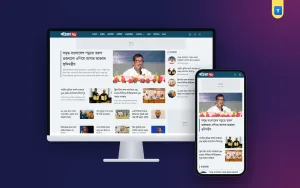
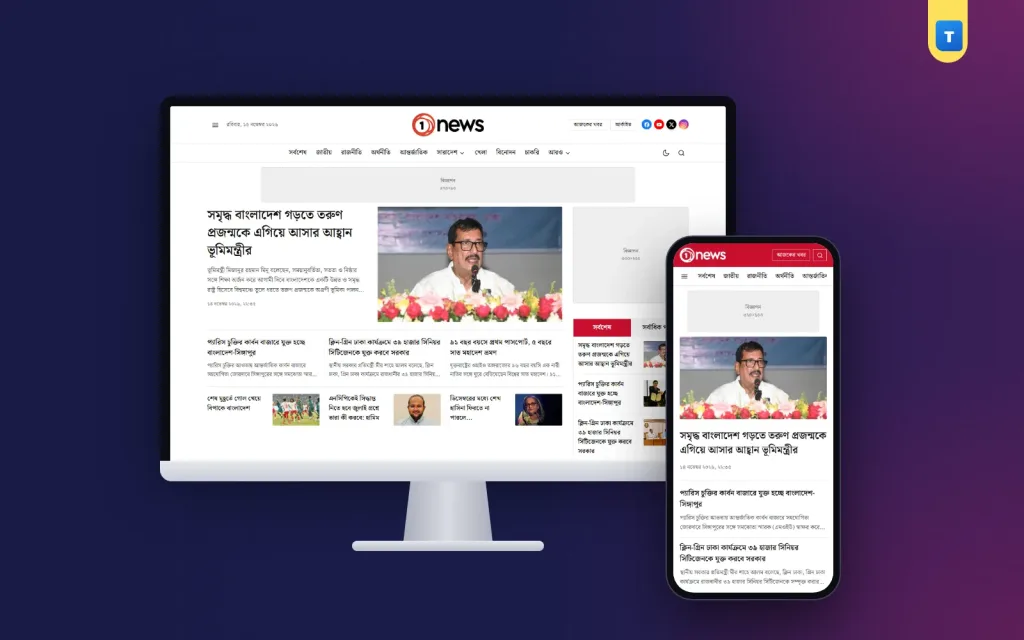
The demo shows a sample Bangla news site called "1 news". Every block on its home page comes from a Blogger label, so the front page stays fresh every time you publish a post. No server, no database and no paid plugin is needed.
A news site has different needs from a personal blog. Readers want to see the top story, the newest headlines and every section at a glance. Editors want to publish fast and never rebuild the home page by hand. Advertisers want clear places for their banners.
Latest News answers all three. The header shows today's date, social links and quick buttons for today's news and the archive. Below it, a two-line menu lists every category. The home page then shows sixteen ready sections, each linked to one label, with ad rows between them.
Because the design reads posts by label, you only write and label your stories. The template places them in the right section, shows the photo in the right size and keeps the newest story on top.
All sections live in Layout under "Home Content Blocks". Each one is an HTML/JavaScript gadget whose title is a Blogger label and whose content is a short code for the design and the number of posts. Drag them to change the order, delete the ones you do not need, or copy one to add a new category.
The top of the page shows the main story with a large photo and summary, smaller lead stories under it, and a side box with two tabs: latest posts and most-read posts. A 300×250 ad box fits beside it.
The national section shows nine stories in a feature layout: one large story with a photo and a list of headlines around it.
International and entertainment news use a seven-story layout with a large opening story and a row of smaller cards.
Politics uses a two-story spotlight with three more headlines, a good fit for big political reports.
The "সারাদেশ" section shows six district stories in a compact list for local reporters.
Sports gets a photo mosaic of seven stories, so match pictures fill the section.
"ইসলাম ও জীবন" sits beside an opinion column in a split block, and a four-card grid is ready for job circulars.
A six-story video section marks each post with a play badge. At the end, a four-column block shows education, health, technology and expatriate news side by side, each with five headlines.
The template gives you a 970×90 banner under the menu, a 300×250 box in the lead area, ad rows between home page sections, a sidebar box, an ad inside the article and an ad after the article. Each place is a plain HTML/JavaScript gadget, so you can paste Google AdSense, a sponsor's banner image with a link, or any ad network script.
Grey placeholders mark the ad places in the demo. Remove them or replace them with your own code when you are ready to sell ads.
A story page shows the category, headline, author, date and lead photo, followed by the text in a readable Bangla font size. Readers get share buttons for social networks and a print button for people who want a paper copy. A related news list with the title "সম্পর্কিত খবর" shows more stories from the same label.
Category pages and search results list stories with a photo, headline and short summary, using the same clean style as the home page.
On a phone, the header shrinks to a red bar with the logo, a "today's news" button and search. The menu scrolls sideways under it, and a menu button opens every category. Home page sections turn into one column with large headlines that are easy to tap.
A moon button switches the site to dark mode for night reading, and the site remembers the reader's choice on their next visit. Images below the screen load only when readers scroll to them, which keeps the first view quick on mobile data.
A "Theme Options" gadget holds simple settings such as logo height for computers and phones, the related news title, how many related stories to show and what to show when a section has no posts yet. Logo, menus, footer logo, editor information, address and contact, social icons and the copyright line each have their own gadget.
This news blogger template keeps your design and content apart. When an update is released, you upload the new XML and your gadgets, posts and labels stay as they are.
You get a zip with the template XML and a documentation file with screenshots. The documentation walks you through backing up your old theme, uploading this one, entering your license code and setting every gadget. It also lists the exact code of all sixteen home page sections from the demo, so you can rebuild the same front page or change it to your own categories.
One license covers one blog. After upload, open the "Themeve License" gadget in Layout and paste the site code from your account. Updates come with your license.
See every section working in the Latest News live demo. For more designs, browse our Blogger news templates.
Latest News suits anyone who needs a blogger template for news website work in Bangla: a district newspaper starting its online edition, an online portal run by a small team, a school or university news desk, or a reporter who wants a personal news site with a professional front page.
Small teams benefit the most. Because every section reads posts by label, a team of two or three writers can keep sixteen sections full without anyone editing the home page. Writers post from the Blogger app on their phones, choose a label, and the story lands in the right section with its photo.
Agencies can also use it for clients. One license covers one blog, so you can set up a separate news site for each client, copy the section codes from the documentation, and hand the site over with clear steps for the client's team.
Start by backing up your current theme from Theme, then upload the Latest News XML. Next, open Layout and enter your license code in the "Themeve License" gadget. After that, upload your logo in the logo gadget and set its height in Theme Options.
Now build your menu in the main menu gadget, using links to your label pages. Then check the "Home Content Blocks" area: change each section's title to your own labels, or keep the demo labels if they already match your categories. The documentation lists the code of every section, so you can copy a code when you add a new one.
Finally, add your ad codes, fill in the editor information, address and social links in the footer gadgets, and publish a few posts with photos and labels. Within minutes, your news blogger template front page shows real stories in every section.
No reviews yet — be the first to share your experience after buying.
Yes. Blogger hosting is free. You can use a blogspot.com address or connect your own domain. One license covers one blog.
Yes. Each section's gadget title is a Blogger label. Type your own label as the title and the section shows those posts.
The demo uses sixteen sections plus ad rows. You can remove, reorder or duplicate them in Layout.
Yes. Paste AdSense code into any ad gadget: under the menu, in the lead area, between sections, in the sidebar, inside or after the article.
Yes. Readers can switch to dark mode with the moon button, and the site remembers their choice.
Yes. Posts, pages and labels stay in Blogger. Only the design changes. Back up your old theme first as the documentation shows.
You get a refund when the product does not work as described and we cannot fix it, when your license will not activate your website, or when a manually delivered product is late and you cancel before delivery. A working license, or a single license already used on a live domain, is not refundable. Approved refunds go back to the number you paid from within one working day, minus the Send Money charge.
−43%
 −25%
