 −17%
−17%
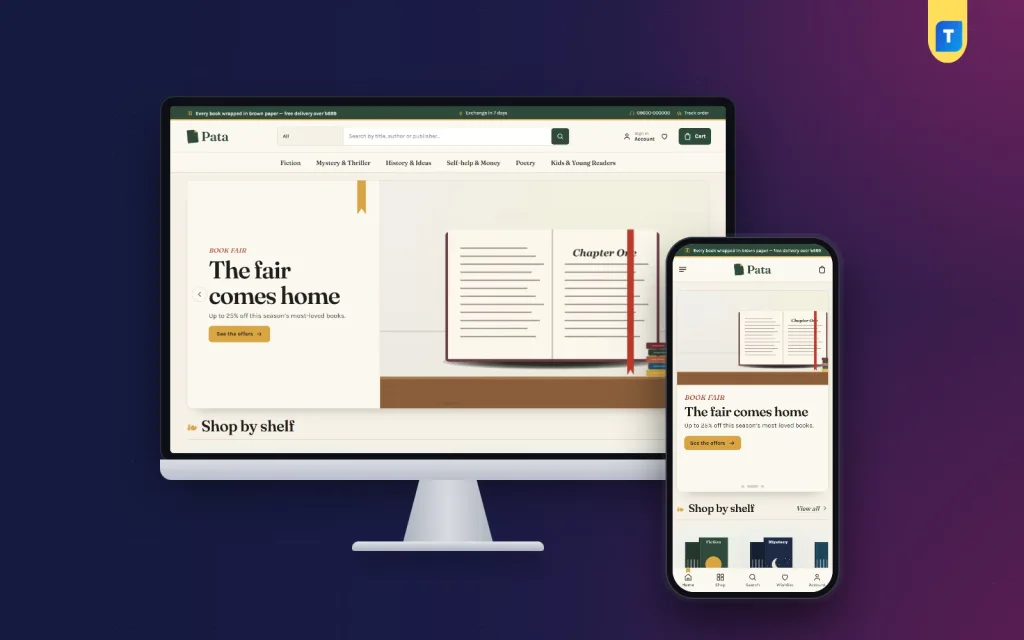
Pata – Ecommerce Website Templates for Bookshops
✦ Key features
- Mood tabs to find the next read
- Reading-pace picker shows days per book
- Read the first page, then add to bag
- 24 homepage blocks, switchable and re-orderable
- Book fair offers with countdown and stock bars
- Paperback and hardcover formats
- Publishers as brands with a logo row
- Delivery date shown on every book
- Five colour palettes and four font choices
- Theme Options that work on a phone
- bKash, Nagad, SSLCommerz and cash on delivery
- Steadfast and Pathao courier
- One-click demo with 27 books from 4 publishers
Overview
Pata is one of the ecommerce website templates built for printed books. It has mood tabs, a reading-pace picker, a first-page reader and 24 homepage blocks, with bKash, Nagad, SSLCommerz and cash on delivery included.
Pata is one of the ecommerce website templates made for selling printed books. It looks like a quiet corner of a good library: library green and mustard, paper-cream pages, tall book covers and Fraunces headings. Most of all, it helps a reader decide what to read next, and that is what turns a visitor into a buyer.
The theme runs on WordPress with its own bundled store plugin, Themeve Commerce, so you do not need WooCommerce or other payment and courier plugins. The demo is a bookshop with 27 sample books, but the layout is not limited to one kind of seller. Anyone who sells items that people choose by mood, author or price can use it.
Who can use Pata
Good ecommerce website templates should fit more than one kind of seller. Pata is written for books, but the same blocks work for any shop with a catalogue that people browse.
- Independent bookshops that want an online counter
- Publishers selling their own list, using publishers as brands
- Booksellers of fiction, mystery and thrillers, poetry, history and ideas, self-help and kids books
- Textbook and stationery sellers
- Library suppliers and book fair organisers
- Gift shops that sell journals, notebooks and reading accessories
Selling e-books instead of printed copies? Jhuli is made for digital downloads. Pairing kids books with children's clothes? Have a look at Khushi.
A bookstore built around how readers choose
People rarely walk into a bookshop knowing the exact title. They want something gripping for a bus ride, or a gentle story before bed. Among ecommerce website templates, few are designed around that moment of choosing. Pata uses two homepage blocks to do the job of a friendly shop assistant.
Find your next read
- Five mood tabs: thrilling, heart-warming, thoughtful, funny and curious
- A shopper picks a feeling instead of a genre
- A reading-pace picker sits beside the tabs
- Choose how much you read in a day, and every book shows about how many days it will take
It is a small touch, and it makes a thick novel feel far less scary.
Read the first page
This block opens a book on a paper page, so shoppers can see how it begins, the same way they would flip open a copy in a real shop. If the opening lines hook them, one button adds the book to the bag.
Light and quick on small screens
The front end uses its own stylesheet and script, and the script is written without jQuery. On phones the header folds down to menu, logo and cart, and product cards stay compact, so more covers fit on one screen. Image-heavy shops need this care, because every cover is a picture.
Front-end features of these ecommerce website templates
24 homepage blocks, arranged like shelves
Switch any block off and drag the rest into the order you like. On a phone, arrow buttons move them up and down. Each block has its own settings.
- Hero slider: book covers on a reading desk
- Shop by shelf: a tile for each category
- New arrivals: two rows of the newest books
- Bestsellers: top titles split into tabs by category
- Book fair offers: a countdown with stock bars, good for a fair week or a weekend sale
- Three department blocks: each with a banner and eight books, so poetry, kids books and thrillers can each have a stage
- Shop by reader: four cards for any group of readers
- Shop by budget: price tiles paired with books
- Trending now: a sliding row
- Top rated: the best-rated titles
- Publishers: a logo row
- Reading room: your latest three posts
- Promise strip: wrapping, exchange, delivery and cash on delivery
Seven extra blocks wait, switched off, for when you need them.
Book page
- A delivery date shown on every book, so the reader knows when the parcel should arrive
- Paperback and hardcover set up as formats of the same book
- Publishers as brands with their own logos
- Reviews in a fold under the book
- A popup that invites the first review when a title has none yet
- A wishlist for the maybe-later books
- Back-in-stock help when a popular title sells out
Account, cart and checkout
- Shoppers sign in or register in a popup without leaving the page
- Checkout is a single page
- An "Order placed" popup confirms each order
- A Track Order page lets readers follow the parcel
Pages that come with the demo
About Pata, Delivery, FAQ, Returns and Exchange, Our Stores and Track Order. Rename and rewrite them for your own shop.
Back-end options in the dashboard
Pata, then Theme Options
Everything sits in one place, and the screen also works on a phone, so you can fix a banner from behind the counter.
- Settings for each homepage block
- Header, product cards, product page and footer have their own settings
- A setting search
- A save bar that stays in view
- Reset, and settings export and import
- A Live Customizer for quick visual changes
Colours, fonts and menus
- Five colour palettes: Library green, Oxblood, Ink blue, Paperback and Slate
- Any single colour can be changed by hand
- Four font choices: Fraunces with Karla, Libre Baskerville with Source Sans 3, Crimson Pro with Inter, and DM Sans on its own
- Main menu for the menu bar
- Footer menus called Footer - Shop and Footer - Help for the footer columns
Setup and updates
Pata, then Setup, installs the Themeve Commerce plugin in one click. Demo Import builds the sample bookshop. Updates reach you through your Themeve account.
Running an online shopping ecommerce website from the Shop menu
In the dashboard, the store tools live under one menu called Shop. This is what you control. You do not need to install or learn a second system, because the plugin covers the cart, checkout, payments and courier delivery. For a seller who wants an online shopping ecommerce website without a pile of add-ons, that saves a lot of setup time.
Orders and invoices
- A sales overview with today's sales, the last seven days and the month so far
- Each order has a status and a printable invoice
- A payments box that records advances, dues and refunds
- Incomplete Orders lists people who started checkout and left
Books and stock
- A full-page product editor
- Formats such as paperback and hardcover, each with its own price, stock and SKU
- Categories, brands (your publishers) and tags
Payments
- bKash and Nagad payment
- Card payment through SSLCommerz
- Cash on delivery
- Manual Send Money with a transaction ID
Delivery and couriers
- A delivery charge for each district
- Steadfast and Pathao courier from the order screen
- A COD money screen for what the courier still owes you
Customers and alerts
- Coupons and offers
- Invoices, SMS updates and OTP phone verification
- New-order alerts on Telegram
- Exchange and return requests
- Back-in-stock alerts
- Store locations for your physical shops
Marketing
The Facebook Pixel and Conversion API are built in, and so are Google Analytics 4 and Google Tag Manager. SEO settings handle descriptions and sharing previews.
How Pata helps you sell books
- Mood tabs give browsers a place to start.
- The reading-pace picker removes the fear of a long book.
- The first-page reader lets the writing do the selling.
- Delivery dates and cash on delivery remove checkout doubt.
- Book fair offers with countdowns create urgency without tricks.
- Reviews and the wishlist bring readers back.
Many ecommerce website templates only change the colours of a standard shop. Pata changes the way readers browse. A small independent seller can feature one department at a time. A publisher can lead with its logo and list. A school supplier can turn on shop by budget and shop by reader for parents.
Set up in six steps
- Upload and activate the Pata theme.
- Open Pata, then Setup, and install the bundled plugin.
- Run Demo Import for the sample bookshop.
- Choose a palette and a font pair.
- Replace the sample books and publishers with your own stock.
- Add your payment numbers, delivery charges and courier settings, then arrange the homepage blocks.
The demo imports 27 books from 4 publishers, the mood finder, the first-page reader, Reading Room posts, menus and every page. The covers and publisher names are invented. Pata needs WordPress 6.0 or newer and PHP 7.4 or newer, and it is tested up to WordPress 7.1.
Why choose Pata over generic ecommerce website templates
Most ecommerce website templates are made for clothes or gadgets. A general shop theme treats a book like any product: a photo, a title and a price. Readers need more. They want to know how a book starts, how long it takes and whether it matches their mood.
- Mood tabs and a reading-pace picker are built in
- The first-page reader works without extra plugins
- Publishers work as brands with logos
- Formats cover paperback and hardcover
- The store, payments and couriers are included
- Blocks move or hide without code
What is included
- The Pata theme (PHP, CSS and JS files)
- The bundled Themeve Commerce plugin
- One-click demo content
- Documentation
- Six months of support
Book buyers often come back once they trust a shop, so the details matter: a delivery date on every page, a tracking page after the order and an easy way to ask for an exchange. Pata handles these as part of the store, not as an afterthought. Of all the ecommerce website templates you could pick, choose the one that fits how your customers shop. For a shop that lives on paper and ink, Pata lets readers open the book first.
You can see Pata working on the live demo, and browse more ready-made designs in our WordPress themes collection.
Reviews
0.0
Write a review
★★★★★
0 reviews from buyersNo reviews yet — be the first to share your experience after buying.
Frequently Asked Questions
01Are these ecommerce website templates only for books?
Pata is designed for printed books, but its blocks suit any shop whose customers browse a catalogue. The demo uses books, and you can replace all of it.
02Why choose these ecommerce website templates for an online bookshop?
They include mood tabs, a reading-pace picker, a first-page reader, formats, publishers as brands and a full store, so readers can choose a book with confidence.
03How does the mood finder work?
Find your next read has five mood tabs: thrilling, heart-warming, thoughtful, funny and curious. A reading-pace picker beside them shows about how many days each book will take.
04Can shoppers read part of a book before buying?
Yes. The Read the first page block opens a book on a paper page, and one button adds it to the bag.
05Can I sell paperback and hardcover editions?
Yes. They work as formats of the same book, and publishers are set up as brands with logos.
06Is the store plugin included?
Yes. Themeve Commerce is bundled and installs from Pata, then Setup. It runs the cart, checkout, payments and courier delivery.
07How can readers pay, and how do books reach them?
By bKash, Nagad, SSLCommerz, cash on delivery or manual payment. Parcels go out through Steadfast or Pathao, and readers follow them on the Track Order page.
08Can I edit the shop from my phone?
Yes. Pata, then Theme Options, works on a phone, and the store is fully responsive.
Delivery & Support
1Place your orderAdd to cart, sign in and pay with bKash or Rocket.
2Payment verified automaticallyEnter your Transaction ID — the payment is matched automatically, usually within seconds.
3Get your productYour license key and download appear in My Account → Licenses.
- Secure automatic payment verification
- Delivery to your account & e-mail
- Friendly WhatsApp support
Refund Policy
This policy applies to every product in our store.
You get a refund when the product does not work as described and we cannot fix it, when your license will not activate your website, or when a manually delivered product is late and you cancel before delivery. A working license, or a single license already used on a live domain, is not refundable. Approved refunds go back to the number you paid from within one working day, minus the Send Money charge.
More items
View all →You may also like
−17%
 −57%
−57%
 −14%
−14%
 −34%
−34%
WordPress Themes
Growix – Software License Ecommerce Website Template for WordPress
৳2,150
৳3,250Save −34%
