 −12%
−12%
Pushti – Fresh Grocery Ecommerce Website Template for Fruit & Vegetable Shops
✦ Key features
- Every homepage block has a switch
- Cards with Add to Cart and Buy Now
- Product pages with a FAQ tab
- Sell by weight
- Track an order with a mobile number
- Phone first
- English or Bangla
- Orders
- Daily prices and stock
- Theme options
- Licence and updates
- Delivery areas and charges
Overview
Pushti is a fresh grocery ecommerce website template for fruit, vegetable, rice and dal shops: a bright WooCommerce store with a deal of the week, a Bangladesh checkout, cash on delivery and English or Bangla.
Pushti is a WordPress theme for shops that sell fresh fruit, vegetables, rice and dal online. Think of it as a fresh grocery ecommerce website template that is already a working shop. It has a bright green design, a big search with a category picker and a deal of the week. Its checkout is made for Bangladesh, with district, upazila, mobile number and cash on delivery. Pushti runs on the free WooCommerce plugin, so carts, stock, coupons and orders work the way store owners expect.
Import the demo in one click and you get 14 products in 5 categories: Fruits, Vegetables, Onion Garlic & Ginger, Chilli & Lemon, and Rice & Dal. Each product has 4 photos. Swap in your own photos and prices and you are ready for the morning orders.
Who Pushti is for
Fresh food has its own rhythm: daily prices, early delivery, and buyers who want to see that the mango is ripe. Pushti fits:
- Fruit shops selling seasonal mango, litchi, papaya and pineapple.
- Vegetable sellers who deliver every morning in their area.
- Kacha bazar delivery services that take a family's weekly list in one order.
- Farm and agro brands selling straight from the field.
- Rice and dal traders who want a cleaner shop than a price list on Facebook.
If you were searching for a fresh grocery ecommerce website template because you want customers to order without phoning you, Pushti gives you that in a single theme.
A fresh look that sells fruit and vegetables
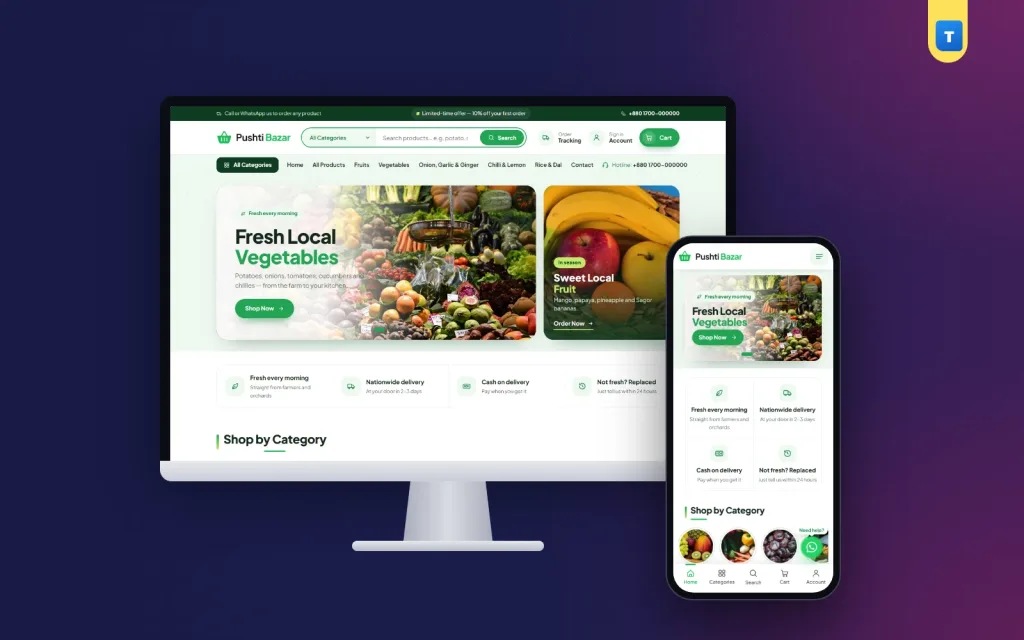
Pushti has its own design and is not a reskinned general store. The header has a slim top strip, a rounded search box with a category picker, round icons for account, saved items and cart, and a mint menu row. The homepage opens with a wide slider and a side banner. On a phone the side banner becomes the last slide, so nothing is squeezed.
Below the slider come your promises (such as fresh every morning or easy returns), round category pictures, a deal of the week, featured products, best sellers, all products with Load more, reviews and a two-column FAQ. The footer is deep green with a soft wave on top. An optional green order card can be switched on when you want to push WhatsApp or phone orders.
Many sellers try a free fresh grocery website design template first and then find the shop pages are plain WooCommerce. In Pushti every page matches: shop, category, product, cart, checkout, account and order tracking.
Checkout built for Bangladesh
A fresh food order is small and quick, so the checkout must be short. Pushti removes the country and postcode fields and asks for what a delivery rider needs:
- District and upazila picked from lists, so addresses come in clean.
- Mobile number, plus an optional second number.
- Point or home delivery: the demo charges ৳60 and ৳80, and you can set your own prices.
- Coupon box on the checkout.
- Cash on delivery on by default.
Choose in the theme options whether buyers can check out as guests or must open an account first. Accounts can use a mobile number or an email.
Pushti features
Every homepage block has a switch
Each homepage block can be turned on or off and has its own settings in the dashboard. Hide the deal of the week when there is no deal, or change the promises when your delivery area grows.
Cards with Add to Cart and Buy Now
You set the text and colour of both buttons, or hide one of them. Buy Now sends the buyer straight to the checkout.
Product pages with a FAQ tab
A 4-photo gallery with hover zoom and a full-screen viewer shows the produce up close. Description, FAQ and Reviews tabs sit under the price. Use the FAQ tab to explain how you pick, wash and pack.
Sell by weight
Use WooCommerce variations such as 500 g, 1 kg and 5 kg, each with its own price and stock. That works well for potatoes, onions, rice and dal.
Track an order with a mobile number
The Track Order page needs only the order number and the mobile number, so buyers can check an order without logging in.
Phone first
A bottom tab bar, a side drawer menu and a floating WhatsApp button make the shop feel like an app. Buttons are thumb-sized and cards sit two per row.
English or Bangla
Pushti opens in English. Theme Options → Language switches the whole site and the dashboard to Bangla without any translation plugin.
Running the shop
You use the normal WordPress and WooCommerce dashboard.
Orders
Orders arrive in WooCommerce → Orders with the buyer's name, numbers, district, upazila and items. Change the status as you pack and deliver.
Daily prices and stock
Fresh prices change often. Edit price and stock from the product list in seconds. When an item runs out, it shows as out of stock automatically.
Theme options
One page holds colours, the logo, homepage blocks, card buttons, delivery prices, checkout mode, language and the WhatsApp number. A section picker makes it easy to use on a phone.
Licence and updates
Activate the licence once. Updates then arrive in the dashboard and keep your content and settings.
Pushti or a free fresh grocery ecommerce website template?
A free fresh grocery ecommerce website template is usually a static design: it looks good in a screenshot, but you still need to build the shop, the checkout and the order flow. Pushti is already a working WooCommerce store with demo products, delivery prices, a Bangladesh checkout, order tracking and help pages. It also works with any WooCommerce plugin, so you can add bKash, Nagad, card payments or courier plugins later.
Go live in one afternoon
- Install WordPress and WooCommerce on your hosting.
- Upload Pushti in Appearance → Themes → Add New and activate it.
- Activate your licence with the key from your Themeve account.
- Import the demo from Pushti → Setup.
- Add your produce: photos, prices, weights and stock.
- Set delivery and payment: your two delivery prices and the payment methods you accept.
- Test an order from your phone, then share the link.
Take produce photos in daylight on a plain table, one item per photo and the same angle each time. Square photos fit the cards and gallery best.
With Pushti, your fresh grocery ecommerce website template is not a mock-up. It is a real shop your customers can use from the first day.
Tips for selling fresh produce online
Fresh food online is about trust and timing. Show the real photo of what the buyer will get, not a perfect stock photo. Write the weight clearly, and say when you deliver: morning, afternoon or next day. Put your cut-off time in the top strip so buyers know when to order.
Use the deal of the week block for the item you have too much of, such as a box of mangoes at the peak of the season. Change it every week so returning buyers always see something new. Keep your promises block honest, for example "Picked this morning" or "Replace if damaged", because buyers remember.
Some sellers start with a fresh grocery website design template and later move to a full shop. With Pushti you can start with the full shop, then change the look step by step as your brand grows.
Delivery areas and charges
Most shops deliver at home inside their own city and send parcels outside it through a courier point. Two delivery prices cover that: a lower one for collection from a courier point and a higher one for delivery to the door. Set both in the theme options. If you want free delivery above a certain order total, add a WooCommerce coupon or a free shipping rule.
Repeat customers
Grocery buyers come back every week or every month. When they open an account with a mobile number or email, their address is saved and the next order takes less than a minute. The Saved Items page lets them keep a list of what they buy often, and reviews on each product help new buyers decide.
Works with the plugins you already know
The theme uses standard WooCommerce templates and hooks, so the usual plugins keep working: payment gateways for bKash, Nagad and cards, courier plugins for Steadfast or Pathao, SMS alerts, Facebook Pixel and Google Analytics. You can add them later as the shop grows, and you never need to edit the theme files.
Pushti runs on WooCommerce, the free shop plugin used by millions of stores. Browse more grocery themes or see all our WordPress themes.
What is included
- The Pushti theme zip file
- One-click demo import: 14 products, 5 categories, 4 photos each, pages and menus
- English and Bangla for the site and the dashboard
- Step-by-step documentation in English and Bangla
- Theme updates with your licence
All you need is WordPress and the free WooCommerce plugin to turn this fresh grocery ecommerce website template into your shop.
Reviews
0.0
Write a review
★★★★★
0 reviews from buyersNo reviews yet — be the first to share your experience after buying.
Frequently Asked Questions
01What kind of shop is Pushti for?
Fruit and vegetable shops, kacha bazar delivery, farm brands and rice and dal sellers.
02Is Pushti a fresh grocery ecommerce website template or a full theme?
It is a full WordPress theme with a working WooCommerce shop, demo products and a Bangladesh checkout.
03Do I need WooCommerce?
Yes. Pushti runs on the free WooCommerce plugin and needs no other plugin.
04Can I sell by kilogram?
Yes. Use WooCommerce variations such as 500 g, 1 kg and 5 kg.
05Can the shop be in Bangla?
Yes. Theme Options → Language switches the site and the dashboard to Bangla.
06Can buyers order as guests?
Yes, if you allow it. You can also require an account with a mobile number or email.
07Can I take online payments?
Cash on delivery works out of the box. Add bKash, Nagad or card with any WooCommerce payment plugin.
08Do I need coding skills?
No. Import the demo, then change photos, prices and texts from the dashboard.
Delivery & Support
1Place your orderAdd to cart, sign in and pay with bKash, Nagad or Rocket.
2Payment verified automaticallyEnter your Transaction ID — the payment is matched automatically, usually within seconds.
3Get your productYour license key and download appear in My Account → Licenses.
- Secure automatic payment verification
- Delivery to your account & e-mail
- Friendly WhatsApp support
Refund Policy
This policy applies to every product in our store.
You get a refund when the product does not work as described and we cannot fix it, when your license will not activate your website, or when a manually delivered product is late and you cancel before delivery. A working license, or a single license already used on a live domain, is not refundable. Approved refunds go back to the number you paid from within one working day, minus the Send Money charge.
More items
View all →You may also like
−12%
 −29%
−29%
 −15%
−15%
 −36%
−36%
