 −50%
−50%
Shipping Rules – WooCommerce Shipping Rules Plugin
 −50%
−50%
✦ Key features
- Hide chosen shipping methods above an amount
- Based on cart subtotal
- Checkout updates as the cart changes
- Free delivery on Themeve Commerce above the amount
- Works on top of your shipping zones
- Ideal for free delivery targets
- On/off switch keeps your settings
- Works on WooCommerce and Themeve Commerce
- One clear store-wide rule
- Set up in minutes
Overview
Shipping Rules is a WooCommerce shipping rules plugin that hides chosen shipping methods once the cart reaches an amount you set. On Themeve Commerce, delivery becomes free.
Shipping Rules is a WooCommerce shipping rules plugin for one of the most popular offers in online retail: better delivery terms for bigger carts. Set an amount, choose which shipping methods to hide once the cart subtotal reaches it, and your checkout changes by itself as buyers add items.
It works on WooCommerce and on Themeve Commerce, where the same rule makes delivery free above your amount.
Why delivery offers drive bigger orders
Delivery charges are one of the main reasons shoppers leave a cart. They are also one of the easiest levers to pull. Tell buyers that orders above a certain amount get free delivery, and many will add one more item to reach it.
That extra item often covers the delivery cost and more. The buyer feels they won something, and you ship a bigger parcel for the same courier charge.
How the rule works on WooCommerce
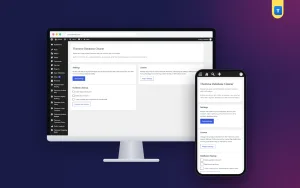
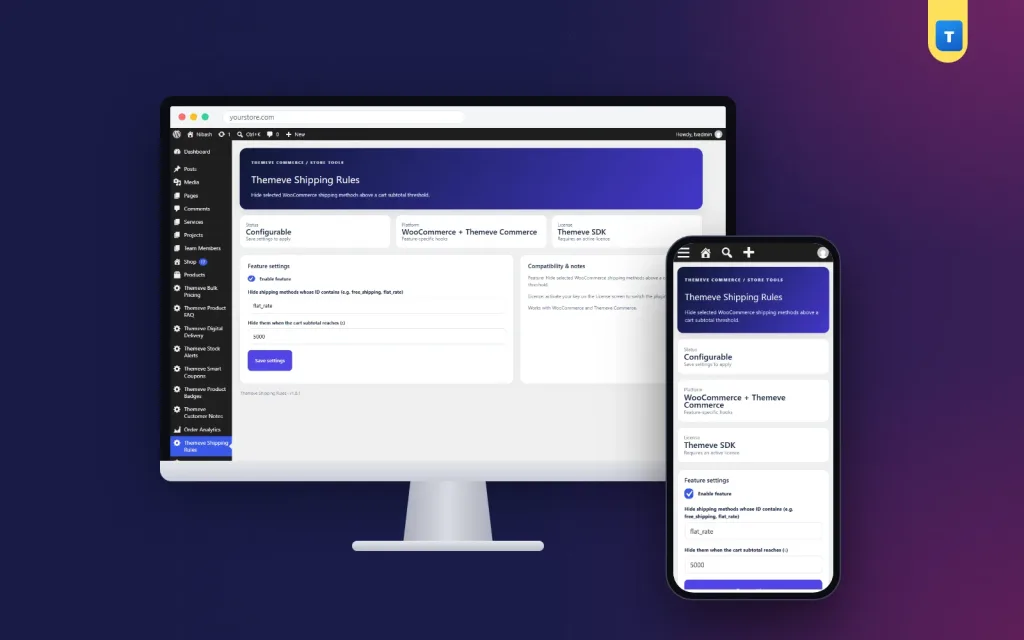
Open Themeve Shipping Rules from the left admin menu. Enter the cart subtotal amount and list the shipping methods to hide once that amount is reached, for example flat_rate. When a cart reaches the amount, those methods disappear from the checkout and the buyer sees the remaining options, such as free shipping.
Below the amount, everything stays as normal. The checkout updates as the cart changes, so buyers see the effect the moment they cross the line.
Common setups
The classic setup hides the paid flat rate once the cart reaches your free delivery amount, so only free shipping remains. Make sure each shipping zone has a free shipping method, so buyers above the amount always have an option left.
How the rule works on Themeve Commerce
On Themeve Commerce stores, the same amount controls the delivery charge. Once the cart subtotal reaches your amount, the delivery charge becomes zero. Below it, the normal charge applies.
So whichever shop system you use, one setting gives your buyers a clear free delivery target.
Setting your amount
Look at your average order value. Set the amount a little above it, so a typical buyer needs one more item to reach it. Too low, and you give free delivery to orders that would have come anyway. Too high, and nobody bothers trying.
Remember the courier charge for far-away districts. If delivery outside Dhaka costs more, make sure your amount still leaves profit after paying for those parcels.
Tell buyers about it
A free delivery target only works if people know it exists. Add it to your homepage banner, your Facebook page intro and every campaign post. Mention it when buyers message you. Many shops also show it as a badge on product cards during campaigns.
How this WooCommerce shipping rules plugin fits your store
This is one simple rule based on cart subtotal, with an on/off switch. It does not replace your shipping zones; it works on top of them. Keep your zones and rates set up in WooCommerce or Themeve Commerce as usual, and let the rule handle the threshold.
It pairs well with two other tools. Smart Checkout Rules decides when cash on delivery is offered, by order total or district. Bulk Pricing gives a fixed discount once the cart reaches a set number of items.
To learn how shipping zones and methods work, see the WooCommerce documentation.
A quick example
A cosmetics shop sees an average order of about 900 taka. It sets the amount to 1,200 and hides the paid flat rate above it. Buyers with 1,000 taka in their cart add a lip balm or a face wash to reach free delivery, and the average order rises within a few weeks.
Checking the results
After two or three weeks, compare your average order value and the share of orders that reached the target with the weeks before. If few buyers reach it, lower the amount a little. If almost everyone already did, raise it.
Also compare your courier bills. Free delivery is a cost you now carry, so the extra sales should more than cover it. A WooCommerce shipping rules plugin makes it easy to change the amount and test again until the numbers feel right.
Licence, updates and setup
Shipping Rules needs an active Themeve licence key. Without it, no rule runs and only the lock screen and License screen open. Enter the key from My Account › Licenses and the settings become available. Updates arrive in Dashboard › Updates while the licence is active.
After activation, enter your amount, list the methods to hide, switch the rule on, and test with two carts: one below and one above the amount.
When both look right, announce your free delivery target. A WooCommerce shipping rules plugin is a small change at checkout that can make every campaign more profitable.
Reviews
0.0
Write a review
★★★★★
0 reviews from buyersNo reviews yet — be the first to share your experience after buying.
Frequently Asked Questions
01What does the rule do on WooCommerce?
It hides the shipping methods you choose, such as a paid flat rate, once the cart subtotal reaches your amount.
02What does it do on Themeve Commerce?
Once the cart subtotal reaches your amount, the delivery charge becomes zero.
03Can I have several rules?
No. It is one rule based on cart subtotal, which keeps the offer easy to explain.
04Does it replace my shipping zones?
No. It works on top of the zones and methods you already have.
05Does the checkout update when the cart changes?
Yes. Buyers see the change as soon as their cart crosses the amount.
06Can I pause the rule?
Yes. The on/off switch pauses it and keeps your settings.
07Does it need a licence?
Yes. Without an active Themeve licence key no rule runs and only the lock and License screens open.
Delivery & Support
1Place your orderAdd to cart, sign in and pay with bKash, Nagad or Rocket.
2Payment verified automaticallyEnter your Transaction ID — the payment is matched automatically, usually within seconds.
3Get your productYour license key and download appear in My Account → Licenses.
- Secure automatic payment verification
- Delivery to your account & e-mail
- Friendly WhatsApp support
Refund Policy
This policy applies to every product in our store.
You get a refund when the product does not work as described and we cannot fix it, when your license will not activate your website, or when a manually delivered product is late and you cancel before delivery. A working license, or a single license already used on a live domain, is not refundable. Approved refunds go back to the number you paid from within one working day, minus the Send Money charge.
More items
View all →