 −50%
−50%
Database Cleaner – WordPress Database Cleanup Plugin
 −50%
−50%
✦ Key features
- Delete post revisions
- Delete expired transients
- Choose what to clean
- Confirmation step before deleting
- Uses WordPress's own functions
- Works on every supported database
- Never touches data without an expiry
- Batch deletion for large sites
- Never drops database tables
- Works on any WordPress site
Overview
Database Cleaner is a careful WordPress database cleanup plugin that deletes expired transients and post revisions, with a confirmation step before anything is removed.
Database Cleaner is a careful WordPress database cleanup plugin for sites that have built up clutter over the years. It deletes expired transients and post revisions, two of the most common kinds of leftover data, and asks you to confirm before anything is removed.
It uses WordPress's own functions, so it works on every database WordPress supports and never touches data that has no expiry.
Where database clutter comes from
Every time you save a post or page, WordPress keeps a revision: a full copy of the old version. Edit a long article twenty times and you have twenty copies. Across hundreds of posts and products, revisions can outnumber your real content many times over.
Plugins and themes also store temporary data called transients, with an expiry time. Expired ones are supposed to disappear, but many linger. Over time, both kinds of leftovers make your database larger and backups slower.
What Database Cleaner removes
Post revisions
Old copies of posts, pages and products saved during editing. Your current content stays exactly as it is; only the saved older versions are removed. Revisions are deleted in batches, so even large sites are handled smoothly.
Expired transients
Temporary data whose expiry time has already passed. Transients without an expiry are never touched, because some plugins rely on them to work.
Choose, confirm, clean
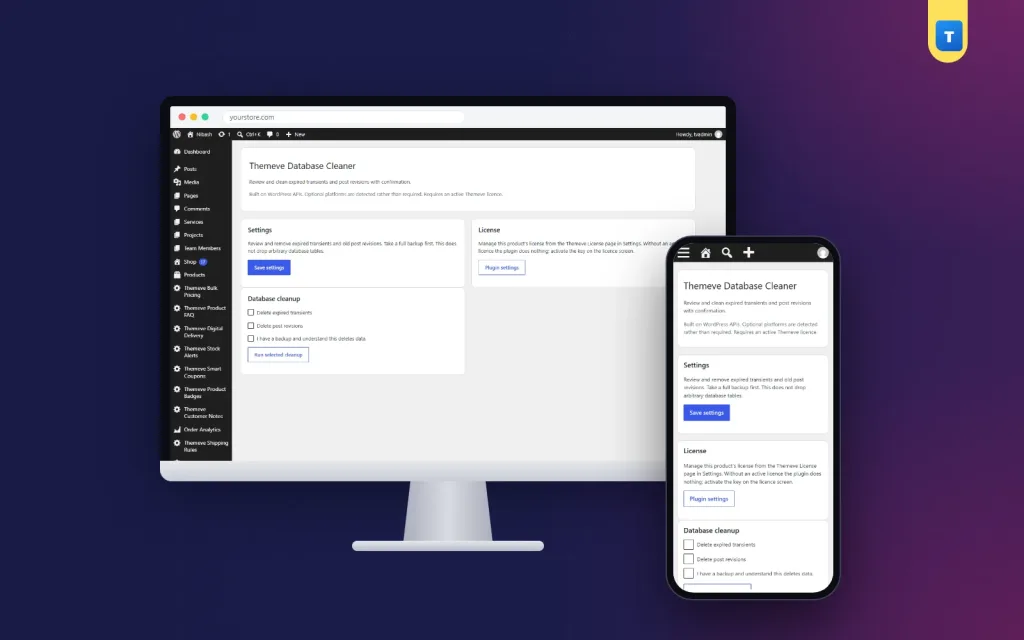
Open Settings › Themeve Database Cleaner. Tick what you want to clean: expired transients, post revisions or both. Then tick the confirmation box to say you have a backup and understand that the cleanup deletes data. Only then does the cleanup run.
Nothing is removed automatically or in the background. You decide when, and you decide what.
Take a backup first
Any cleanup deletes data for good. Before you run one, take a full backup of your site and database, and make sure you know how to restore it. Most hosting control panels offer backups; ask your host if you are unsure.
Why this WordPress database cleanup plugin is careful
Some cleanup tools run raw database queries that only work on certain database types and can delete more than intended. Database Cleaner uses WordPress's own functions for deleting revisions and expired transients. That means it follows the same rules WordPress itself follows, works on every supported database and leaves data without an expiry alone.
It does not drop database tables or remove unknown data. It cleans two well-understood kinds of clutter and stops there.
Pair it with speed and health checks
Site Monitor shows your WordPress version, PHP version, plugins and memory limit on one screen. Speed Optimizer trims scripts and adds lazy loading for faster pages.
To learn how revisions work, see the WordPress documentation.
Who it suits
Blogs and news sites with years of edited articles. Shops with hundreds of products edited many times. Business sites that have never been cleaned. Anyone whose backups have grown slow and large.
A quick example
A news site with three thousand articles has tens of thousands of revisions. The owner takes a full backup, ticks post revisions and expired transients, confirms and runs the cleanup. The database shrinks noticeably, and the nightly backup finishes faster than before.
How often to clean
For most sites, every few months is enough. Busy sites with many daily edits may clean monthly. Always back up first, every time.
Keep a short note of each cleanup with the date and what you removed. If anything ever looks different later, your notes show exactly when the last cleanup happened.
When not to clean
Wait if you are in the middle of editing important pages, because revisions are your undo button while work is in progress. Wait if you have no working backup. And do not clean during a big sale or launch, when you want the site as stable as possible.
Choose a quiet day instead, take your backup, run the cleanup and check a few pages afterwards. A WordPress database cleanup plugin is safest when it is part of a calm routine, not an emergency fix. Put it on your calendar every few months, next to updates and backup checks.
Licence, updates and setup
Database Cleaner needs an active Themeve licence key. Without it, no cleanup runs and only the lock screen and License screen open. Enter the key from My Account › Licenses and the settings become available. Updates arrive in Dashboard › Updates while the licence is active.
After activation, take a backup, choose what to clean, confirm and run. A careful WordPress database cleanup plugin like this keeps your database tidy without taking risks with the data you need.
Reviews
0.0
Write a review
★★★★★
0 reviews from buyersNo reviews yet — be the first to share your experience after buying.
Frequently Asked Questions
01What does Database Cleaner delete?
Expired transients and post revisions, whichever you choose.
02Will my current content be affected?
No. Only saved older versions (revisions) and expired temporary data are removed.
03Does it delete transients without an expiry?
No. Those are never touched, because some plugins rely on them.
04Does it run automatically?
No. You choose what to clean, confirm, and run it yourself.
05Do I need a backup?
Yes. Always take a full backup before any cleanup, because deleted data cannot be recovered without one.
06Does it work on my database type?
It uses WordPress's own functions, so it works on every database WordPress supports.
07Does it need a licence?
Yes. Without an active Themeve licence key no cleanup runs and only the lock and License screens open.
Delivery & Support
1Place your orderAdd to cart, sign in and pay with bKash, Nagad or Rocket.
2Payment verified automaticallyEnter your Transaction ID — the payment is matched automatically, usually within seconds.
3Get your productYour license key and download appear in My Account → Licenses.
- Secure automatic payment verification
- Delivery to your account & e-mail
- Friendly WhatsApp support
Refund Policy
This policy applies to every product in our store.
You get a refund when the product does not work as described and we cannot fix it, when your license will not activate your website, or when a manually delivered product is late and you cancel before delivery. A working license, or a single license already used on a live domain, is not refundable. Approved refunds go back to the number you paid from within one working day, minus the Send Money charge.
More items
View all →