A WooCommerce shipping rules plugin lets your checkout change delivery options automatically as the cart grows. This woocommerce shipping rules plugin guide is for online shops in Bangladesh that want to offer free delivery above a certain amount, without giving it away on every small order and without editing shipping settings by hand before every campaign.
We will look at why delivery offers work, how to choose a profitable amount, how to set up your shipping methods, and how Shipping Rules applies the rule on WooCommerce and Themeve Commerce stores.
Why delivery charges matter so much
Buyers hate surprise costs. A product that looks like a good deal can feel expensive once a delivery charge is added at the end. In Bangladesh, where many buyers compare prices on Facebook pages and marketplaces, the delivery charge often decides which shop wins the order.
At the same time, delivery is a real cost. Couriers charge per parcel, and parcels to far districts cost more. Offering free delivery on everything can wipe out the profit on small orders. The answer most shops use is a threshold: free delivery above a set amount.
How a free delivery target changes behaviour
A threshold gives buyers a goal. Someone with 1,000 taka in the cart and a free delivery target of 1,200 will often add a small item rather than pay delivery. That item usually costs you less than the courier charge you are waiving, so both sides win.
The effect is strongest when the target is visible. Buyers who know about it from your banner or Facebook post plan their cart around it. Buyers who discover it at checkout are pleased but less likely to go back and add more.
Choosing a profitable amount
Start with your average order value from the last month or two. Set the target a little above it, often by the price of one small product. Then check the numbers. Take your profit on an order at the target amount, subtract the delivery cost you will now pay, and make sure what remains is still worth it.
Think about far districts. If delivery outside Dhaka costs noticeably more, check that the target still makes sense for those orders. Some shops set the target slightly higher to cover the average delivery cost across all areas.
Testing and adjusting
Run the target for a few weeks and watch two numbers: average order value and the share of orders that reach the target. If almost nobody reaches it, lower it. If almost everyone does without changing their cart, raise it a little.
Why you hide shipping methods instead of changing rates
In WooCommerce, delivery options are shipping methods inside shipping zones, such as a paid flat rate and a free shipping method. The cleanest way to run a threshold is to hide shipping methods that should no longer apply once the cart is big enough. Hide the paid flat rate above the target, and the buyer sees only free shipping.
This keeps your zones and rates untouched. You do not need to rebuild shipping settings for every campaign; you change one amount and let the rule do the rest.
How the WooCommerce shipping rules plugin works
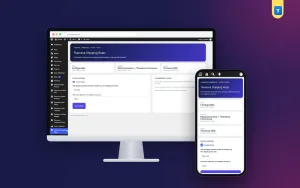
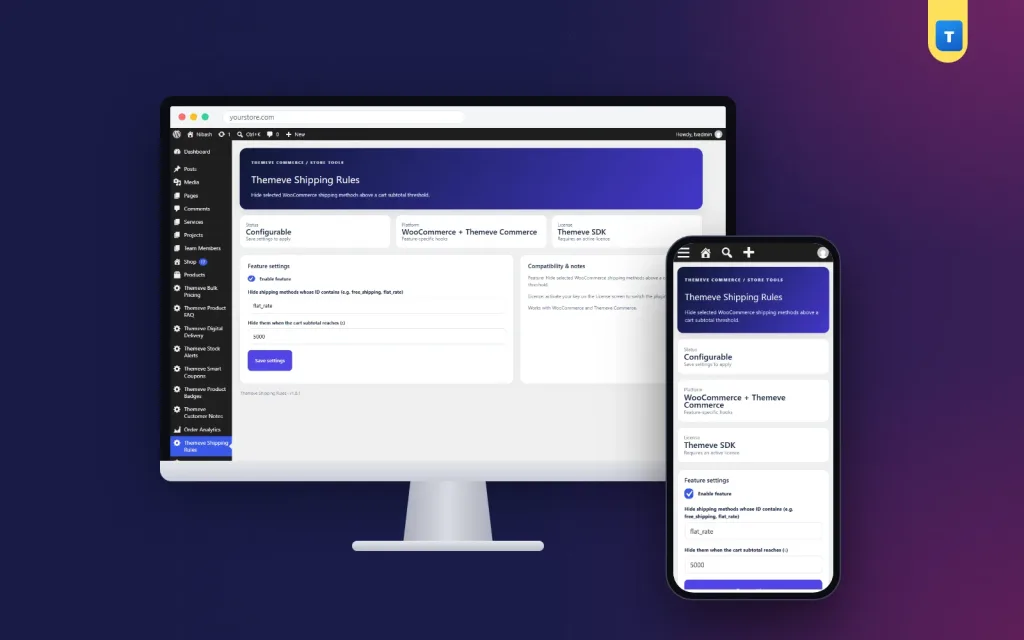
Shipping Rules adds a screen called Themeve Shipping Rules to the left admin menu. Enter a cart subtotal amount and list the shipping methods to hide once the cart reaches it, for example flat_rate. When a cart crosses the amount, those methods disappear from the checkout. Below the amount, everything works as normal.
On Themeve Commerce stores, the same amount controls the delivery charge: once the cart subtotal reaches it, delivery becomes free. An on/off switch pauses the rule without losing your settings. It is one rule based on cart subtotal, which keeps the offer easy to understand.
Setting it up
Upload the zip from Plugins, Add New, Upload Plugin, and activate it. The plugin needs an active Themeve licence key. Until the key is entered, no rule runs and only the lock screen and License screen open. Paste the key from My Account, Licenses, and the settings become available. While the licence is active, updates arrive in Dashboard, Updates.
On WooCommerce, check your shipping zones first. Make sure each zone has both a paid method and a free shipping method. Then enter your target amount in Shipping Rules, list the paid method to hide, and switch it on. Test with one cart below and one above the amount. The WooCommerce documentation explains shipping zones and methods step by step.
Promoting your delivery target
Tell everyone. Put the target in your homepage banner, in the first line of your Facebook page intro, and in every campaign post. When buyers message you, mention it naturally: add one more item and delivery is free. Your staff should know the exact amount by heart.
During campaigns, a badge on product cards can repeat the message across the shop. Matching words everywhere make the offer impossible to miss.
Combining delivery rules with other offers
A free delivery target works well alongside other cart offers. Bulk Pricing gives a fixed discount once the cart reaches a set number of items, so a buyer who adds items gets both benefits. Be careful not to stack offers so generously that large orders become unprofitable.
For larger orders, think about payment risk too. Smart Checkout Rules can hide cash on delivery above a maximum order total, so very large carts are paid in advance. That protects you when free delivery attracts bigger, riskier orders.
Ideas for different shops
Cosmetics and grocery shops, with many small items, benefit most from a free delivery target, because adding one more item is easy. Fashion shops can set the target at the price of two typical items, encouraging buyers to add a second piece. Electronics shops with high-value items may prefer free delivery on everything above a modest amount, because most orders already exceed it.
Seasonal changes help too. Lower the target slightly during a festival week to attract more orders, then return to the normal amount afterwards. Each change takes a minute.
Explaining delivery to buyers
Clear delivery information builds trust. On product pages and in your FAQ, explain the normal delivery charge, the free delivery target, and how long delivery usually takes inside and outside Dhaka. Avoid promises you cannot control, such as exact delivery dates, because couriers sometimes run late.
If a buyer just misses the target, a friendly message suggesting a small add-on item often turns a hesitant buyer into a happy one. Keep a short list of low-cost add-ons ready for these moments.
Watching your delivery costs
Free delivery is not free for you. Each month, compare the delivery costs you paid with the extra sales the target brought in. If costs rise faster than sales, raise the target or review your courier rates. Many couriers offer better rates to shops with steady volume, so ask.
Track far-district orders separately if you can. If they make up a large share of free-delivery orders, a slightly higher target may be fairer to your margin.
A worked example
Imagine a cosmetics shop where most orders are between 700 and 1,000 taka. Delivery inside Dhaka costs the shop a fixed courier charge, and outside Dhaka a bit more. The owner sets a free delivery target of 1,200 taka and hides the paid flat rate above it.
On the first weekend, a buyer with a face wash and a moisturiser in the cart sees that adding a lip balm makes delivery free. The lip balm costs less than the delivery charge she would have paid, so she adds it. The shop earns profit on a third item and ships one parcel. Over a month, the average order rises, and the extra profit covers the free delivery comfortably.
The owner keeps a short list of small, popular items to suggest when buyers are just below the target. Staff mention them in Messenger replies, and the shop adds a line on the cart page about the target. Small, steady habits like these make the rule work harder.
Common mistakes
The first mistake is setting the target below your average order. A WooCommerce shipping rules plugin should push buyers up, not reward orders that would have come anyway. The second is forgetting to add a free shipping method to each zone in WooCommerce, so hiding the paid method leaves no option at all. Always test both sides of the amount.
The third mistake is keeping the target secret. Promote it. The fourth is ignoring delivery costs to far districts. Check that the numbers work everywhere you ship.
Frequently asked questions
What happens on WooCommerce above the amount?
The shipping methods you listed are hidden, so buyers see only the remaining options, such as free shipping.
What happens on Themeve Commerce?
The delivery charge becomes zero once the cart subtotal reaches your amount.
Can I create several thresholds?
No. It is one rule based on cart subtotal.
Do I need to change my shipping zones?
No, but each WooCommerce zone should have a free method available above the amount.
WooCommerce Shipping Rules Plugin guide: final thoughts
A free delivery target is simple, familiar to buyers and, when the numbers are right, profitable. Choose an amount just above your average order, check your delivery costs, promote the target everywhere and review it every few weeks. To apply that target automatically on WooCommerce or Themeve Commerce, try Shipping Rules.