 −50%
−50%
Speed Optimizer – WordPress Speed Optimization Plugin
 −50%
−50%
✦ Key features
- Switch off the WordPress emoji script
- Remove emoji styles from every page
- Switch off the embed script
- Remove oEmbed discovery links
- Native lazy loading for images
- Leaves existing lazy loading alone
- Every option off until you turn it on
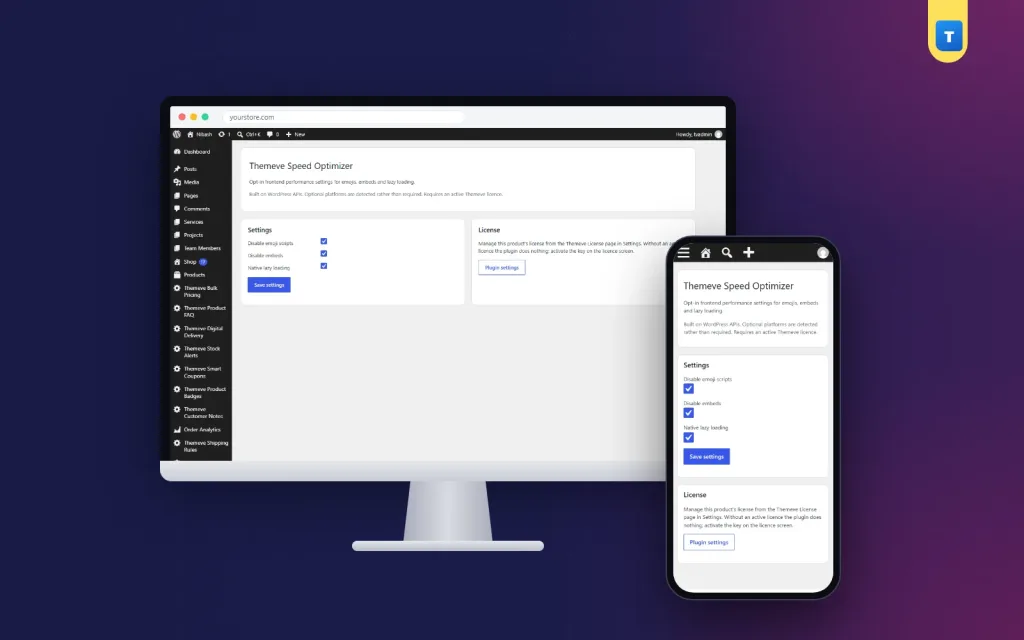
- One short settings screen
- Works with any WordPress theme
- Lightweight, no page cache needed
Overview
Speed Optimizer is a lightweight WordPress speed optimization plugin that switches off the emoji script, embed script and oEmbed discovery and adds lazy loading to images.
Speed Optimizer is a lightweight WordPress speed optimization plugin that removes small things your pages load but rarely need. Switch off the WordPress emoji script and styles, switch off the embed script and oEmbed discovery, and add native lazy loading to images that do not have it yet.
Every option is off until you turn it on, so nothing changes on your site until you decide.
Why small scripts matter
A WordPress page loads more than the text and photos you see. Core adds an emoji script and styles to every page, so old browsers can show emoji. It adds an embed script so other WordPress sites can be embedded in your posts. Each piece is small, but each is one more request on every visit.
On a fast office connection, nobody notices. On a mobile connection outside the city, every request counts, and many of your visitors browse exactly that way.
What you can switch off
Emoji script and styles
Modern phones and browsers show emoji on their own. The extra script WordPress adds is mostly for very old browsers. Switching it off removes a script and a small block of styles from every page, while emoji in your posts still display normally on current devices.
Embed script and oEmbed discovery
WordPress lets other sites embed your posts and adds a script so you can embed theirs. Most shop and business sites never use this. Switching it off removes the embed script and the discovery links from your pages.
Lazy loading for images
Lazy loading tells the browser to load images only when the visitor scrolls near them. Pages with many product photos or blog images benefit most, because the first screen appears sooner and visitors who never scroll to the bottom never download those images.
Speed Optimizer adds native lazy loading to images that do not have it yet. Images that already have it are left alone.
Safe by default
Every option starts switched off. Turn them on one at a time, check your pages, and keep what works for your site. If a theme or plugin depends on one of these scripts, switch that option off again and everything returns to how it was.
Settings live under Settings › Themeve Speed Optimizer, on one short screen.
What this WordPress speed optimization plugin is, and is not
Speed Optimizer trims scripts and adds lazy loading. It is not a page cache and it does not compress images. For many small sites, these trims are a good first step; larger sites may also want caching from their hosting provider.
Image size is often the biggest factor on shop sites. Image Optimizer sets the JPEG quality WordPress uses on upload and scales down huge photos. Site Monitor shows your WordPress version, PHP version, active plugins and memory limit on one screen.
To learn more about how WordPress loads pages, see the WordPress documentation.
Measure before and after
Test a few key pages with a free speed testing tool before you switch anything on. Then turn on the options and test again. Real numbers from your own site tell you more than any promise, and they help you decide what to try next.
Who it suits
Shop sites with many product images, blogs with long posts, and business sites that want a cleaner page without a heavy all-in-one tool. It works on any WordPress site, with any theme, because it only removes core extras and adds a standard browser feature.
A quick example
A clothing shop with a long homepage full of product photos switches on all three options. The emoji and embed scripts disappear from every page, and photos further down the homepage load only when shoppers scroll to them. The owner tests the homepage on a phone and sees the first screen appear sooner.
Simple next steps
After the trims, look at the bigger factors. Resize photos before upload, remove plugins you no longer use, and turn off theme features you never show, such as sliders. Each step is small, and together they make a real difference for visitors on mobile data. A WordPress speed optimization plugin handles the first part; good habits handle the rest.
Licence, updates and setup
Speed Optimizer needs an active Themeve licence key. Without it, no option is applied and only the lock screen and License screen open. Enter the key from My Account › Licenses and the settings become available. Updates arrive in Dashboard › Updates while the licence is active.
After activation, turn on one option at a time and check your pages after each. A careful WordPress speed optimization plugin should never surprise you, and with every option off by default, this one never does.
Reviews
0.0
Write a review
★★★★★
0 reviews from buyersNo reviews yet — be the first to share your experience after buying.
Frequently Asked Questions
01Is Speed Optimizer a cache plugin?
No. It switches off the emoji and embed scripts and adds lazy loading. It does not cache pages or compress images.
02Will emoji still show in my posts?
Yes, on current phones and browsers, which show emoji on their own.
03Can I embed YouTube videos after switching off embeds?
The option removes the WordPress embed script and oEmbed discovery. Test your pages after switching it on, and switch it off again if something you use stops working.
04Does it change anything right after activation?
No. Every option is off until you turn it on.
05Does it work with any theme?
Yes. It only removes core extras and adds a standard browser feature.
06How do I know it helped?
Test key pages with a speed testing tool before and after turning options on.
07Does it need a licence?
Yes. Without an active Themeve licence key no option is applied and only the lock and License screens open.
Delivery & Support
1Place your orderAdd to cart, sign in and pay with bKash, Nagad or Rocket.
2Payment verified automaticallyEnter your Transaction ID — the payment is matched automatically, usually within seconds.
3Get your productYour license key and download appear in My Account → Licenses.
- Secure automatic payment verification
- Delivery to your account & e-mail
- Friendly WhatsApp support
Refund Policy
This policy applies to every product in our store.
You get a refund when the product does not work as described and we cannot fix it, when your license will not activate your website, or when a manually delivered product is late and you cancel before delivery. A working license, or a single license already used on a live domain, is not refundable. Approved refunds go back to the number you paid from within one working day, minus the Send Money charge.
More items
View all →