 −50%
−50%
Image Optimizer – WordPress Image Optimizer Plugin
 −50%
−50%
✦ Key features
- Set the JPEG quality used on upload
- Set the big image threshold
- Huge uploads scaled down automatically
- WebP server support check
- Works on every new upload
- No outside service
- Photos never leave your server
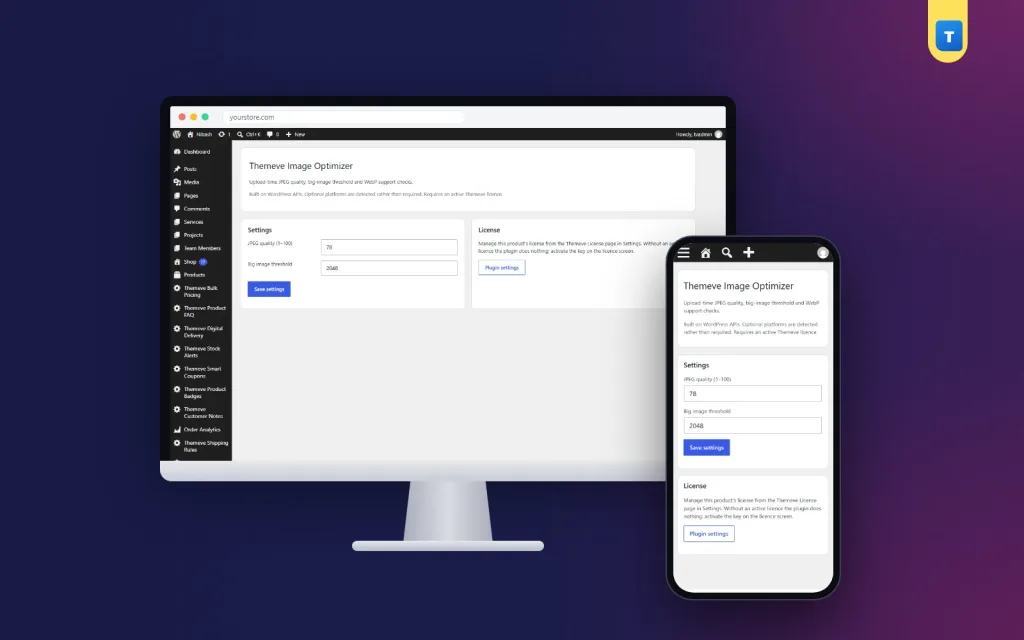
- One simple settings screen
- Works with any WordPress theme
- Lighter pages for mobile visitors
Overview
Image Optimizer is a WordPress image optimizer plugin that sets the JPEG quality used on upload, scales down huge photos and shows whether your server supports WebP.
Image Optimizer is a WordPress image optimizer plugin that makes every new upload lighter without any outside service. Set the JPEG quality WordPress uses when it creates image sizes, set the size above which huge photos are scaled down, and check at a glance whether your server supports WebP.
It works on any WordPress site and runs entirely on your own server.
Why images make sites heavy
Photos are usually the largest files on a page. A product photo straight from a modern phone can be several megabytes and thousands of pixels wide, far bigger than any screen needs. Multiply that by a shop homepage full of products, and visitors on mobile data wait a long time.
WordPress already creates smaller copies of each upload for thumbnails and product cards. How heavy those copies are depends on the quality setting it uses, and how big the largest copy is depends on its size limit. This plugin puts both settings in your hands.
Set the JPEG quality
When WordPress creates image sizes, it saves JPEG files at a certain quality. Higher quality means larger files; lower quality means smaller files with slightly softer detail. Image Optimizer lets you choose the number on a simple settings screen.
For most shop and blog photos, a moderate quality looks the same to visitors and saves a noticeable amount of space. Try a value, upload a test photo, and compare it with the original on a phone.
Scale down huge uploads
WordPress has a big image threshold: uploads wider or taller than this size are scaled down automatically, and the scaled copy is used on your site. Image Optimizer lets you set that threshold to match your theme.
If your widest layout shows images at about 1600 pixels, there is little point in keeping 5000-pixel copies. A sensible threshold keeps the largest copies to a useful size.
WebP support check
WebP is a modern image format that is often smaller than JPEG at similar quality. Whether you can use it depends on your server. Image Optimizer shows whether your server supports WebP, so you know what your hosting can do before you plan any change.
What this WordPress image optimizer plugin is, and is not
Image Optimizer works on new uploads. It does not bulk-compress images you uploaded before, and it does not send images to an outside service. That keeps it light and private: your photos never leave your server.
For older images, you can re-upload the most important ones, such as homepage banners and best-seller photos, after setting your preferred quality.
Pair it with other speed steps
Lighter images are one part of a faster site. Speed Optimizer switches off the emoji and embed scripts and adds lazy loading to images. Site Monitor shows your WordPress version, PHP version, plugins and memory limit on one screen.
To learn how WordPress handles image sizes, see the WordPress documentation.
Who it suits
Online shops with many product photos, news and blog sites with daily image uploads, photographers and portfolio sites, and anyone whose team uploads photos straight from their phones. It is especially helpful when several people upload images and nobody resizes them first.
A quick example
A fashion shop's staff upload product photos straight from their phones, each several megabytes. The owner sets a moderate JPEG quality and a big image threshold that matches the theme's widest layout. New uploads now produce much lighter copies, and the product grid loads sooner on mobile data.
Habits that help
Crop photos before upload so the product fills the frame. Use plain backgrounds. Name files clearly, such as blue-cotton-panjabi.jpg. Good habits plus sensible settings keep your media library tidy and light.
Check the results
Before you change anything, note the size of a typical new product photo in your media library. After a week with your new settings, check again and look at your homepage on a phone. If photos look soft, raise the quality slightly. A WordPress image optimizer plugin is easy to tune because each change is one number.
Licence, updates and setup
Image Optimizer needs an active Themeve licence key. Without it, no setting is applied and only the lock screen and License screen open. Enter the key from My Account › Licenses and the settings become available. Updates arrive in Dashboard › Updates while the licence is active.
Settings live under Settings › Themeve Image Optimizer. Choose your quality and threshold, upload a test photo and compare.
From then on, your WordPress image optimizer plugin makes every new photo lighter without any extra work from your team.
Reviews
0.0
Write a review
★★★★★
0 reviews from buyersNo reviews yet — be the first to share your experience after buying.
Frequently Asked Questions
01Does it compress my old images?
No. It works on new uploads. Re-upload important older images if you want them lighter.
02Does it use an outside compression service?
No. Everything happens on your own server.
03What does the big image threshold do?
Uploads larger than this size are scaled down, and the scaled copy is used on your site.
04Does it convert images to WebP?
It shows whether your server supports WebP, so you know what your hosting can do.
05Which JPEG quality should I choose?
Try a moderate value, upload a test photo and compare it on a phone. Pick the lowest value that still looks good to you.
06Does it work with any theme?
Yes. It works on any WordPress site.
07Does it need a licence?
Yes. Without an active Themeve licence key no setting is applied and only the lock and License screens open.
Delivery & Support
1Place your orderAdd to cart, sign in and pay with bKash, Nagad or Rocket.
2Payment verified automaticallyEnter your Transaction ID — the payment is matched automatically, usually within seconds.
3Get your productYour license key and download appear in My Account → Licenses.
- Secure automatic payment verification
- Delivery to your account & e-mail
- Friendly WhatsApp support
Refund Policy
This policy applies to every product in our store.
You get a refund when the product does not work as described and we cannot fix it, when your license will not activate your website, or when a manually delivered product is late and you cancel before delivery. A working license, or a single license already used on a live domain, is not refundable. Approved refunds go back to the number you paid from within one working day, minus the Send Money charge.
More items
View all →