 −50%
Advanced Product Editor – WooCommerce Product Fields Plugin
✦ Key features
- Five ready product profiles
- Digital: download URL and licence term
- Grocery: unit, weight and expiry date
- Fashion: size, colour and material
- Electronics: brand, model and warranty
- Furniture: dimensions, material and weight
- Choose a different profile for each product
- Works in the WooCommerce product editor
- Works in the Themeve Commerce product studio
- Values saved with the product
- Settings page with a profile table
- No front-end scripts or styles
- Same fields for the whole team
Overview
Advanced Product Editor is a WooCommerce product fields plugin that adds ready field sets for digital, grocery, fashion, electronics and furniture products. Pick a profile per product, fill the boxes, and the values are saved with the product.
A WooCommerce product fields plugin should do one job well: give every product a proper place for the details buyers ask about. Advanced Product Editor adds a product profile to each product. You choose Digital, Grocery, Fashion, Electronics or Furniture, fill in the matching boxes, and the values are saved with the product.
It is built for shop owners and for the staff who add products every day. If your team keeps writing weight, warranty or size in the middle of a description, this plugin gives those facts their own fields. They are entered the same way every time and are easy to find later.
Who can use Advanced Product Editor
The plugin does not belong to one niche. Any shop that sells more than one kind of item will find a use for it. Typical users are:
- Grocery and food shops that must track unit, weight and expiry date.
- Gadget and electronics sellers who answer brand, model and warranty questions all day.
- Clothing pages with many sizes, colours and fabrics.
- Furniture makers and home-decor shops that list dimensions, material and weight.
- Sellers of digital files who keep a download link and a licence term for each product.
- Mixed lifestyle shops that sell clothes, a few gadgets and some home items in the same store.
- Teams of two or more people who add products and want everyone to follow the same format.
It works with WooCommerce. It also works with the Themeve Commerce product studio, where it adds its own section to the product form.
Why a WooCommerce product fields plugin helps
Most shops store important details inside the description. One product mentions 100% cotton in the first line. Another hides it in the last paragraph. A third forgets it. When a buyer asks about the warranty, someone has to read the whole text to find the answer, if it is there at all.
Separate fields fix this in three ways, and that is why a WooCommerce product fields plugin is worth having:
- Each detail has its own box, so it is never forgotten.
- Every product of the same type shows the same boxes in the same order.
- A new staff member adds a product exactly as the owner would.
Back-end options of the WooCommerce product fields plugin
Everything is managed from the WordPress dashboard. If you search for product fields for WooCommerce, this is the whole admin side in one place. There is no front-end setup and no code to write.
Settings page
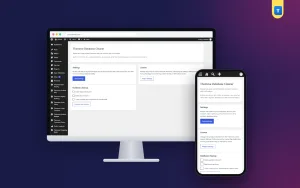
After activation, open Settings › Themeve Advanced Product Editor. The page is a simple admin screen with three cards:
- Settings: a short explanation of how profiles work and a Save settings button. Product profiles do not need any further configuration. They are ready as soon as the licence is active.
- License: a link to the licence screen where you activate or check your licence.
- Profiles: a table that lists each profile and the fields it contains, so your staff can check it at a glance.
Only administrators who can manage options can open this page.
The product profile selector
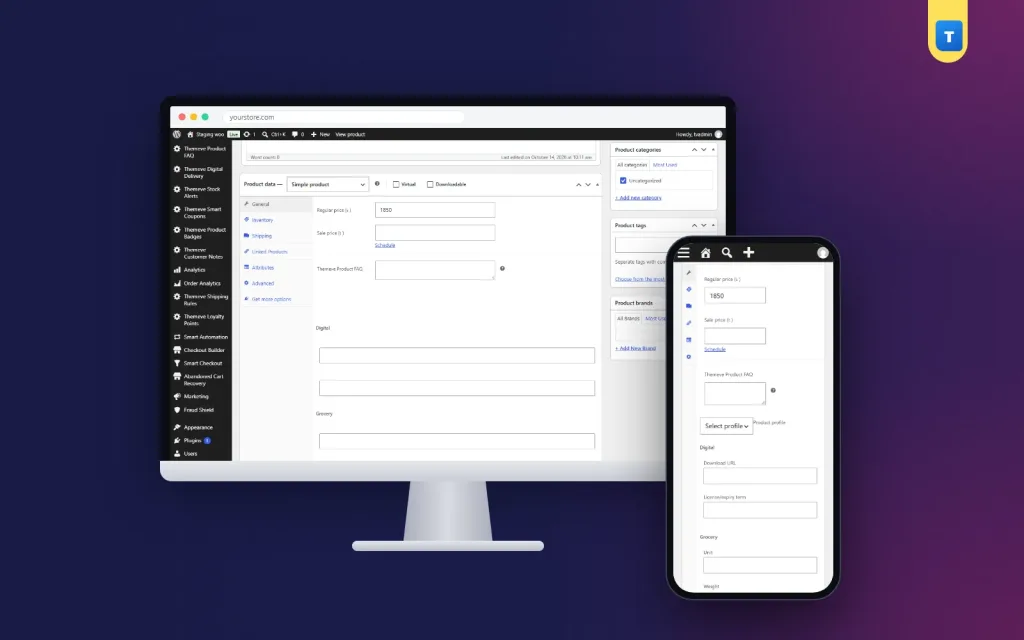
On every product edit screen you get a Product profile drop-down. The options are Select profile, Digital, Grocery, Fashion, Electronics and Furniture. The choice is per product, so one store can use all five.
The five profiles and their fields
Each profile has its own set of text boxes:
- Digital: Download URL and License/expiry term.
- Grocery: Unit, Weight and Expiry date.
- Fashion: Size, Color and Material.
- Electronics: Brand, Model and Warranty.
- Furniture: Dimensions, Material and Weight.
The form lists the field groups for all profiles, each under its own heading. Fill in the group that matches the selected profile and leave the others empty.
Where the fields appear in the editor
- WooCommerce: the fields are added to the General tab of the Product data panel.
- Themeve Commerce: a section called Themeve Universal Product Profile is added to the product studio.
- Product post type without WooCommerce: a meta box named Themeve Product Profile is added below the editor.
How the data is stored
- The chosen profile and the field values are saved as post meta on the product.
- Values are cleaned with the standard WordPress text sanitising before they are saved.
- Saving is limited to users who are allowed to edit that product.
- The data stays with the product when you change the price, replace photos or duplicate the product.
What visitors see on the front end
The plugin adds and stores the fields. It does not redraw your product page. How the details appear to shoppers depends on your theme. Some themes read this data and show it. If yours does not, copy the key facts into the product description or short description as well.
This keeps the plugin light. It loads nothing on the shop pages, so it cannot slow down your product grid.
Speed and lightness
Many shop owners worry that one more plugin will slow the store. Here the worry is small, because the plugin only works in the admin area.
- No front-end scripts and no front-end styles are added by the plugin.
- One small admin stylesheet loads only on its own settings screen.
- No outside service is called to save product fields.
- The fields are plain text inputs, so the product editor stays fast.
How a product fields plugin helps you run the shop
Here are five small examples from different kinds of shops. Each one shows the same idea: put the fact where people expect to find it.
A gadget shop
A shop lists fifty power banks, earphones and chargers. With the Electronics profile, each product has brand, model and warranty in the same place. A buyer asks how long the warranty is on a charger. Staff open the product and read one field, instead of scanning a long description.
A grocery page
Packaged food has an expiry date. With the Grocery profile, the date has its own box. When you check stock at the end of the month, you know where to look.
A clothing page
Fashion products carry size, colour and material. Staff answer the same three questions again and again. A fixed set of fields means the answers are always at hand.
A furniture workshop
Customers ask for measurements before they ask for the price. The Furniture profile keeps dimensions, material and weight together, ready to quote.
A digital product seller
The Digital profile stores the download URL and the licence or expiry term for each product, so a support person can look up what a customer bought.
Tips for clean product data
A WooCommerce product fields plugin only helps if the entries are tidy. A few habits make a big difference over a year of work.
Keep entries short
Write the value, not a sentence. Use Cotton, not This product is made of cotton. Short values are easier to scan, compare and copy into invoices.
Decide who owns the data
Choose one person to check new products each week. A quick look at five or six products is enough to catch a missing warranty or a wrong unit before a buyer sees it.
Use the same words for the same thing
Pick one name for each colour and one spelling for each brand. If you write Navy on one product and Dark Blue on another, search and sorting become harder later.
- Agree on formats before you start. Write sizes as S, M, L, XL every time.
- Write weights with units, such as 500 g or 2 kg.
- Write warranty in months, for example 12 months.
- Use one date format for expiry, and keep to it.
- Start with your best sellers, then fill the fields for every new product.
Consistent entries make your products easier to compare, search and update later, especially when several people add products.
Setup steps
- Go to Plugins › Add New › Upload Plugin and upload the plugin zip.
- Click Install Now, then Activate.
- Open My Account on the store where you bought it, copy your licence, and activate it on the plugin's licence screen. Until then, the fields are not added.
- Open Settings › Themeve Advanced Product Editor and read the Profiles table.
- Edit a product. Choose a profile from the Product profile drop-down.
- Fill in the fields and click Update or Publish.
- Repeat for your other products, starting with the ones that sell most.
Updates arrive in the WordPress Dashboard under Updates while your licence is active.
Why choose a product fields plugin over notes in descriptions
- Fields are separate from the story you tell in the description, so both stay clear.
- Every product of the same type follows the same layout.
- Your team does not have to remember what to write. The boxes remind them.
- Values stay with the product when you duplicate it for a new colour.
- There is no new product type, no page builder and no extra database to learn.
This WooCommerce product fields plugin is also easy to explain to new staff: pick the profile, fill the boxes, save. A heavier field-builder plugin lets you design any field you like. This plugin does not. It gives you five ready sets that cover common shop types, and nothing else. For many small and medium shops, that is the faster path.
What this plugin does not do
- It does not let you create your own field types. The five profiles are fixed.
- It does not change how your product page looks.
- It does not import values in bulk. You enter them product by product.
Knowing this before you buy saves you time. If you need fully custom fields, a different tool is a better match.
Works well with other Themeve plugins
For a shop that needs product fields for WooCommerce and little else, this plugin can stand alone.
Product FAQ shows questions and answers under each product. Custom Content Types and Fields adds ready content types for things beyond products, such as services or team members. Each plugin does one job, and you add only the ones you need.
Questions buyers ask before they install
Will my old products change?
No. Existing products stay as they are until you open them and choose a profile. You can add fields to old products one at a time, starting with the ones that get the most questions.
Can I use two profiles on one product?
No. Each product has one profile. If a product spans two types, choose the closer one and put the rest in the description.
Do I need to know code?
No. The fields are ordinary boxes in the product editor. Staff who can type a product title can fill them in.
Is it only for WooCommerce?
It works in the WooCommerce product editor and in the Themeve Commerce product studio. On a site with a product post type and no WooCommerce, it adds a meta box instead.
Requirements
- WordPress 6.2 or newer, tested up to WordPress 7.1.
- PHP 7.4 or newer.
- WooCommerce or the Themeve Commerce product studio for the best result.
- An active licence for this plugin.
What is included
- The plugin zip, ready to upload from Plugins › Add New.
- Your licence, shown in My Account after payment.
- Updates in Dashboard › Updates while the licence is active.
- Documentation after purchase.
- Support for six months through WhatsApp.
The product is delivered right after your payment is checked. Pay with bKash, Nagad or Rocket, enter your Transaction ID, and the download appears in your account. Your whole team can then use the same simple product fields from the first day. That is what a good WooCommerce product fields plugin should give you: less guessing, fewer mistakes and faster answers.
Advanced Product Editor is built on the official WordPress documentation standards, and you can browse more of our WordPress plugins.
Reviews
0.0
Write a review
★★★★★
0 reviews from buyersNo reviews yet — be the first to share your experience after buying.
Frequently Asked Questions
01What does a WooCommerce product fields plugin do?
It adds extra boxes to the product editor for details such as size, warranty or expiry date, and saves them with the product. Advanced Product Editor offers five ready profiles.
02Why use a WooCommerce product fields plugin instead of the description?
Fields are entered the same way every time and are easy to find. Details hidden in long descriptions are easy to forget or miss.
03Which product types are covered?
Digital, grocery, fashion, electronics and furniture, each with its own fields.
04Can different products use different profiles?
Yes. You choose a profile on each product.
05Will the fields appear on my product page?
The plugin saves the fields. How they appear to shoppers depends on your theme. It does not redesign the product page.
06Does it work with Themeve Commerce?
Yes. A section is added to the Themeve Commerce product studio and the values are saved with the product.
07Can I add my own field types?
No. The plugin offers the five ready profiles and their fields.
08Does it need a licence?
Yes. Without an active licence the fields are not added, and only the lock and licence screens open.
Delivery & Support
1Place your orderAdd to cart, sign in and pay with bKash or Rocket.
2Payment verified automaticallyEnter your Transaction ID — the payment is matched automatically, usually within seconds.
3Get your productYour license key and download appear in My Account → Licenses.
- Secure automatic payment verification
- Delivery to your account & e-mail
- Friendly WhatsApp support
Refund Policy
This policy applies to every product in our store.
You get a refund when the product does not work as described and we cannot fix it, when your license will not activate your website, or when a manually delivered product is late and you cancel before delivery. A working license, or a single license already used on a live domain, is not refundable. Approved refunds go back to the number you paid from within one working day, minus the Send Money charge.
More items
View all →You may also like
−50%
 −50%
 −50%
 −50%
