An ethnic wear website for a panjabi house has one big job: help a family dress for Eid without a trip to the market. This guide is for Bangladeshi shops that sell cotton panjabi, embroidered Eid wear, kabli, koti sets and sherwani, and for the freelancers who build stores for them. We cover what the store needs, how to plan your range, how to set it up and how to run the Eid rush.
In the last two weeks of Ramadan the same questions arrive again and again on Messenger: which fit suits me, do you have this in maroon, which size is right for a 40 inch chest, and will it arrive before Eid? A good store answers them on the page, so your team can pack parcels instead of typing replies.
Throughout this guide we use Mehfil – Ethnic Wear WordPress Theme as the example. Mehfil means a gathering, and the theme dresses a store in bottle green, cream and antique gold with DM Serif Display headings. It keeps the days to Eid in plain view and is built around fits, colours and chest sizes, which are the three things panjabi buyers worry about most.
What an Ethnic Wear Website Needs Before Eid
Start with the buyer, not the design. Most panjabi orders in Bangladesh are placed on a phone, often late at night, often for more than one person. A father may buy for himself and two sons. A bride's family may order sherwani and matching koti sets for the groom's side. The store has to make choosing quick, and it has to make the right size obvious, because an exchange after Eid helps nobody.
Next comes timing. Eid sales are compressed into a few weeks, so your homepage should change with the season. Show new pieces early in Ramadan, push sets and best sellers in the middle weeks, be honest about the last order date at the end, then calm down and sell Friday, wedding and everyday wear.
Finally, trust. Buyers who have never visited your shop want to see real photos, a clear size guide, a simple exchange policy and payment methods they already use. An ethnic wear website that shows these things near the top of the page will convert better than one that hides them in the footer.
Planning Your Panjabi Collection Before You Build
Decide your categories the way men actually shop. A typical panjabi house might use cotton panjabi, embroidered and print, kabli and long, koti sets and sherwani. Keep the main menu to five or six items so it fits on one line and stays short in the phone drawer.
Fits, lengths and the words buyers use
Many younger buyers know the look they want but not the name for it. Pick clear fit names, such as slim, regular and long, and use them everywhere: product titles, photo captions, Facebook posts and the size guide. Write one plain line for each fit that explains who it suits.
Chest sizes measured on your own stock
Panjabi sizing varies between makers, so never copy a size chart from a supplier. Measure your own pieces: chest, length, shoulder and sleeve for every size you sell. Put those numbers on a Size Guide page and link to it from every product.
Colour, photos and the panjabi collection as a whole
Colour sells panjabi, especially for Eid morning photos. Tag every piece with its main colour so buyers can shop by colour later, and photograph each one in daylight so the maroon on screen is the maroon in the parcel. Shoot the whole panjabi collection with the same background and the same angles. A consistent grid looks like a real brand.
How Mehfil Builds an Ethnic Wear Website for a Panjabi House
Mehfil comes with 14 homepage blocks, and each one can be switched off or moved. In Theme Options you drag blocks into any order, and on a phone you move them with arrows. That makes the seasonal plan above easy to follow without rebuilding anything.
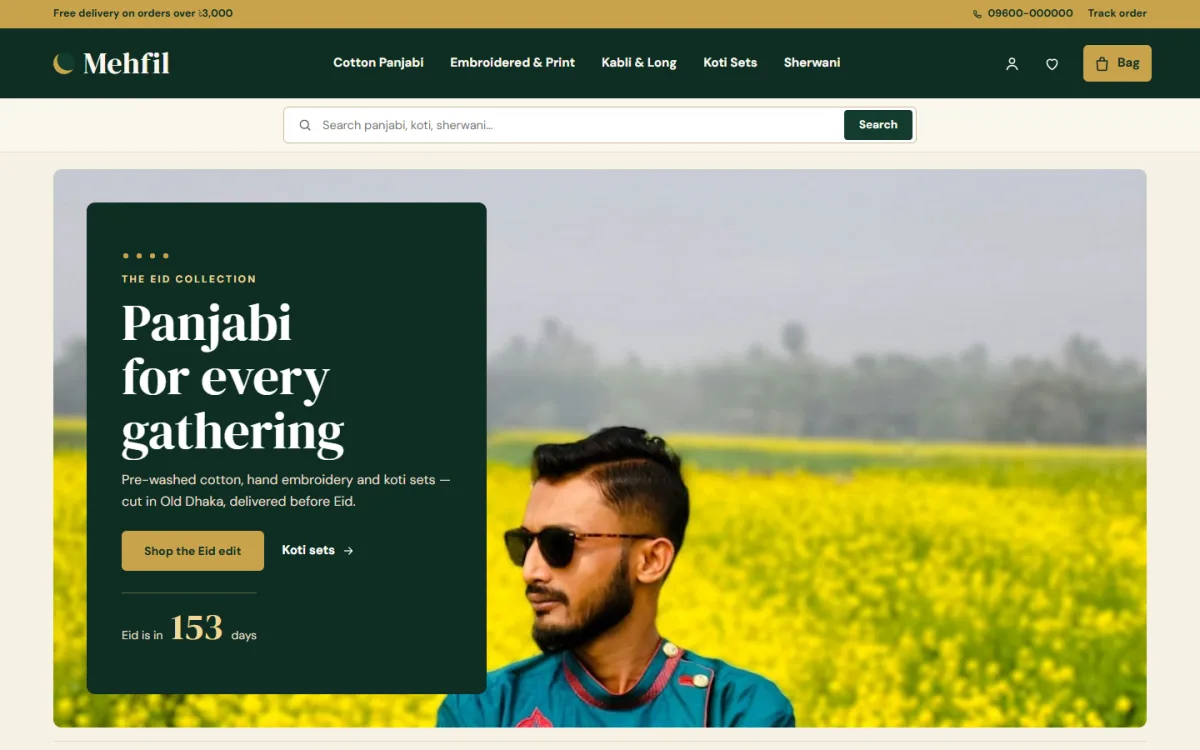
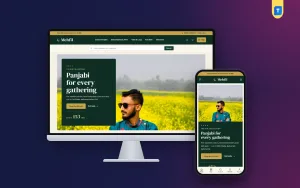
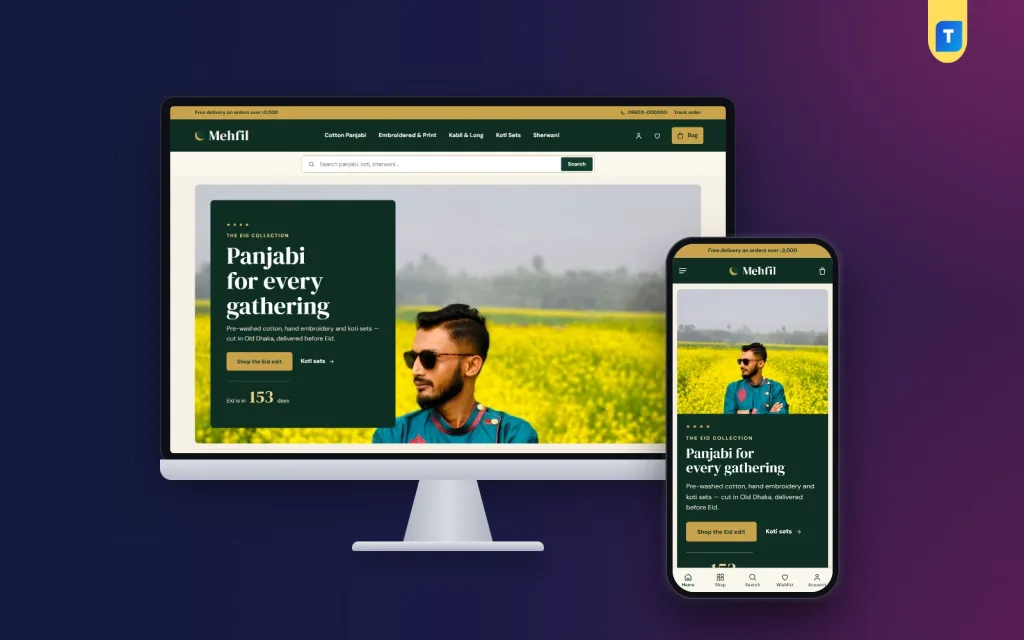
In the demo, a gold top bar carries a free delivery message, a hotline and a Track order link. The deep green header puts the categories in the middle, here Cotton Panjabi, Embroidered and Print, Kabli and Long, Koti Sets and Sherwani, with account, wishlist and bag icons on the right. A cream search strip sits under the header and invites buyers to search panjabi, koti or sherwani.
An Eid hero with a days-to-Eid counter
The Eid hero pairs a wide photo with a deep green panel, a headline, two links and a counter that shows how many days are left until Eid. You set the Eid date in Theme Options and can change the words around the number. In the demo the panel reads Panjabi for every gathering, with a Shop the Eid edit button and a Koti sets link beside it.
Shop by style, shop by colour and find your fit
Three blocks follow the planning work you did earlier. Shop by style lays out arched photo tiles, one per category. Shop by colour shows colour dots linked to your colour tags, so a buyer set on maroon taps one dot and sees only maroon. Find your fit explains slim, regular and long with simple cut drawings, each linked to its own collection.
Blocks for the rest of the page
A service line covers delivery, exchange and the pajama included with the panjabi. New this Eid shows the eight newest pieces, and Dressed for the day uses four tall photo cards with their own titles and links. Best sellers sorts favourites into tabs by category. Two department blocks pair a portrait photo with products, and the demo gives them to koti sets and the groom.
Between the departments, Our story holds a photo, a short note and a signature; the demo tells a story from Old Dhaka. Reviews shows the latest five-star reviews on deep green, More panjabi fills a big grid with a Load more button, and Journal brings in your three newest posts.
Phone view and product cards
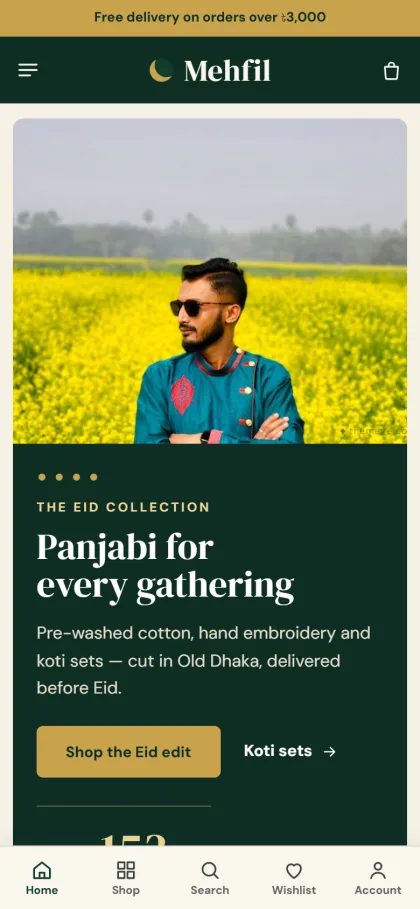
On phones the header keeps to menu, logo and bag, and a bottom bar gives quick access to Home, Shop, Search, Wishlist and Account. Product cards turn compact, so more panjabi fit on each screen, and the whole store is fully responsive. On a computer, cards are cream with thin gold hairlines, and when a shopper hovers over one the chest sizes rise up, so the right size goes into the bag in one tap.
The chest-size guide is switched on, and the demo includes a Size Guide page ready for your own measurements. Product pages can show delivery charges and times from your store settings, a Frequently bought together row, your return and exchange text and default care instructions for cotton or embroidered pieces. Reviews sit in a fold, with a popup that invites the first review.
Setting Up Your Ethnic Wear Website Step by Step
Mehfil needs WordPress 6.0 or newer and PHP 7.4 or newer, and it is tested up to WordPress 7.1. Go to Appearance, Themes, Add New, Upload Theme, choose the Mehfil zip and click Activate. Then open Mehfil, Setup and install the bundled Themeve Commerce plugin in one click. The WordPress documentation is a good reference if pages, menus and media are new to you.
Enter the license key from your Themeve account, found under My Account and Licenses, in Mehfil, License. Next, run Mehfil, Demo Import once. It loads Mehfil Panjabi House: 47 pieces across cotton and embroidered panjabi, kabli, koti sets and sherwani, with the Eid countdown, colours, fits, size guide, journal posts, menus and every page, including About Mehfil, Delivery, FAQ, Returns and Exchange, Size Guide, Our Stores and Track Order. The demo photos are free stock photos for the preview, and every label and product name is invented. Replace them with your own photos, names and measurements before you launch.
Then open Mehfil, Theme Options, which works well on a phone with its own bottom bar. Four colour palettes are ready: Bottle green and gold, Maroon and gold, Navy and brass, and Charcoal and saffron. Five font pairs are included, among them DM Serif Display with DM Sans and Gilda Display with Figtree. A setting search, a sticky save bar, reset, settings export and import and the Live Customizer are built in, and no code is needed.
Before you decide, open the live demo on your phone and walk through it as a buyer: tap a colour dot, read the fit drawings, add a size and reach checkout. Then look around the demo dashboard to see the Shop menu, where your orders, coupons and store tools live during the rush.
Payments, Courier and Eid Marketing in Bangladesh
Sign in and register open in a popup, so nobody loses the panjabi they were about to buy. Checkout fits on one page and ends with an Order placed popup, and the Track Order page lets customers follow their parcel. Buyers pay by bKash, Nagad, SSLCommerz, cash on delivery or manual payment, and you ship with Steadfast or Pathao courier.
Themeve Commerce, the bundled store plugin, also adds coupons, invoices, SMS and OTP, new-order alerts on Telegram, offers and back-in-stock alerts. Coupons suit an early-bird Eid offer. Returns and a store locator are on too, and the Our Stores page helps buyers who prefer to collect from a branch.
Courier queues grow long in the final days before Eid. Choose a realistic last order date for delivery before Eid, put it in the top bar and in your posts, and keep to it. Confirm large cash on delivery orders by phone, and consider a small advance for sherwani or made-to-order pieces.
Facebook is still where most panjabi buyers first see a new piece. Mehfil includes Facebook Pixel with the Conversion API, so your ads can be judged on orders rather than clicks. Post your new Eid pieces early in Ramadan, push koti sets and groom wear in the middle weeks, and run last-chance posts before your delivery cut-off. Write captions in Bangla if that is how your buyers talk.
Common Mistakes on an Ethnic Wear Website
The first mistake is starting too late. Photos, measurements and product text should be ready before Ramadan begins, not during it. The second is using supplier photos that do not match the real fabric or colour. Buyers notice the difference when the parcel opens, and that is when returns and bad reviews begin.
Another common mistake is a size guide with no real numbers. If a buyer cannot match their chest measurement to your sizes, they will either message you or guess. Sellers also leave the Eid countdown and seasonal blocks running long after Eid, or fill the homepage with blocks they cannot keep stocked. Switch off what you cannot fill, and never promise delivery dates you cannot keep.
Frequently Asked Questions
How does the Eid countdown work?
You enter the Eid date in Mehfil, Theme Options, and the hero panel shows how many days are left until Eid. You can also change the words around the number. After the festival, set the next Eid date or switch the hero to a calmer message for everyday selling.
Can buyers pick a size straight from the product card?
Yes. On a computer, when a shopper hovers over a card, the chest sizes rise up and one tap adds the chosen size to the bag. This can be switched off in the product card settings if you prefer buyers to open each product page first.
Can I use a colour other than bottle green?
Yes. Switch to the Maroon and gold, Navy and brass or Charcoal and saffron palette, or set each colour yourself in Mehfil, Theme Options. The dashboard works on a phone too, so you can make small changes between orders on a busy night.
Which theme suits a different kind of festive shop?
If you want a moonlit look with a collar guide and father and son pairs, see Parbon – Panjabi Shop WordPress Theme. If you are dressing the whole family for Eid and weddings, Mela – Festive Wear WordPress Theme is the closer match.
Final Thoughts
A successful ethnic wear website is planned before it is built. Name your fits clearly, measure your chest sizes on real stock, tag every colour, photograph your panjabi collection in daylight and set a delivery cut-off you can keep. With that groundwork done, the right theme makes the busy weeks much lighter. For a Bangladeshi panjabi house that lives for Eid, Mehfil – Ethnic Wear WordPress Theme is ready for the next gathering.