If you are researching how to start an electronics store that sells TVs, fridges, washing machines and other home electronics, this guide walks through the first year in plain steps. It is written for new entrepreneurs in Bangladesh, family businesses opening a second branch, and freelancers who set up shops for clients. We cover choosing a focus, suppliers and paperwork, showroom and installation, the website, and the habits that keep a young store alive.
Home electronics is a steady trade. Every new flat needs a fridge, a TV and fans, every wedding brings gifts, and every summer pushes AC sales. The risks are real too: stock is expensive, margins can be thin, and buyers expect warranty support long after the sale. A clear plan, a small but well-chosen range and a trustworthy online presence give a new store a fair chance against older showrooms.
For the website part we use Taranga – Home Electronics WordPress Theme as the example. It is a calm theme in sand, soft coral and slate, made for shops selling ACs, TVs, fridges, washing machines, fans, rice cookers, kitchen appliances, lighting and irons to families furnishing a home. First, though, the business decisions.
Decide What Kind of Electronics Store You Are
Electronics covers very different shops. A gadget store lives on phones, earbuds and accessories, with small parcels and fast turnover. A home electronics store sells to families who are furnishing a room, with larger items, longer decisions and installation. Mixing both from day one stretches your capital and confuses your message. Pick a lead and let the other follow later.
If you choose home electronics, think about your typical buyer. Often it is a couple or a parent choosing a TV for the living room or a fridge for a growing family. They want to picture the product at home, ask about size and warranty, and feel the shop will still answer the phone in two years. That buyer rewards calm, honest selling more than loud discount banners.
How to Start an Electronics Store: Paperwork, Suppliers and Capital
Before you buy a single TV, get the basics in order. Most new shops in Bangladesh need a trade licence from the local city corporation or municipality, a TIN, a business bank account and, depending on turnover, VAT registration. Rules change, so confirm the current requirements with your local office or an accountant rather than relying on a friend's experience.
Choose suppliers who back the warranty
Work with authorised distributors or brand dealers wherever possible. Ask who handles warranty claims, how long a replacement takes and whether they provide installation support for ACs and wall-mounted TVs. A cheaper grey-market unit can wipe out a month of profit if it fails and nobody will repair it. Keep every agreement, price list and warranty term on file.
Size your stock to your capital
Home electronics ties up money quickly. Start with a short list: two or three TV sizes, a few fridge capacities, fans and small kitchen appliances that sell all year. Order bulky items on demand from your distributor where you can, and keep display units for the showroom. Track what sells each week and grow the range from real orders rather than guesses.
Showroom, Storage and an Installation Team
Even an online-first store benefits from a small showroom or display corner. Families like to see the real size of a 55-inch TV or open a fridge door before spending a large sum. If rent is too high, a shared space or a branch inside a furniture shop can work. List the address clearly on your website so walk-in buyers can find you.
Installation is where home electronics stores win loyalty. Train or hire at least one reliable technician for ACs and wall mounting, and set clear areas and timings. Give each installation a short checklist and a photo at the end, so complaints can be traced. Buyers remember a technician who arrived on time and cleaned up far longer than they remember the price.
What Your Electronics Shop Website Needs
Your electronics shop website is the showroom that never closes. It should show each product with its key specs, warranty and monthly cost if you offer instalments, let buyers compare two or three models, and make delivery and installation terms easy to find. A good search box, clear categories by appliance type and a simple checkout with local payment methods are the basics.
Because home electronics is a family decision, the site should also feel welcoming rather than pushy. Room-based browsing, a single featured product of the week and plain promise cards about delivery and warranty build trust. Most visitors will arrive on a phone, often from a Facebook post, so the mobile view needs as much care as the desktop.
Why Taranga Suits a Home Electronics Boutique
Most appliance sites shout; Taranga speaks softly. It uses warm cards, rounded arch tiles, Urbanist headings and calm room slides, so products have room to breathe. The header carries a small wave logo next to a big search with a category picker. It feels like a boutique, yet the demo holds 47 appliances from 6 brands, so it can carry a full catalogue as you grow.

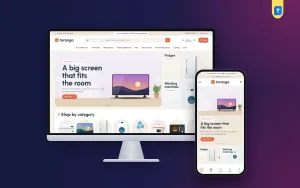
In the desktop screenshot the top strip carries EMI and installation lines, a hotline and a Track order link, shown in the demo as sample text you would set to match your own offers. The menu lists Air Conditioners, Televisions, Refrigerators, Washing Machines, Fans, Rice Cookers, Kitchen Appliances, Lighting and Irons. The hero is a Home cinema slide, a big screen that fits the room, with a TV on a sand-coloured floor beside a potted plant. Fridge and washing machine banners sit to the right, and Shop by category uses arch-shaped tiles.
The Product spotlight block puts one product on stage with a big arch picture, key specs, price, EMI from, warranty and Add to cart. Pick it in Theme Options, or leave it and your top best seller appears. Every product card works as a small spec sheet with brand, name, up to three key specs, rating, price, an EMI from monthly price and a warranty pill. A floating compare bar follows buyers as they browse, and the Compare page lines up to four products.
Telling a story with the homepage
Taranga ships with 23 homepage blocks that you can switch off or drag into order. A natural flow opens with the room slides, then the Product spotlight, Smart picks and Why Taranga promise cards. Weekly offers adds a countdown with stock bars, Smart kitchen pairs a banner with kitchen appliances, and Shop by room and Shop by budget help families narrow choices before Picked for your home and the Home tech journal close the page.
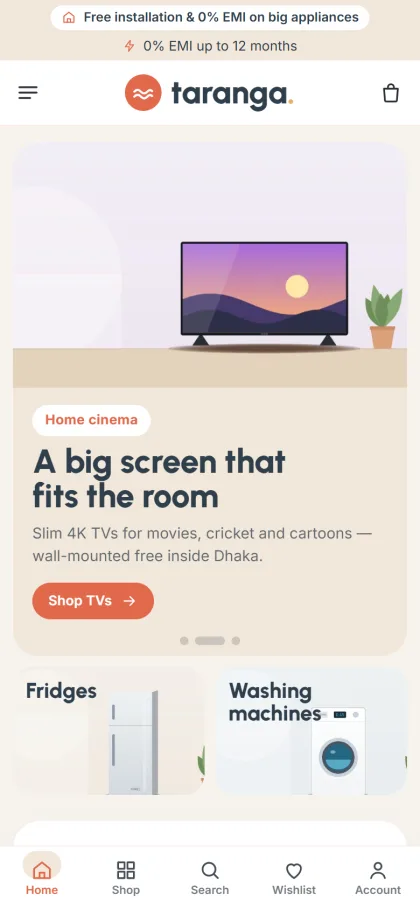
On a phone, the screenshot shows the two promise lines stacked at the top, then a header with a menu icon, the wave logo and a bag. The TV picture sits above the headline and the coral Shop TVs button, and the fridge and washing machine tiles share one row below. The demo also has a bottom bar with Home, Shop, Search, Wishlist and Account, and product cards turn compact on small screens.
Launching the Website Step by Step
Upload the Taranga zip in Appearance, Themes, Add New, Upload Theme and activate it. Go to Taranga, Setup and install the bundled Themeve Commerce plugin with one click. Activate your licence in Taranga, License using the key from My Account, Licenses. Taranga needs WordPress 6.0 or newer and PHP 7.4 or newer, and the WordPress documentation is a good reference for pages, menus and users.
Run Taranga, Demo Import to bring in the 47-product boutique with specs, warranty, the spotlight, the compare page, journal posts, menus and pages such as Delivery & Installation, EMI, Warranty & Replacement and Our Stores. Brand names and artwork are invented, so rewrite each page in your own words and replace every product. Then choose a palette, Coral & slate, Sage, Ocean, Terracotta or Plum, and a font pair in Taranga, Theme Options.
Before you buy, browse the live demo on your phone as a customer would, and open the demo dashboard to see how products, blocks and settings are organised. Ten minutes of clicking will tell you whether the workflow suits you and your staff.
Payments, Delivery and Your First Customers
Customers pay by bKash, Nagad, SSLCommerz, cash on delivery or manual payment, and Steadfast or Pathao courier can carry smaller items. Buyers sign in through a login popup, save favourites to a wishlist and pay on a one-page checkout, with an Order placed popup and an order tracking page afterwards. Coupons, invoices, SMS, OTP, Telegram order alerts and Facebook Pixel with Conversion API come with the plugin.
For large items, plan your own delivery van or a trusted transport partner and confirm cash on delivery orders by phone first. Your first customers will likely come from friends, neighbours and Facebook. Post short videos of real rooms with your TVs and fridges in them, answer every comment quickly in Bangla, and ask happy buyers for a review on the product page. Early reviews matter more than early discounts.
Mistakes New Electronics Stores Make
The most common mistake is overstocking expensive models before the store has any customers. Another is buying from sources that cannot honour warranty, which turns one faulty unit into a reputation problem. Many new owners also leave installation to chance, sending whoever is free. Decide who installs, where and when before your first AC sale.
On the website side, avoid copying spec sheets without checking them, hiding delivery charges and promising instalment terms you cannot deliver. Keep the homepage seasonal: fans and ACs up front in summer, TVs before big cricket tournaments and Eid. Anyone working out how to start an electronics store should treat the website as a branch with its own daily routine, not a one-time project.
Frequently Asked Questions
Can I start online only, without a showroom?
Yes, many shops do, especially with fans, small kitchen appliances and TVs. Larger items sell more easily when buyers can see them, so consider a display corner or partner space once orders grow. List your address on an Our Stores page if you open one.
Is Taranga only suitable for small shops?
No. The look is calm, but the demo carries 47 appliances from 6 brands across ACs, TVs, fridges, washers, fans, kitchen appliances, lighting and irons, with three department blocks and a big Load more grid. It can grow with your catalogue.
Which theme fits a louder megastore or a size picker?
For a brighter megastore with an EMI calculator, look at Bijli – Electronics and Appliance WordPress Theme. If you want a size picker for ACs and fridges and a running-cost calculator, see Ujjal – Home Appliance WordPress Theme. Taranga stays the calmer choice of the three.
Do I need a developer to change the design?
No. Colours, fonts, cards, header, footer and the order of homepage blocks are all changed in Taranga, Theme Options, with a settings search, export and reset tools and a sticky save bar. On a phone you can re-order blocks with arrow buttons.
Final Thoughts
Knowing how to start an electronics store comes down to a clear focus, honest suppliers, sensible stock, reliable installation and a website families trust. Build those one at a time and the store grows with every satisfied household. If you want a calm electronics shop website that lets TVs and fridges breathe, start with Taranga – Home Electronics WordPress Theme.