 −50%
−50%
Activity Log – WordPress Activity Log Plugin
 −50%
−50%
✦ Key features
- Records logins with user and time
- Records failed logins
- Records content saves and deletes
- Records plugin activation and deactivation
- Choose which events to record
- Choose how many entries to keep
- Export the log as CSV
- Clear the log in one click
- Works on any WordPress site
- Simple, readable entries
Overview
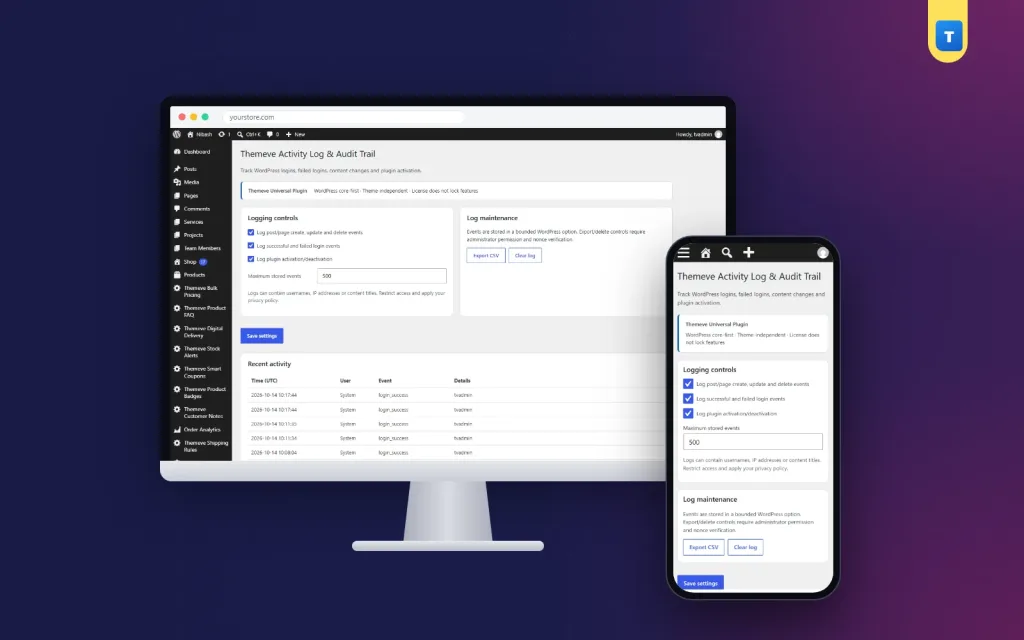
Activity Log is a WordPress activity log plugin that records logins, failed logins, content changes and plugin activation with the user and time, with CSV export.
Activity Log is a WordPress activity log plugin that answers a simple question: who did what on your site, and when? It records logins, failed logins, content saves and deletes, and plugin activation and deactivation, each with the user and the time.
It works on any WordPress site and lives under Settings › Activity Log & Audit Trail.
Why a site needs an activity log
As soon as more than one person works on a website, questions start. Who deleted that page? When was this product description changed? Did someone install a new plugin last week? Without a record, the answers depend on memory, and memory is not reliable.
An activity log replaces guesswork with facts. It also helps with security, because unusual logins and failed attempts show up clearly.
What it records
Logins and failed logins
Every successful login is recorded with the user and the time. Failed logins are recorded too, which helps you notice password-guessing attempts or a staff member who is locked out.
Content saves and deletes
When posts, pages or products are saved or deleted, the log shows who did it and when. If something disappears or changes unexpectedly, you can see the moment it happened.
Plugin activation and deactivation
Plugins change how your whole site works. The log records when a plugin is activated or deactivated and by whom, which is often the first clue when something breaks.
You decide what to keep
Choose which events to record and how many entries to keep. A small site might keep a few hundred entries; a busy shop with many staff might keep more. Older entries are removed as new ones arrive, so the log never grows without limit.
Export or clear
Export the log as a CSV file whenever you need a record, for example at the end of each month or before a staff change. When you no longer need old entries, clear the log in one click.
What this WordPress activity log plugin is, and is not
Activity Log records logins, content changes and plugin changes. It does not record changes to settings screens. For most small teams, the recorded events cover the questions that come up most often.
The log is a record, not a lock. It shows what happened; it does not prevent anyone from doing something. Pair it with good access control so each person can only do what they need.
Pair it with security and access tools
Security Center limits login attempts and adds security headers. User Role & Access Manager lets you add capabilities to a role and hide admin menus for a role, so staff see only what they need.
To learn about user roles in WordPress, see the WordPress documentation.
Who it suits
Shops with several staff adding products and handling orders. News and blog sites with multiple authors and editors. Agencies and freelancers who manage client sites and want a clear record of their work. Any owner who wants to know what happens on their site while they are away.
A quick example
A shop owner finds that a popular product page has disappeared. Instead of asking every staff member, the owner opens the log and sees that the product was deleted the day before by a new staff account. The owner restores it from the trash and explains the process to the new team member. The whole thing takes five minutes.
A good habit
Look at the log once a week. Check for failed logins at strange hours and for changes nobody mentioned. Export a CSV at the end of each month and keep it with your other business records.
Give everyone their own account
A log is only as useful as the accounts behind it. If several people share one admin login, every entry shows the same name and the record tells you little. Create a separate account for each staff member, family member and freelancer, and remove accounts when people leave.
With personal accounts in place, a WordPress activity log plugin becomes a clear, fair record of who did what, which protects honest staff as much as it protects the site.
Licence, updates and setup
Activity Log needs an active Themeve licence key. Without it, nothing is recorded and only the lock screen and License screen open. Enter the key from My Account › Licenses and recording starts. Updates arrive in Dashboard › Updates while the licence is active.
After activation, choose the events to record and how many entries to keep, then log out and back in to see your first entry.
From then on, your WordPress activity log plugin keeps a calm, factual record of everything important that happens on your site.
Reviews
0.0
Write a review
★★★★★
0 reviews from buyersNo reviews yet — be the first to share your experience after buying.
Frequently Asked Questions
01What does the log record?
Logins, failed logins, content saves and deletes, and plugin activation and deactivation, each with the user and time.
02Does it record settings changes?
No. Settings changes are not recorded.
03Can I choose what to record?
Yes. Choose which events to record and how many entries to keep.
04Can I export the log?
Yes, as a CSV file.
05Can I clear old entries?
Yes. Clear the log in one click.
06Does it stop people from making changes?
No. It records what happens. Use roles and access settings to control what people can do.
07Does it need a licence?
Yes. Without an active Themeve licence key nothing is recorded and only the lock and License screens open.
Delivery & Support
1Place your orderAdd to cart, sign in and pay with bKash, Nagad or Rocket.
2Payment verified automaticallyEnter your Transaction ID — the payment is matched automatically, usually within seconds.
3Get your productYour license key and download appear in My Account → Licenses.
- Secure automatic payment verification
- Delivery to your account & e-mail
- Friendly WhatsApp support
Refund Policy
This policy applies to every product in our store.
You get a refund when the product does not work as described and we cannot fix it, when your license will not activate your website, or when a manually delivered product is late and you cancel before delivery. A working license, or a single license already used on a live domain, is not refundable. Approved refunds go back to the number you paid from within one working day, minus the Send Money charge.
More items
View all →