−10%
−10%
Arogya – Medical Store Website Templates
 −11%
−11%
✦ Key features
- Strength and pack variations with stepped prices
- Generic name, company and form on every medicine
- Red Rx mark on prescription medicines
- Find medicine by symptom chips and name search
- Prescription ordering by WhatsApp and call
- Price per unit on the facts card
- Medical disclaimer and delivery date
- 24 homepage blocks to switch and re-order
- One-page checkout with bKash, Nagad and SSLCommerz
- Steadfast and Pathao courier
- 5 colour palettes and 4 font pairs
- One-click demo with 33 products
Overview
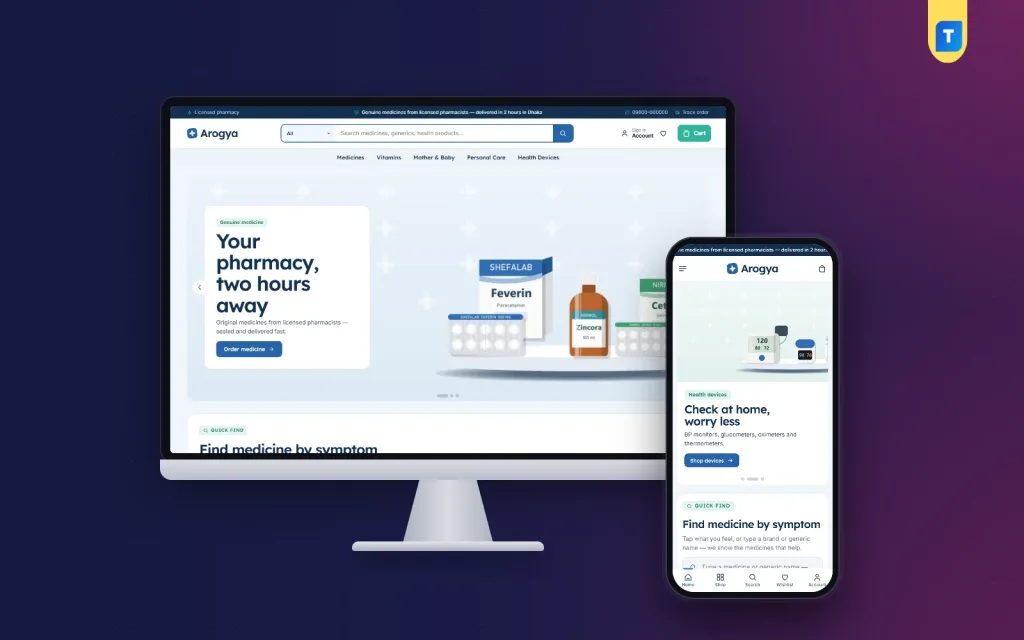
Arogya is a WordPress theme in the class of medical store website templates, made for pharmacies. It has strength and pack variations, generic names, a red Rx mark, a symptom finder and prescription ordering by WhatsApp or call.
Arogya is one of the few medical store website templates built around how a pharmacy really sells. A medicine has a strength, a pack size, a generic name, a company and sometimes a prescription rule. Most shop themes ignore all of that. Arogya puts each of these facts on the screen where the buyer needs it.
It is a WordPress theme for licensed pharmacies, chemist shops and health stores in Bangladesh. It runs on Themeve Commerce, our own store plugin, which is bundled and installed for you. You do not need WooCommerce. The look is clinical blue, mint and white, with clean type that stays easy to read on a small phone.
Who can use these medical store website templates
The theme was designed for a medicine counter, but it works for any shop that sells health goods. A few examples:
- A neighbourhood pharmacy that wants to take orders online and deliver by courier.
- A chain with several branches that wants a page listing every store.
- A medical supply shop selling BP monitors, glucometers, thermometers and wheelchairs.
- A vitamin and supplement store.
- A mother and baby care shop.
- A personal care and hygiene store.
- A home health shop selling devices with a warranty.
The demo is a full online pharmacy with 33 sample products. Every name and picture in it is invented, so replace them with your own stock.
Light and quick to load
A pharmacy site is often opened on a phone with a weak signal, so we kept the code small. Many medical store website templates load heavy sliders and plugins, and Arogya avoids that. The facts below come from the theme files.
- The front end loads one theme stylesheet and one theme script.
- The script does not depend on jQuery.
- Web fonts can be switched off in one setting. The site then uses plain system fonts, which load at once.
- Motion is optional. You can turn off the gentle fade and glide effects.
- Homepage blocks you do not use can be switched off, so they are not built at all.
Front-end features for the shopper
Header and menu
- A top bar with up to three short offers and your hotline number.
- An optional English and Bangla language switch.
- A round search field with a category picker.
- A sticky header that stays on top while the page scrolls.
- Account and wishlist icons on desktop.
- Sign in and register open in a popup, so the customer never leaves the page.
- Picture cards for your categories inside the menu.
Medicine pages that show the right facts
This is where Arogya differs from a plain shop template. Each medicine can carry the details a pharmacist would say out loud.
- Strength and pack options, such as 500 mg with 10 tablets or 500 mg with 100 tablets, each with its own stepped price.
- Generic name, company and form saved on every product.
- A red Rx mark on prescription medicines. It shows on the product page and in search results, so the buyer sees it before opening the page.
- A prescription notice above the facts card on Rx medicines. You write the wording yourself.
- A facts card with the generic name, company, form and price per unit. For a device, the card shows the warranty instead.
- A medical disclaimer on every product page, also editable.
- An expected delivery date.
- Delivery charges and times, taken from the store settings.
- Your return and exchange text.
- Default care or storage instructions.
- A "Frequently bought together" row that matches products by tag.
- Reviews in a fold, with a popup that invites the first review.
- On phones, an add-to-cart bar that sticks to the bottom of the screen.
Product cards
- Photo shape: square, portrait or tall.
- Brand or category above the name, which you can hide.
- Star rating and a sold count, each on or off.
- Colour dots for products that come in colours.
- A second photo on hover.
- Sizes that rise up on hover, for a one-tap add to cart.
Finding medicine fast
Many people know the symptom but not the medicine. The "Find medicine by symptom" block shows a row of symptom chips and a search box. The box looks through brand names and generic names and shows up to eight results at once, each with its generic name, price and Rx mark. The chips come from the product tags you choose, so the list matches your own stock. It is a browsing shortcut, not medical advice, and the disclaimer stays on every product page.
Order with your prescription
Plenty of customers would rather send a photo of the prescription. This block explains the process in three steps. It offers a WhatsApp button, a call button and your pharmacist's working hours. You edit the title, text, steps, phone number, link and hours in the dashboard.
Cart, checkout and tracking
- A one-page checkout.
- An "Order placed" popup that confirms the order.
- A Track Order page where customers follow the parcel.
- Wishlist and back-in-stock alerts.
- An Our Stores page for customers who prefer to pick up in person.
Mobile layout
- A compact header with menu, logo and cart.
- A bottom bar with Home, Shop, Search, Wishlist and Account.
- A menu drawer with your phone number.
- Compact product cards and the sticky add-to-cart bar.
Footer
- About text, phone, email, address and opening hours.
- Social links for Facebook, Instagram, TikTok, YouTube and WhatsApp. Empty ones are hidden.
- Two link columns, Shop and Help, managed in the menus screen.
- Your own copyright line.
The homepage: 24 blocks you can switch and re-order
Most medical store website templates give you a fixed homepage. Here it is built from 24 blocks. Seventeen are on by default and seven are spare. In the dashboard you switch any block on or off and drag it into a new place. On a phone, arrow buttons replace dragging.
On by default
- Hero slider with three slides and two side promos.
- Find medicine by symptom.
- Shop by category, with round tiles.
- Order with your prescription.
- Best sellers in tabs, one tab per category.
- New arrivals in two rows.
- Three departments, each with a banner and eight products.
- Health deals with a countdown and stock bars.
- Care for everyone, with four picture cards.
- Shop by budget, with four price tiles and products.
- Trending now in a sliding row.
- Top rated.
- Trusted company logos, taken from the brand images.
- Health tips from your blog.
- A promise strip.
Spare blocks, off by default
- Our promise, with a short text and a signature.
- Quick links.
- Four cards.
- Banner with a product row.
- Promo cards.
- Brand spotlight.
- More to explore.
The demo promise strip talks about genuine medicine, a pharmacist, cold chain and delivery. Keep only the points your pharmacy truly provides.
Back-end options in Theme Options
Everything lives in one page, Arogya, then Theme Options. A sidebar switches sections at once, and on a phone it becomes a scrolling tab bar. A search box finds any setting by name. A sticky save bar shows when you have unsaved changes. Each section has its own reset button.
Design settings
- Colors: five ready palettes, Clinical blue, Teal care, Green cross, Violet and Slate. You can also set the main color, navy, mint, discount tag, text, card background and page background yourself.
- Typography: four font pairs, Lexend with Inter, Nunito Sans, Figtree or DM Sans.
- Button shape: square, soft corners or pill.
- Content width, from 1100 to 1700 pixels.
- Web fonts on or off, and gentle motion on or off.
- Header and menu: offers, hotline, language switch, search, sticky header, login popup, bottom bar.
- Product cards: photo shape and every card detail listed above.
Homepage settings
- Homepage layout: the on/off and order list for all 24 blocks.
- Hero slider: for each slide a picture, small tag, title, text, button, link and text colour. Two side promos with picture, title and link.
- Symptom finder, prescription steps, categories, deals and brands: titles, texts, WhatsApp link, phone, hours, deal end time and category picks.
- Product sections: best-seller tabs, budget tiles, department banners, care cards, brand spotlight and section titles.
Page settings and tools
- Product page: delivery info, frequently bought together, return text, sticky bar, care text, prescription note and disclaimer.
- Footer and contact details.
- Backup and restore: copy your settings, download them as a file, or paste a backup to bring them back.
- Menus screen for the main menu and the two footer menus.
- Live Customizer for visual changes, including the logo.
The store dashboard behind these medical store website templates
Themeve Commerce adds a Shop menu to the WordPress dashboard. It handles the cart, orders, payments and delivery, so you need no extra shop plugin. This is what it gives you.
Orders and products
- A sales overview with today's sales, the last seven days, the month so far and orders waiting for you.
- Order statuses, printable invoices and a payments box for advances, dues and refunds.
- Incomplete orders, so you can call people who left at checkout.
- A full-page product editor with options, each with its own price, stock, SKU and photo.
- Categories, brands and tags, plus attributes and a size guide.
- A Customer list that groups buyers as new, repeat, VIP, inactive or risky.
Payments and delivery
- bKash, Nagad, SSLCommerz, cash on delivery and manual payment.
- Delivery charge by district, with extra zones.
- Steadfast and Pathao courier from the order screen.
- A COD money screen showing what the courier still owes you.
- Coupons.
Alerts, accounts and marketing
- New-order alerts on Telegram.
- SMS updates and OTP phone verification.
- Sign in by password or by a code sent to the phone.
- Facebook Pixel with the Conversion API.
- Google Analytics 4 and Google Tag Manager.
- SEO settings for descriptions and sharing previews.
- Transactions with monthly totals.
Optional modules
Modules keep the plugin light. You switch on only what you use, from one screen.
- Pre-orders for items that are out of stock.
- Delivery date and time slots.
- Flash Sale and Offers.
- Loyalty Points with refer a friend.
- Upsell and cross-sell, and Recently Viewed.
- Back in Stock alerts.
- Exchange and Returns.
- Store Locations for your branches.
- Sales and Signup popups.
- Reseller and wholesale prices.
How it helps you run a pharmacy
A good pharmacy website saves time at the counter. Some practical examples:
- A customer who needs a 10-tablet strip and one who needs a 100-tablet box both order from the same product page.
- The Rx mark tells the buyer early that a prescription is needed, so fewer orders come in without one.
- The prescription block moves those customers to WhatsApp or a phone call, where your pharmacist can check the paper.
- Price per unit helps a buyer compare pack sizes without a calculator.
- Telegram alerts tell the counter about a web order straight away.
- The Our Stores page helps people find the nearest branch.
Check the rules for selling medicine online in your area. The theme shows the information. Your pharmacy is responsible for how it sells.
Set up in a few steps
- Install the theme in WordPress and activate it. Arogya works as a pharmacy website template from the first page.
- Open Arogya, then Setup, and install the bundled store plugin in one click.
- Run the one-click demo import called Online Pharmacy. It adds 33 products, health tips posts, menus and every page.
- Open Theme Options and pick a palette and a font pair.
- Replace the logo, hero slides, texts and contact details.
- Add your own medicines, with strengths, packs, generic names and Rx status.
- Set your payment methods and delivery charges in the Shop menu.
- Delete the demo products and go live.
Why choose it over a plain template
A general shop template shows a title, a photo and a price. Good medical store website templates need more than that, because a pharmacy sells by strength, pack and prescription rule.
- Variations by strength and pack, not just size and colour.
- Generic names beside brand names, searchable.
- An honest Rx mark in listings and on the page.
- A prescription ordering route by WhatsApp or call.
- Bangladeshi payments and couriers already connected.
- A dashboard that edits the whole homepage without code.
If you only need a pharmacy website template with a few pages and no online ordering, a simple brochure theme may be enough. If you plan to sell, this is built for it.
What is included
- The Arogya theme files (PHP, CSS and JS).
- The Themeve Commerce plugin, bundled.
- The one-click demo, Online Pharmacy.
- Documentation after purchase.
- Six months of support.
It needs WordPress 6.0 or newer and PHP 7.4 or newer, and it is tested up to WordPress 7.1. The layout is responsive on phone, tablet and desktop. It is compatible with Gutenberg, bKash, Nagad, SSLCommerz, Steadfast, Pathao and Facebook Pixel.
For a pharmacy, clear information matters more than decoration, and that is the aim of these medical store website templates. Arogya keeps the right strength, the right pack and an honest Rx mark in front of the buyer. Import the demo, replace it with your shelves and start taking orders.
You can see Arogya working on the live demo, and browse more ready-made designs in our WordPress themes collection.
Reviews
0.0
Write a review
★★★★★
0 reviews from buyersNo reviews yet — be the first to share your experience after buying.
Frequently Asked Questions
01Are these medical store website templates only for pharmacies?
No. Arogya also suits vitamin shops, mother and baby stores, personal care shops and sellers of home health devices.
02Do these medical store website templates need WooCommerce?
No. The theme runs on Themeve Commerce, which is bundled and installs in one click from Arogya, then Setup.
03Can I sell one medicine in several strengths and pack sizes?
Yes. Each medicine can have strength and pack options, such as 500 mg with 10 tablets or 100 tablets, each with its own price.
04How are prescription medicines shown?
They carry a red Rx mark, which also shows in search results. The product page shows a prescription notice above the facts card.
05How do customers order with a prescription?
The Order with your prescription block explains three steps and gives WhatsApp and call buttons with your pharmacist's hours. You edit it in Theme Options.
06Which payments and couriers are supported?
bKash, Nagad, SSLCommerz, cash on delivery and manual payment, with Steadfast and Pathao courier and a Track Order page.
07Can I change the colours and fonts?
Yes. Choose from five palettes and four font pairs, or set each colour yourself.
08Do I need coding skills?
No. Homepage blocks, prescription steps, symptom chips, colours and fonts are all managed in Theme Options, which also works on a phone.
Delivery & Support
1Place your orderAdd to cart, sign in and pay with bKash, Nagad or Rocket.
2Payment verified automaticallyEnter your Transaction ID — the payment is matched automatically, usually within seconds.
3Get your productYour license key and download appear in My Account → Licenses.
- Secure automatic payment verification
- Delivery to your account & e-mail
- Friendly WhatsApp support
Refund Policy
This policy applies to every product in our store.
You get a refund when the product does not work as described and we cannot fix it, when your license will not activate your website, or when a manually delivered product is late and you cancel before delivery. A working license, or a single license already used on a live domain, is not refundable. Approved refunds go back to the number you paid from within one working day, minus the Send Money charge.
More items
View all →