 −29%
−29%
WordPress Themes
Dheu – Seafood Restaurant WordPress Theme with Online Ordering
৳2,500
৳3,500Save −29%
✦ Key features
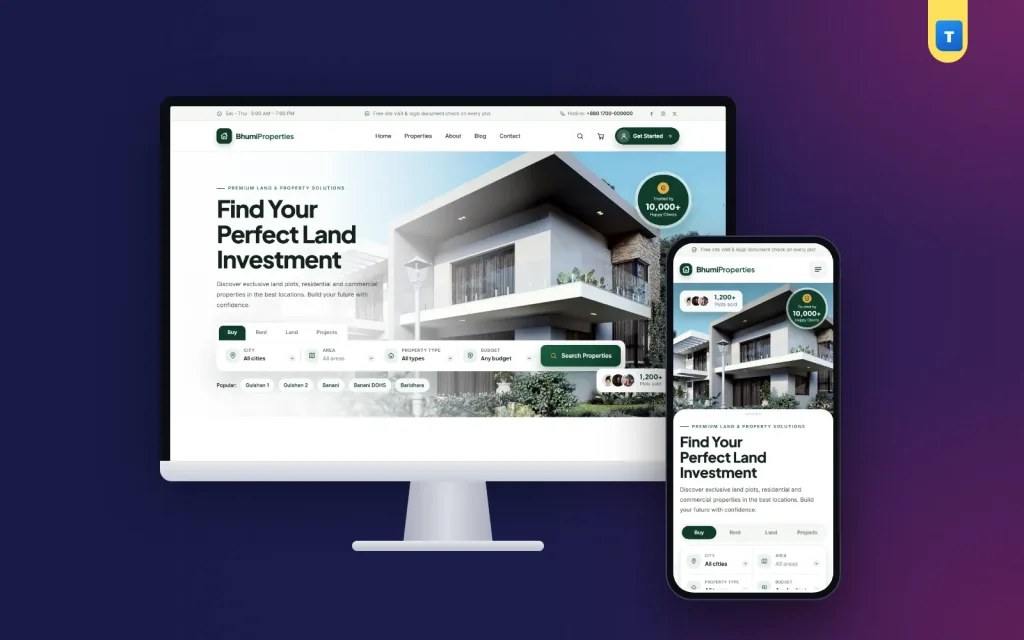
Bhumi is a property WordPress theme for real estate companies, land sellers, developers and agents who want buyers and tenants to find the right property online. Every property gets its own page with photos, price, size, location, features, documents and an agent, and visitors can search by city, area, type and budget. Serious buyers can book a site visit or pay booking money online. It runs on WooCommerce, so payments and records are handled by a system you already know.
The demo comes with 24 properties, 4 categories, 4 agents and all the pages a property business needs. Import it in one click and start adding your own listings.
Bhumi handles land, apartments, houses, offices, shops and warehouses, for sale or for rent, in one property WordPress theme.
Property sites need large, sharp photos, which can make them slow. Bhumi keeps its own JavaScript to about 52 KB and uses no page builder. Wide photos are prepared at sensible sizes, and the layout stays stable while they load. WooCommerce is the only plugin it needs.
The search on the homepage has tabs for Buy, Rent, Land and Projects. Under each tab, buyers choose a city, then an area inside that city, a property type and a budget range. Results show only matching properties, so a family looking for a 3-bed flat to rent in one area does not scroll past land for sale in another city.
You control the lists in the dashboard: locations, property types, budget ranges, amenities and documents. Locations are entered as "City | Area, Area…", and you can add other countries as "Country > City | …" if you sell abroad.
Each property page has a "Property details" tab with everything buyers ask about: type, purpose (sale or rent), status, city, area, full address, map, size and unit, square feet, bedrooms, bathrooms, balconies, total floors, the unit's floor, facing, road width, parking, furnishing, year built, booking money, the agent, nearby places, amenities and available documents.
Set a booking amount for any property. When a buyer books, that booking money becomes the cart price, and the rest is paid at registration. This is a simple way to hold a plot or flat for a serious buyer.
Buyers can ask for a site visit from the property page. Requests appear under Bhumi → Site visits in your dashboard, so your team can call back and fix a time.
Add your agents once with photo and contact details, then pick an agent for each property. Buyers see who to call, which builds trust.
The homepage includes a hero with search, property categories, featured and latest properties, popular locations, smart reasons to choose you, numbers, how buying works, agents, a call to action, testimonials, FAQ and blog. Turn sections on or off and reorder them.
Visitors can save properties to a list and compare them later. The demo includes a Saved Properties page.
Long pages such as Privacy, Terms or a Booking and Refund Policy automatically get a contents list and numbered section cards, so they are easy to read. The FAQ page combines homepage questions with your page headings.
Customers sign up and sign in with a mobile number or an email and a password. An account is needed to pay booking money, which keeps your buyer records clean and lets them see their bookings later.
Each property is a WooCommerce product with an extra property details box. Add photos, fill in the details, set the booking money and publish.
Bhumi → Theme Options → Property settings holds your locations, property types, amenities, document list, budget ranges and agents. Change these once and they appear in search and on every property.
Site visit requests have their own list under Bhumi → Site visits. Contact form messages go to the enquiries inbox.
Booking payments appear in WooCommerce → Orders. Add bKash, Nagad or card with any WooCommerce payment plugin.
Homepage layout, colours, typography, header and menu, contact form and company details all live on one page, with search and backup and restore.
Activate your licence key once to unlock the demo import and updates.
Most property searches start on a phone. Bhumi keeps the search simple to tap, cards readable, photos swipeable and the call and site visit buttons easy to reach.
A plain property website template often shows nice cards but stores little real data, so search and filters are weak. Bhumi stores 25 property details for every listing, has city and area search, booking money, site visit requests and agents built in. A typical property website template also needs a separate listing plugin; Bhumi only needs WooCommerce.
Take photos in daylight, include the road and the view, and always show the size and price. The property WordPress theme presents them clearly on every screen.
Buying land or a flat is a big step, and buyers look for reasons to trust you before they call. A strong property site does these things well:
The property WordPress theme is designed around these points, so your listings feel complete and professional.
Start with your best twenty properties and make each one complete before adding more. Use the same photo order on every listing: front view, road, inside rooms, then the view or surroundings. Write a short paragraph about the neighbourhood, such as schools, markets and transport. Keep sold properties marked as sold for a while, because they show buyers that you close deals. Answer site visit requests on the same day and confirm the time by phone. Share each new listing on Facebook with a direct link to its page instead of a long post. Over time, update your popular locations and budgets in Property settings so the search keeps matching what buyers are looking for.
Property buyers often come back to a listing many times before they decide. Saved properties, clear photos and a named agent make those return visits easy, and every site visit request is stored so your team can follow up even weeks later. For developers with several projects, categories keep land, flats and commercial units apart, so each buyer sees only what fits.
Every Bhumi licence includes theme updates from inside your dashboard. When we improve a feature or fix a problem, you see the update in WordPress and install it with one click; your content and settings stay as they are. If you get stuck while setting up, the documentation walks you through each step with screenshots, and our support team answers in Bangla or English. Most questions, such as how to change the homepage order, add a payment method or set delivery charges, are answered within a day.
We also keep Bhumi tested with the latest versions of WordPress and WooCommerce, so you can update your site with confidence instead of worrying that the shop will break.
Bhumi runs on WooCommerce, the free shop plugin used by millions of stores. Browse more real estate themes or see all our WordPress themes.
No reviews yet — be the first to share your experience after buying.
Real estate companies, land sellers, developers, agents and rental managers.
Yes. Each property has a purpose (sale or rent), and the search has Buy and Rent tabs.
Yes. Buyers pick a city and then an area, plus type and budget. You set the lists in Property settings.
Yes. The booking money becomes the cart price, and the rest is paid at registration.
Yes. There is no page builder, and the theme's own JavaScript is about 52 KB.
To Bhumi → Site visits in your dashboard.
Yes. WooCommerce is the only plugin Bhumi needs.
No. Everything is set from the dashboard.
You get a refund when the product does not work as described and we cannot fix it, when your license will not activate your website, or when a manually delivered product is late and you cancel before delivery. A working license, or a single license already used on a live domain, is not refundable. Approved refunds go back to the number you paid from within one working day, minus the Send Money charge.
−29%
 −14%
−14%
 −10%
−10%
 −25%
−25%
