 −15%
−15%
Dheu – Seafood Restaurant WordPress Theme with Online Ordering
✦ Key features
- Hero
- Signature dishes and menu highlights
- About with story video
- Good food band
- Full menu with tabs
- Why choose us and how it works
- Special offer and platters
- Gallery, reviews, booking and blog
- Guest accounts, wishlist and order history
- Orders and menu
- Theme Options
- Licence and updates
Overview
Dheu is a seafood restaurant WordPress theme for WooCommerce: order dishes online, take table reservations, show the full menu in tabs, run coupon offers and let guests sign in with a mobile number or email.
Dheu is a seafood restaurant WordPress theme for places that serve fresh fish, prawns and crab and want guests to book a table or order online. It has a calm sea-at-dusk look in navy, orange and sky blue.
Guests can browse the full menu, add dishes to the cart and pay cash on delivery. They can also send a table request in a few taps. Dheu runs on the free WooCommerce plugin, so cart, coupons, stock and orders work the normal way.
The one-click demo gives you 26 dishes in 5 categories, ready pages and sample blog posts, so you only swap in your own photos, prices and story.
Who this seafood restaurant WordPress theme is for
A seafood kitchen sells freshness, a view and a good night out. Dheu is built around that. It fits:
- Seafood restaurants in the city that want online orders and table bookings in one place.
- Fish grills and barbecue spots that sell by the plate or by the platter.
- Beach restaurants in Cox's Bazar, Kuakata and other coastal towns that get tourist bookings.
- Sushi and fish bars with a short, focused menu.
- Fish home-delivery kitchens and cloud kitchens that only deliver.
- Hotel restaurants that need a separate site for the dining room.
- Caterers that sell seafood platters for weddings, office events and family parties.
If you are comparing seafood restaurant website templates, the big difference is that Dheu is not a picture of a site. It is a working restaurant site with a real cart, checkout and reservation inbox.
A sea-at-dusk design that makes guests hungry
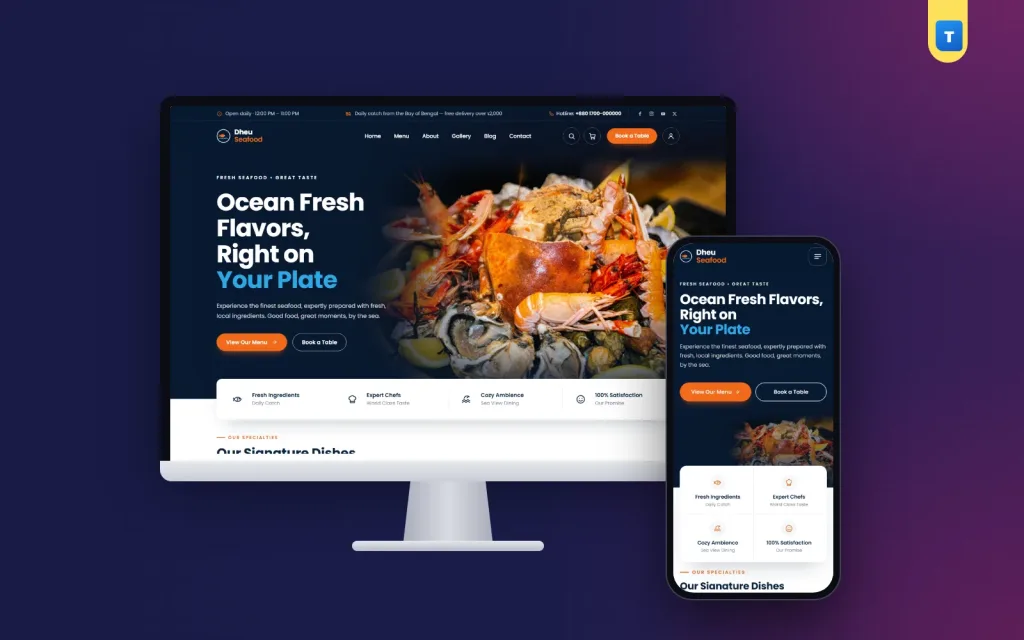
The header carries a fish-and-wave logo, the menu in the middle, a search button and an orange "Book a Table" button with the cart count. Over the hero the header is see-through. Once the guest scrolls, it turns solid so the menu is always easy to reach.
On phones the layout is planned, not squeezed. That matters for any seafood restaurant WordPress theme, because most dinner orders now start on a phone. The menu button sits on the left, the logo in the centre and search on the right. The menu opens as a side drawer. Cards, buttons and the booking form are sized for a thumb.
Homepage blocks you can switch on and off
Every block has its own on/off switch and its own fields in Theme Options. Change the text and photos, or hide a block, without touching code.
Hero
A sea-at-dusk photo with your headline, two buttons ("View Our Menu" and "Book a Table") and a rating line with small guest faces. Beside it sits a dish photo with a "daily catch" card and a price card. A white card below lists your four promises.
Signature dishes and menu highlights
Show four signature dishes as product cards. A second block shows four round dish photos with names and prices, which works well for the plates people come back for.
About with story video
A photo with a play button opens your story video. Three ticks and an "Our Story" button tell guests who cooks and where the fish comes from.
Good food band
A boat photo with three figures that count up as the guest scrolls, such as years open, dishes served and happy guests.
Full menu with tabs
Pill tabs, one per menu category with its own icon. Each dish card has a round "+" button that adds it straight to the cart. This is the block most guests use to order. Many seafood restaurant website templates show a menu as a flat list, but here every dish can be ordered from the homepage.
Why choose us and how it works
A navy band with a plated dish and three reasons to eat with you. Then three simple steps that follow the fish from the boat to the table.
Special offer and platters
A coupon code with a round badge and an "Order Now" button. A platters and combo deals block with three cards is ready too. It is off by default, so switch it on when you have family platters to sell.
Gallery, reviews, booking and blog
A photo gallery, a reviews slider with guest photos, stars and city, a reservation form on a sunset photo, and your latest three blog posts.
Table reservations without an extra plugin
The booking form sits on the homepage and on the contact page. Each request is saved in the dashboard under Dheu → Reservations and is also emailed to the restaurant. If email fails one day, the booking is still waiting in the dashboard. Staff can open the list, call the guest and confirm the table. Few seafood restaurant WordPress theme designs keep bookings inside the dashboard like this.
Online ordering built on WooCommerce
Each dish is a WooCommerce product, so you manage the menu the same way any shop manages stock. The product page is made for food:
- Freshness notes such as "Bay of Bengal, caught daily" and "Made fresh to order".
- Size option for half and full plates, with its own price.
- "You save" line when a dish is on sale.
- Delivery promises: delivery in about 40 minutes, pick-up ready in 15 minutes, free delivery over ৳2,000.
- Wishlist, share and copy link buttons.
- Tabs for product details and delivery & returns.
The cart shows a friendly line such as "Add ৳X more for free delivery", which nudges guests to add a drink or a dessert. The checkout shows trust notes for cash on delivery. You can add bKash, Nagad or cards with any WooCommerce payment plugin.
The shop page has a cream heading band and a filter sidebar with categories, price and rating, so a guest can find grilled dishes under ৳800 in seconds.
Guest accounts, wishlist and order history
Guests sign up and sign in with a Bangladeshi mobile number or an email and password. The sign-in popup can show a welcome coupon line to turn first visits into first orders. By default an account is needed to place an order, which keeps fake orders down. Password reset works by email. Signed-in guests get a wishlist page and a My Orders page with their past orders.
Light and quick on a phone
Hungry guests do not wait. Dheu keeps its own code small:
- One plain-JavaScript file of 36.8 KB, about 10 KB when compressed.
- One stylesheet, about 53 KB compressed.
- No jQuery needed by the theme itself and no page builder.
WooCommerce still loads its own scripts for the cart and checkout. The theme adds very little on top, so pages stay quick even on mobile data. Compress your dish photos before upload and the site will feel fast.
A light seafood restaurant WordPress theme also helps tourists on weak beach networks, who often book from a hotel room or a bus.
Running your seafood restaurant WordPress theme day to day
You work in the normal WordPress and WooCommerce dashboard. There is no extra control panel to learn.
Orders and menu
New orders arrive in WooCommerce → Orders. Change the status as the kitchen cooks and the rider leaves. Mark a dish out of stock when the catch runs out, and it stops taking orders.
Theme Options
One settings page with a section sidebar holds colours, typography, header and menu, every homepage block, the contact form, company details and footer, and delivery charges.
Licence and updates
Activate the licence once. Updates then arrive in the dashboard and keep your content and settings.
Works with any WooCommerce plugin
Dheu uses WooCommerce's own templates, so plugins keep working. Add payment gateways for bKash, Nagad and cards, courier plugins, or analytics later. You never need to edit theme files, so a seafood restaurant WordPress theme update never wipes your changes.
Getting started in one afternoon
- Install WordPress and WooCommerce on your hosting.
- Upload Dheu in Appearance → Themes → Add New and activate it.
- Activate your licence with the key from your Themeve account.
- Import the demo from Dheu → Setup with one click.
- Add your dishes: photos, plate sizes and prices.
- Set delivery and payment: your delivery charge, the free-delivery amount and the payment methods you accept.
- Test a booking and an order from your phone, then share the link.
Shoot dishes in daylight near a window, on the same plate style and from the same angle. Square photos fit the cards and the round menu highlights best.
Dheu runs on WooCommerce, the free shop plugin used by millions of stores. See all our WordPress themes for other restaurant and shop designs.
What is included
- The Dheu theme zip file
- One-click demo import with dishes, categories, pages, menus and blog posts
- Reservation inbox under Dheu → Reservations
- Step-by-step documentation
- Theme updates with your licence
The demo comes with 26 dishes in Starters, Main Course, Seafood, Drinks and Desserts, plus the OCEAN15 coupon and four blog posts. All you need is WordPress and the free WooCommerce plugin to turn this seafood restaurant WordPress theme into your own site.
Reviews
0.0
Write a review
★★★★★
0 reviews from buyersNo reviews yet — be the first to share your experience after buying.
Frequently Asked Questions
01What kind of business is Dheu for?
Seafood restaurants, fish grills, beach restaurants, sushi bars, delivery kitchens, hotel restaurants and caterers.
02Is Dheu a seafood restaurant WordPress theme with online ordering?
Yes. Dishes are WooCommerce products with a cart, checkout, coupons and order history.
03Can guests book a table?
Yes. The booking form saves each request under Dheu → Reservations and emails it to you.
04Does this seafood restaurant WordPress theme need a page builder?
No. You edit every block in Theme Options. It needs only WordPress and the free WooCommerce plugin.
05Can guests order without an account?
By default an account is needed, which keeps fake orders down. Guests sign in with a mobile number or email.
06Can I take bKash or Nagad?
Cash on delivery works out of the box. Add bKash, Nagad or cards with any WooCommerce payment plugin.
07Can I change the delivery charge?
Yes. The demo uses ৳80 and free delivery over ৳2,000, and you can change both.
08Do I need coding skills?
No. Import the demo, then change photos, prices and texts from the dashboard.
Delivery & Support
1Place your orderAdd to cart, sign in and pay with bKash, Nagad or Rocket.
2Payment verified automaticallyEnter your Transaction ID — the payment is matched automatically, usually within seconds.
3Get your productYour license key and download appear in My Account → Licenses.
- Secure automatic payment verification
- Delivery to your account & e-mail
- Friendly WhatsApp support
Refund Policy
This policy applies to every product in our store.
You get a refund when the product does not work as described and we cannot fix it, when your license will not activate your website, or when a manually delivered product is late and you cancel before delivery. A working license, or a single license already used on a live domain, is not refundable. Approved refunds go back to the number you paid from within one working day, minus the Send Money charge.
More items
View all →