 −15%
−15%
Bishram – Furniture Shop WordPress Theme, Gallery Style
✦ Key features
- Header with category search
- Hero slides and category mosaic
- Best sellers in tabs and a room banner
- New arrivals, deals and testimonials
- A category page that sells
- Design and words without code
- Daily numbers
- Order handling
- A catalogue that stays organised
- Payment choices
- Delivery and the courier
- Sign-in and customer accounts
- Messages and safety
- Marketing tools and reports
Overview
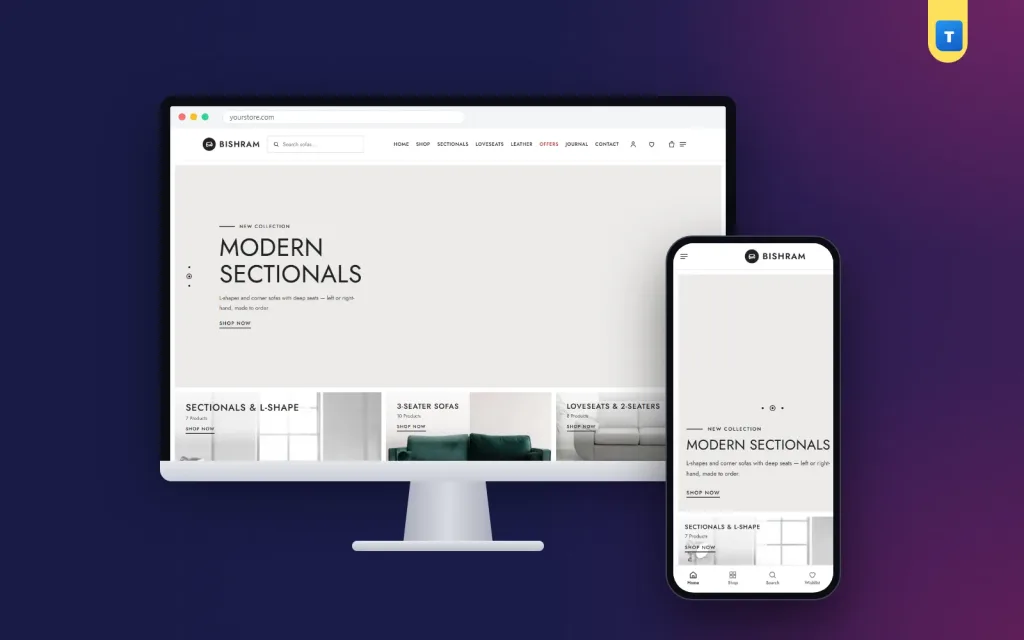
Bishram is a furniture shop WordPress theme with a calm gallery look: a header search with a category picker, a category mosaic, best sellers in tabs, room hotspots and a full shop with local payments.
Bishram is a furniture shop WordPress theme with a gallery-style design for stores that sell sofas, sectionals, recliners and living room furniture. Big room photos, a category mosaic and clean square cards make your range look like a showroom, and the built-in shop plugin takes orders with bKash, Nagad or cash on delivery.
The look is calm and editorial: a white header, thin capital headings, light-grey panels and black prices. It suits shops that want their furniture to look premium without a dark or crowded layout.
Who can use this furniture shop WordPress theme
Bishram is a good fit for shops that sell a curated range and care about presentation. It works for:
Furniture showrooms with a large catalogue. Sofa and living room specialists. Interior design studios that also sell furniture. Premium and designer furniture stores. Home décor shops that mix sofas with lamps, rugs and side tables. Importers who sell finished furniture online across the country.
Because categories, options and labels are all editable, Bishram also works as a furniture shop website template for bedroom, dining or office furniture.
Light, even for a photo-heavy furniture shop WordPress theme
Gallery layouts depend on big photos, so Bishram keeps its own code small. There is no page builder and no jQuery. The homepage loads five small JavaScript files, about 77 KB in total, and photos further down load only when the visitor scrolls to them. Your room photos get the speed, not the theme.
Features that make your range look like a showroom
Bishram has 21 homepage blocks that you can switch on or off and reorder, and about 240 settings in Theme Options. The default homepage follows a gallery layout.
Header with category search
The white header holds your logo, a search field with its own "All Category" picker, a menu in capitals, and icons for account, wishlist and cart. Buyers can search inside one category, such as "Recliners", from any page.
Hero slides and category mosaic
A light-grey hero shows a thin capital headline, an underlined "Shop now" link and a room photo, with up to three slides. Below it, a mosaic of one large tile and four small tiles shows your main categories with their product counts.
Best sellers in tabs and a room banner
"Best selling products" sits in line tabs: All, Featured, Best seller and Sales. A wide "Living Room" banner uses + hotspots, so buyers can tap any piece in the photo and open it.
New arrivals, deals and testimonials
New arrivals, "Deals of the Week" with an outlined countdown timer, a large five-star testimonial shown one at a time, three service promises with big icons and a journal block for your buying guides complete the page.
A category page that sells
Category pages open with a grey title band and round category pictures, followed by flat filters, a "Showing N products" line with a sort menu and a clean three-column grid. Cards show an "Add to cart" bar on hover, which becomes a round icon on touch screens, a heart next to the name and a black price that turns red only on sale.
Design and words without code
Four palettes (Black & white, Navy & grey, Olive & cream, Walnut & sand), three font pairs led by Jost, and a "Words & labels" section where you can rename the tabs, buttons and small labels. Settings can be searched and exported as a backup.
Behind the showroom: the furniture shop WordPress theme dashboard
The gallery look is only half of this furniture shop WordPress theme. The other half is the Themeve Commerce plugin, which comes with the theme, installs with one click and runs the whole shop without WooCommerce or extra plugins. Here is what it gives you in the dashboard.
Daily numbers
Open the store dashboard to see today's sales, the week, the month and pending orders, with a fourteen-day chart. It is the quickest way to see whether your weekly deal is pulling buyers in.
Order handling
Orders move through clear statuses, with an invoice for each and a payments record that keeps advances, balances and refunds in one place. Incomplete Orders collects shoppers who left during checkout, a useful list when every order is a large one.
A catalogue that stays organised
In a furniture shop WordPress theme, the catalogue is everything. The full-page product editor handles fabric and colour options, each with its own price, stock, SKU and photo, and the sizes that appear on the cards. Categories, brands and tags each have their own screen, which keeps a large furniture range tidy.
Payment choices
Accept cash on delivery, bKash and Nagad payment, card payment through SSLCommerz, and manual Send Money for bKash, Nagad, Rocket and Upay with a transaction ID. Require an advance on cash on delivery for high-value pieces, and choose the display order of payment methods.
Delivery and the courier
Set delivery charges by district or by extra zone, send orders to Steadfast or Pathao from the order screen, and use courier automation to save time. The COD money screen tracks cash the courier still owes and imports their payment sheet.
Sign-in and customer accounts
The account icon in the header opens a popup to sign in or register with a password, a one-time phone code, Google or Facebook. Customers then see their orders and tracking, their wishlist of saved pieces and their exchange or return requests.
Messages and safety
New orders arrive by email, Telegram or WhatsApp. Customers can receive SMS updates and a review request after delivery. OTP phone checks and fake order protection stop many false cash-on-delivery orders. SMS campaigns announce new arrivals to past buyers.
Marketing tools and reports
Connect Facebook Pixel with the Conversion API, Google Analytics 4 and Google Tag Manager, and publish product feeds to Facebook and Google. SEO settings add descriptions, sharing previews and product rich results. The Transactions screen totals payments and refunds by month, and the Customer list shows new, repeat, VIP, inactive and risky buyers.
Modules for a growing showroom
Modules extend the furniture shop WordPress theme when you need more. Switch on Store Locations to list your showrooms with hours, calls and directions. Reseller & Wholesale Prices serves interior designers, Bulk Order & Corporate Quotes serves offices and hotels, and Pre-orders handles pieces still in production.
Combo & Bundle Offers, Flash Sale, Delivery Date & Time, Loyalty Points with refer a friend, Upsell & Cross-sell, Recently Viewed, Back in Stock Alerts, Exchange & Returns, Sales and Signup popups, an Affiliate Program and a Marketplace module round it off. Testimonials, offers and support tickets have their own menus, and a REST API with signed webhooks is available for developers.
Why a furniture shop WordPress theme needs a strong category page
In a furniture shop, most buyers do not land on the homepage. They come from an ad or a search straight into a category, such as recliners or L-shape sofas. That page has to work as hard as the homepage.
Bishram treats the category page as a second homepage. Round pictures at the top let buyers jump to a related category, flat filters stay out of the way until they are needed, and the product count tells buyers how much choice they have. The three-column grid gives each sofa enough room to look good without endless scrolling.
This is the main difference between a design-only furniture shop website template and a working Bishram: the pages buyers actually use are designed with the same care as the homepage.
Comfortable on every phone
On phones, Bishram keeps the header simple, shows three service promises in three small columns and keeps product cards about the height of a thumb's reach, so buyers see more of your range. The checkout fits on one screen and sign-in opens in a popup.
Bishram or a plain furniture shop website template?
A design-only template gives you a gallery homepage but leaves you to add the shop, payments and couriers yourself. Bishram is a complete Bishram: the showroom look, the category tools and a full shop, built to work together.
For a warmer, homely style, see our sofa theme Kedara. For classic high-end pieces, look at our luxury furniture theme.
Getting started
Upload the theme in WordPress, install the plugin with one click, activate your license and import the demo. Then add your logo, choose a palette, replace the hero slides and category tiles, and upload your own products. Set delivery charges per district and switch on your payment methods. Most shops are ready in a day.
What is included
The Bishram theme, the Themeve Commerce plugin, a setup guide, theme updates and help from our support team. Bishram runs on WordPress 6.0 or newer with PHP 7.4 or newer. The one-click demo adds 35 sample sofas in 5 categories, 17 ready pages and 3 menus.
Reviews
0.0
Write a review
★★★★★
0 reviews from buyersNo reviews yet — be the first to share your experience after buying.
Frequently Asked Questions
01Which shops is the Bishram furniture shop WordPress theme for?
Furniture showrooms, sofa and living room specialists, interior studios, premium furniture stores and home décor shops.
02Can buyers search inside one category?
Yes. The header search has its own category picker, so a buyer can search only recliners or only sectionals.
03Is this furniture shop WordPress theme fast?
Yes. No page builder, no jQuery, about 77 KB of JavaScript on the homepage and photos that load as you scroll.
04Can I rename the tabs and buttons?
Yes. "Words & labels" in Theme Options lets you change the tab names, button texts and small labels.
05Do I need WooCommerce?
No. The included Themeve Commerce plugin runs the shop.
06Which payments and couriers are supported?
bKash, Nagad, SSLCommerz, cash on delivery with an optional advance and manual payment, plus Steadfast and Pathao courier.
07Can I sell other furniture?
Yes. Categories, options and labels are editable for any furniture or décor.
08Do I need coding skills?
No. Everything is changed from Theme Options.
Delivery & Support
1Place your orderAdd to cart, sign in and pay with bKash or Rocket.
2Payment verified automaticallyEnter your Transaction ID — the payment is matched automatically, usually within seconds.
3Get your productYour license key and download appear in My Account → Licenses.
- Secure automatic payment verification
- Delivery to your account & e-mail
- Friendly WhatsApp support
Refund Policy
This policy applies to every product in our store.
You get a refund when the product does not work as described and we cannot fix it, when your license will not activate your website, or when a manually delivered product is late and you cancel before delivery. A working license, or a single license already used on a live domain, is not refundable. Approved refunds go back to the number you paid from within one working day, minus the Send Money charge.
More items
View all →You may also like
−15%
 −27%
−27%
 −29%
−29%
 −38%
−38%
