 −22%
−22%
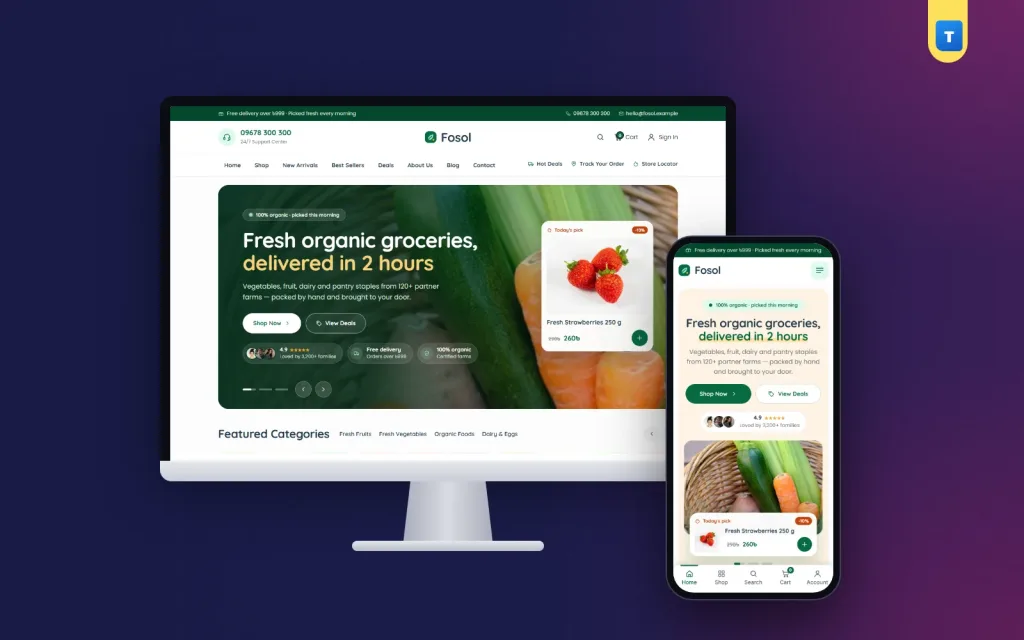
Fosol – Organic Shop WordPress Theme for Organic Grocery Stores
✦ Key features
- Designed for phones, not just shrunk
- Photo hero slider with a live "Today's pick"
- Featured categories and promo banners
- Popular products with tabs
- Daily best sells and deals of the day
- Four product lists
- Lifestyle band, benefits, reviews, blog, FAQ and newsletter
- The full product page
- Sign in with a mobile number or email
- Orders and stock
- Theme Options
- Enquiries and subscribers
Overview
Fosol is an organic shop WordPress theme for WooCommerce: sell vegetables, fruit, rice, oil, honey and daily groceries in Regular and Family Packs, add to cart without reloading, run daily deals with countdowns, and take Cash on Delivery or bKash, Nagad and Rocket Send Money.
Fosol is an organic shop WordPress theme for WooCommerce, made for stores that sell fresh vegetables, fruit, rice, oil, honey, spices, dairy and daily groceries online. The design uses deep green (#076B43) with cream and beige, rounded Quicksand headings and real food photos, so the shop looks clean, calm and fresh on a laptop and on a phone.
Buyers pick a Regular or Family Pack right on the product card, add it to the cart without leaving the page and pay cash on delivery or by bKash, Nagad or Rocket Send Money. Because Fosol runs on the free WooCommerce plugin, stock, coupons, orders and shipping work the normal way, and other WooCommerce plugins can be added when you need them.
The one-click demo brings 64 products in 12 grocery categories, every shop page, menus and blog posts, so you start from a full store and only change photos, prices and text.
Who this organic shop WordPress theme is for
Organic buyers look for two things before they order: proof that the food is fresh and a clear price for the pack they want. Fosol puts both on every card. It suits:
- Organic grocery shops selling vegetables, fruit, eggs and pantry items.
- Farm-to-home brands that deliver their own produce to city families.
- Healthy food stores with honey, ghee, nuts, seeds and cold-pressed oil.
- Neighbourhood supermarkets moving their daily shopping online.
- Rice, dal and spice sellers who offer a small and a large pack.
- Home businesses selling pickles, homemade ghee or village-made products.
- Facebook and Instagram sellers who want a real shop with a cart instead of taking orders in messages.
A plain layout file only shows a design. Fosol is a working grocery store WooCommerce theme with a cart, checkout, accounts, order tracking and a wishlist already built in.
A fresh green design with a warm cream base
Deep green marks buttons, prices and the current menu item, while cream and beige panels keep the page soft and easy to read. Product photos sit on white cards with rounded corners, a sale badge, a star rating and a stock line.
On a computer the header has three rows. A green bar at the top carries your offer and contact line. The middle row has your support number, logo, wishlist, cart and account. The menu row has a green pill for the current page, quick links and a search box with an All Categories list.
Designed for phones, not just shrunk
Most grocery orders come from a phone, often late in the evening for tomorrow's cooking. On a phone the header shows only the menu and your logo, so the page opens on the products. Search and cart move to a bottom tab bar that stays under the thumb.
The hero text sits centred on cream with two buttons side by side, and product cards show two per row with large pack buttons. An organic shop WordPress theme has to work with one thumb on a cheap Android phone, and Fosol was checked on screens from 360 px wide up.
Homepage blocks for an organic grocery
Every homepage block can be switched on or off and moved up or down in Theme Options. No page builder and no code are needed.
Photo hero slider with a live "Today's pick"
Big full-photo slides carry your headline with a highlighted word, a Shop button and a View Deals button, plus a rating line and small service chips. A "Today's pick" card shows a real product that is on sale, with its price and an Add button, so the hero is not just a picture but a place to start shopping.
Featured categories and promo banners
Pastel category tiles show each category with a photo and the number of products. Below them, three promo banners point to the offers you want to push this week, such as fresh fruit, cooking oil or a breakfast bundle.
Popular products with tabs
A product grid with category tabs lets the buyer jump between vegetables, fruit, dairy and more without opening the shop page.
Daily best sells and deals of the day
Daily best sells pairs a feature panel with a rail of products and "sold" bars. Deals of the day shows your sale products with a live countdown, which works well for flash offers on seasonal fruit.
Four product lists
Top Selling, Trending, Recently Added and Top Rated sit side by side, filled from your real WooCommerce data.
Lifestyle band, benefits, reviews, blog, FAQ and newsletter
An organic lifestyle photo band, five service benefit tiles, three review cards, your latest three blog posts, a FAQ that opens and closes, and a newsletter band. The demo reviews and facts are placeholder text, so replace them with your own.
Product cards that sell packs quickly
The product card is where a grocery shop wins or loses time. Each Fosol card shows:
- Badge for sale or new items.
- Wishlist heart and quick view buttons on the photo.
- Category, stars, brand and stock in small lines.
- Pack chips: the demo products have Regular and Family Pack options, and the price changes when the buyer taps a chip.
- Add button that puts the item in the cart with AJAX, so the page does not reload.
Quick view opens the product in a pop-up with photos, price, pack choice and Add to Cart. A buyer can fill a weekly basket from the homepage without opening a single product page.
The full product page
The product page has a gallery, sale tag, price, stock pill, pack options, quantity, Add to Cart and Buy Now, payment logos and help buttons. Description, Additional information and Reviews tabs follow, then related products. Fosol uses WooCommerce's own templates, so plugins for delivery dates, product add-ons or minimum orders work with this organic shop WordPress theme without changes.
Every page a grocery store needs
The demo creates all the pages, with menus already linked:
- Shop with a filter sidebar, plus a search results page.
- Deals & Offers (/offers/), Best Sellers and New Arrivals.
- Wishlist, cart, checkout and order received.
- Track Order, where buyers check the status of an order.
- My Account with orders, addresses and account details.
- About, Contact, Blog and FAQ.
- Privacy, Terms, Return & Refund and Shipping policy pages.
The policy pages hold starter text. Read them and change them to match how your shop really works before you go live.
Cart, checkout, delivery and payment
The cart shows a free-delivery bar that reads the real amount from Theme Options. The default is ৳999: when the cart passes that total, delivery becomes free and the bar says so. Change the amount, or set it to 0 to switch it off.
- Delivery charges: the demo sets Inside Dhaka at ৳80 and Outside Dhaka at ৳120 with WooCommerce shipping. Change them or add your own zones.
- Cash on Delivery is ready.
- bKash / Nagad / Rocket Send Money: a manual method. The buyer places the order, sends the total to your number and replies with the transaction ID. You check it and confirm the order. It is not an automatic gateway.
- Phone number is required at checkout, so your rider can always call.
- Welcome coupon: WELCOME200 is ready in the demo.
Live bKash, Nagad or SSLCommerz payments need your own merchant account and the provider's WooCommerce plugin. Fosol does not pretend a payment is paid when it is not.
Sign in with a mobile number or email
The account pop-up lets buyers sign in or register with a Bangladeshi mobile number or an email and a password, then go back to where they were. Signed-in buyers see their orders, saved address and wishlist, so the next weekly order takes a minute.
Shop page and filters
The shop page has a sidebar with search, categories, a price range in taka, rating, stock and on-sale filters. A buyer can find "honey under ৳600, in stock" in a few taps. On a phone the product cards stay two per row. Good filters matter in an organic shop WordPress theme, because a grocery list is long and buyers want to finish it fast.
How light is Fosol?
- One JavaScript file of 67 KB, about 17 KB compressed, written in plain JavaScript.
- No jQuery needed by the theme's own script.
- One stylesheet of about 108 KB compressed.
- No page builder, so pages do not carry builder files.
WooCommerce and your other plugins still load their own files, and the theme leaves them alone. Compress your product photos and this grocery store WooCommerce theme stays quick on mobile data.
Running your organic shop WordPress theme day to day
You work in the normal WordPress and WooCommerce dashboard, plus one Fosol menu for the theme's own settings.
Orders and stock
Orders arrive in WooCommerce → Orders with the buyer's phone, area and payment method. For Send Money orders, match the transaction ID with your account, then move the order to Processing. Mark items out of stock when the morning's vegetables run out.
Theme Options
Fosol → Theme Options holds the header support line and links, hero slides, service chips, category tiles, promo banners, product block titles and counts, the free-delivery amount, WhatsApp number, every homepage block's switch and order, and the footer.
Enquiries and subscribers
Contact form messages are emailed to you and kept under Fosol → Enquiries, so a bulk order from an office canteen is never lost. Newsletter sign-ups are listed under Fosol → Subscribers.
Works with other WooCommerce plugins
Fosol is built on WooCommerce only and follows its normal hooks. Courier, SMS, delivery date, invoice and payment plugins work here as on any WooCommerce shop. An organic shop WordPress theme should leave room for the tools your business already uses.
Getting started
- Install WordPress and WooCommerce on your hosting.
- Upload Fosol in Appearance → Themes and activate it.
- Enter your licence key from your Themeve account. The theme stays locked until the licence is active.
- Import the demo from Fosol → Setup with one click.
- Add your products with Regular and Family Pack prices.
- Set the free-delivery amount, delivery charges and payment numbers.
- Place a test order from your phone, from cart to order received.
Shoot vegetables and fruit in daylight on a plain surface. Honest photos matter more in an organic store than any banner.
Fosol runs on WooCommerce, the free shop plugin used by millions of stores. See all our WordPress themes for more grocery and food designs.
What is included
- The Fosol theme zip file
- One-click demo import with 64 products, 12 categories, pack options, pages, menus and blog posts
- Enquiries inbox and Subscribers list
- Step-by-step documentation
- Theme updates with your licence
The demo also sets the WELCOME200 coupon, Inside and Outside Dhaka delivery charges, Cash on Delivery and the Send Money method, so a test order works from the first day. That is the point of a full organic shop WordPress theme demo: you replace the photos and prices, and the shop is ready to sell.
Reviews
0.0
Write a review
★★★★★
0 reviews from buyersNo reviews yet — be the first to share your experience after buying.
Frequently Asked Questions
01What kind of shop is Fosol for?
Organic grocery shops, farm-to-home brands, healthy food stores, supermarkets and home food businesses that sell in packs.
02Is Fosol an organic shop WordPress theme with a real cart?
Yes. It runs on WooCommerce with a cart, checkout, coupons, accounts, order tracking and a wishlist.
03Does it take bKash and Nagad payments?
It includes a manual bKash, Nagad and Rocket Send Money method and Cash on Delivery. For automatic payments, add the provider's plugin with your merchant account.
04Can I change the free-delivery amount?
Yes. Set any amount in Theme Options, or 0 to turn it off. The default is ৳999.
05Does this organic shop WordPress theme need a page builder?
No. Every homepage block is edited and ordered in Theme Options. You need only WordPress and WooCommerce.
06Can buyers sign in with a phone number?
Yes. The account pop-up accepts a mobile number or an email for sign-in and registration.
07Why does the theme ask for a licence key?
Fosol stays locked until you activate the licence from your Themeve account. The licence also brings theme updates.
08Do I need coding skills?
No. Import the demo, then change photos, prices and texts from the dashboard.
Delivery & Support
1Place your orderAdd to cart, sign in and pay with bKash, Nagad or Rocket.
2Payment verified automaticallyEnter your Transaction ID — the payment is matched automatically, usually within seconds.
3Get your productYour license key and download appear in My Account → Licenses.
- Secure automatic payment verification
- Delivery to your account & e-mail
- Friendly WhatsApp support
Refund Policy
This policy applies to every product in our store.
You get a refund when the product does not work as described and we cannot fix it, when your license will not activate your website, or when a manually delivered product is late and you cancel before delivery. A working license, or a single license already used on a live domain, is not refundable. Approved refunds go back to the number you paid from within one working day, minus the Send Money charge.
More items
View all →