 −22%
−22%
Chabagan – Tea Shop WordPress Theme for Tea & Coffee
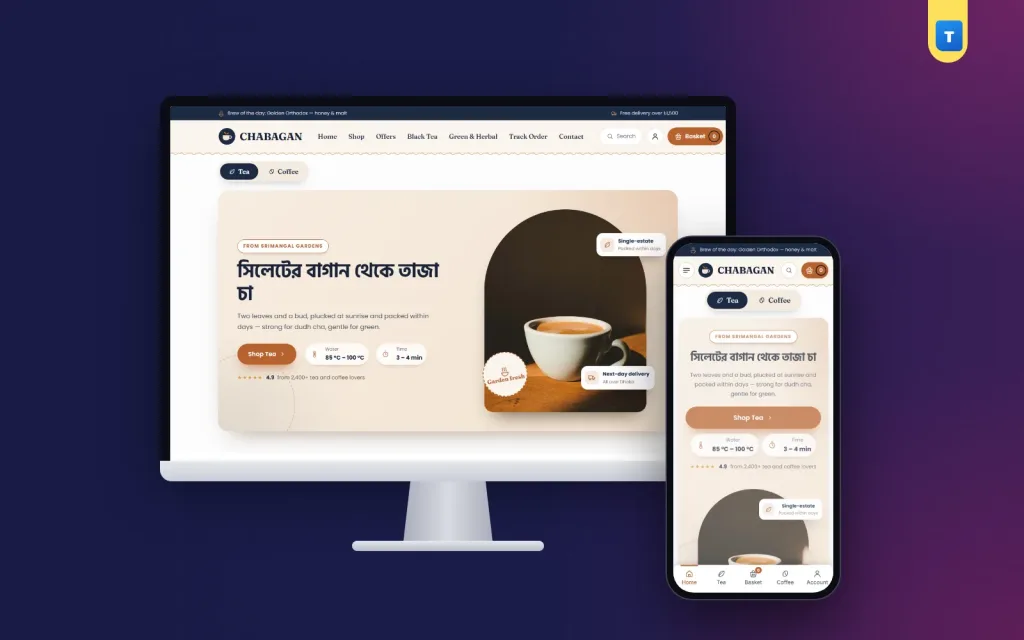
✦ Key features
- Designed for phones
- Tea or coffee switch hero
- Tin-shaped categories
- Brew guide
- Bestselling blends
- Find your cup
- Garden story, coffee corner, reviews, FAQ and blog
- Guest orders or accounts
- Orders and roast days
- Theme Options
- Enquiries, subscribers and licence
- Works with any WooCommerce plugin
Overview
Chabagan is a tea shop WordPress theme for WooCommerce: sell loose tea, coffee beans, teaware and gift sets in two pack sizes, switch the hero between tea and coffee, show a brew guide and take cash on delivery.
Chabagan is a tea shop WordPress theme for brands and shops that sell loose tea, green and herbal blends, coffee beans, ground coffee, teaware and gift sets online. It has a midnight navy, copper and cream look with a soft serif font that feels like a quiet tea room.
Buyers choose a blend, pick a Small or Large pack, add it to the cart and pay cash on delivery. Chabagan runs on the free WooCommerce plugin, so stock, coupons, orders and payments work the normal way, and any WooCommerce plugin can be added later.
The one-click demo brings 29 products in six categories (Black Tea, Green & Herbal, Coffee Beans, Ground & Cold Coffee, Teaware & Brewing and Gift Sets), ready pages and blog posts.
Who this tea shop WordPress theme is for
Tea and coffee buyers care about taste, freshness and how to brew. Chabagan has a block for each. It fits:
- Tea gardens and estates selling their own leaf directly.
- Tea brands with black, green, herbal and flavoured blends.
- Coffee roasters selling beans and ground coffee.
- Tea and coffee shops that want an online counter beside the café.
- Teaware sellers with kettles, presses, pour-overs and cups.
- Gift brands making tea and coffee boxes for Eid and offices.
- Importers of matcha, specialty coffee and herbal blends.
If you have tried a coffee website template before, you may know the problem: a nice page, but no shop. Chabagan is a working WooCommerce store with a cart, checkout, accounts and order history.
A calm tea-room design
The header carries the logo, the menu, search, the cart and a small "brew of the day" note that you change in Theme Options. Search shows matching products while the buyer types "green tea" or "espresso".
Midnight navy and cream keep the page quiet, while copper picks out buttons, prices and small steam-line details. Category cards are shaped like tea tins. The look is calm and grown-up, which is what a tea shop WordPress theme needs: the colour should come from the leaves and the cups.
Designed for phones
Most tea and coffee orders come from phones. The phone layout has one main banner, cards two per row, large pack buttons, a menu sheet from the left and a bottom tab bar with Home, Shop, Cart and Account.
Homepage blocks you can switch on, off and reorder
Every block has its own on/off switch and fields in Theme Options, and you can change the order. No code and no page builder.
Tea or coffee switch hero
The hero has a switch at the top. One side shows your tea story, the other your coffee story, each with its own photo, small line, headline, text, button and brewing note (water temperature and time, such as 85–100 °C and 3–4 minutes). Buyers who came for coffee tap once and see coffee.
The hero also has a short rating line; the demo number is placeholder text, so change it to your own or remove it.
Tin-shaped categories
"Pick Your Tin" shows each category as a tea tin card with a photo, so buyers jump straight to green tea or coffee beans.
Brew guide
Four brewing methods side by side, each with temperature and time: for example dudh cha, green tea, pour-over and French press. It answers the question every new buyer has before they order.
Bestselling blends
A grid of products you tag "top".
Find your cup
Three taste moods, such as strong and malty, light and floral, or bold and chocolatey, each linking to the right category. It helps buyers who do not know tea or coffee names choose by taste.
Garden story, coffee corner, reviews, FAQ and blog
A photo band with a story card and figures about your garden or roastery, a sideways coffee rail, three review cards, a FAQ block with a help line, and your latest three posts. The figures and reviews in the demo are placeholder text.
Product pages for tea and coffee
Every demo product is a variable product with Small and Large packs, each with its own price. The card button reads "Choose Pack". Add 100 g, 250 g and 500 g packs, or whole bean and ground options, with WooCommerce's normal variations.
- Gallery with a discount tag when an item is on sale.
- Price range and an "In Stock" pill.
- Short text about taste, origin and roast date.
- Secure payment strip with the logos you accept, including Amex.
- Pack buttons, quantity, Add to Cart and Buy Now.
- Three promise boxes for delivery, cash on delivery and returns.
- Key highlights card built from the product details.
- Help card with Call and WhatsApp; WhatsApp opens with the blend's name.
Description, Additional information and Reviews tabs follow, with a score card above the reviews, then related products. All of it uses WooCommerce's own templates, so a grind-size option plugin or a subscription plugin hooks into this tea shop WordPress theme without changes.
Cart, checkout and delivery
The cart and checkout show a three-step bar (Shopping cart, Delivery & payment, Order placed), a free-delivery progress bar and a row of trust notes.
- Delivery zones: the demo sets Inside Dhaka at ৳80 and Outside Dhaka at ৳120. Change them or add more.
- Cash on delivery is on. Add bKash, Nagad or cards with their WooCommerce plugins.
- Welcome coupon: WELCOME200 is ready in the demo.
- Delivery details on each product: 1–2 days inside Dhaka and 2–4 days outside by default.
Tea and coffee travel well, so you can sell across Bangladesh by courier. For gift sets, buyers can send to another address and leave a note.
Guest orders or accounts
Guests can order by default. Switch on "Orders need an account" and buyers sign in with a Bangladeshi mobile number or an email and a password in a pop-up, then return to checkout. Signed-in buyers get a My Account dashboard, a wishlist and their order history, so reordering a favourite blend takes two taps.
Shop page and filters
The shop page has a filter sidebar: search, categories, a price range in taka, average rating, stock status and on-sale items, with Apply and Reset. Wishlist hearts sit on every card, and a Track Order page is included.
With six categories and many blends, filters are what make a tea shop WordPress theme easy to shop: "green tea under ৳600, in stock" takes one click.
How light is it?
- One JavaScript file of 57.5 KB, about 14.5 KB compressed, in plain JavaScript.
- No jQuery needed by the theme itself.
- One stylesheet of about 100 KB compressed.
- No page builder, and web fonts can be switched off for system fonts.
WooCommerce and your plugins still load their own files; the theme leaves them alone, so every plugin works. Compress your tin and cup photos before upload, and the dark navy pages of this tea shop WordPress theme stay fast on mobile data.
Running your tea shop WordPress theme every day
You work in the normal WordPress and WooCommerce dashboard, plus one Chabagan menu for the theme's own pages.
Orders and roast days
Orders arrive in WooCommerce → Orders. If you roast once a week, pack coffee orders after roast day and say so in the product text. Mark a blend out of stock when the batch is gone.
Theme Options
Colours or a ready palette, fonts, button shape, the brew-of-the-day note, both hero sides, the brew guide, taste moods, garden story, every homepage block, checkout and accounts, company details, hours, payment logos and footer.
Enquiries, subscribers and licence
Contact form messages are emailed and kept under Chabagan → Enquiries, so a café's wholesale request is never lost. Newsletter sign-ups are listed under Subscribers. Activate your licence once and updates arrive in the dashboard.
Works with any WooCommerce plugin
Subscription, product add-on, SMS, courier and payment plugins use WooCommerce's normal hooks, so they work here as on any shop.
Getting started
- Install WordPress and WooCommerce on your hosting.
- Upload Chabagan in Appearance → Themes and activate it.
- Activate your licence with the key from your Themeve account.
- Import the demo from Chabagan → Setup.
- Add your blends with packs, prices and photos.
- Write your brew guide and taste moods.
- Set delivery and payment, then place a test order from your phone.
Photograph loose leaf in a small bowl beside the tin, and coffee beans in a scoop. A cup with a little steam, shot against a dark background, suits the navy design.
Chabagan runs on WooCommerce, the free shop plugin used by millions of stores. See all our WordPress themes for more food and drink designs.
What is included
- The Chabagan theme zip file
- One-click demo import with products, categories, packs, pages, menus and blog posts
- Enquiries inbox and Subscribers list
- Step-by-step documentation
- Theme updates with your licence
The demo has 29 tea and coffee products in six categories and the WELCOME200 coupon. A coffee website template shows a design; this tea shop WordPress theme also sells, with nothing more than WordPress and the free WooCommerce plugin.
Reviews
0.0
Write a review
★★★★★
0 reviews from buyersNo reviews yet — be the first to share your experience after buying.
Frequently Asked Questions
01What kind of business is Chabagan for?
Tea gardens, tea brands, coffee roasters, tea and coffee shops, teaware sellers and gift brands.
02Is Chabagan a tea shop WordPress theme that also sells coffee?
Yes. The hero switches between tea and coffee, and the demo has coffee beans, ground coffee and a coffee rail.
03Can I show brewing instructions?
Yes. The brew guide shows four methods with temperature and time, and each hero side has its own brewing note.
04Does this tea shop WordPress theme need a page builder?
No. Every block is edited in Theme Options. It needs only WordPress and the free WooCommerce plugin.
05Can buyers order without an account?
Yes, by default. You can switch on a rule that asks buyers to sign in with a mobile number or email first.
06Can I take bKash or Nagad?
Cash on delivery works out of the box. Add bKash, Nagad or cards with any WooCommerce payment plugin.
07Can I change the delivery charges?
Yes. The demo uses ৳80 inside Dhaka and ৳120 outside Dhaka, and you can change both.
08Do I need coding skills?
No. Import the demo, then change photos, prices and texts from the dashboard.
Delivery & Support
1Place your orderAdd to cart, sign in and pay with bKash, Nagad or Rocket.
2Payment verified automaticallyEnter your Transaction ID — the payment is matched automatically, usually within seconds.
3Get your productYour license key and download appear in My Account → Licenses.
- Secure automatic payment verification
- Delivery to your account & e-mail
- Friendly WhatsApp support
Refund Policy
This policy applies to every product in our store.
You get a refund when the product does not work as described and we cannot fix it, when your license will not activate your website, or when a manually delivered product is late and you cancel before delivery. A working license, or a single license already used on a live domain, is not refundable. Approved refunds go back to the number you paid from within one working day, minus the Send Money charge.
More items
View all →


