Good seafood restaurant website design does two jobs at once. It makes people hungry, and it gets them to act: book a table, order a platter or call you.
A guest who finds you at 8 pm wants to know three things fast. What is fresh today, how much it costs, and how to get it. This guide shows how to answer those questions with a simple site that works on a phone.
The ideas below come from how seafood places in Bangladesh actually sell, from Dhaka fish grills to beach restaurants in Cox's Bazar and Kuakata. Pick the ones that fit your kitchen and start small.
Why seafood restaurant website design is different
Seafood is the most trust-heavy food on any menu. Guests worry about freshness, smell and price. Many dishes are priced by size or weight, and the catch changes every day. A plain restaurant layout copied from a burger shop will not answer those worries.
- Freshness must be visible: where the fish came from and when.
- Price must be clear, even for dishes sold by size.
- Booking matters more, because seafood dinners are often for groups and special days.
- Delivery must be fast, because fried fish and prawns go soft quickly.
Start with the hero: sea, dish and two buttons
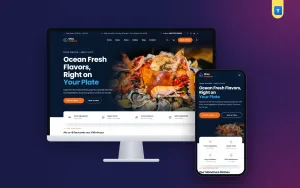
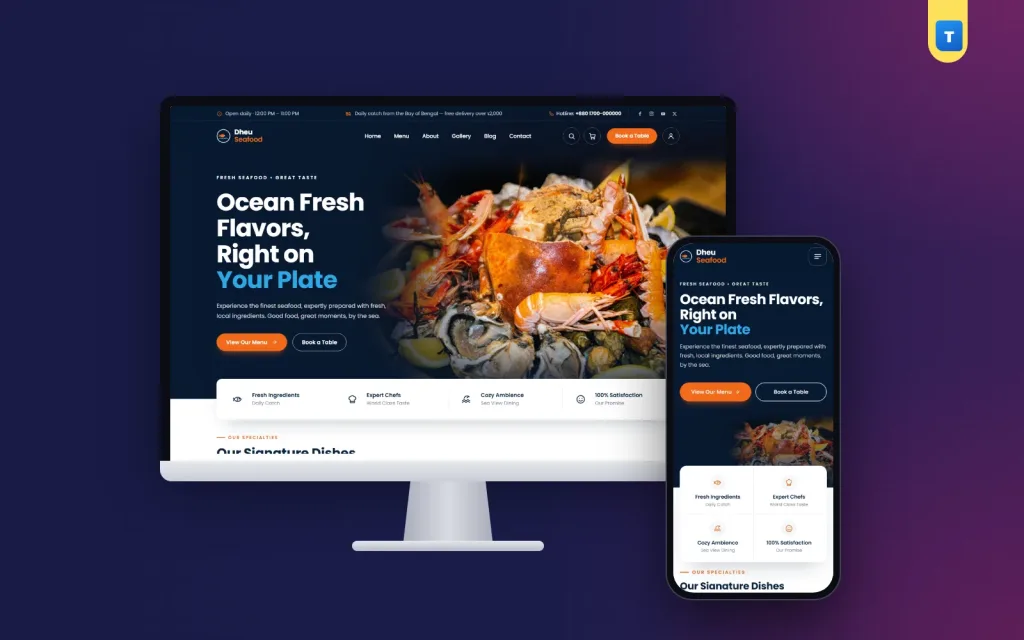
The top of the homepage should show one great dish and a hint of the sea. A dusk photo of the water behind a plated grilled pomfret says more than a long welcome text. Keep the headline short, such as "Fresh from the Bay, grilled tonight".
Under the headline, place two buttons only: "View Our Menu" and "Book a Table". Two clear actions beat five weak ones. A small rating line with a few guest faces adds proof without a long review block at the top.
A small "daily catch" card on the dish photo is a smart touch. Change it each morning: "Today: lobster, rupchanda, tiger prawns". It shows the kitchen is alive.
Show your signature dishes early
Most guests come for one or two famous plates. Put four of them right below the hero, with a real photo, the name and the price. Do not hide prices. A guest who sees "Grilled lobster ৳1,950" and still clicks is a guest who will order.
Round dish photos in a "menu highlights" row work well for the plates people return for: chilli crab, prawn malai curry, fried calamari, fish and chips. Keep the same plate, light and angle in every photo, so the row looks calm and planned.
Think of this block as your shop window. In good seafood restaurant website design, a guest should be able to judge your food, your prices and your style before scrolling any further.
A full menu people can order from
A PDF menu is the most common mistake in seafood restaurant website design. It is slow on mobile data, hard to read and impossible to order from. Turn the menu into real items instead.
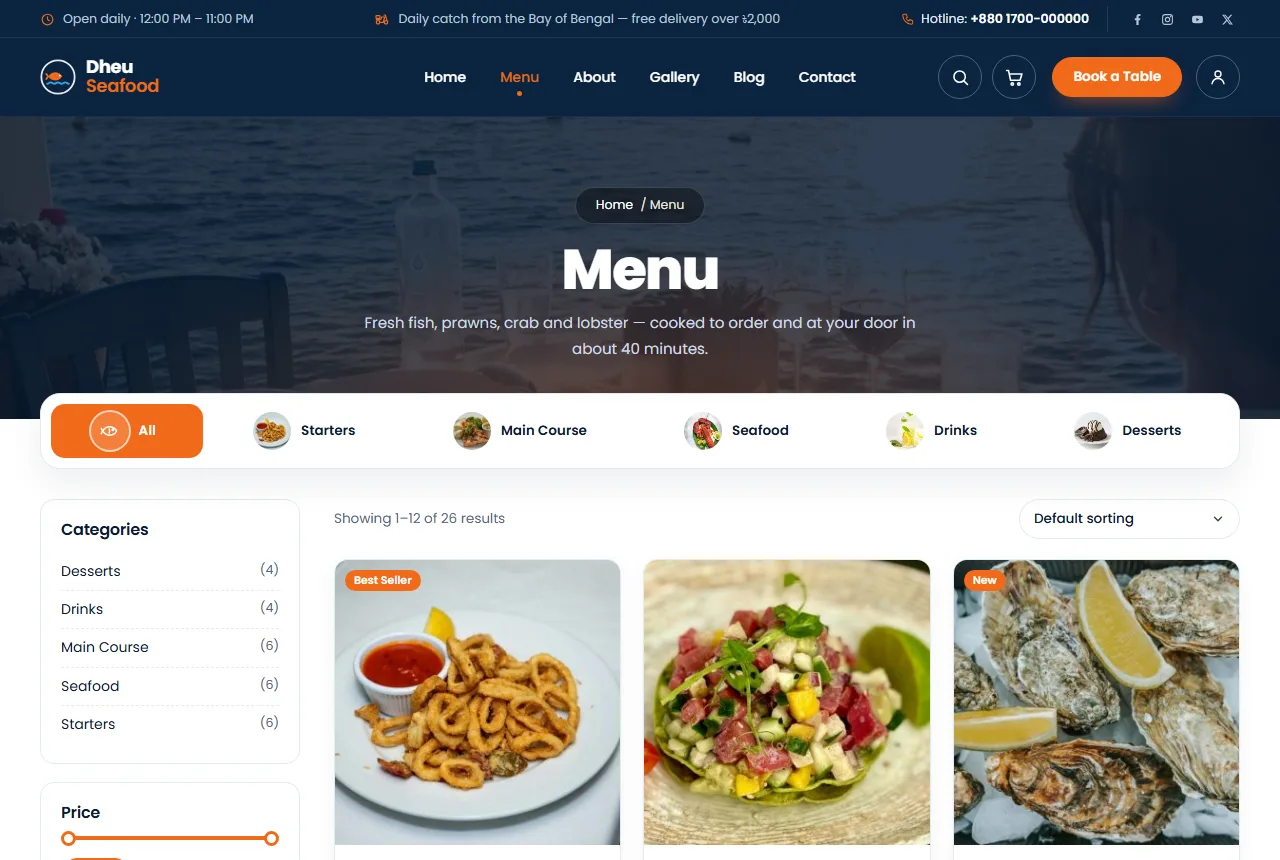
- Use tabs for each category: Starters, Main Course, Seafood, Drinks, Desserts.
- Give each tab a small icon so it is easy to scan.
- Show a photo, a short line and the price on every card.
- Add a round "+" button that puts the dish in the cart without opening a new page.
For dishes sold by size, use half plate and full plate options, each with its own price. For fish sold by weight, write the weight range clearly, such as "400 to 500 g".
Make freshness easy to believe
Words like "fresh" are cheap. Details are not. On each dish page, add one or two concrete notes: "Bay of Bengal, caught daily" or "Made fresh to order". If you buy from a ghat in Chattogram every morning, say so on the About page with a photo.
A short "how it works" block helps too. Three steps from the boat to the table, such as "Caught at dawn", "Cleaned in our kitchen", "Grilled when you order", explain your process in seconds. Only promise what you do every single day.
Numbers help as well. A small band with three figures, such as years open, dishes served and happy guests, gives a quick sense of scale. Keep the numbers honest and update them once a year.
Table booking that never gets lost
Seafood dinners are often for birthdays, office teams and visiting family. A booking form is not optional. Keep it short: name, mobile number, date, time, number of guests and a note.
Place the form on the homepage, near the bottom, on a calm sunset photo. Put it on the contact page too. Make sure every request is saved somewhere you check, not only sent by email. Emails go to spam. A list in the dashboard does not.
Call the guest back within the hour to confirm. In a beach town, tourists book from the bus or the hotel lobby, and a quick call wins the table.
Online ordering and delivery for seafood
Fried seafood loses its crunch in about 30 minutes. Your delivery area and promise must match that. State the times plainly on the dish page and in the cart:
- delivery in about 40 minutes inside your area;
- pick-up ready in 15 minutes;
- free delivery over ৳2,000, with a ৳80 charge below that.
A cart line such as "Add ৳300 more for free delivery" lifts the order size in a gentle way. Guests add a drink or a dessert instead of paying for delivery.
At checkout, show cash on delivery clearly, because most guests in Bangladesh still use it. Add bKash and Nagad when you are ready, and cards for hotel guests and foreigners. Keep the form short: name, mobile number, area and address.
Accounts that cut fake orders
Fake orders hurt a restaurant more than a shop, because the food is already cooked. Asking guests to sign in with a mobile number or email before ordering removes most of them. Make sign-up quick, and add a small reward, such as a welcome coupon on the first order.
Signed-in guests also get their order history and a saved address, so the second order takes less than a minute. A wishlist lets them keep the dishes they love for next Friday.
Offers, platters and coupons
Seafood is a sharing food. Family platters and combo deals sell well for groups and events. Show three platter cards with what is inside, how many people they serve and the price.
A single coupon code in a clear badge, such as OCEAN15, works better than many small offers. Put it in one homepage block with an "Order Now" button, and switch the block off when the offer ends. Old offers make a site feel abandoned.
Event catering is a second income for many seafood kitchens. Add a line under the platters such as "Feeding 30 or more? Call us for a party menu." It brings wedding and office orders without a separate page.
Phone-first seafood restaurant website design
Most of your guests will find you on a phone, often on mobile data. Design for that first:
- menu button left, logo centre, search right;
- a side drawer menu with large tap areas;
- a sticky header with a "Book a Table" button and the cart count;
- dish cards one or two per row, with big photos;
- a booking form that fits on one screen.
Keep the site light. Compress photos, avoid heavy page builders and use a theme with small script files. Test the site on a cheap phone over mobile data before you share the link.
Colours, photos and words
The sea gives you a ready palette. Navy for trust, a warm orange for buttons, and a soft sky blue for small details. Keep backgrounds light or deep navy, and use orange only for actions so buttons stand out.
In seafood restaurant website design, photos sell more than words. Shoot in daylight near a window, use one plate style and avoid heavy filters. A steaming dish looks fresh. A cold, shiny one does not.
Write the way you talk to guests. Short sentences, real names of fish, real prices. If you use a fish restaurant website design template, rewrite every sample line so it sounds like your kitchen, not like a stranger's.
Reviews, stories and social proof
Guests trust other guests. A reviews slider with a photo, stars, the guest's city and one or two lines of text works better than a wall of five-star ratings. Ask for reviews by WhatsApp a day after the meal, while the taste is still fresh in memory.
Reply to every review, including the hard ones. A calm answer to a complaint about a late delivery shows new guests how you treat people. Strong seafood restaurant website design leaves room for this kind of honest proof instead of hiding it.
A short story video also helps. Film the morning fish market, the kitchen at work and a dish going out. One minute is enough. Put it behind a play button on the About block, so it does not slow the page.
Pages every seafood place needs
- Menu: real items with photos and prices.
- About: your story, your chefs and where the fish comes from.
- Book a Table: the short form and your opening hours.
- Delivery: areas, times, charges and the free-delivery amount.
- Contact: phone, WhatsApp, map and address.
- Blog: short posts on buying fresh fish, grilling prawns or picking a platter.
A team block with four chef portraits on the About page puts real faces behind the food. Guests trust a kitchen more when they can see who cooks.
Common mistakes to avoid
Most problems we see are small and easy to fix. Check your own site against this list before you spend money on ads.
- A PDF menu instead of real dishes.
- No prices, or "price on request" for common dishes.
- Stock photos that look nothing like your plates.
- A booking form that only sends email.
- Hidden delivery charges that appear at checkout.
- Old offers left on the homepage after they end.
- Heavy sliders and video backgrounds that freeze cheap phones.
Google's guide to helpful content is a good reminder: write for hungry guests, not for search engines. Clear menus, honest photos and real prices help both.
Speed and simple upkeep
A slow site loses guests before they see a single dish. Keep photos under 200 KB each, use one font family, and avoid auto-playing video on the homepage. Pick a theme whose own scripts are small and that does not need a page builder.
Upkeep should take minutes, not hours. Mark a dish out of stock when the catch runs out, change the daily catch card each morning and switch blocks on or off as the season changes. Simple seafood restaurant website design is easier to keep fresh, and a fresh site sells more.
Also plan who updates the site. One staff member with a clear daily routine beats an owner who means to do it "later".
A launch checklist
- Every dish has a photo, a short line and a price.
- The hero has two buttons: menu and booking.
- The booking form saves requests where staff check daily.
- Delivery times and charges are on the dish page and in the cart.
- Cash on delivery works, and online payment is planned.
- The site loads well on a cheap phone over mobile data.
- You placed one test order and one test booking yourself.
- Your Google business profile links to the same site and phone number.
Run through this list once a month too. A seafood restaurant website design that stays up to date earns more trust than a fancy one that goes stale.
Build it with the Dheu theme
The Dheu seafood restaurant theme for WordPress already follows most of these ideas. It has a sea-at-dusk hero with menu and booking buttons, a daily catch card, signature dishes, a tabbed full menu with a "+" button on every dish, and a booking form that saves each request in the dashboard.
Ordering runs on WooCommerce, with plate sizes, freshness notes, delivery promises, a free-delivery nudge in the cart and cash on delivery. Guests sign in with a mobile number or email. Every homepage block can be switched on or off, and the demo brings 26 dishes, so you can start from a full fish restaurant website design template instead of a blank page.
Frequently asked questions
How much does seafood restaurant website design cost?
With WordPress, the free WooCommerce plugin and a ready theme, most of the cost is hosting, the domain and good food photos.
Should I show prices on my menu?
Yes. Clear prices bring better guests and fewer calls asking "how much".
Does seafood restaurant website design need online ordering?
Not on day one. Start with the menu and table booking, then add ordering when your kitchen can handle delivery.
Which payment methods should I offer?
Cash on delivery first. Add bKash, Nagad and cards when you are ready.
How often should I update the site?
Change the daily catch every day and the offers every week or two.