 −38%
−38%
Dipto – Digital Products WordPress Theme for Subscription Shops
✦ Key features
- Wide and square hero sliders
- Category cards
- Trending, category and recent products
- Trust strip and offer band
- How it works
- Reviews, FAQ and blog
- Header, search and shop filters
- Accounts, wishlist and order tracking
- Theme Options
- Plans, delivery and payment
- Licence and updates
- Tips for a shop that sells digital access
Overview
Dipto is a digital products WordPress theme for WooCommerce: wide and square hero sliders, category cards, plan options on the product page, how-it-works steps, reviews and sign-in with a mobile number or email.
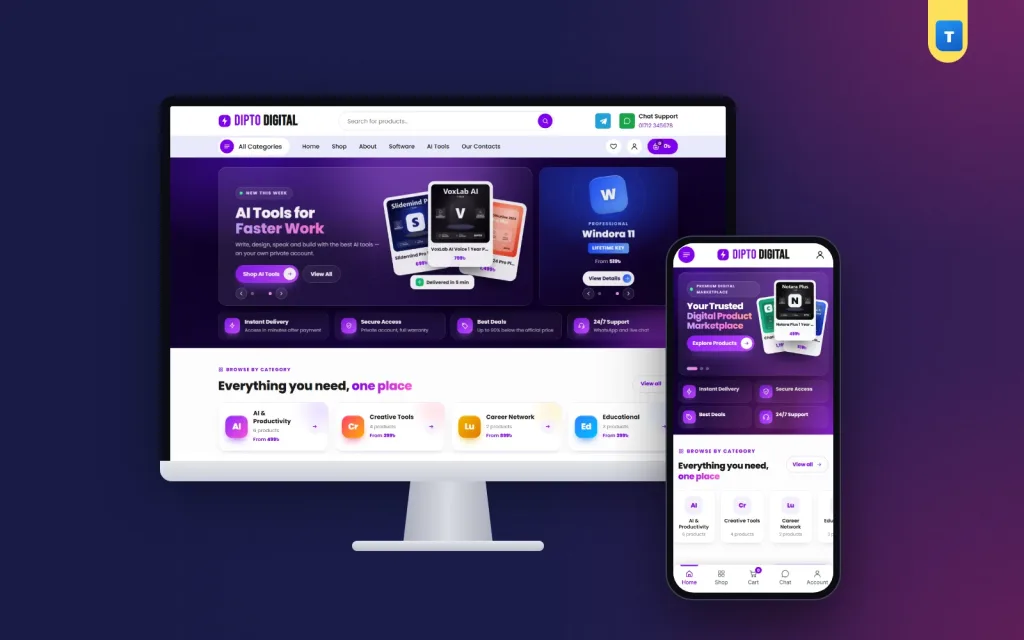
Dipto is a digital products wordpress theme for shops that sell subscriptions, creative apps, online courses, software licences and security tools. It has a dark purple hero, glowing category cards, plan buttons on the product page and a clear "how it works" band, so a buyer knows what happens after payment.
Dipto runs on the free WooCommerce plugin, so carts, plans, coupons and orders work the way shop owners expect.
Import the demo in one click and you get 20 products in 7 categories, help pages, menus and 3 blog posts.
Who Dipto is for
Selling something with no parcel is different from selling shoes. The buyer wants to know the plan, the price and how fast the access arrives. Dipto fits:
- Subscription resellers who sell monthly and yearly plans for writing, design and video tools.
- Licence key sellers with operating system licences, office suites and antivirus keys.
- Course sellers who offer learning platforms and language apps.
- VPN and security shops with one-year and lifetime plans.
- Facebook pages that already sell digital access by message and want a real website.
- Freelancer supply shops that sell business mail, cloud storage and career subscriptions.
If you were looking for a digital products wordpress theme that explains plans and delivery clearly, Dipto was made for exactly that kind of shop.
Why Dipto works as a digital products wordpress theme
Most shop designs assume a parcel, a courier and a delivery charge. Dipto starts from the other side. Every demo product is a WooCommerce variable product with a Plan option, such as 1 Month, 6 Months, 1 Year, Lifetime or Retail Key, and every plan is a virtual item. There is no shipping step and no delivery charge.
The design follows the same idea. Promises talk about access time, private accounts and support hours instead of courier days. Many digital products website template designs only change the colours of a clothes shop. Dipto changes the words, the blocks and the product page as well.
The homepage, block by block
Every block of this digital products wordpress theme has an on/off switch and can be dragged into a new order in Theme Options. Here is the order in the demo:
Wide and square hero sliders
A dark band holds two sliders side by side. The wide slider has a small line, a two-part title, a short text, two buttons and a stack of three floating product cards with prices. The square slider shows three offer banners, each with an app-style tile, an offer line, a "From" price and a button to its category.
Both sliders move on their own. Upload your own picture for any slide and it replaces the designed banner. A strip of four promises sits under the sliders. On phones only the wide slider shows, so nothing is squeezed.
Category cards
Each card has a glowing gradient tile, the category name, the number of products and the lowest price in that category. The last card is "All Products". Phones show two cards per row.
Trending, category and recent products
A trending grid shows products with the "trending" tag. A second grid shows one category of your choice, such as creative tools. A recent products grid shows the newest items. Each grid has four cards per row on desktop and two on phones, with a "More Products" link.
Trust strip and offer band
Four promise boxes, such as fast access, genuine products, secure payment and live support, sit on a soft purple band. The offer band shows a coupon code that buyers can tap to copy, a short text, a button and floating product pictures.
How it works
Three glass step cards with big numbers and icons: choose a plan, pay, get access. A help line with a WhatsApp button closes the band. On phones the steps turn into a timeline.
Reviews, FAQ and blog
A rating summary sits beside three review cards with photos and a "Verified buyer" badge. The summary numbers in the demo are sample text, so replace them with your own real figures before launch. Then come FAQ questions in two columns with a phone and WhatsApp help strip, and a blog block with one large post and two smaller ones.
Product cards and the product page
A product card shows a "SAVE %" tag when a plan is on sale, a heart for the wishlist, a square picture, a two-line name, the price range of its plans and stars. Under them sit a full "Order Now" button and a round cart button.
The product page is one white panel. On the left is the gallery. On the right are the title, the price range with an "In Stock" pill, a short text and a secure payment strip with the logos you pick in Theme Options.
Below that come the plan buttons, quantity, Add to Cart and Buy Now, then three promise boxes for genuine products, digital delivery and priority support. A second panel holds the Description, Additional information and Reviews tabs, and Related Products follow.
The page is built with WooCommerce's own template functions, so plugins that hook into the product summary keep working.
Header, search and shop filters
The desktop header has the logo, a round search box, a Telegram button and a WhatsApp "Chat Support" number. A lavender bar under it holds an "All Categories" drop-down, the main menu, saved items, the account button and the cart with its count and total.
Shop and category pages have a filter card:
- Search Products inside the shop.
- Categories, or the current category locked on category pages.
- Price Range with taka boxes for the lowest and highest price.
- Average Rating from five stars down.
- Stock Status and On Sale.
Apply Filters and Reset All buttons sit at the bottom. On phones the filters open in a panel, so a shop built on this digital products wordpress theme stays easy to browse even with many plans.
Phones, speed and customer accounts
Most buyers in Bangladesh order from a phone. On small screens Dipto shows a round menu button, a centred logo and the account button. A bottom tab bar gives Home, Shop, Cart, Chat and Account, and the Chat tab opens WhatsApp with your number. A side drawer holds the full menu.
The theme's own JavaScript is one plain-JavaScript file of 57.4 KB, about 14.5 KB compressed. The theme does not need jQuery for its own features and uses no page builder. There is one stylesheet, about 100 KB compressed. WooCommerce still loads its own scripts, as it does with any theme.
A light digital products wordpress theme matters when buyers open your shop on mobile data and want their access fast.
Accounts, wishlist and order tracking
Dipto has its own sign-in and sign-up popup and page. Customers can sign up and sign in with a Bangladeshi mobile number (01XXXXXXXXX) or with email and password. Password reset works by email. Mobile-number accounts skip the email step at checkout.
By default buyers can order as guests and create an account at checkout if they want one. Switch on "Orders need an account" in Theme Options and everyone signs in first, then returns to the checkout.
Buyers can save items to a wishlist and check an order on the Track Order page. The Contact page has a form, and every message is kept in the dashboard under Dipto → Enquiries, even if email is not set up. Newsletter subscribers are listed in the dashboard too.
Running the shop with this digital products wordpress theme
You use the normal WordPress and WooCommerce dashboard. Orders arrive in WooCommerce → Orders. Products, plans, prices, coupons and categories are edited the usual way.
Theme Options
One settings page with a section sidebar and a search box holds the homepage layout, colours, typography, header and menu, hero and categories, product rows, offer, steps, reviews, FAQ and blog, inner-page promises, the contact form, checkout and accounts, and company details and footer.
Plans, delivery and payment
Each plan is a WooCommerce variation with its own price and sale price. Because every plan is virtual, WooCommerce skips shipping and adds no delivery charge.
The demo turns on WooCommerce's cash on delivery method, renames it "bKash / Nagad / Rocket" and allows it for virtual orders. The buyer places the order, you send the payment number on WhatsApp and activate the product once the money arrives. For automatic bKash, Nagad or card payments, add any WooCommerce payment plugin.
The demo also adds a WELCOME100 coupon: ৳100 off a first order over ৳1,000, once per customer.
Licence and updates
Activate the licence once. Updates then arrive in the dashboard and keep your content and settings.
Get started in one afternoon
- Install WordPress and WooCommerce on your hosting.
- Upload Dipto in Appearance → Themes → Add New and activate it.
- Activate your licence with the key from your Themeve account.
- Import the demo from Dipto → Setup → Import demo.
- Add your products with a picture, a short text and one variation per plan.
- Set your payment method and write clear payment steps.
- Place a test order from your phone, then share the link.
Photos in the demo are free-licence, and the product and brand names are invented, so replace them with your own before launch.
Tips for a shop that sells digital access
A good digital products wordpress theme only helps if every plan is easy to understand. Write the plan length in the variation name, such as 1 Month or Lifetime, and say in the short text whether the access is on the buyer's own account or a shared one.
Say how long activation takes and during which hours. "Within 30 minutes, 9 AM to 11 PM" is clearer than "instant". Put the same line in the trust strip, the steps and the FAQ.
Keep a short renewal note on every product. Many buyers come back when a plan ends, and a clear renewal path brings that second order to you.
Some owners start with a free digital products website template and later find the cart, checkout and account pages do not match. In Dipto every page shares one design, from the homepage to the order received page.
This digital products wordpress theme works with any WooCommerce plugin, so you can add payment, SMS, licence-key or analytics plugins as the shop grows.
Dipto runs on WooCommerce, the free shop plugin used by millions of stores. See all our WordPress themes for more shop designs.
What is included
- The Dipto theme zip file
- One-click demo import: 20 products, 7 categories, 11 pages and 3 posts
- Help pages: About, Contact, Blog, FAQs, How to Buy, Return Policy, Track Order, Saved Items, Privacy, Terms
- Step-by-step documentation
- Theme updates with your licence
All you need is WordPress and the free WooCommerce plugin.
Reviews
0.0
Write a review
★★★★★
0 reviews from buyersNo reviews yet — be the first to share your experience after buying.
Frequently Asked Questions
01What kind of shop is this digital products wordpress theme for?
Shops that sell subscriptions, software licences, courses, VPN plans and other access that needs no parcel.
02Can I sell monthly, yearly and lifetime plans with this digital products wordpress theme?
Yes. Each plan is a WooCommerce variation with its own price, shown as plan buttons on the product page.
03Do I need any plugin besides WooCommerce?
No. WordPress and the free WooCommerce plugin are enough.
04Is there a delivery charge on digital orders?
No. The demo plans are virtual, so WooCommerce skips shipping and adds no delivery charge.
05Can customers sign in with a mobile number?
Yes. They can use a Bangladeshi mobile number or an email with a password.
06Can buyers order without an account?
Yes, by default. Switch on "Orders need an account" in Theme Options if you want everyone to sign in first.
07Can I take bKash or Nagad payments?
The demo sets up a manual bKash, Nagad and Rocket method. Add any WooCommerce payment plugin for automatic payments.
08Do I need coding skills?
No. Import the demo, then change photos, plans, prices and texts from the dashboard.
Delivery & Support
1Place your orderAdd to cart, sign in and pay with bKash, Nagad or Rocket.
2Payment verified automaticallyEnter your Transaction ID — the payment is matched automatically, usually within seconds.
3Get your productYour license key and download appear in My Account → Licenses.
- Secure automatic payment verification
- Delivery to your account & e-mail
- Friendly WhatsApp support
Refund Policy
This policy applies to every product in our store.
You get a refund when the product does not work as described and we cannot fix it, when your license will not activate your website, or when a manually delivered product is late and you cancel before delivery. A working license, or a single license already used on a live domain, is not refundable. Approved refunds go back to the number you paid from within one working day, minus the Send Money charge.
More items
View all →


