 −27%
−27%
Gola – Food Store WordPress Theme (Rice and Dal Shop)
✦ Key features
- Wholesale rate chart for 1, 5 and 25 kg
- Monthly bazar calculator with Add all to bag
- Know your rice guide with six cards
- Price per kg or litre on every card
- Add button that becomes a stepper
- Bulk-order band for messes, offices and shops
- 25 homepage blocks, switch on or off and re-order
- Five palettes and four font pairs
- No jQuery, one CSS and one JS file
- Sign in and register in a popup
- bKash, Nagad, SSLCommerz, COD, Steadfast and Pathao
- One-click demo with 46 products
Overview
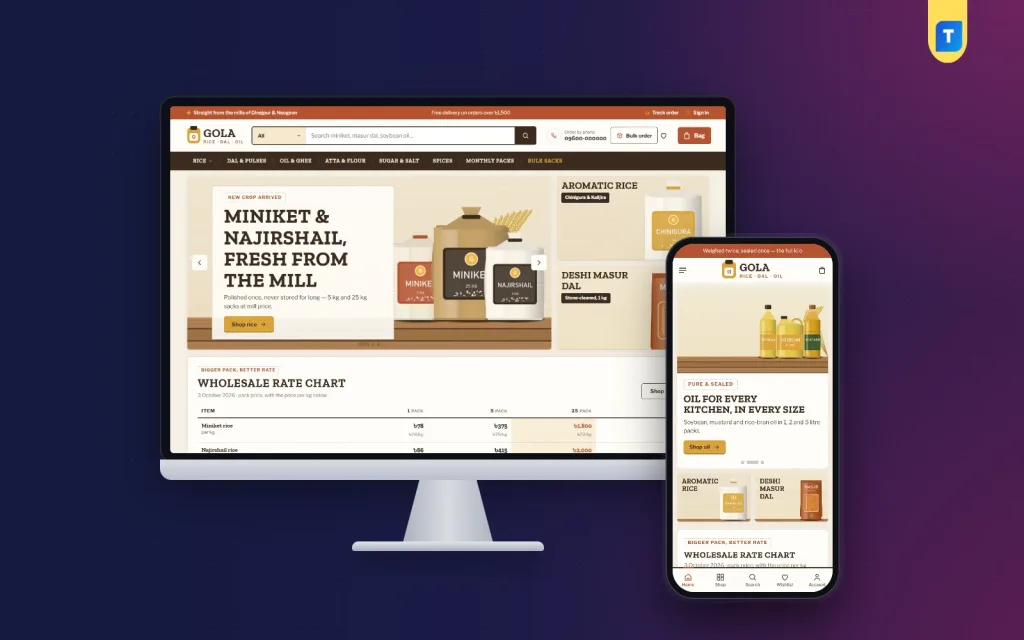
Gola is a food store WordPress theme for rice, dal, oil and spice sellers. It has a wholesale rate chart, a monthly bazar calculator, a rice guide, 25 homepage blocks, bulk-order tools and a bundled shop with local payments.
Gola is a food store WordPress theme built for sellers who count in kilos, sacks and monthly lists. Rice, dal, oil, flour, sugar, salt and spices are bought in bulk and re-ordered often, and most shop themes ignore that habit. Gola is shaped around it, with a wholesale rate chart, a monthly bazar calculator and a rice guide.
The name means granary, and the design follows. A jute-brown menu bar, terracotta buttons, slab capitals and stitched seams give the shop a sturdy, honest feel. The full shop system, with Bangladesh payments and couriers, is already inside.
Who can use this food store WordPress theme
The demo is a rice and dal shop with invented mills. It is only an example. If your buyers think in packs and weights, the layout fits you.
- Staples shops that sell rice, dal, oil, atta, sugar and spices
- Rice traders who supply messes, offices, canteens and small shops
- Family brands with their own mill or farm
- Neighbourhood grocers moving online
- Wholesalers who quote different prices for different pack sizes
- Spice, masala and dry-food sellers
- Oil, ghee and honey sellers who sell by the litre or kilo
- Bakery ingredient and snack shops
- Any food seller with monthly or repeat buyers
Three tools a general food store WordPress theme does not have
Wholesale rate chart
The rate chart puts pack prices for 1 kg, 5 kg and 25 kg side by side. For each item it shows the pack price, the price per kg or litre and the saving on the biggest pack. You type the rows in Theme Options. When the market moves, changing a price takes a minute.
Monthly bazar calculator
Most staples customers do not buy one item. They buy a month. The shopper picks how many people eat at home, from one to eight. Each row works out a month of that item, the packs needed and the price. One tap on "Add all to bag" puts the whole list in the cart.
Know your rice
Six rice cards, each with a drawn grain, an aroma meter and a note on what that rice is best for, such as daily meals, biryani or polao. It helps first-time buyers choose without calling you.
Light on the server and quick on a phone
A grocery website template that loads slowly loses the monthly buyer. These facts come from the theme code.
- No jQuery. The script is plain JavaScript
- One stylesheet and one script file
- The script is about 26 KB before compression
- Images load lazily
- Google Fonts can be turned off in Theme Options
Front-end features
This is what shoppers see in the food store WordPress theme, from the first tap on the phone to the order page. Each part is made for people who buy the same things again and again.
Header and menu
- Search with a category picker
- An "Order by phone" link for buyers who prefer a call
- A "Bulk order" button next to the bag
- Menu items that open stitched columns with their best sellers
- On phones: menu, logo and cart only
Product cards
- A pack-size tag, such as 5 kg or 1 litre
- Price per kg or litre on the card
- A full-width Add button that becomes a minus, number and plus stepper
- Compact cards on phones
- Wishlist heart and quick view
Product page and account
- Reviews inside a fold, with a popup that asks for the first review
- Sign in or register in a popup, without leaving the page
- Back-in-stock requests
- Coupon codes
Checkout and tracking
- One-page checkout
- An "Order placed" popup
- A Track Order page for every customer
- A Bulk Orders page in the demo, linked to a bulk-order band above the footer
The 25 homepage blocks
Any block can be switched off. You drag blocks into a new order on a computer and use arrows on a phone. Most sellers open with the first few and add the rest later.
- Hero slider on a jute wall with two side cards
- Shop the granary: square sack tiles for categories
- Kitchen staples: a tabbed row by category
- Granary deals: a countdown with stock bars
- Monthly family packs: a banner with ready packs
- Mills and brands: a logo row
- Ready bazar lists: six lists with links
- A promise strip, for example fair weight, cash on delivery, mill price and replace on the spot
- Three department blocks
- Most re-ordered
- Stock up under: price tiles with products
- Mill of the month
- Cook with Gola: dish cards
- Kitchen ledger: your latest three blog posts
- Rate chart, bazar calculator and rice guide
- Promo cards, new arrivals, highly rated and a reminder band
Colours, fonts and style
A food store WordPress theme should look like your shop, not like every other shop. Colours and fonts are chosen from the dashboard, and the choices were made for a granary feel.
- Five palettes: Jute and clay, Paddy gold, Mustard oil, Red rice and Indigo sack
- Every colour can be set by hand
- Four font pairs, from Zilla Slab with Libre Franklin to Bitter with Work Sans
- Setting search, a sticky save bar, reset, export and import
- Logo in Appearance, then Customize, then Site Identity
- Menus under Gola, then Menus
Back-end: Theme Options
Everything sits under Gola, then Theme Options. There is no code to edit.
- Homepage layout: turn blocks on or off and set their order
- Colors: palette and single colours
- Typography and style: font pair
- Header and menu: top bar, phone link and bulk-order button
- Product cards: what each card shows
- Hero slider: slides and side cards
- Rate chart, calculator, rice guide, categories, deals and promos: every row, pack size and card
- Product sections: homepage product rows
- Product page: single product layout
- Footer and contact: store details and links
Back-end: the shop dashboard
Gola uses Themeve Commerce, our own shop plugin. It is bundled and installs in one click from Gola, then Setup. You do not need WooCommerce or separate plugins for payments and couriers.
Orders, products and customers
- Sales overview with today, the last seven days and the month, plus a two-week chart
- Orders with statuses, printable invoices and a payments box for advances and dues
- Incomplete orders from shoppers who left checkout
- Product editor with pack sizes, each with its own price, stock and SKU
- Categories, brands and tags
- Customer list: new, repeat, VIP, inactive or risky
- Transactions with every payment and refund
Payments and delivery
- bKash, Nagad, SSLCommerz, manual Send Money and cash on delivery
- Advance payment on cash on delivery
- Delivery charge by district and extra zones
- Steadfast and Pathao from the order screen, which helps when a 25 kg sack must travel
- COD money screen with a courier payment sheet import
Alerts and marketing
- New-order alerts by email, Telegram or WhatsApp
- SMS, OTP, SMS campaigns and a review request after delivery
- Fake order protection
- Facebook Pixel with Conversion API, Google Analytics 4, Google Tag Manager and product feeds
- SEO settings
Optional modules
- Bulk order and corporate quotes
- Reseller and wholesale prices for shops that buy from you
- Delivery date and time
- Combo and bundle offers, and flash sales
- Loyalty points and refer a friend
- Upsell, cross-sell and recently viewed
- Back-in-stock alerts, and exchange and returns
- Store locations
- Sales and signup popups
- Affiliate programme and a marketplace module
How it helps a staples business
Staples are a repeat business. A buyer who trusts your weight and your rate will come back every month, so the site should make the second order faster than the first. That is the idea behind the whole design.
Think of a rice trader in Bogura who supplies three messes and sixty families. Before, every price change meant a round of phone calls. With Gola the chart is edited once and every buyer sees it. The calculator turns a family size into a basket, so a mother of four can build the month's list in two minutes. A neighbourhood shop can also show its own pack prices beside wholesale rates without extra plugins.
Messes and small shops use the bulk-order band and the wholesale module. Families use packs and the stepper. A wholesale price, a pack price and a per-kg price can all sit on one site. Advances on cash on delivery cut down fake orders for heavy parcels, and courier booking from the order screen saves a trip to the counter.
A mill that sells under its own brand can use Mills and brands, Mill of the month and the blog block to tell buyers where the rice comes from. A shop that buys from many mills can skip those blocks. The page works either way.
Set up in five steps
You can have the food store WordPress theme running with sample data in a few minutes. Then you replace the samples with your own items.
- Upload and activate Gola in WordPress.
- Activate your licence under Gola, then License.
- Install Themeve Commerce from Gola, then Setup.
- Run the one-click demo import under Gola, then Demo Import.
- Choose a palette, add your logo, replace the sample products with your own and start selling.
Why choose it over a plain template
A plain grocery website template gives you a homepage. A plain food store WordPress theme usually stops there too. You then add a cart, a checkout, payment plugins, courier plugins and a calculator, and hope they work together. Gola is one tested package.
- Rate chart, bazar calculator and rice guide are part of the design
- Local payments and couriers are built in
- No page builder and no jQuery
- Prices per kg or litre appear on every card
- Bulk-order tools for messes, offices and shops
What is included
- The Gola theme
- The Themeve Commerce plugin
- One-click demo: 46 products from 6 invented mills and brands, four monthly packs, posts, menus and pages such as Bulk Orders and Our Stores
- Documentation
- Six months of support, with updates through your Themeve account
Gola needs WordPress 6.0 or newer and PHP 7.4 or newer. It is tested up to WordPress 7.1. Among grocery website template choices, Gola is the one for sellers of staples by weight. If you want a full supermarket range, see Protidin. For a classic corner-shop look, try Mudi.
You can see Gola working on the live demo, and browse more ready-made designs in our WordPress themes collection.
Reviews
0.0
Write a review
★★★★★
0 reviews from buyersNo reviews yet — be the first to share your experience after buying.
Frequently Asked Questions
01Is this food store WordPress theme only for rice and dal?
No. The demo is a rice and dal shop, but any seller of oil, flour, sugar, spices, snacks or other packed food can use it by replacing the sample products.
02Do I need coding skills to run Gola?
No. Rate chart prices, calculator rows, colours, fonts and the order of homepage blocks are all set in Theme Options.
03Can I show different prices for 1 kg, 5 kg and 25 kg packs?
Yes. The wholesale rate chart lists items across three pack sizes with the pack price, the price per kg or litre and the saving on the biggest pack.
04How does the monthly bazar calculator work?
The shopper picks how many people eat at home, from one to eight. Each row shows a month of that item, the packs needed and the price, and Add all to bag fills the cart.
05Can a food store WordPress theme like Gola take bulk orders?
Yes. There is a bulk-order band, a Bulk order button in the header and an optional bulk order and quotes module in the shop dashboard.
06Which payments and couriers can I use?
bKash, Nagad, SSLCommerz, cash on delivery and manual payment, with Steadfast and Pathao for delivery.
07Is the Themeve Commerce plugin included?
Yes. It is bundled and installs in one click from Gola, then Setup. WooCommerce is not needed.
08Does Gola work well on phones?
Yes. The phone header shows the menu, logo and cart, cards stay compact, and you can re-order homepage blocks with arrows.
Delivery & Support
1Place your orderAdd to cart, sign in and pay with bKash or Rocket.
2Payment verified automaticallyEnter your Transaction ID — the payment is matched automatically, usually within seconds.
3Get your productYour license key and download appear in My Account → Licenses.
- Secure automatic payment verification
- Delivery to your account & e-mail
- Friendly WhatsApp support
Refund Policy
This policy applies to every product in our store.
You get a refund when the product does not work as described and we cannot fix it, when your license will not activate your website, or when a manually delivered product is late and you cancel before delivery. A working license, or a single license already used on a live domain, is not refundable. Approved refunds go back to the number you paid from within one working day, minus the Send Money charge.
More items
View all →You may also like
−27%
 −36%
−36%
Grocery
Shishir – Dairy WordPress Theme for Milk, Eggs & Bakery Shops (WooCommerce & Elementor)
৳1,750
৳2,750Save −36%
 −11%
−11%
 −28%
−28%
News Themes
WordPress Bangla Newspaper Theme – Online News Website Design WordPress Theme
৳540
৳750Save −28%
