 −43%
Blogger Templates
Dainik Alo – Newspaper Template for Blogger with a Bangla Front Page
৳2,000
৳3,500Save −43%
✦ Key features
Jago Patrika is a news blogger theme for Bangla news portals that want a busy, magazine-rich front page with a clean, modern finish. It runs on free Blogger, on a blogspot address or your own domain. The home page combines a lead block, a "for you" row, district news with an area finder, paired category sections, opinion and video sliders and a dark photo gallery. Story pages add a photo card maker that turns any story into a share-ready picture. Install one XML file, activate your licence and manage everything from Blogger's Layout screen.
Every home section is an HTML gadget in Layout: the title is the label to show and the content is a layout code such as layout: pair; side: স্বাস্থ্য. Reorder sections by dragging, remove what you do not need or add new ones.
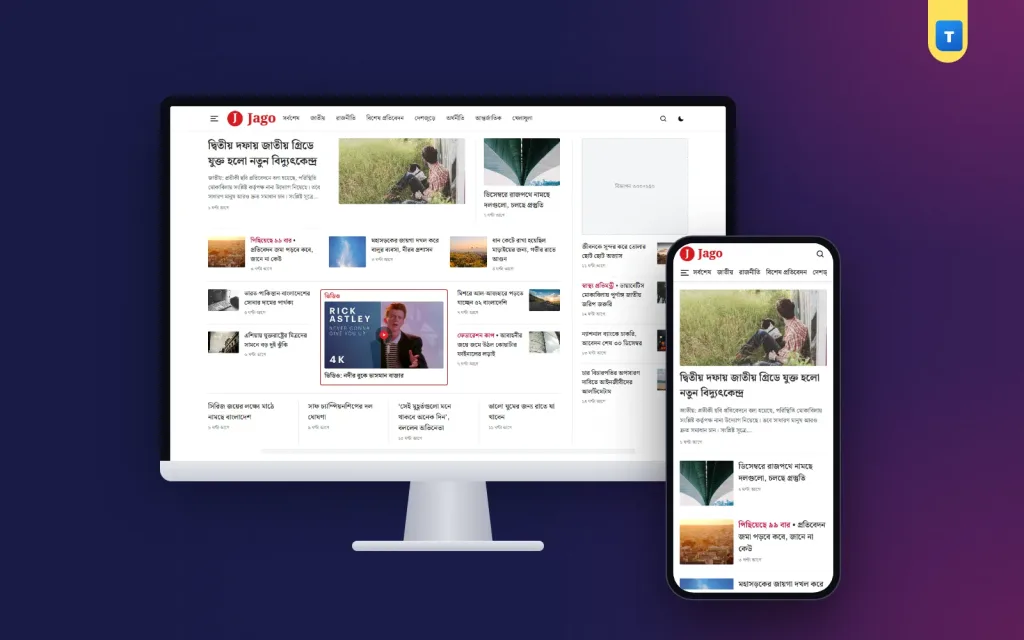
The lead story with its summary beside a large picture, a second story, three picture stories, a video box between four more stories, a row of headlines and a sidebar with an ad and a list of stories with coloured shoulders.
Three large picture cards next to a numbered "সর্বশেষ" list that readers can page through with arrows.
Division, district and upazila drop-downs with a search button, a large district story with smaller ones around it, and coloured buttons for every division ("এক ক্লিকে বিভাগের খবর").
A big story with four more beside it, plus a second label in the sidebar, for example national news with health, economy with jobs, or entertainment with lifestyle.
An opinion slider with the writer's picture and name, a video slider, and three label columns for literature, education and technology.
A regional block with a big story and two lists, and a dark photo gallery band with large pictures and captions.
News spreads on social media as pictures. The ফটোকার্ড শেয়ার button makes a square card with the story photo, your logo, the category and date, and the headline in large type. Readers choose one of five colour designs, then download the picture or share it to Facebook, WhatsApp or any app on their phone. Your site address is printed on the card, so every share brings readers back. You can turn the feature off with one line in Theme Options.
This news magazine blogger template is designed phone-first. The header shows the logo and search on one row and a menu button with scrolling categories below it. The lead appears with a large picture, stories follow with pictures on the left, smaller stories sit in two-column grids, side lists keep pictures on the right, and sliders show one card at a time. Nothing spills past the screen edge, and Blogger's mobile view uses the same template.
One stylesheet and one small script, no jQuery. The first sections load at once and the rest as the reader scrolls, and pictures are requested at the size each card needs. The Noto Serif Bengali font gives headlines a newspaper feel, dates use Bangla digits and month names, and cards show times such as "৫ মিনিট আগে".
Nothing is hard-coded, which matters when you run a real newsroom:
Gadgets left over from an old theme are hidden automatically, so the site looks clean right after installation.
Demo: a Bangla news portal with more than 20 categories, ten stories in most of them, videos, opinion pieces and a photo gallery.
Back up your old theme, restore the Jago Patrika XML, activate the licence and paste the site code into the Themeve License gadget. Then set your logo and menus, publish posts with labels and watch every section fill itself. Jago Patrika gives you a news blogger theme with a big-portal front page, shareable photo cards and a phone layout readers know.
Most news sites start small and add desks over time. Jago Patrika is built for that. Start with a few labels, and the home page simply shows fewer sections; add a new desk later by creating one HTML gadget with the label name and a layout code. The paired sections let you show a main desk and a smaller one side by side, so even a new desk with only a few stories looks complete next to a busy one.
Because it is a news magazine blogger template, features and long reads have a place too: the "for you" row, the opinion slider, literature and education columns and the photo gallery give softer stories room beside breaking news. Readers who come for one story find many more to read, which is exactly what a portal needs.
Reporters publish with a picture and a label; the sections fill themselves. Editors only reorder sections when the news changes, and swap ad codes in the ad gadgets. Social media editors open any story, tap the photo card button and share a branded picture in seconds. That is how a news blogger theme should work: the design takes care of itself so the team can focus on reporting. With this news blogger theme your site looks like a large portal from the first day.
Open the live demo of Jago Patrika and try the photo card on any story. Want another layout? Compare Ajker News Portal, Dainik Alo and Bangla News Portal.
No reviews yet — be the first to share your experience after buying.
Yes. It has its own phone layout with a two-row header, headline cards, two-column grids and sliders, and nothing overflows the screen.
On a story page the reader taps ফটোকার্ড শেয়ার, picks one of five designs and downloads or shares the square picture. No extra app or plugin is needed.
Yes. Connect it in Blogger Settings first and activate the licence on that address.
No. Everything is changed from Layout gadgets and Theme Options.
Each section shows the latest posts of the label written in its gadget title.
Yes. AdSense or any network code goes into the ready ad gadgets.
Yes. Blogger's Theme Designer shows the main colour, headline colour, shoulder colour and site width, so you can match your own brand without touching code.
Yes. Posts, pages and comments are not changed by a new theme. As soon as a post's label matches a section title, it appears in that section, on its category page and in the latest lists.
Yes. A moon button in the desktop header switches between light and dark, and the choice is saved in the reader's browser.
The story photo, your logo in a white badge, the category and date in a small pill, the headline in large type and your site address. If you upload a picture logo in the Logo gadget, that picture is used on the card; otherwise your text logo is drawn.
Only as many as fit on one line, so the header always looks tidy. Every category is still available in the full-screen menu that opens from the menu button.
You get a refund when the product does not work as described and we cannot fix it, when your license will not activate your website, or when a manually delivered product is late and you cancel before delivery. A working license, or a single license already used on a live domain, is not refundable. Approved refunds go back to the number you paid from within one working day, minus the Send Money charge.
−43%
 −43%
 −43%
 −25%