 −43%
Blogger Templates
Ajker News Portal – Blogspot News Template for Bangla News Portals
৳2,000
৳3,500Save −43%
✦ Key features
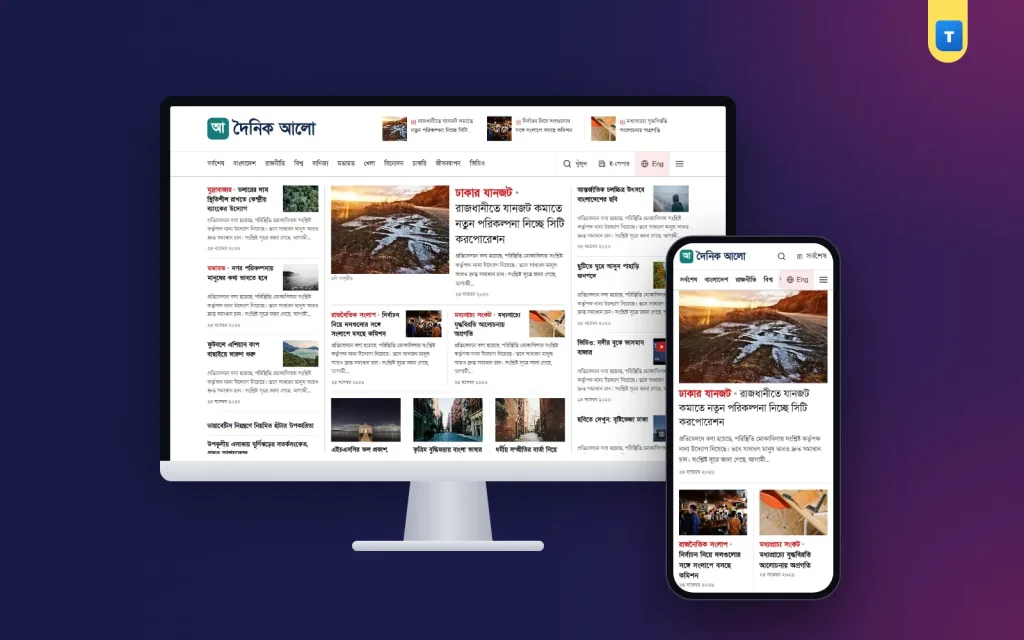
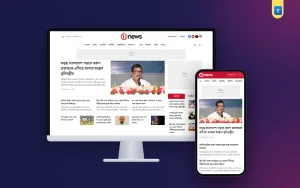
Dainik Alo is a newspaper template for Blogger, made for Bangla news sites that want the look of a printed daily on a free blogspot address or their own domain. The front page opens like a real newspaper: the latest stories beside the logo, a large lead with supporting stories, district news with an area finder, a photo gallery, opinion columns and many label sections, all filled automatically from the posts you publish. You upload one XML file, activate your licence, and every part of the site is then controlled from Blogger's Layout screen, with no code editing.
Dainik Alo suits anyone who publishes news every day and wants a serious, trustworthy front page without paying for hosting:
Because Blogger is free and handles hosting, security and traffic spikes, you only pay once for the template. A newspaper template for Blogger is also easy for a team: every reporter can post from the Blogger app, and the home page arranges the stories by label on its own.
The home page is a set of sections. Each section is one HTML gadget in Layout: the gadget title is the label it shows (for example জাতীয়, খেলা or বিনোদন), and the gadget content is a short layout code. You can add, remove and reorder sections by dragging gadgets. The layouts that come with the template are:
A large lead story with an excerpt, supporting stories around it and a list of further headlines, the same arrangement readers know from the first page of a newspaper.
A sliding row of top stories and a tiled block of picture stories for features, entertainment or lifestyle.
A big story in the middle with lists on both sides, and a business-style block with numbers-friendly headlines for the economy desk.
A district news block with a division, district and upazila finder. Readers pick their area and the matching label page opens, so local news is one click away.
A sports block with a large picture story, an opinion section for columns and editorials, and a photo gallery slider with captions and a counter.
Card grids, multi-label columns and boxed sections for smaller desks such as education, technology, religion or jobs.
The header shows your logo and the three latest stories as small teasers, followed by the main menu. A ☰ button opens a full-screen menu with every category, search, social links and app download buttons. Optional e-paper and English buttons sit in the header for papers that have a print PDF or an English edition; leave a link empty and its button disappears. The menu, the full menu, the buttons, social links and app links are all Link List gadgets, so you change them by typing names and links.
Readers spend most of their time on the story page, so this blogger newspaper theme gives it careful attention:
Advertising pays for most news sites, so ad spaces are built into the layout instead of being squeezed in later:
Paste Google AdSense or any network's code into these gadgets. Empty places show a neat "বিজ্ঞাপন" placeholder in the demo so you can see where each ad will appear.
The template uses one stylesheet and one small script, with no jQuery and no extra frameworks. The first two home sections load at once and the rest load as the reader scrolls, which keeps the first view quick even on mobile data. Text uses the SolaimanLipi Bangla font, and dates are written with Bangla digits and month names. Pictures are requested at the size each card needs, so phones never download desktop-sized images.
The design adapts to every screen. On phones the header shows the logo with search and menu buttons, the sections turn into easy single-column and two-column lists, and the story page keeps the share and font tools close to the text. Blogger's mobile view uses the same template, so your site looks the same whether a reader arrives from Facebook, Google or a direct link.
A blogger newspaper theme should not need a developer every time something changes. In this template you can, from Layout alone:
Each purchase includes one Themeve licence for one blog. You activate it on a private page of your blog, copy the short site code it gives you and paste it into the Themeve License gadget; the key itself is never stored in the template. When a new version is released, the licence panel tells you, and the download in your Themeve account is updated.
Demo: a working Bangla news blog with ten stories in each category, a photo gallery and every home section filled.
If you want a newspaper template for Blogger that looks like a real daily, stays fast on phones and can be managed without code, Dainik Alo gives your newsroom a complete front page from the first day.
Many small newsrooms start on Blogger because it is owned by Google, costs nothing to host and does not slow down when a story goes viral. The problem has always been design: most free themes look like personal blogs, not newspapers. A newspaper template for Blogger closes that gap. Dainik Alo turns Blogger's simple post list into a full front page with desks, a lead, district news and an archive that readers can browse by category.
Blogger also keeps your work safe. Posts are stored by Google, backups are one click away and you can move to your own domain at any time without losing links. Search engines read Blogger sites easily, and the template writes proper titles, social sharing pictures and clean headings so each story is ready to be shared. With a team, each reporter gets their own Blogger author account, and the editor decides what is published.
A normal day takes only a few steps. Reporters publish stories with a picture at the top and the right label. The lead and the desk sections update themselves. The editor changes the order of the home sections only when the news needs it, for example moving sports to the top during a big match, and swaps ads in the ad gadgets when a campaign changes. Because every part of this newspaper template for Blogger is a gadget, these changes take seconds and never break the design.
Open the live demo of Dainik Alo to try every section on your own phone. Running WordPress as well? The same design is available as the Dainik Alo WordPress theme. For other Blogger looks, compare Jago Patrika and Ajker News Portal.
No reviews yet — be the first to share your experience after buying.
No. It is a premium template with a lifetime licence for one blog, documentation and updates. Blogger itself stays free, so you have no hosting cost.
Yes. Connect your domain in Blogger Settings first, then activate the licence on that final address.
No. The logo, menus, home sections, ads, footer and the words the template prints are all changed from Layout gadgets.
Each section reads the latest posts of the label in its gadget title. Publish a post with that label and it appears in the section.
Yes. Paste your AdSense code into the top, sidebar, in-article, after-article and home ad gadgets.
Yes. Change the text lines in Theme Options and use English labels; the layout works with any language.
You get a refund when the product does not work as described and we cannot fix it, when your license will not activate your website, or when a manually delivered product is late and you cancel before delivery. A working license, or a single license already used on a live domain, is not refundable. Approved refunds go back to the number you paid from within one working day, minus the Send Money charge.
−43%
 −43%
 −43%
 −43%