 −15%
−15%
Jogajog – Multi Vendor Ecommerce Website Template

✦ Key features
- Instant spec filter with 5G, RAM and battery chips
- Brand and price-band grid with lowest prices
- Sort by popularity, price or battery
- Cards with three spec bullets
- Key-spec tiles, warranty and 0% EMI line
- 24 homepage blocks, 17 on by default
- Flash sale with countdown and stock bars
- Theme Options dashboard works on phones
- Five palettes and four font pairs
- Login popup and one-page checkout
- bKash, Nagad, SSLCommerz and cash on delivery
- Steadfast and Pathao courier with order tracking
- Demo with 36 products from 7 brands
Overview
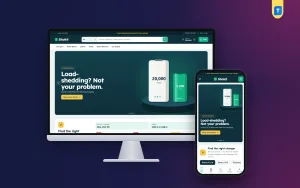
Jogajog gives phone shops the busy look of a multi vendor ecommerce website template: an instant spec filter, a brand and budget grid, 24 homepage blocks and a bundled store plugin. It is built for one owner and has no seller accounts.
Jogajog is a WordPress theme for phone shops that want the busy look of a multi vendor ecommerce website template, with many brands and deals on one screen. Walk into a phone market in Dhaka and you hear the same request again and again, "5G, big battery, under twenty thousand." Jogajog turns that sentence into a few taps on the screen.
Please read this part before you buy. Jogajog is a phone marketplace layout for one owner. It does not let other sellers register, and it has no seller dashboard or commission system. The marketplace feeling comes from the number of brands, the filters and the deal blocks, not from separate seller accounts.
Is this the multi vendor ecommerce website template you need?
Many people search for a multi vendor website template when they really want a shop that looks like a big phone marketplace. Check which group you belong to:
- You stock many brands yourself and want a busy, information-rich storefront: Jogajog fits.
- You want sellers to open their own stores and earn payouts: Jogajog is not built for that. Pick a theme with a seller module.
- You want to start with your own stock now and think about sellers later: Jogajog is a good first step.
Who can use Jogajog
The demo is a phone marketplace, but the blocks work for any shop with many products and many specs.
- Multi-brand mobile shops selling smartphones, keypad phones and tablets
- Gadget stores with earbuds, watches, speakers, power banks, chargers and cases
- Shops that sell a few brands but many price levels
- Electronics sellers who want spec-based filtering for laptops, cameras or small appliances
- Mobile accessory sellers who want one catalogue for cases, glass, chargers and cables
- Resellers who want a loud, deal-driven look rather than a calm boutique feel
Built for busy phone shops
When you stock seven brands and dozens of models, the hard part is not selling. It is helping people find the right phone fast. The look is loud on purpose: deep teal, amber and coral, with Rubik headings, bold colour slides and tight cards that pack information into a small space.
If you compare options, a multi vendor website template for phones usually means a heavy platform with seller panels. Jogajog is lighter, and it is faster to launch with your own stock.
The name means "connection". Every block connects a buyer's need to a short list of phones.
Front-end features
Filter by what matters
This is the block that sets Jogajog apart. Shoppers tap spec chips and the results update at once.
- Chips for 5G, 120 Hz+ screens, 8 GB RAM+, 5000 mAh+ batteries and 50 MP+ cameras
- Chips for AMOLED, fast charging, wireless charging, and budgets under 20k and under 40k
- Sort by popularity, price or battery
- Only phones that have every chosen feature stay on screen
- Chips come from your product tags, so adding a phone to the filter means tagging it
Every brand, every budget
The second signature block is a grid. Brands run down the side and price bands run across the top. Each cell shows how many phones you have there and the lowest price, then links to that brand inside that band. A student with 15,000 taka can see at a glance which brands you carry in that range. You set the brands and price bands yourself.
Homepage with 24 blocks
Seventeen blocks are on by default and seven wait in reserve. Switch them, drag and drop them, or use the arrows on a phone.
- Hero slider with bold colour slides
- Shop by category on colour tiles
- Filter by what matters, and Every brand, every budget
- Flash sale with a countdown and stock bars
- New launches, Best sellers in tabs, Trending now and Top rated
- Shop by budget and Pick by need, with four need cards
- Three department blocks, each pairing a banner with eight products
- Brands, Phone tips and a promise strip for official products, COD, EMI and fast delivery
- In reserve: Our promise, Quick links, Four cards, Banner + row, Promo cards, Brand spotlight and More to explore
Product cards and product page
- Tight white cards with three spec bullets, a teal price and an amber Add to cart
- Storage and colour options as variants
- Key-spec tiles on the product page
- A warranty box with a 0% EMI line and a delivery date
- Reviews in a fold, with a popup that asks for the first review
Cart, checkout and account
- Sign in and register in a popup
- A one-page checkout, then an "Order placed" popup
- A Track Order page
- A wishlist, coupons and invoices
- An Our Stores page, if you run showrooms
Mobile layout
On phones the header shrinks to menu, logo and cart. Cards stay compact so more phones fit on each screen. The Theme Options dashboard also works on a phone, so you can change a flash sale while standing in the shop.
Tagging, variants and keeping the filter honest
The filter is only as good as your tags. Spend an hour on it when you add stock, and the shop does the selling for you later.
- Tag each phone with the features it really has: 5G, AMOLED, 120 Hz, 5000 mAh and so on
- Add storage and colour as variants, so one phone has one page and one set of reviews
- Give each brand a clean name and a logo, because the brand grid reads from them
- Set price bands that match how your customers talk, such as under 15k, 15k to 25k and above
A buyer who filters for "5G and 5000 mAh" and finds a phone without 5G will not trust the next filter. Honest tags are the cheapest trust-builder you have.
Speed and lightness
- The front end runs on one plain JavaScript file of about 26 KB, with no jQuery
- One stylesheet of about 125 KB covers the theme
- Images below the first screen load lazily
Back-end and dashboard options
Theme Options
Every theme setting is in Jogajog, under Theme Options.
- Homepage layout: switch blocks and set their order
- Colours: Teal and amber, Royal and lime, Berry, Forest or Charcoal, or set each colour by hand
- Typography: Rubik with Inter, Barlow, Figtree or DM Sans
- Header and menu
- Product cards
- Hero slider
- The spec filter category, brand rows and price bands, plus categories and deals
- Product sections and the product page
- Footer and contact details
- Settings search, export, reset and a sticky save bar
Store dashboard
The bundled Themeve Commerce plugin runs the shop. WooCommerce is not needed. It installs with one click from Jogajog, under Setup.
- A sales overview with today, the last seven days and the month, plus a sales chart
- Orders with status, printable invoices and a payments box
- Incomplete orders from people who left at checkout
- A full-page product editor with variants, stock, SKU and photos
- Categories, brands and tags
- Payments: cash on delivery, bKash, Nagad, SSLCommerz and manual payment
- Delivery charges and courier booking through Steadfast or Pathao
- SMS, OTP and Telegram alerts for new orders
- Facebook Pixel with the Conversion API
- Customer list, transactions and reports
Modules
Jogajog switches on the modules a phone shop uses: attributes, size guide, back-in-stock alerts, offers, returns and the store locator. Other modules stay off until you need them.
How it helps you sell phones
Phone buyers compare. They open three shops on three tabs and pick whichever one answers their questions first. These points help you win that comparison.
- The spec filter shortens the path from "I want 5G" to a product page.
- The brand and budget grid shows a buyer that you carry their price level.
- Flash sales with stock bars create honest urgency, because the bar shows what is really left.
- Back-in-stock alerts bring buyers back when a popular model returns.
- Order tracking reduces calls from people asking where their parcel is.
Multi vendor ecommerce website template or a phone store theme?
A real multi vendor ecommerce website template adds seller approval, commissions and payouts to your daily work. If you only sell your own phones, that work has no value for you. Jogajog keeps things simple: one owner, one catalogue, one set of prices, and a layout that feels like a big market.
Set up in five steps
- Install and activate the Jogajog theme.
- Open Jogajog, then Setup, and install Themeve Commerce.
- Activate your licence under Jogajog, then License.
- Run the one-click demo import. It adds 36 products from 7 brands, with variants, tips, menus and every page.
- Choose a palette, set your price bands, tag your phones, replace the sample content and open the shop.
The demo covers 5G flagships, camera and gaming phones, budget and keypad phones, tablets, earbuds, watches, speakers, chargers, power banks, cases and glass. Every brand and picture is invented.
Why choose Jogajog over a plain template
- The store engine, payments and couriers are included
- The spec filter and brand grid are made for phones
- Many a multi vendor ecommerce website template needs extra plugins for payments and couriers; here they are inside the package
- Updates arrive in your dashboard once your licence is active
What is included
- The Jogajog theme
- The Themeve Commerce plugin, bundled
- One-click demo content
- Lifetime updates
- Support on WhatsApp
The theme needs WordPress 6.0 or higher and PHP 7.4 or higher, and it is fully responsive. If you prefer a calm single-brand boutique, look at Alap. If you also sell TVs and fridges, look at Jontro.
You can see Jogajog working on the live demo, and browse more ready-made designs in our WordPress themes collection.
Reviews
0.0
Write a review
★★★★★
0 reviews from buyersNo reviews yet — be the first to share your experience after buying.
Frequently Asked Questions
01Is Jogajog a multi vendor ecommerce website template?
It has the busy look of one, but it is for a single owner. There are no seller accounts, seller dashboards or commissions. You sell your own stock from many brands.
02Can other sellers list phones on a multi vendor ecommerce website template like Jogajog?
No. If you want sellers to register and earn payouts, choose a theme with a seller module. Jogajog is for one shop.
03How do I add a phone to the spec filter?
The filter chips come from product tags. Tag a phone with the right features and it appears when shoppers tap those chips.
04What does the brand and budget grid show?
Each cell shows how many phones a brand has in a price band and the lowest price. A click opens that brand filtered to the band.
05Can I choose my own price bands?
Yes. Brands and price bands are set in Jogajog, under Theme Options.
06Is the store plugin included?
Yes. Themeve Commerce is bundled and installs in one click from Jogajog, then Setup.
07Which payment and courier options are available?
bKash, Nagad, SSLCommerz, cash on delivery and manual payment, with Steadfast and Pathao courier and a Track Order page.
08Can I sell accessories too?
Yes. The demo mixes phones with tablets, earbuds, watches, speakers, chargers, power banks, cases and glass.
Delivery & Support
1Place your orderAdd to cart, sign in and pay with bKash or Rocket.
2Payment verified automaticallyEnter your Transaction ID — the payment is matched automatically, usually within seconds.
3Get your productYour license key and download appear in My Account → Licenses.
- Secure automatic payment verification
- Delivery to your account & e-mail
- Friendly WhatsApp support
Refund Policy
This policy applies to every product in our store.
You get a refund when the product does not work as described and we cannot fix it, when your license will not activate your website, or when a manually delivered product is late and you cancel before delivery. A working license, or a single license already used on a live domain, is not refundable. Approved refunds go back to the number you paid from within one working day, minus the Send Money charge.
More items
View all →