 −34%
−34%
Khamar – Poultry Farm WordPress Theme for Egg Farms
✦ Key features
- A homepage that shows a real farm
- Products in clear categories
- Selling aids on the product page
- Services page
- Help and policy pages
- Coupons
- Orders
- Products and stock
- Payments and delivery
- Selling aids
- Theme Options
- Licence and updates
Overview
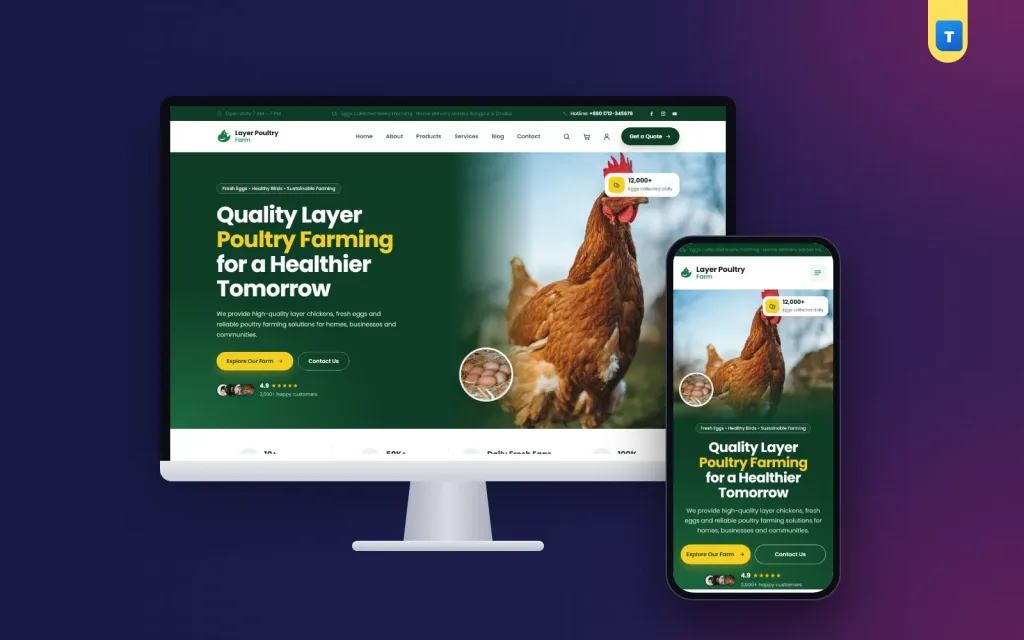
Khamar is a poultry farm WordPress theme for layer farms, egg farms and hatcheries: sell eggs, birds, chicks and feed on WooCommerce with WhatsApp ordering, an order-by countdown, stock bar and quick quantities.
Khamar is a poultry farm WordPress theme for layer farms, egg farms, hatcheries and agro businesses that want to sell eggs, birds, chicks, feed and farm supplies online. It runs on WooCommerce, so orders, stock and coupons are handled properly, and it gives your farm a clean, trustworthy look with your story, your services and your impact on the community. Product pages come with selling aids such as units sold, an order-by countdown, a stock bar and WhatsApp ordering, each one easy to switch off.
The demo brand "Layer Poultry Farm" comes with 12 products in 5 categories, a coupon and every page a farm shop needs. Import it in one click and add your own products and prices.
Who can use this poultry farm WordPress theme
- Layer farms selling eggs by the dozen, tray or case.
- Hatcheries selling day-old chicks and point-of-lay birds.
- Feed and supply shops with layer feed, drinkers, feeders and medicine.
- Broiler and duck farms selling birds and meat.
- Agro companies supplying farmers with inputs and advice.
- Farm cooperatives that sell members' produce together.
The poultry farm WordPress theme suits both buyers at home and business buyers such as shops, bakeries and hotels.
A light poultry farm WordPress theme
Many of your buyers live in towns and villages with slow mobile data. Khamar keeps its own JavaScript to about 57 KB and uses no page builder. Pages open quickly and stay stable while photos load. WooCommerce is the only plugin it needs.
Poultry farm WordPress theme features
A homepage that shows a real farm
The homepage has 13 sections: a full-width hero, your farm story, services, a shop section, an eggs section, numbers, how ordering works, why choose you, your impact on the community, partners, testimonials, FAQ and blog. The hero, services and impact backgrounds run edge to edge for a strong first look. Turn sections on or off and reorder them in Theme Options.
Products in clear categories
The demo uses 5 categories: eggs, layer birds, chicks, feed and farm supplies. Add as many products as you need, each with its own price, unit and stock.
Selling aids on the product page
Each of these can be switched off in Theme Options → Product page:
- Units sold to show that others buy from you.
- Order-by countdown for same-day or next-day dispatch.
- Stock bar to show how much is left.
- Quick quantities so buyers can pick 1, 2 or 5 trays in one tap.
- WhatsApp order button for buyers who prefer to chat.
- Payment logos to show which methods you accept.
- FAQ tab with answers to common questions.
- Sticky buy bar on phones so the add to cart button is always in reach.
Services page
Show what else you offer, such as farm visits, bulk supply contracts, vaccination advice or farm setup help.
Help and policy pages
The demo creates About, Services, Contact, Blog, FAQs, Delivery, Return and Refund, Track Order, Saved Items, Privacy and Terms pages, plus 6 posts. Long pages get a contents list and numbered sections automatically.
Coupons
The demo includes the coupon FRESHFARM. Create your own for first orders or bulk buyers.
Customer accounts
Buyers sign up and sign in with a mobile number or an email and a password. An account is needed to order, which keeps fake orders away and saves the address for repeat orders.
Running your farm shop from the dashboard
Orders
Orders arrive in WooCommerce → Orders with the buyer's phone, address and items. Update the status as you pack and deliver.
Products and stock
Add products with photos, price, unit and stock. When stock runs out, products are marked out of stock automatically.
Payments and delivery
Cash on delivery and shipping zones are set in WooCommerce. Add bKash, Nagad or card with any WooCommerce payment plugin.
Selling aids
Turn each product page aid on or off and set the countdown time in Theme Options → Product page.
Theme Options
Homepage layout, colours, typography, header and menu, contact form and company details live on one page with search and backup and restore.
Licence and updates
Activate your licence key once to unlock the demo import and updates.
Built for the phone first
On a phone, the sticky buy bar keeps ordering one tap away, quick quantity buttons save typing, and the WhatsApp button is there for buyers who want to ask first.
Why choose Khamar over a plain poultry farm website template
A plain poultry farm website template usually shows the farm but cannot take orders, or needs several plugins to do it. Khamar is a full WooCommerce shop with farm-specific pages, selling aids, WhatsApp ordering and mobile number sign-in. With a poultry farm website template you start from empty pages; with Khamar you start from a finished farm shop.
Set up your farm shop in one afternoon
- Install WordPress and WooCommerce, then upload and activate Khamar.
- Activate your licence key and import the demo from Khamar → Setup.
- Add your logo, farm photos, address and phone number.
- Replace the demo products with your eggs, birds, feed and prices.
- Set delivery areas and payment methods.
- Place a test order from your phone.
Show your clean sheds and healthy birds in the photos. Buyers who can see the farm trust the eggs, and the poultry farm WordPress theme gives those photos plenty of space.
What makes a farm website sell more eggs
Buyers of eggs and farm products care most about freshness and trust. A good farm website shows both:
- Show the farm. Photos of clean sheds, healthy birds and your team tell buyers your eggs are safe.
- Explain the feed and care. A short line on what your hens eat answers a question many families have.
- Make bulk buying easy. Shops, bakeries and hotels want trays and cases at clear prices. Quick quantity buttons help them order fast.
- Be clear about delivery. The Delivery page and the order-by countdown tell buyers when their order will arrive.
- Offer a quick question channel. The WhatsApp order button lets first-time buyers ask before they pay.
- Show your impact. The impact section tells buyers how the farm helps local people, which builds goodwill.
The poultry farm WordPress theme has a section or setting for each of these, so your farm site works as hard as you do.
Tips for your first month online
Start with your main products: eggs by tray, layer birds and feed. Set clear delivery areas and a cut-off time for next-day delivery, then show that time in the countdown. Visit nearby shops and bakeries with a small card that has your website link and a first-order coupon. Post one short farm update each week on the blog and share it on Facebook. Ask regular buyers to leave a review. After a month, look at what sells most and put it first on the homepage.
Keeping the site up to date
Farm prices change with the season and with feed costs. Khamar makes price changes quick: open a product, change the price and save, and the shop, cart and homepage all update at once. Seasonal offers can run as coupons, and the order-by countdown keeps buyers aware of your daily dispatch time.
Support and updates
Every Khamar licence includes theme updates from inside your dashboard. When we improve a feature or fix a problem, you see the update in WordPress and install it with one click; your content and settings stay as they are. If you get stuck while setting up, the documentation walks you through each step with screenshots, and our support team answers in Bangla or English. Most questions, such as how to change the homepage order, add a payment method or set delivery charges, are answered within a day.
We also keep Khamar tested with the latest versions of WordPress and WooCommerce, so you can update your site with confidence instead of worrying that the shop will break.
Khamar runs on WooCommerce, the free shop plugin used by millions of stores. Browse more poultry farm themes or see all our WordPress themes.
What is included
- The Khamar theme zip file
- One-click demo import: 12 products, 5 categories, coupon, pages and 6 posts
- Step-by-step documentation
- Theme updates with your licence
Reviews
0.0
Write a review
★★★★★
0 reviews from buyersNo reviews yet — be the first to share your experience after buying.
Frequently Asked Questions
01Who is the Khamar poultry farm WordPress theme for?
Layer farms, egg farms, hatcheries, feed shops and agro businesses.
02Can I sell eggs by tray?
Yes. Set up products or variations for a dozen, a tray or a case, each with its own price.
03Can buyers order on WhatsApp?
Yes. A WhatsApp order button can be shown on product pages, and you can turn it off.
04Is this poultry farm WordPress theme fast on slow mobile data?
Yes. There is no page builder, and the theme's own JavaScript is about 57 KB.
05Can I turn off the countdown or stock bar?
Yes. Every selling aid can be switched off in Theme Options → Product page.
06Do I need WooCommerce?
Yes. It is the only plugin Khamar needs.
07Can customers sign in with a mobile number?
Yes, with a mobile number or an email and a password.
08Do I need coding skills?
No. Everything is set from the dashboard.
09Can I change the colours and fonts to match my brand?
Yes. Theme Options has colour and typography settings. Pick your brand colours and fonts once, and every page, button and card follows them without any code.
10Will my products and settings stay when the theme updates?
Yes. Updates replace the theme files only. Your products, pages, orders and Theme Options settings stay exactly as they are, and you can download a settings backup before any big change.
Delivery & Support
1Place your orderAdd to cart, sign in and pay with bKash or Rocket.
2Payment verified automaticallyEnter your Transaction ID — the payment is matched automatically, usually within seconds.
3Get your productYour license key and download appear in My Account → Licenses.
- Secure automatic payment verification
- Delivery to your account & e-mail
- Friendly WhatsApp support
Refund Policy
This policy applies to every product in our store.
You get a refund when the product does not work as described and we cannot fix it, when your license will not activate your website, or when a manually delivered product is late and you cancel before delivery. A working license, or a single license already used on a live domain, is not refundable. Approved refunds go back to the number you paid from within one working day, minus the Send Money charge.
More items
View all →