 −34%
−34%
Machranga – Meat Shop WordPress Theme for Fish & Meat Delivery
✦ Key features
- Designed for phones
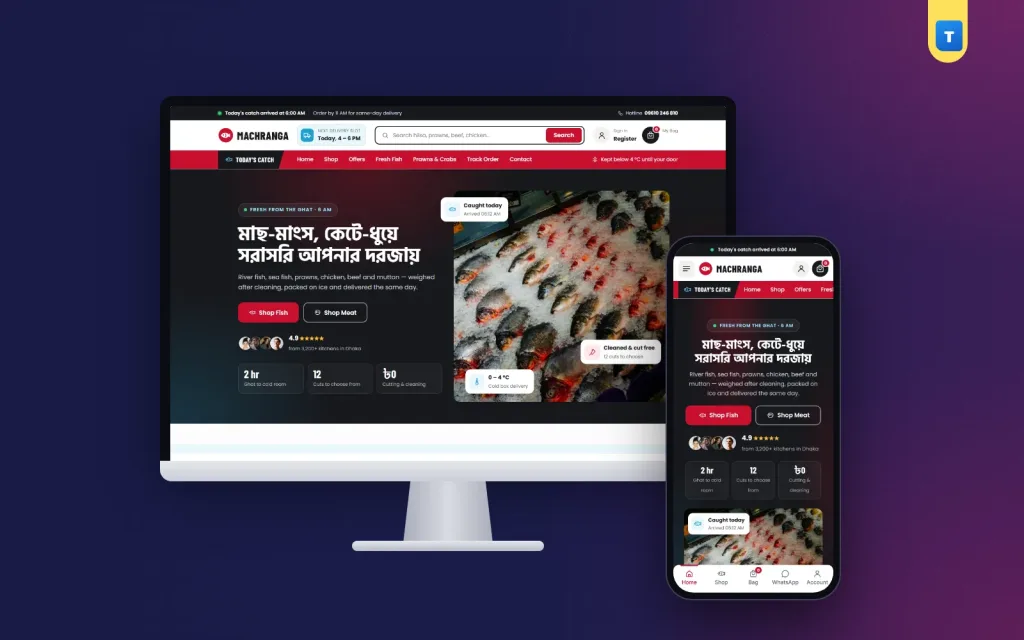
- Split hero with freshness cards
- Today's catch rail
- Choose your cut
- Category tabs
- Deals, favourites and cold-chain steps
- Reviews, FAQ and blog
- Guest orders or accounts, your choice
- Orders and stock
- Theme Options
- Enquiries and subscribers
- Licence and updates
Overview
Machranga is a meat shop WordPress theme for WooCommerce: sell fish, prawns, chicken, beef and mutton by weight, show today's catch and cut options, deliver Inside or Outside Dhaka and take cash on delivery.
Machranga is a meat shop WordPress theme for stores that sell fresh fish, prawns, chicken, beef and mutton online and deliver them cold the same day. It has a charcoal and crimson butcher-market look that feels clean and serious about hygiene.
Buyers pick a fish or a cut, choose 500 g or 1 kg, add it to the cart and pay cash on delivery. Machranga runs on the free WooCommerce plugin, so stock, coupons, orders and payments work the normal way and any WooCommerce plugin can be added later.
The one-click demo brings 31 products in six categories (Fresh Fish, Prawns & Crabs, Chicken, Beef, Mutton and Dried Fish), ready pages and blog posts, so you only change photos, prices and your story.
Who this meat shop WordPress theme is for
Selling raw fish and meat online is about trust: is it fresh, is it clean, and will it arrive cold? Machranga is built around those three questions. It fits:
- Online fish shops that sell river fish, sea fish, hilsa and prawns by weight.
- Butcher shops that cut beef, mutton and chicken to order.
- Fish and meat counters inside a bazar that want home delivery.
- Farm brands selling their own poultry or goat meat.
- Dried fish (shutki) sellers who ship across the country.
- Cloud stores with a cold room and riders but no shop front.
- Qurbani and event meat services that take bulk orders before Eid.
If you have been comparing a fish shop website template with a real store, note the difference: Machranga is a working WooCommerce shop with a cart, checkout, accounts and order history, not a static page that only looks like a shop.
A butcher-market design that feels fresh
The colours are deep charcoal, a strong crimson and white, which keeps photos of red meat and silver fish bright. Rounded cards, clear prices and plenty of white space make the counter look tidy, which is what a buyer expects from a meat shop WordPress theme.
The header carries a delivery slot pill such as "Next delivery slot: Today, 4–6 PM" and a short cold-chain line such as "Kept below 4 °C until your door". Under it sits an icon category bar, so buyers jump to fish, prawns, chicken, beef, mutton or shutki in one tap. The header can stay on top while the buyer scrolls.
The search field shows matching products while the buyer types. Type "hilsa" or "beef" and the results appear under the box with photos and prices.
Designed for phones
Most fish and meat orders are placed on a phone in the morning or on the way home. The phone layout is planned separately: one main banner, cards two per row, buttons sized for a thumb, a menu sheet that opens from the left with folding sections, and a bottom tab bar with Home, Shop, Cart and Account.
Homepage blocks you can switch on, off and reorder
Every block has an on/off switch and its own fields in Theme Options. You can also change the block order. Edit text, photos and links without code.
Split hero with freshness cards
A full-width hero with your Bangla or English headline, a short line such as "Fresh from the ghat, 6 AM", two buttons (Shop Fish and Shop Meat) and floating cards that point out freshness, cleaning and cold delivery. A rating line sits under the buttons; the demo numbers are placeholders you replace with your own.
Today's catch rail
A sideways rail of products that arrived this morning, with a note such as "Limited stock". It is the best place for hilsa, coral or large prawns that sell out fast.
Choose your cut
Cut cards show buyers how you can prepare their order: curry cut, bone-in, boneless, whole fish cleaned, fillet and so on. This answers the most common question before a buyer has to call.
Category tabs
"Shop the Counter" shows a product grid with one tab per category. Buyers switch between fish, prawns, chicken, beef, mutton and dried fish without leaving the homepage.
Deals, favourites and cold-chain steps
Deal banners for weekly offers, a Customer Favourites grid of best sellers, and a four-step band that follows the order from the ghat or farm to the buyer's door.
Reviews, FAQ and blog
Three review cards, a FAQ block that opens and closes with a call and WhatsApp help line, and the latest three posts from your "Kitchen Tips" blog.
Product pages made for selling by weight
Fish and meat are sold by weight, so every product in the demo is a variable product with two options, 500 g and 1 kg, and the second option has its own price. The card button reads "Choose Weight", which tells the buyer what to do next. You can add more weights, such as 2 kg or a whole fish, with WooCommerce's normal variations.
The product page keeps everything in one white panel:
- Gallery with a discount tag such as "-10%" when the item is on sale.
- Price range and an "In Stock" pill, so buyers know at once if today's stock is left.
- Short text about size, source and cleaning, such as "cleaned and cut free of charge".
- Secure payment strip with the logos you choose: bKash, Nagad, Rocket, Visa, Mastercard and cash on delivery.
- Weight buttons, quantity, Add to Cart and Buy Now; Buy Now goes straight to checkout.
- Three promise boxes for delivery, cash on delivery and returns.
- Key highlights card built from the product details, with a link to the full list.
- Help card with Call and WhatsApp buttons; WhatsApp opens with the product name filled in.
Below the panel come Description, Additional information and Reviews tabs. The reviews tab shows an average score card and a coloured initial for each reviewer. Related products close the page. All of this is built on WooCommerce's own templates, so a meat shop WordPress theme like this keeps working when you add plugins that hook into the product page.
Cart, checkout and delivery in Bangladesh
The cart and checkout show a three-step bar: Shopping cart, Delivery & payment, Order placed. The cart adds a free-delivery progress bar that tells the buyer how much more to add, plus a row of trust notes.
- Delivery zones: the demo sets Inside Dhaka at ৳80 and Outside Dhaka at ৳120 as WooCommerce shipping methods. Change the amounts or add zones any time.
- Cash on delivery is switched on. Add bKash, Nagad or card gateways with their WooCommerce plugins.
- Welcome coupon: WELCOME200 is created for the demo, so you can see how a first-order offer looks.
- Delivery details on each product: 1–2 days inside Dhaka and 2–4 days outside Dhaka by default.
Dried fish travels well across the country, while fresh fish usually stays inside one city. With WooCommerce zones you can limit fresh items to the areas your riders cover.
Guest orders or accounts, your choice
Out of the box, buyers can order as guests. If fake cash orders become a problem, switch on "Orders need an account" in Theme Options. Buyers then sign in or sign up in a pop-up with a Bangladeshi mobile number or an email and a password, and come straight back to checkout. Password reset works by email.
Signed-in buyers get a styled My Account dashboard, a wishlist page and their order history. A Track Order page lets anyone check an order with the order number and email.
Shop page with real filters
The shop and category pages open with a heading band and a filter sidebar: product search, categories, a minimum and maximum price in taka, average rating, stock status and an on-sale switch, with Apply and Reset buttons. A buyer can find "chicken under ৳400, in stock" in seconds. On a category page the current category is shown as locked, so filters stay inside it.
Wishlist hearts sit on every product card of this meat shop WordPress theme. Buyers save the fish they buy every week and order it again in two taps.
How light is it?
Raw meat buyers are often in a hurry, standing in a kitchen with a phone. Machranga keeps its own code small:
- One JavaScript file of 57.5 KB, about 14.5 KB when compressed, written in plain JavaScript.
- No jQuery needed by the theme. It only sends WooCommerce's cart events when jQuery is already on the page.
- One stylesheet of about 100 KB when compressed.
- No page builder. Blocks are edited in Theme Options.
- Web fonts can be switched off, so the site uses fast system fonts.
WooCommerce still loads its own cart and checkout scripts, and other plugins load theirs. The theme does not remove them, so every plugin keeps working. Compress your fish and meat photos before upload, and a light meat shop WordPress theme stays quick on mobile data.
Running your meat shop WordPress theme day to day
You work in the normal WordPress and WooCommerce dashboard, with one Machranga menu for the theme's own pages.
Orders and stock
New orders arrive in WooCommerce → Orders. Change the status as the order is cut, packed and handed to the rider. When the hilsa is gone, mark it out of stock and it stops taking orders, while the "In Stock" pill on the page turns into "Out of Stock".
Theme Options
One settings page with a sidebar of sections: colours (or a ready palette), fonts and button shape, header and menu, every homepage block, checkout and accounts, company details, opening hours, payment logos and the footer. Changes show on the site at once.
Enquiries and subscribers
Messages from the contact form are emailed to you and also kept under Machranga → Enquiries, so a bulk order request for a wedding is never lost in a spam folder. Newsletter sign-ups are listed under Subscribers.
Licence and updates
Activate your licence once in the dashboard. Theme updates then arrive like any WordPress update and keep your content and settings.
Works with any WooCommerce plugin
Because the theme uses WooCommerce's own templates and hooks, payment gateways, courier plugins, SMS plugins, analytics and SEO plugins work as they do on any shop. A meat shop WordPress theme should never lock you into one set of tools, and this one does not.
Getting started in one afternoon
- Install WordPress and WooCommerce on your hosting.
- Upload Machranga in Appearance → Themes → Add New and activate it.
- Activate your licence with the key from your Themeve account.
- Import the demo from Machranga → Setup with one click.
- Add your products: photos, weights, prices and cutting notes.
- Set delivery and payment: your zones, charges and payment methods.
- Place a test order from your phone, then share the link.
Shoot fish and meat on a clean white or slate board in daylight, from the same angle each time. Square photos fit the cards and the rails best, and a sprig of coriander or a lemon wedge makes raw meat look fresher without hiding it.
Machranga runs on WooCommerce, the free shop plugin used by millions of stores. See all our WordPress themes for other food and grocery designs.
What is included
- The Machranga theme zip file
- One-click demo import with products, categories, weights, pages, menus and blog posts
- Enquiries inbox and Subscribers list in the dashboard
- Step-by-step documentation
- Theme updates with your licence
The demo shows 31 fish and meat products in six categories with Bangla and English names, and the WELCOME200 coupon. WordPress and the free WooCommerce plugin are all you need to turn this meat shop WordPress theme into your own store. A plain fish shop website template gives you a look; Machranga gives you a shop that takes orders.
Reviews
0.0
Write a review
★★★★★
0 reviews from buyersNo reviews yet — be the first to share your experience after buying.
Frequently Asked Questions
01What kind of shop is Machranga for?
Online fish shops, butcher shops, bazar counters with delivery, farm meat brands, shutki sellers and cloud stores.
02Is Machranga a meat shop WordPress theme with weight options?
Yes. Every demo product has 500 g and 1 kg options with their own prices, and you can add more weights.
03Can I sell fish too?
Yes. The demo has Fresh Fish, Prawns & Crabs and Dried Fish next to Chicken, Beef and Mutton.
04Does this meat shop WordPress theme need a page builder?
No. You edit every block in Theme Options. It needs only WordPress and the free WooCommerce plugin.
05Can buyers order without an account?
Yes, guest orders are on by default. You can switch on a rule that asks buyers to sign in with a mobile number or email first.
06Can I take bKash or Nagad?
Cash on delivery works out of the box. Add bKash, Nagad or cards with any WooCommerce payment plugin.
07Can I change the delivery charges?
Yes. The demo uses ৳80 inside Dhaka and ৳120 outside Dhaka, and you can change both or add new zones.
08Do I need coding skills?
No. Import the demo, then change photos, prices and texts from the dashboard.
Delivery & Support
1Place your orderAdd to cart, sign in and pay with bKash, Nagad or Rocket.
2Payment verified automaticallyEnter your Transaction ID — the payment is matched automatically, usually within seconds.
3Get your productYour license key and download appear in My Account → Licenses.
- Secure automatic payment verification
- Delivery to your account & e-mail
- Friendly WhatsApp support
Refund Policy
This policy applies to every product in our store.
You get a refund when the product does not work as described and we cannot fix it, when your license will not activate your website, or when a manually delivered product is late and you cancel before delivery. A working license, or a single license already used on a live domain, is not refundable. Approved refunds go back to the number you paid from within one working day, minus the Send Money charge.
More items
View all →You may also like
−34%
 −34%
−34%
 −18%
−18%
 −10%
−10%
