Good butcher shop website design has to win trust before it wins an order. A buyer cannot smell the fish or press the meat through a screen, so the site must show freshness, cleanliness and cold delivery in every photo, line and button. This guide covers the pages, photos, product options, delivery rules and daily habits that help an online fish and meat shop in Bangladesh get repeat orders.
The ideas are simple and cheap. Pick the ones that fit your shop, try them for a few weeks and keep what brings orders.
Why butcher shop website design is different
A clothing shop can show a model and a size chart. A fish and meat shop sells something raw, heavy and short-lived. Buyers worry about three things:
- Freshness: when was it caught or cut?
- Hygiene: who cleaned it, and how?
- Cold chain: will it still be cold when it reaches my door?
Every block on the homepage should answer at least one of these. A pretty banner that says nothing about freshness wastes the most valuable space you have.
Weight is the second big difference. Nobody buys "one beef". They buy 500 g of curry cut or 2 kg of bone-in for a family dinner. Your product pages must make weight and price clear before anything else.
Start with clean, honest photos
Photos sell raw food more than any text. Bad lighting turns red meat brown and silver fish grey. A few rules help:
- Shoot in daylight near a window, never under yellow bulbs.
- Use the same white or slate board for every product.
- Show the real cut, not a cooked dish, as the main photo.
- Add one photo of the cleaned, packed item, so buyers see what arrives.
- Keep blood and scraps out of the frame.
Square photos fit product cards on phones and laptops alike. Keep the same angle across a category so the grid looks calm. A slice of lemon or a few coriander leaves can add colour, but they must not hide the meat.
Do not use stock photos of a different fish
If you sell rui, show your rui. Buyers who receive a fish that looks different from the photo will not order again. Honest photos are part of butcher shop website design, not an extra.
Categories buyers understand
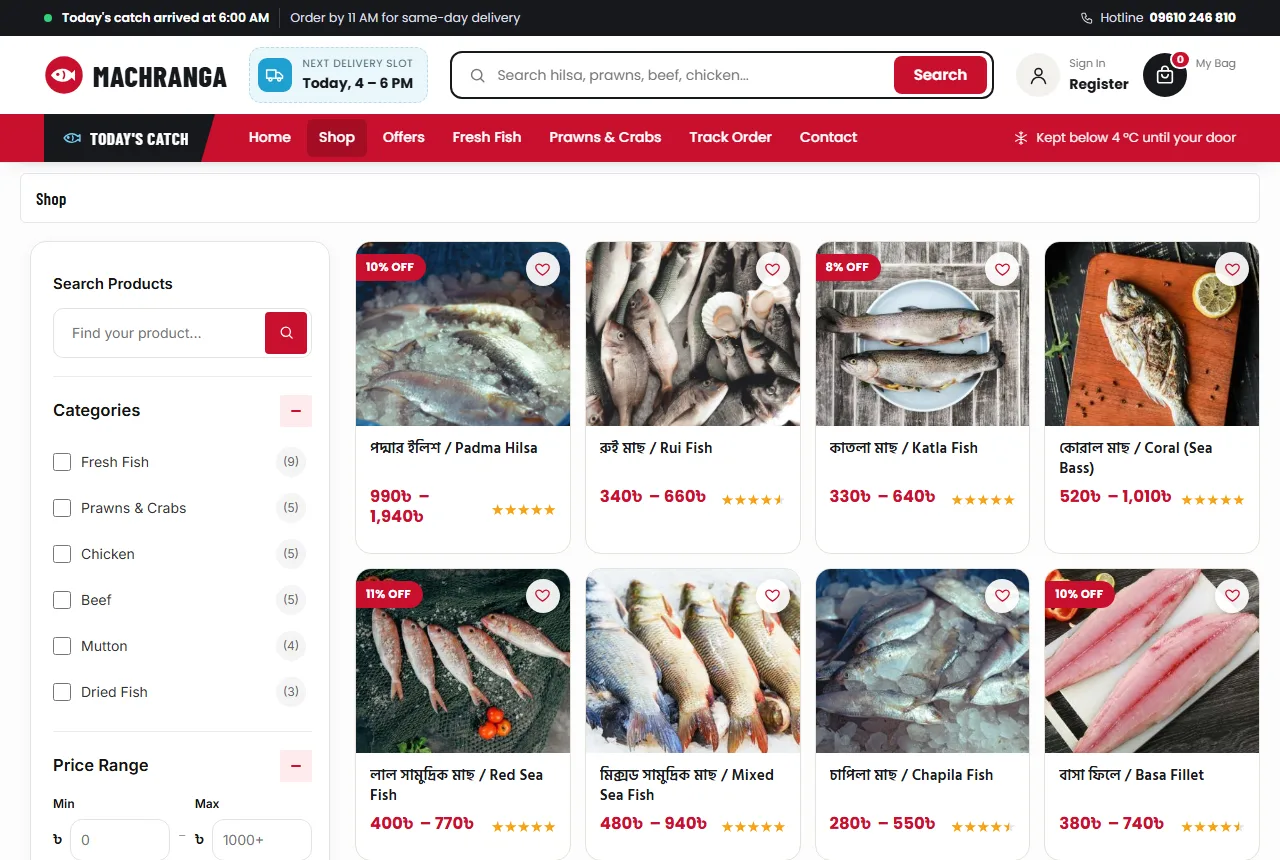
Keep the menu short and in the words buyers use. A clear set for a Bangladeshi shop is Fresh Fish, Prawns & Crabs, Chicken, Beef, Mutton and Dried Fish. Add Ready to Cook or Marinated later if you sell them.
Show categories as an icon bar under the header and again as tiles on the homepage. Icons of a fish, a prawn, a chicken leg and a steak are understood at a glance, even by buyers who read little English.
Use Bangla and English names together on products, such as "রুই মাছ / Rui Fish". Many buyers search in English letters for Bangla names, like "rui", "ilish" or "shutki". Add those words to titles and tags so search finds them.
A homepage order for fish and meat
In butcher shop website design, think of the homepage as your counter in the morning. The best items go in front, the promises are on the wall and the help line is close. An order that works well:
- Hero with one clear promise, such as "Cleaned, cut and delivered cold the same day", and two buttons: Shop Fish and Shop Meat.
- Category bar or tiles so buyers jump straight to what they came for.
- Today's catch: a rail of items that arrived this morning, with a "limited stock" note.
- Choose your cut: cards for curry cut, bone-in, boneless, whole cleaned and fillet.
- Category tabs with a grid of products for each tab.
- Weekly deals in one or two banners.
- Customer favourites as social proof.
- Cold-chain steps: from the ghat or farm to the door in four steps.
- Reviews, FAQ and a few kitchen tips from your blog.
Each block should end with a clear button. "View all fish" is better than "Learn more".
A delivery slot in the header
Fresh food buyers plan around meals. A small pill in the header that says "Next delivery slot: Today, 4–6 PM" answers the question "will it come before dinner?" without a phone call. Update it when your slots change, and never show a slot you cannot meet.
Product pages that sell by weight
A product page in a meat shop has one main job: help the buyer choose a weight and a cut, then order. Keep the top of the page focused:
- Photo gallery with the raw item and the packed item.
- Price for each weight, such as 500 g and 1 kg, shown as buttons.
- An "In Stock" or "Out of Stock" pill beside the price.
- A short line about source and size: "Padma hilsa, 900 g to 1 kg, cut free".
- Add to Cart and Buy Now buttons, both large.
- Small promise boxes for delivery time, cash on delivery and returns.
Explain how weight works. Is the weight before or after cleaning? Many disputes come from this. A line such as "weighed after cleaning" removes the doubt and shows you are honest.
Cutting notes and special requests
Let buyers write a note at checkout: "big pieces for rezala", "no head", "skin off". It costs nothing and makes the buyer feel served by a real butcher. Read every note before cutting. Small touches like this are where butcher shop website design meets real service.
A WhatsApp button on the product page helps buyers who want to ask before ordering. When it opens with the product name filled in, your staff know exactly what the question is about.
Delivery, cold chain and timing
Delivery is where a fish and meat shop wins or loses its name. Be clear and specific:
- Which areas you deliver fresh items to, and which you do not.
- The delivery charge for each area, such as ৳80 inside Dhaka and ৳120 outside.
- Slot times, and the last order time for each slot.
- How items are packed: ice packs, insulated boxes, sealed bags.
Fresh fish and meat are best kept inside one city, while dried fish and frozen packs can travel across the country. Set your delivery zones to match this, so a buyer in a far district cannot order fresh hilsa you cannot deliver cold.
Show the cold-chain promise in several places: the header, the product page and the footer. A line such as "Kept below 4 °C until your door" is short and easy to remember, but only use it if your packing really does it.
Packing that arrives well
Double-bag every item, keep fish and meat in separate bags and put ice packs at the top and bottom of the box. Write the order number and the buyer's name on the box. Riders should hand over cold items first and never leave them in the sun.
Checkout and payment in Bangladesh
A short checkout gets more orders. Ask for the name, mobile number, area and a short address. Show delivery charges in the cart, before the last step, so nobody feels tricked.
Cash on delivery is still how most buyers pay for food. Add bKash, Nagad and cards as the shop grows, and show their logos on the product page and in the footer. A free-delivery bar in the cart, such as "Add ৳600 more for free delivery", raises the order value without discounts.
Fake orders hurt a fresh food shop more than most, because the meat is already cut. If you see many fake orders, ask buyers to sign in with a mobile number or email before ordering. Keep the sign-in short, in a pop-up, and return the buyer to checkout after it.
Mobile first butcher shop website design
Most buyers order from a phone, often while cooking or on the way home. Design the phone view first:
- A menu button, the logo and the cart in the top bar.
- One main banner, not three.
- Product cards two per row with the price visible.
- Weight buttons and Add to Cart large enough for a thumb.
- A bottom tab bar with Home, Shop, Cart and Account.
Test on a low-cost Android phone over mobile data. If the homepage feels slow there, it is slow for most buyers. Compress photos to 800–1200 pixels wide and use a light theme without a heavy page builder. Speed is part of butcher shop website design, because a hungry buyer will not wait.
Trust pages and help
New buyers read your help pages before the first order. Keep them short and clear:
- About: where your fish and meat come from, and who cuts it.
- Delivery: areas, charges, slots and packing.
- Returns: what happens if an item is not fresh, with photos as proof.
- FAQ: weights, cleaning, cutting and payment.
- Contact: phone, WhatsApp, address and opening hours.
- Track Order: order number and email or phone.
Put your opening hours and your phone number in the footer. A buyer who sees "6:00 AM – 10:00 PM, every day" knows when someone will pick up.
Halal and hygiene notes
If your meat is halal, say so plainly and say how. If your staff wear gloves and clean boards every hour, say that too. Never claim a certificate you do not have.
Seasons and festivals
Fish and meat demand follows the calendar. Hilsa season, Eid-ul-Adha, winter weddings, Ramadan and Pohela Boishakh all change what buyers want. Good butcher shop website design changes with them:
- Before Pohela Boishakh, move hilsa and ilish combos to the top.
- During Ramadan, push marinated chicken and kebab cuts for iftar.
- Before Eid-ul-Adha, add a page for cutting and packing services.
- In winter, show mutton and party packs for weddings and picnics.
Change the hero and the deals banner for each season. Regular buyers notice, and it shows the shop is alive.
Common butcher shop website design mistakes
- Dark photos taken under yellow light.
- No weight options, only "1 piece".
- Delivery charges shown only at the last step.
- No word on how items are packed or kept cold.
- Promising a slot the riders cannot meet.
- Product text copied from another shop.
- No phone number or WhatsApp on the site.
Google's guide to helpful content is a good reminder. Write your product text for real buyers, in your own words, and answer the questions they ask you on the phone every day.
A launch checklist
- Every product has a clear photo, a source line, weight options and prices.
- Stock is set, so sold-out items stop taking orders.
- Delivery zones and charges match what your riders can do.
- The cold-chain promise is written where buyers can see it.
- Help pages are written and linked in the footer.
- You placed three test orders from a phone, including one with a cutting note.
After launch
Ask happy buyers for a short review after delivery, ideally with a photo of what arrived. Reply to every review, including the unhappy ones. Track a few numbers each week: orders, repeat buyers, returns and the most-sold items. Change one thing at a time and watch the numbers.
A fish and meat website design template can save weeks of work, but it should be a working shop, not only a picture. Check that it has weights, stock, delivery zones and accounts before you choose one.
Building your shop with Machranga
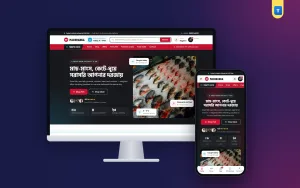
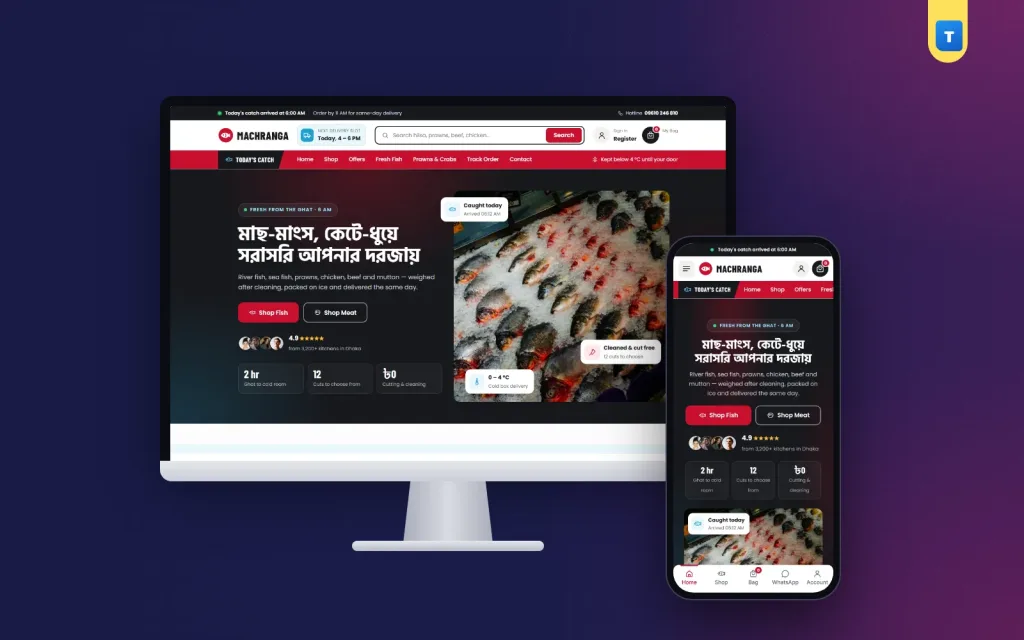
These ideas are easier to follow when the theme already has them. The Machranga meat shop WordPress theme for WooCommerce has a delivery slot pill and a cold-chain line in the header, an icon category bar, a split hero with freshness cards, a Today's catch rail, choose-your-cut cards, category tabs, deal banners, a favourites grid, cold-chain steps, reviews, FAQ and a blog block.
Every demo product has 500 g and 1 kg options. The product page has an In Stock pill, payment logos, Buy Now, promise boxes and Call and WhatsApp help.
Delivery zones for Inside and Outside Dhaka, cash on delivery, mobile or email sign-in and a phone tab bar are ready after the one-click demo import. As a fish and meat website design template, it lets you add your own products and start taking orders the same week.
Frequently asked questions
What should butcher shop website design show first?
Freshness, categories and the next delivery slot. Buyers want to know what is fresh today and when it will arrive.
Should I sell meat by weight or by piece?
By weight. Offer at least two options, such as 500 g and 1 kg, each with its own price.
Can I deliver fresh fish outside my city?
Only if you can keep it cold. Most shops keep fresh items inside one city and ship dried or frozen items further.
How much does butcher shop website design cost?
A ready WooCommerce theme costs far less than a custom build. Add hosting, a domain and your own photos.
Do I need online payment at the start?
No. Cash on delivery is enough at first. Add bKash, Nagad and cards later.