 −15%
−15%
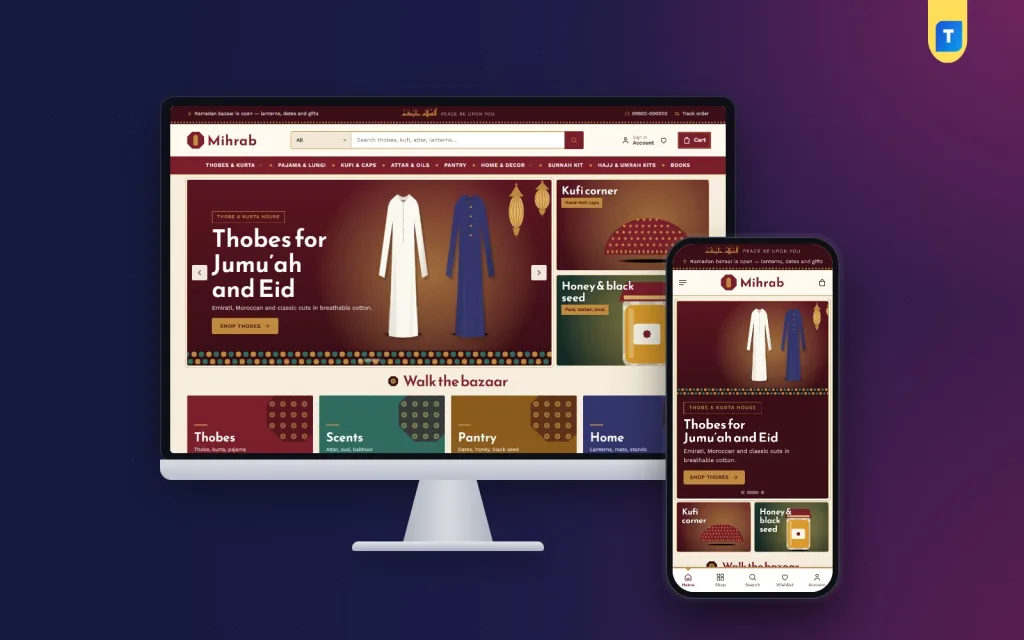
Mihrab – Islamic Store Ecommerce Website Template
✦ Key features
- 22 homepage blocks to switch off or re-order
- Salah times ledger you type yourself
- Octagon aisle tiles for categories
- Hajj and Umrah kit rail with banner
- Merchant logos and merchant of the month
- Under 500 taka price tiles
- Seasonal tiles for Ramadan, Eid and Jumu'ah
- Size guide for thobe and kufi
- 5 palettes and 4 font pairs
- Login popup and one-page checkout
- bKash, Nagad, SSLCommerz and COD
- Steadfast and Pathao courier booking
- Themeve Commerce plugin bundled
- One-click demo import
Overview
Mihrab is an Islamic store ecommerce website template for WordPress. It has 22 homepage blocks, salah times, a Hajj and Umrah kit rail, merchant logos, local payments and courier booking in one package.
Mihrab is an Islamic store ecommerce website template for WordPress, made for shops that sell goods from many merchants under one roof. It comes in maroon, brass and parchment, and it has a salah times ledger, a Hajj and Umrah kit rail, merchant logos and a price block for small buys. A real shop engine, with checkout, local payments and courier booking, is bundled with it.
The theme is built for Bangladesh, but the idea works anywhere people buy modest clothing, attar, dates, prayer mats and gifts online. You get a finished homepage, a product page that answers sizing questions, and a dashboard where you manage orders, payments and parcels. Nothing else needs to be bought.
Who can use this Islamic store ecommerce website template
Mihrab suits any shop that sells Islamic goods or family goods with an Islamic feel. The demo shows one example, but the layout is flexible. You can use it for:
- A multi-merchant Islamic bazaar with a row of seller logos
- A single-brand shop for thobe, kurta, pajama, lungi and kufi
- An attar, honey, dates and black seed store
- A Hajj and Umrah kit seller
- A shop for prayer mats, Quran stands, tasbih, miswak and lanterns
- An Islamic bookshop or gift shop
- A mosque-run or community shop that sells a few items online
- A Ramadan and Eid pop-up store that runs for a few months each year
If you stock different things in different lanes, the aisle tiles and department blocks let you show them without crowding the page. If you sell one product line, you can switch off the blocks you do not need.
What you get in an Islamic store ecommerce website template that is built for a bazaar
A boutique shows a few things slowly. A bazaar shows a lot, quickly, and lets people wander. Mihrab is drawn for the second kind of shop. Merchants get their own logo row and a monthly spotlight. Categories become octagon tiles. Your cheapest items get a corner of their own, so a buyer who came for honey also sees a tasbih and a pack of miswak.
As an Islamic bazaar ecommerce website theme it adds salah times, kits and merchant spotlights that general shop themes lack. The demo content is a sample shop with 39 products from 6 merchants. It is there to show how the pages fit together, and you replace it with your own stock.
Speed and weight
A long bazaar page can get heavy, so the theme keeps its files small and tidy.
- One stylesheet and one script file for the whole front end
- Product images load lazily, so they download as the visitor scrolls
- Google Fonts can be switched off in Theme Options if you prefer system fonts
- No page builder is needed, so there is no extra builder code on each page
- Optional shop modules stay off until you switch them on
Front-end features: the homepage
The homepage has 22 blocks. Each block can be switched off or moved up and down in Theme Options. On a phone you move blocks with arrow buttons instead of dragging.
Bazaar blocks
- Hero slider: maroon slides with lanterns and two side cards
- Salah times: a ledger of the five daily prayers plus Jumu'ah, typed by you, with no outside service
- Walk the bazaar: four zellige tiles that lead into your main sections
- Bazaar aisles: your categories shown as octagon tiles
- Bazaar deal: a countdown with stock bars
- Hajj and Umrah kits: a banner beside your ready-made kits
- Daily reminder: a short hadith or ayah with its reference
- Through the year: four picture cards for Ramadan, Eid, Jumu'ah and the journey
Selling blocks
- Fresh in the bazaar: two rows of your newest stock
- Best of the bazaar: products in tabs by category
- Under 500 taka: price tiles beside products for small add-on buys
- Everyone's buying: a sliding row of best sellers
- Merchants: a row of merchant logos
- Merchant of the month: one merchant and their products
- Three department blocks: a banner and eight products each
- Highly rated, promo cards and Keep browsing: the last one has a Load more button
- From the bazaar: posts from your blog
- Promise strip: delivery, cash on delivery, exchange and original goods
Header and menu
- A maroon top bar with a Salam greeting that you can hide
- An octagon logo, a wide search box with a category picker and a menu with brass dots
- On phones, the header shrinks to menu, logo and cart
Front-end features: product page, cart and account
Product page
- A size guide, where thobes go by length and kufi by head size
- A wishlist to save items for later
- Reviews inside a fold, with a popup that invites the first review
- Back-in-stock alerts for items that sell out
- Compact product cards that work well on small screens
Account and checkout
- Sign in or register in a popup, so the buyer does not lose their place
- Single-page checkout
- An Order placed popup that confirms the purchase
- A Track Order page where buyers follow their parcel
- Returns and exchange requests, and a store locator for physical shops
Picture a buyer in Sylhet who wants a white thobe for Jumu'ah. She checks the size guide, saves a second item to her wishlist, signs in through the popup and pays on one page. She never leaves the product she was looking at.
Back-end: Theme Options
All look-and-feel settings are in Mihrab, under Theme Options. There is a search box for settings, a sticky save bar, a reset button, and export or import so you can keep a backup. The Live Customizer is also in the Mihrab menu.
Settings tabs
- Homepage layout: switch blocks on or off and set their order
- Colors: choose from 5 palettes (Maroon and brass, Teal tile, Indigo night, Saffron, Ink and sand) or set every colour by hand
- Typography and style: 4 font pairs, namely Reem Kufi with Work Sans, Aref Ruqaa with Lato, Scheherazade New with Source Sans 3, and Cormorant Garamond with Work Sans
- Header and menu: the top bar, greeting and search
- Product cards: how each product looks in the grids
- Hero slider: slides and side cards
- Salah times, bazaar tiles, categories, deals and promos: prayer times, reminder text, tiles and offers in simple fields
- Product sections: titles and content of the selling blocks
- Product page: what appears on each product
- Footer and contact: your address, phone and links
Back-end: the shop dashboard
Every Islamic store ecommerce website template needs a working back office, and here it is. The Themeve Commerce plugin comes with the theme. It adds a Shop menu to your WordPress dashboard and handles everything behind the shop window, so you do not need a separate shop plugin, payment plugin or courier plugin.
Orders and products
- A sales overview with today's sales, the last seven days, the month so far and orders waiting for you
- Order statuses, printable invoices and a payments box for advances, dues and refunds
- A list of incomplete orders from people who left during checkout
- A full-page product editor with options such as size or colour, each with its own price, stock, SKU and photo
- Categories, brands and tags with their own menus
Payments and delivery
- bKash, Nagad, SSLCommerz, cash on delivery and manual payment, with a transaction ID for Send Money
- An advance on cash on delivery, as a fixed sum, the delivery charge or a percentage
- Delivery charges by district and extra zones
- Steadfast and Pathao booking from the order screen, plus a COD money screen to match courier payments
Customers and alerts
- Login by password, by phone code, or with Google or Facebook
- A customer account with orders, delivery tracking, wishlist and return requests
- New-order alerts by email, Telegram or WhatsApp
- SMS updates, OTP phone checks and fake order protection for cash on delivery
- Review requests after delivery and SMS campaigns for past buyers
Marketing and reports
- Coupons and offers
- Facebook Pixel with the Conversion API, Google Analytics 4 and Google Tag Manager
- Product feeds for Facebook and Google shopping
- SEO settings for descriptions, sharing previews and Google product results
- A transactions screen with monthly totals and a customer list that groups buyers as new, repeat, VIP, inactive or risky
Optional modules
Modules keep the shop light, because you switch on only what you use. They include pre-orders, delivery date and time, bulk orders and quotes, reseller prices, combo offers, flash sales, loyalty points, upsell and cross-sell, recently viewed items, back-in-stock alerts, exchange and returns, store locations, popups, an affiliate programme and a marketplace module. Support tickets and testimonials have their own menus, and developers get a REST API with signed webhooks.
How it helps you sell
- The Under 500 taka block turns a single purchase into a basket of three or four small items.
- The Hajj and Umrah kit banner puts your highest-value bundles in front of people early in the season.
- Seasonal cards for Ramadan, Eid and Jumu'ah let you change focus without redoing the page.
- Merchant of the month gives each seller a reason to share your shop with their own followers.
- Salah times and the daily reminder give people a reason to come back to the site.
- Telegram alerts tell you about each sale the moment it happens.
Setup in five steps
- Upload the theme to WordPress and activate it.
- Open Mihrab, then Setup, and install Themeve Commerce in one click.
- Enter your licence key under Mihrab, then License.
- Run Demo Import. It creates 39 products, posts, menus and every page.
- Replace the sample merchants, photos and prices with your own, then pick a palette and fonts.
The demo adds pages for About, Contact, Delivery, FAQ, From the Bazaar, Size Guide, Returns and Exchange, Track Order, Wishlist, Our Stores, Terms and Privacy Policy. Edit the text on each so it matches your shop.
Why choose this Islamic store ecommerce website template over a plain one
A plain template gives you a header, a grid and a footer. You then add a shop plugin, a payment plugin, a courier plugin and a size chart plugin, and hope they work together. With Mihrab, the shop pieces come as one set, and the design already knows what an Islamic store needs.
- Salah times, hadith reminders and Hajj kits are built in, not added later
- Payments and couriers are the ones your Bangladeshi buyers already use
- Every block has a switch, so you never have to delete code to hide something
- Settings are in plain fields, so you do not need a developer
If you prefer a quieter single-brand shop, the sister theme Barakah has prayer times and gift boxes. If you sell mostly modest clothing, see Noor.
Technical details
- Needs WordPress 6.0 or newer and PHP 7.4 or newer
- Tested up to WordPress 7.1
- Fully responsive layout, so the shop works on a phone
- Works with the block editor (Gutenberg)
- Version 1.0.0, with 6 months of support
What is included
- The Mihrab theme files
- The Themeve Commerce plugin
- One-click demo content
- Documentation
- A licence key with updates
- Unlimited re-downloads
For a lively Islamic bazaar ecommerce website theme with many merchants in one place, Mihrab is a good place to start. All artwork and merchant names in the demo are samples, so replace them with your own before you go live.
You can see Mihrab working on the live demo, and browse more ready-made designs in our WordPress themes collection.
Reviews
0.0
Write a review
★★★★★
0 reviews from buyersNo reviews yet — be the first to share your experience after buying.
Frequently Asked Questions
01Is Mihrab a good Islamic store ecommerce website template for a multi-merchant shop?
Yes. It has a merchant logo row, a merchant of the month block, aisle tiles and three department blocks, so many sellers can share one site.
02Can I use this Islamic store ecommerce website template for a single-brand shop?
Yes. Every homepage block can be switched off, so you can keep only the ones a single shop needs.
03Do I have to buy the shop plugin separately?
No. Themeve Commerce is bundled and installs in one click from Mihrab, then Setup.
04How do the salah times update?
You type them in Theme Options. Nothing is pulled from an outside service, so the times shown are exactly what you enter.
05Which payment methods can buyers use?
bKash, Nagad, SSLCommerz, cash on delivery and manual payment. You choose which ones to show.
06Can I send parcels with Steadfast or Pathao?
Yes. Both couriers can be booked from the order screen, and buyers can check progress on the Track Order page.
07Does the demo content come with the theme?
Yes. One click imports 39 sample products from 6 merchants, posts, menus and every page. Replace the samples with your own.
08Does it work well on phones?
Yes. The layout is responsive, the phone header shows menu, logo and cart, and product cards stay compact.
Delivery & Support
1Place your orderAdd to cart, sign in and pay with bKash or Rocket.
2Payment verified automaticallyEnter your Transaction ID — the payment is matched automatically, usually within seconds.
3Get your productYour license key and download appear in My Account → Licenses.
- Secure automatic payment verification
- Delivery to your account & e-mail
- Friendly WhatsApp support
Refund Policy
This policy applies to every product in our store.
You get a refund when the product does not work as described and we cannot fix it, when your license will not activate your website, or when a manually delivered product is late and you cancel before delivery. A working license, or a single license already used on a live domain, is not refundable. Approved refunds go back to the number you paid from within one working day, minus the Send Money charge.
More items
View all →You may also like
−15%
 −34%
−34%
 −27%
−27%
 −25%
−25%
