 −27%
−27%
Shikhor – Corporate WordPress Theme
✦ Key features
- 17 homepage blocks to switch and re-order
- Where do you want to go next finder
- Client stories with headline results
- Latest thinking with topic tabs
- Dotted world map with offices by region
- Careers template with a team filter
- Investors template with reports and calendar
- Enquiries kept under Shikhor, Enquiries
- Wide menu panels with a featured article
- Sign in and register popup
- 6 colour palettes and 5 font pairs
- One-click demo of an advisory firm
Overview
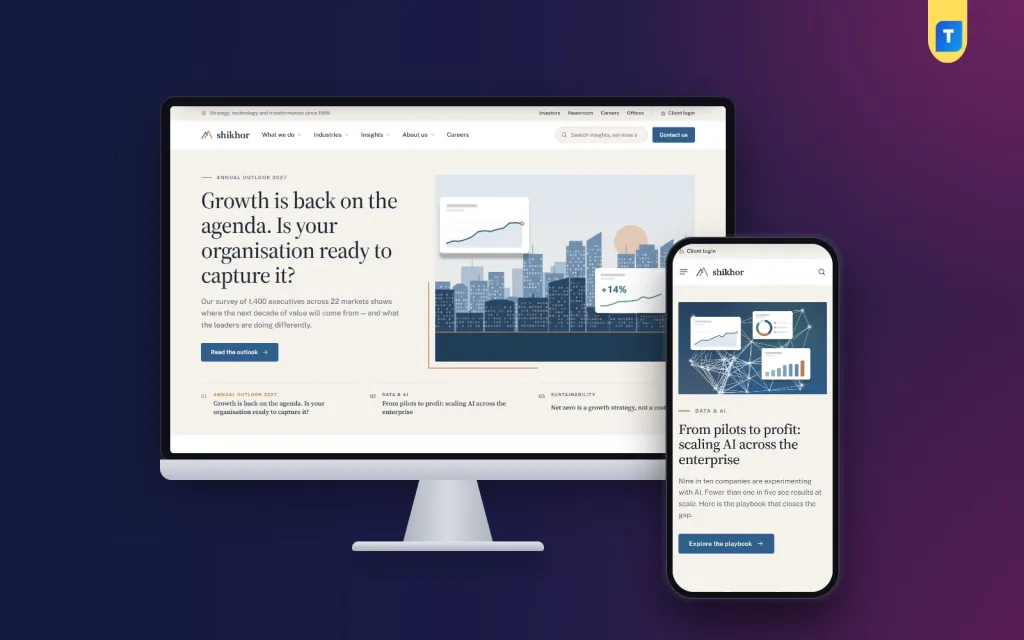
Shikhor is a corporate WordPress theme for consulting, advisory and professional-services firms. It has 17 homepage blocks, an industry finder, client stories, insights, careers and investor pages, and an enquiry form kept in your dashboard.
Shikhor is a corporate WordPress theme for advisory, technology and professional-services firms that want a website in the style of the large international firms. It is calm, editorial and full of substance. Services, industries, client stories, insights, careers, investors and enquiries all have a place.
Shikhor means peak. The look uses a serif for headings, paper-coloured bands, fine hairlines and a copper accent, so long reading pages feel natural. You set up everything from the WordPress dashboard, with no code.
Who can use Shikhor
The demo is an invented global advisory firm, but the theme suits any company whose clients read before they call.
- Management consultancies and advisory firms.
- Technology, software and data companies.
- Audit, accounting and tax practices.
- Law firms and engineering practices.
- Investment and holding companies with an investor page.
- Any group with several offices, a newsroom and open roles.
It is a company website first, built around an enquiry form, offices, news and careers. There is nothing extra to switch off before you start. Shikhor needs WordPress 6.0 or newer and PHP 7.4 or newer, and it is tested up to WordPress 7.1.
Why choose a corporate WordPress theme built for firms
A general business template gives you a hero, three icons and a contact form. A firm needs more. Clients want to see which industries you serve, who leads the team, what you have delivered and where your offices are.
Shikhor puts those answers in the structure. It is not a business ecommerce website theme, because it has no product grid or cart on the front. It is meant for firms that sell expertise and take enquiries.
Speed and weight
Long reading pages should still open quickly on a slow office connection or a phone. This corporate WordPress theme keeps the front end small.
- The public pages do not load jQuery. The theme script is plain JavaScript.
- The theme uses one main style file of about 70 KB and one small script.
- The world map is a light SVG file, not an embedded map service.
- The contact form sends without reloading the page.
Homepage blocks of the corporate WordPress theme
The homepage has 17 blocks. Each can be switched off or moved into a new order. On a phone, you use arrows to move them.
- Featured stories. A big headline, a picture and three story tabs.
- Client logos. A quiet row under the opening block.
- Who we are. A statement paired with four key figures.
- What we do. Service cards pulled from your Services page.
- Industries. A list beside a picture panel.
- Where do you want to go next? The finder, described below.
- Client stories. Each story leads with its headline result.
- Latest thinking. One big article and four more, with topic tabs.
- Leadership message. A portrait and a short quote.
- Commitments. Four targets with progress bars.
- Global presence. A dotted world map next to office cards by region.
- Careers. A short block that points to open roles.
- Newsroom. Recent releases with a media contact.
- Contact band. A closing call to start a conversation.
- Recognition, Upcoming events and Client voices. Three more blocks for awards, dates and quotes.
The finder visitors remember
The "Where do you want to go next?" block lets a visitor pick an industry and a priority. Shikhor then shows two matching services and the newest client story with that industry and priority.
- You choose the two services for each priority in Theme Options.
- Client stories come from your own posts, tagged in their "Shikhor details" box.
- The finder grows as you publish more stories.
Page templates for a company website
Shikhor comes with templates for the pages a firm needs. This corporate WordPress theme saves you from building each one from blocks.
- Hub. Lists its sub-pages, which makes it a fit for Services and Industries.
- Service or industry page. Key facts, an "at a glance" card, how we work and related client stories.
- About. Values, a timeline, the leadership team and offices.
- Careers. Perks, open roles with a team filter, email applications and the hiring steps.
- Investors. Highlights, report downloads and a financial calendar.
- Contact. The enquiry form, the head office and an offices map.
Every page and post has a "Shikhor details" box for an icon and key facts. On client stories, it also holds the result, client, service, industry and priority.
Header, menu and sign-in
- A thin top bar with your top-bar links, a language switch between English and Bangla, and a client login.
- A white header with the peak mark, the main menu, a search field and a "Contact us" button.
- Wide menu panels with a one-line description under each link and a featured article.
- On phones, a sheet menu that folds by section.
- Sign in and register in a popup.
Insights, news and enquiries
A firm builds trust by publishing what it knows. Shikhor gives that writing a proper home, so a white paper or a news release looks as good as a service page. Editors only fill in the title, the text, the image and the topic. The theme sets the layout, the share links and the related reading.
- Insights get topic chips, a big lead article and a three-column grid.
- Articles carry share links and related reading.
- Client stories show an "at a glance" box.
- News releases have their own listing.
- The contact form emails every message to you and also keeps it under Shikhor → Enquiries, so nothing slips through.
- A shortcode, [shikhor_contact], places the same form on any page.
Back-end options of the corporate WordPress theme
All settings are in Shikhor → Theme Options. They are grouped in tabs, with a search box, a sticky save bar, export, import and reset.
- Homepage layout. Switch blocks on or off and set their order.
- Colors. Six palettes: Harbour blue, Evergreen, Plum & sand, Slate & coral, Burgundy and Ocean teal. You can also set each colour by hand.
- Typography & style. Five font pairs, such as Source Serif 4 with Public Sans, or an all-sans option.
- Header & menu. Top bar, links and the header button.
- Featured stories & logos. The opening block and the client logo row.
- Who we are & leadership. The statement, the four figures and the leadership message.
- Services & industries. The cards and the picture panel.
- Finder. The two services shown for each priority.
- Stories, insights & news. How the article blocks behave.
- Commitments, recognition & contact band. Targets, awards and the closing call to action.
- Offices. One office per line as City | Address | Phone. The list feeds the homepage map and the Contact page.
- About page, Careers and Investors. Values, roles, reports and the financial calendar.
- Contact form. Settings for the enquiry form.
- Company details & footer. Your details, with footer columns built from menus. Each menu name becomes the column title.
Other dashboard parts
- Shikhor → Enquiries, where contact form messages are stored.
- Shikhor → Setup, which installs the bundled Themeve Commerce plugin in one click.
- Shikhor → License, for the key for updates.
- Demo Import, which loads the sample firm.
How it helps your firm
- Credibility. The structure looks like a large firm's site: leaders, offices, reports and client results.
- Lead capture. The enquiry form appears on the Contact page, in the header and in the closing band.
- Content that grows. Each new insight, story or news release feeds the homepage blocks automatically.
- Hiring. Open roles with a team filter bring applicants to one page.
- Investor relations. Reports and a financial calendar have a fixed home.
- Easy upkeep. Your staff edit pages in the normal WordPress editor.
If you also need to sell products, a business ecommerce website theme is a better base. Shikhor is for firms that sell services and take enquiries. If you want a storefront for downloads, see Jhuli. Running an engineering or industrial group? Bhitti is the bolder sister theme.
Set it up in seven steps
You do not need a developer to launch a corporate WordPress theme like this one. A marketing manager or an office administrator can follow the steps below. Collect your logo, office list, leader photos and a few client results first, and the work goes much faster.
- Upload the theme zip in Appearance → Themes and activate it.
- Open Shikhor → Setup and install Themeve Commerce.
- Enter your license key in Shikhor → License.
- Run Demo Import to load the sample firm.
- Replace the sample services, industries, stories, leaders and offices with your own.
- Pick a palette and a font pair in Theme Options, and set the block order.
- Add your company details, footer menus and contact email, then test the enquiry form.
To add a service or an industry, create a page under your Services or Industries page by setting its Parent. Give it an icon and key facts in its "Shikhor details" box, and the homepage cards update.
What the demo contains
The one-click demo builds an invented global advisory firm. It includes six services, six industries, 6 client stories, 9 insights, 5 news releases, 8 leaders and 11 offices on the world map. It also has careers, investors, sustainability and every page. Every company, client, person and figure is a sample, so replace them with your own.
What is included
- The Shikhor theme files (PHP, CSS and JavaScript).
- The Themeve Commerce plugin.
- Demo content and a world map file.
- Documentation, available after purchase.
- A license key, lifetime updates and six months of support.
For a firm whose name should carry weight, Shikhor is the corporate WordPress theme that reads like one of the big ones.
You can see Shikhor working on the live demo, and browse more ready-made designs in our WordPress themes collection.
Reviews
0.0
Write a review
★★★★★
0 reviews from buyersNo reviews yet — be the first to share your experience after buying.
Frequently Asked Questions
01What kind of website is this corporate WordPress theme made for?
A company website for consulting, advisory, technology and professional-services firms, built around services, industries, stories, insights, careers and enquiries.
02Is Shikhor a good corporate WordPress theme for a law or audit firm?
Yes. The service, industry, about, careers and contact templates fit any firm that sells expertise.
03Is the Themeve Commerce plugin included?
Yes. It is bundled and Shikhor, Setup installs it in one click.
04Where do contact form messages go?
Each message is emailed to you and kept under Shikhor, Enquiries. The [shikhor_contact] shortcode places the form on any page.
05How does the finder decide what to show?
Visitors pick an industry and a priority. Shikhor shows the two services you chose for that priority and the newest matching client story.
06How do I add my own services and industries?
Create pages under your Services or Industries page by setting the Parent, then add an icon and key facts in the Shikhor details box.
07How do I list our offices on the world map?
Type them in Theme Options under Offices, one per line as City | Address | Phone.
08Can I change colours and fonts without code?
Yes. Choose one of 6 palettes or set each colour, pick from 5 font pairs, and re-order the blocks in Theme Options.
Delivery & Support
1Place your orderAdd to cart, sign in and pay with bKash or Rocket.
2Payment verified automaticallyEnter your Transaction ID — the payment is matched automatically, usually within seconds.
3Get your productYour license key and download appear in My Account → Licenses.
- Secure automatic payment verification
- Delivery to your account & e-mail
- Friendly WhatsApp support
Refund Policy
This policy applies to every product in our store.
You get a refund when the product does not work as described and we cannot fix it, when your license will not activate your website, or when a manually delivered product is late and you cancel before delivery. A working license, or a single license already used on a live domain, is not refundable. Approved refunds go back to the number you paid from within one working day, minus the Send Money charge.
More items
View all →You may also like
−27%
 −10%
−10%
 −15%
−15%
 −33%
−33%
Grocery
Kheti – WordPress Theme for Fruits and Vegetables Shops (WooCommerce & Elementor)
৳1,990
৳2,990Save −33%
