−50%
Shipping Rules – Shipping Rules Plugin WordPress
−50%
✦ Key features
- One store-wide cart subtotal rule
- Hide shipping methods by ID on WooCommerce
- Free delivery above the amount on Themeve Commerce
- Checkout updates as the cart changes
- Works on top of your shipping zones
- On and off switch keeps your values
- Amount field in taka
- No coding needed
- Set up in minutes
Overview
Shipping Rules is a shipping rules plugin WordPress shop owners can use to change delivery terms once a cart reaches an amount. On WooCommerce it hides the shipping method you choose. On our Themeve Commerce shop system it makes delivery free. You set one amount, save, and the checkout adjusts itself as buyers add items.
The plugin is made for one very common offer: free or cheaper delivery for bigger orders. It is small on purpose. One screen, one rule and an on and off switch. That makes it easy to set up, easy to explain to buyers and easy to test.
Who can use this shipping rules plugin WordPress stores need
Any shop that charges for delivery and wants bigger carts can use it. It does not depend on your products. It only reads the cart subtotal.
- Cosmetics, skincare and grocery shops that want buyers to add one more item.
- Clothing and shoe stores that run "free delivery over a set amount" campaigns.
- Electronics accessory shops with many small, low-price products.
- Book, stationery and gift shops that ship light parcels.
- Agencies that build WooCommerce shops and need a simple threshold rule.
- Owners who use Themeve Commerce and want a free delivery target without extra setup.
Why delivery offers lead to bigger orders
Delivery charges are one of the main reasons shoppers leave a cart. They are also one of the easiest things to change. Tell buyers that orders above a certain amount get free delivery, and many will add one more item to reach it.
That extra item often pays for the delivery and more. The buyer feels they gained something, and you ship a bigger parcel for the same courier charge.
Shipping rules plugin WordPress buyers notice at checkout
There is no new page, pop-up or widget. Buyers simply see different delivery options once their cart crosses your amount.
On WooCommerce
- Below your amount, every shipping method works as normal.
- At or above your amount, the method you chose is removed from the list of options.
- The remaining methods, such as free shipping or local pickup, stay available.
- The checkout updates as the cart changes, so buyers see the effect when they cross the line.
On Themeve Commerce
- Below your amount, the normal delivery charge from your zones applies.
- At or above your amount, the delivery charge becomes zero.
- The cart and checkout totals show the change at once.
Back-end settings, field by field
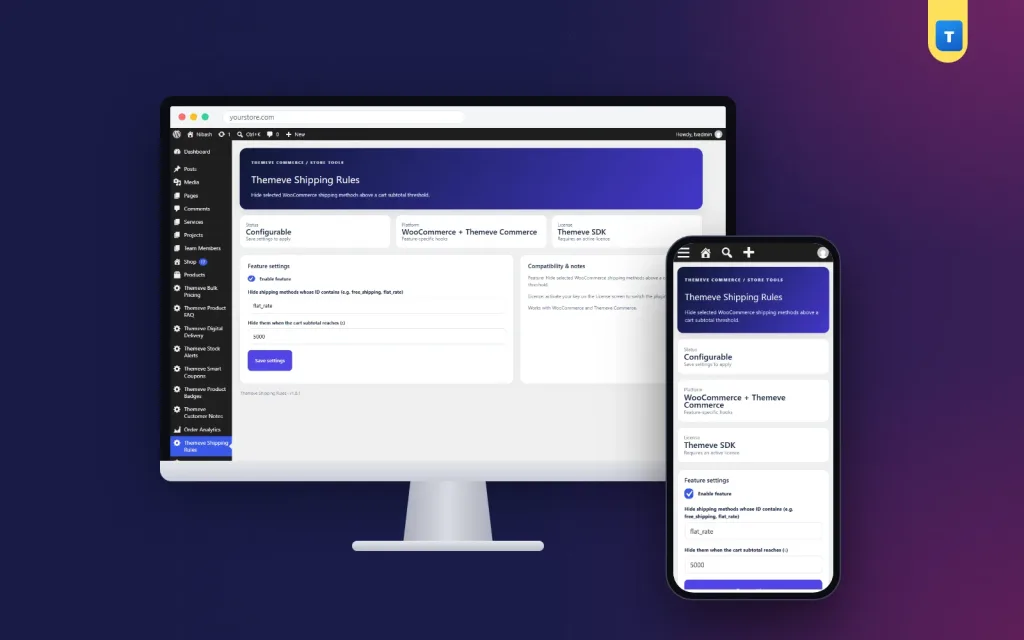
After activation you will find Themeve Shipping Rules in the left admin menu. It opens one settings page with a form card and a notes card. Administrators can open it, and so can WooCommerce shop managers.
Feature settings card
- Enable feature. A checkbox that turns the rule on or off. Your values stay saved when it is off, so you can pause a campaign and bring it back later.
- Hide shipping methods whose ID contains. A text field for WooCommerce. Type a part of the method ID, such as flat_rate or free_shipping. The plugin hides every method whose ID contains that text. Matching ignores upper and lower case.
- Hide them when the cart subtotal reaches (taka). A number field with two decimals. The rule starts when the cart subtotal is equal to or above this amount. A value of zero means the rule does nothing.
- Save settings. A button that stores the form. The rule applies on the next checkout update.
Compatibility and notes card
- A side panel that describes what the plugin does.
- It states that the plugin works with WooCommerce and Themeve Commerce.
- It reminds you to activate your licence on the License screen.
Licence screens
- A lock screen appears when the licence is missing or expired. No rule runs until you activate.
- A License screen lets you activate the plugin once.
- Updates arrive in Dashboard, Updates, while the licence is active.
The method field is only used on WooCommerce. On Themeve Commerce, the amount alone decides when delivery becomes free.
A common setup on WooCommerce
The classic setup hides the paid flat rate once the cart reaches your free delivery amount, so only free shipping remains. Follow these points to make it work.
- Create a flat rate method and a free shipping method in each shipping zone.
- Check the ID of the flat rate method. It usually starts with flat_rate.
- Type flat_rate in the method field of this plugin.
- Enter your free delivery amount and save.
- Test with two carts, one below the amount and one above it.
Make sure every zone keeps at least one method for carts above the amount. Otherwise a buyer could reach the checkout with no delivery option left.
Setting the right amount in your shipping rules plugin WordPress settings
Look at your average order value first. Set the amount a little above it, so a typical buyer needs one more item to reach it. Too low, and you give free delivery to orders that would have come anyway. Too high, and nobody tries.
Remember the courier cost for far-away districts. If delivery outside Dhaka costs more, make sure your amount still leaves a profit after you pay for those parcels.
How it helps you sell
- It gives buyers a clear target to reach.
- It raises your average order value without a separate discount.
- It makes campaigns simple to explain: "Free delivery over a set amount."
- It works on top of your zones, so you do not rebuild your shipping setup.
- You can switch it off in one click when a campaign ends.
Here is an example. A cosmetics shop sees an average order of about 900 taka. It sets the amount to 1,200 and hides the paid flat rate above it. Buyers with 1,000 taka in their cart add a lip balm or face wash to reach free delivery, and the average order rises over a few weeks.
Tell buyers about your offer
A free delivery target only works if people know about it. Put it in your homepage banner, your Facebook page intro and every campaign post. Mention it when buyers message you. Many shops also add it to product badges during sales.
Checking the results of your shipping rules plugin WordPress rule
After two or three weeks, compare your average order value with the weeks before. Look at the share of orders that reached the target. If few buyers reach it, lower the amount a little. If almost everyone already does, raise it.
Also compare your courier bills. Free delivery is a cost you now carry, so the extra sales should cover it.
Things to check before you go live
- Open your shipping zones and confirm each one still has a method that stays visible above the amount.
- Use a real product price in a test cart. A cart of one cheap item may stay below the amount, and that is the correct result.
- Check the method ID, not the method title. The title is what buyers read, but the ID is what the plugin matches.
- Look at the checkout on a phone, since most of your buyers will use one.
- Write down the amount and the date, so you can compare orders before and after.
Setup steps
- In your WordPress dashboard, go to Plugins, Add New, then Upload Plugin, and choose the zip file.
- Click Install Now, then Activate.
- Open the License screen and enter your licence to switch the plugin on.
- Set up your shipping zones and methods in WooCommerce or Themeve Commerce as usual.
- Open Themeve Shipping Rules in the left menu and tick Enable feature.
- On WooCommerce, type the part of the method ID to hide.
- Enter the cart subtotal amount and click Save settings.
- Test two carts, one below and one above the amount, and then announce your offer.
Requirements
- WordPress 6.2 or newer, tested up to WordPress 7.1.
- PHP 7.4 or newer.
- WooCommerce for the hide-method rule, or Themeve Commerce for the free delivery rule.
- An active licence, so the rule can run and updates can arrive.
Why use this instead of custom code
A shipping rules wordpress plugin for WooCommerce saves you from pasting filters into a theme file. Code like that disappears when you change themes, and the next person who edits the site may not know it exists. A settings screen keeps the rule visible and easy to change.
The plugin also stays honest about its scope. It handles one store-wide rule based on the cart subtotal. It does not build price tables by weight or by district. If you need that, keep using the rates in your shipping zones, and let this rule handle the free delivery threshold on top.
What is included
- The plugin zip file, ready to upload in Plugins, Add New.
- One settings page with an on and off switch, a method field and an amount field.
- Support for WooCommerce and for Themeve Commerce.
- Documentation after purchase.
- Updates in Dashboard, Updates, while your licence is active.
- Six months of support, with help on WhatsApp.
Pairs well with other tools
This shipping rules plugin WordPress owners can add in minutes sits next to other small tools. Smart Checkout Rules decides when cash on delivery is offered, by order total or district. Bulk Pricing gives a fixed discount once the cart reaches a set number of items. Smart Coupons shows a coupon code at the cart. All three are optional, and each one does a single job.
A shipping rules wordpress plugin for WooCommerce like this one is a small change at checkout, but it can make every campaign more profitable.
Shipping Rules is built on the official WordPress documentation standards, and you can browse more of our WordPress plugins.
Reviews
No reviews yet — be the first to share your experience after buying.
Frequently Asked Questions
01What does this shipping rules plugin WordPress shop owners install do on WooCommerce?
It hides the shipping methods you choose, such as a flat rate, once the cart subtotal reaches your amount.
02How does a shipping rules plugin WordPress store runs on Themeve Commerce work?
Once the cart subtotal reaches your amount, the delivery charge becomes zero.
03Can I add several rules?
No. It is one store-wide rule based on cart subtotal, which keeps the offer easy to explain.
04Does it replace my shipping zones?
No. It works on top of the zones and methods you already have.
05Does the checkout update when the cart changes?
Yes. Buyers see the change as soon as the cart crosses the amount.
06Can I pause the rule?
Yes. Untick Enable feature. Your values stay saved.
07Do I need WooCommerce?
For the hide-method rule, yes. On Themeve Commerce the free delivery rule works without WooCommerce.
Delivery & Support
- Secure automatic payment verification
- Delivery to your account & e-mail
- Friendly WhatsApp support
Refund Policy
You get a refund when the product does not work as described and we cannot fix it, when your license will not activate your website, or when a manually delivered product is late and you cancel before delivery. A working license, or a single license already used on a live domain, is not refundable. Approved refunds go back to the number you paid from within one working day, minus the Send Money charge.
You may also like
−50%
−7%
−12%
−50%