 −50%
Bulk Pricing – Bulk Discount Plugin WooCommerce
✦ Key features
- Fixed discount from a set item count
- Your own discount name in the cart
- Shown as its own line in totals
- Visible on cart and checkout
- Never takes a total below zero
- One clear store-wide rule
- On/off switch keeps your settings
- Works on WooCommerce and Themeve Commerce
- Set up in about a minute
- No extra scripts on shop pages
Overview
Bulk Pricing is a bulk discount plugin woocommerce shops set up in a minute: pick an item count, an amount and a name, and every bigger cart gets a fixed discount shown as its own line.
Bulk Pricing is a bulk discount plugin woocommerce shops can set up in about a minute. When a customer's cart reaches the number of items you choose, a fixed discount is taken off, under a name you write yourself. It has one job: reward people who buy more.
It works on WooCommerce and on Themeve Commerce, our own shop plugin. There is no long rule table and no per-product setup. You enter an item count, an amount and a name, switch the rule on, and every bigger cart gets the offer.
Why reward bigger carts
Every order has a fixed cost. You pack it, print the label and pay the courier, whether the parcel holds one item or five. When a buyer adds a second or third item, the extra profit is larger than on the first, because the delivery work is already paid for.
Sharing a small part of that profit with the buyer is a fair trade. A modest discount for three items or more pushes people to add a matching item, buy for a family member, or stock up on something they use every month.
Who can use this bulk discount plugin woocommerce
Any shop that sells in units and wants bigger baskets can use it. The rule is the same everywhere, only the numbers change.
- Clothing shops: a discount on three or more pieces during Eid or a winter sale.
- Grocery and household shops: a reward for monthly stock-ups.
- Cosmetic and beauty sellers: a nudge to try a second product.
- Stationery and gift shops: an easier choice for office and school bulk orders.
- Accessory and gadget shops: cables, covers and small items that sell in pairs or sets.
- Book sellers: a saving for readers who buy a series.
In each case the message is simple enough to put on a Facebook post: buy this many items and save this much.
How the bulk discount plugin woocommerce works
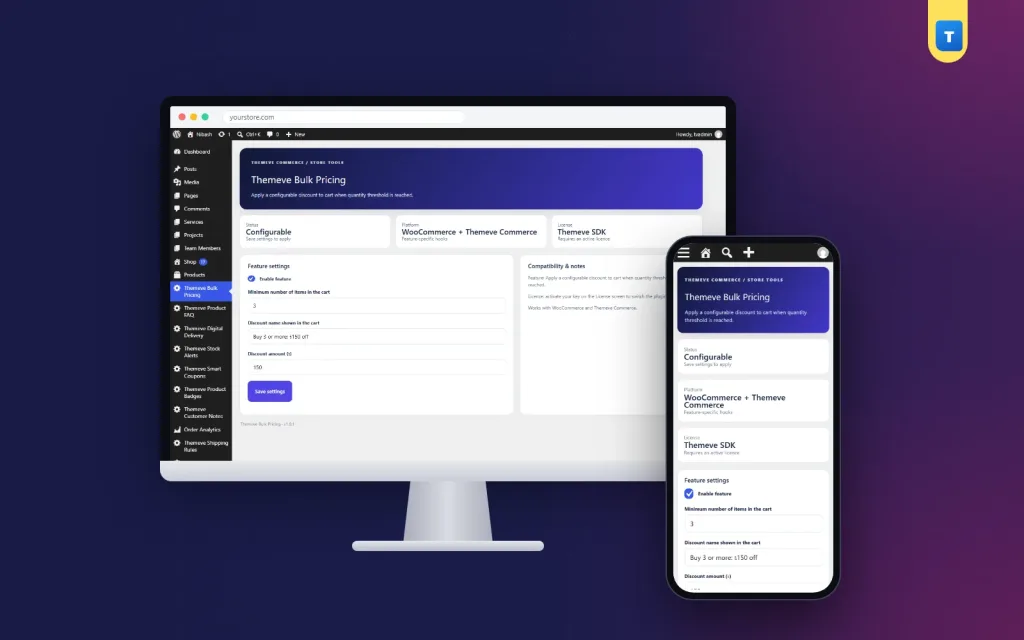
Open Themeve Bulk Pricing from the left admin menu. Set the minimum number of items, the discount amount and the name buyers will see, such as Buy 3 Save or Family Pack Discount. Switch the rule on. From then on it applies whenever a cart reaches the item count.
On WooCommerce
- The plugin adds up the quantities of every item in the cart.
- When the total reaches your minimum, one fixed amount is taken off.
- The discount shows as its own line in the cart and checkout totals, under the name you chose.
- The discount never goes beyond the cart subtotal, so a total cannot fall below zero, even on very cheap carts.
On Themeve Commerce
- The plugin hooks into the Themeve Commerce cart price.
- When a cart line reaches the minimum quantity, the amount is taken off that item's price.
- The price never drops below zero.
Because the two shop systems build the cart differently, test the offer once on your own store and look at the totals before you announce it.
What buyers see on the front end
The plugin has no popups, sliders or extra pages. Buyers see the result where it matters.
- A named discount line in the cart totals on WooCommerce.
- The same line in the checkout totals, so they see exactly what they saved.
- A lower item price on Themeve Commerce carts that reach the minimum quantity.
- Nothing on carts below the minimum, so regular orders look the same as before.
The plugin does not print a badge or a banner on product pages. If you want shoppers to know about the offer early, say so in your page banner, product descriptions and social posts. Buyers who know the rule before they reach the cart add items on purpose. Buyers who find it by surprise are pleased, but they rarely go back to add more.
Back end: every setting on the Bulk Pricing screen
The settings page is short on purpose. It sits in its own menu entry called Themeve Bulk Pricing. On WooCommerce, shop managers can open it. On a Themeve Commerce store without WooCommerce, administrators can open it.
Enable feature
One checkbox switches the whole rule on or off. When it is off, your item count, amount and name stay saved. Turn it on for a weekend campaign, turn it off on Monday, and turn it on again for the next sale.
Minimum number of items in the cart
This number sets when the discount starts. A cart with this many items or more gets the offer. The starting value is 5, and you can change it to any whole number. Pick a number a little above your normal order size.
Discount name shown in the cart
This is the text buyers read next to the discount. Keep it short and clear. The starting text is Recommended, so change it to something that explains the offer. If the field is left empty, the cart shows a plain Bulk discount label on WooCommerce.
Discount amount in taka
This is a fixed amount, not a percentage. The starting value is 0, which means no discount is given until you enter a real amount. You can use decimals, such as 49.50.
Save settings
Press the button and the rule is live. There is nothing else to publish.
Status and compatibility panels
The top of the screen shows the plugin status, the shop systems it supports and the licence state. A side panel repeats the feature description and reminds you that the licence must be active.
Keeping it simple on purpose
This plugin uses one store-wide rule. It does not set different discounts for different products or categories, and it does not give a percentage. For many small shops that is a strength. One rule is easy to explain, easy to check and hard to get wrong during a busy sale.
If you need a special offer on a single product, use a sale price on that product in your shop and let the store-wide rule handle bigger carts.
Why a bulk discount plugin woocommerce owners can trust needs few settings
Discount rules go wrong when there are too many of them. Two rules overlap, a staff member forgets one, and a customer pays less than you planned. With four fields there is very little to forget. Anyone on your team can open the screen, read the four values and know what the shop is offering today.
The offer also fits the way many shops in Bangladesh sell. Orders arrive from a Facebook page, the buyer picks several items, and the team confirms by phone. A clear rule such as buy five and save a fixed amount is easy to say on that call.
Speed and lightness
The front end stays clean. The plugin adds no scripts and no stylesheets to your shop pages. On WooCommerce it does one small calculation when the cart totals are built. Its own stylesheet loads only on its settings screen in the dashboard.
Planning your numbers
- Look at your usual order size. If most buyers take one or two items, start the rule at three.
- Check your delivery cost per parcel.
- Set a discount that is clearly worth it but leaves profit after delivery. A common starting point is about half the delivery charge.
- Run the offer for two weeks.
- Compare the average number of items per order, then adjust the count or the amount.
Pairing the offer with the rest of your store
The rule works alone, but it works better when shoppers can see it. Use a page banner, a line in each product description and a pinned social post. If you run Themeve product badges, a badge with your own text, such as Buy 3 Save, helps the offer show on shop cards.
You can also combine a bulk discount plugin woocommerce store owners already use for the sale season with coupons. Keep the two simple, though. If a buyer can stack many offers, check one test order so you know the final total is still profitable.
Good times to run the offer
- Eid, Puja and other festival weeks
- Pohela Boishakh and winter sales
- Back-to-school weeks for stationery and uniforms
- Month-end grocery shopping
- Clearance of slow stock sold in sets
A quick example
A shop selling cotton T-shirts sees that most buyers take one or two. It sets the target at three items, chooses a discount equal to about half the delivery charge, and names it Family Pack Discount. During Eid week more buyers add a third shirt for a brother or a child. The shop ships fewer parcels for the same number of items.
Setup steps
- Download the plugin zip from My Account after purchase.
- In your dashboard, go to Plugins, Add New, upload the zip and activate it.
- Activate your Themeve licence on the License screen. Until you do, no discount is applied and only the lock screen and the License screen open.
- Open Themeve Bulk Pricing in the left menu.
- Tick Enable feature, then enter the minimum items, the name and the amount.
- Save settings.
- Add the right number of items to a test cart and check the discount line in the totals.
Updates arrive in Dashboard, Updates while the licence is active.
A simple choice for bulk discount for woocommerce stores
A bulk discount plugin woocommerce users can understand in one minute also saves support time. Fewer customers ask why a total looks different, because the named line explains it.
Large rule builders suit stores with hundreds of price tiers. Most small shops do not need that. If you want bulk discount for woocommerce carts without a long list of rules, a single clear offer is faster to set up and easier for buyers to understand. Teams also make fewer mistakes, because there is only one number to check.
Questions to ask before you switch it on
- Is the minimum item count above the size of a normal order?
- Is the fixed amount smaller than the extra profit from the added items?
- Does the name make sense to a buyer who has never heard of the offer?
- Have you placed a test order and read the totals?
- Do your staff know when the offer starts and ends?
Why choose it over a manual sale
- You do not have to edit prices product by product.
- The offer starts and stops with one switch.
- Totals are shown with a named line, so buyers trust the saving.
- The discount is capped so it cannot create a negative total.
- It works on both WooCommerce and Themeve Commerce.
What is included
You get the complete bulk discount plugin woocommerce shops need for a store-wide quantity offer:
- Bulk Pricing plugin, version 1.0.1, as a zip you upload in Plugins, Add New.
- Updates in Dashboard, Updates while the licence is active.
- Support for 6 months, with friendly WhatsApp help.
- Works with WordPress 6.2 and above, tested up to WordPress 7.1, and PHP 7.4 and above.
- Instant download after payment is verified, with unlimited re-downloads.
Bulk Pricing is built on the official WordPress documentation standards, and you can browse more of our WordPress plugins.
Reviews
0.0
Write a review
★★★★★
0 reviews from buyersNo reviews yet — be the first to share your experience after buying.
Frequently Asked Questions
01Can I set different discounts for different products?
No. Bulk Pricing uses one store-wide rule based on the number of items in the cart. Use a sale price for single-product offers.
02Is this bulk discount plugin woocommerce a percentage discount?
No. It is a fixed amount that you set in taka, taken off once the cart reaches the item count.
03Where do buyers see the discount?
As its own line, with your chosen name, in the cart and checkout totals on WooCommerce. On Themeve Commerce it lowers the item price.
04Can the total become negative?
No. The discount never takes a total below zero.
05Does it work on Themeve Commerce?
Yes. It works on WooCommerce and Themeve Commerce.
06Can I run bulk discount for woocommerce offers for only a weekend?
Yes. The on/off switch pauses the offer and keeps your settings, so you can turn it on again for the next sale.
07Does it need a licence?
Yes. Without an active Themeve licence no discount is applied and only the lock and License screens open.
Delivery & Support
1Place your orderAdd to cart, sign in and pay with bKash or Rocket.
2Payment verified automaticallyEnter your Transaction ID — the payment is matched automatically, usually within seconds.
3Get your productYour license key and download appear in My Account → Licenses.
- Secure automatic payment verification
- Delivery to your account & e-mail
- Friendly WhatsApp support
Refund Policy
This policy applies to every product in our store.
You get a refund when the product does not work as described and we cannot fix it, when your license will not activate your website, or when a manually delivered product is late and you cancel before delivery. A working license, or a single license already used on a live domain, is not refundable. Approved refunds go back to the number you paid from within one working day, minus the Send Money charge.
More items
View all →