 −50%
Laravel Project
NovaTech – Electronics Store Software for Phone & Gadget Shops
৳12,500
৳25,000Save −50%
✦ Key features
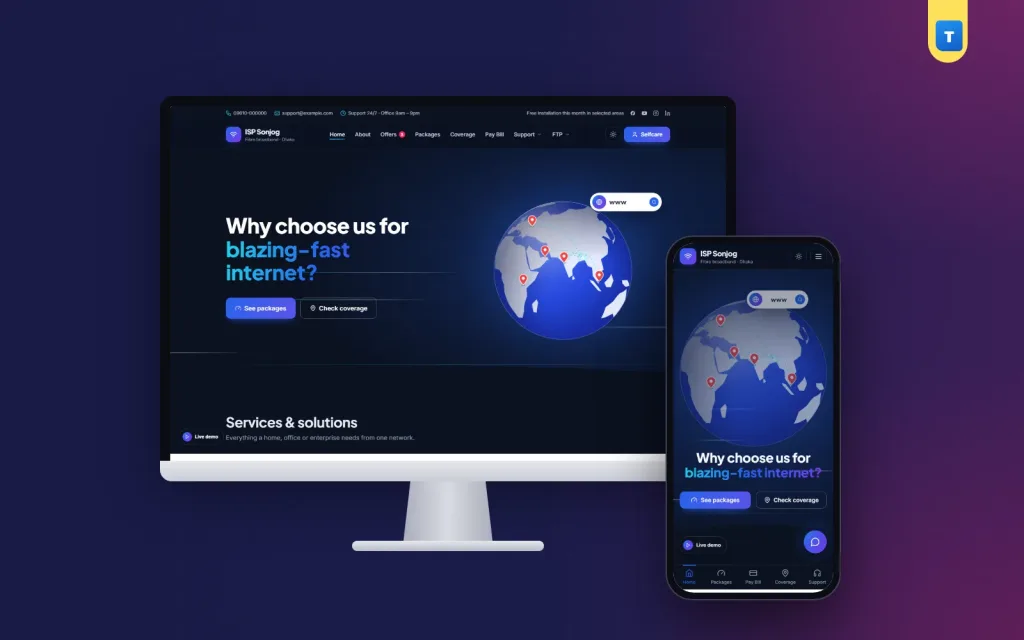
ISP Sonjog is ISP billing software Bangladesh internet providers can install on their own domain: a modern company website, customer Selfcare, automatic monthly bills, online payment with bKash, Nagad and SSLCommerz, a reseller panel with wallet and commission, and MikroTik control that switches PPPoE users on and off by itself. It is a Laravel project with one Filament dashboard for everything.
Most local providers still run their business on a notebook, a spreadsheet and a phone full of bKash messages. Line men collect cash door to door, staff type renewals into the router by hand, and customers call the office to ask how much they owe.
ISP Sonjog puts all of that in one place, so a customer can pay at midnight and be back online a few seconds later without anyone touching the router.
If your customers pay by mobile wallet, your network runs on MikroTik routers, and your team is tired of switching users on and off by hand, this script was made for you.
The public site looks like a premium broadband brand, not a template with demo text. The hero shows an animated dotted Earth globe that visitors can drag, with satellites and signal lines around it. Under it come your packages, offers, coverage, services, testimonials and a call to action. Every page uses curved section edges and light signal-tower animations, so the site feels alive without heavy video.
All pages come from a page builder. You add, move and remove ready blocks:
Each page can have a separate Bangla version of its blocks. The language switch (English and বাংলা) shows only if you turn it on, so a Bangla-only or English-only site is also easy. Many buyers use it as a ready ISP website template and only change the logo, colours, packages and phone numbers.
Packages have a name, speed, monthly price and a list of features such as BDIX speed, YouTube cache, FTP servers or a free router. On phones the package list turns into short rows; a tap opens the features, so nobody has to scroll through long cards.
The coverage module lets you add zones with their area names. Visitors search their area and see on a drawn map whether you serve it. If you do, the new connection form takes their name, mobile number, address and chosen package. Each request lands in the dashboard under Connection requests, where your team can mark it as contacted or connected. Contact form messages and newsletter sign-ups are saved there too.
Quick Pay is the page most of your customers will use. They type their Customer ID, the site shows their name partly hidden (so they know it is the right account) and the amount due, and they pay. No login, no password to remember.
This alone cuts a large share of the "how much is my bill?" calls, and it is the first thing most owners ask for in ISP billing software Bangladesh customers will actually use.
Customers who sign in get Selfcare, a small personal panel:
After every payment the customer gets a receipt by SMS and e-mail, with the new expiry date.
A scheduled task (one cron job on your hosting) does the monthly work. A set number of days before a connection expires, the system makes the bill and can send an SMS with the amount, due date and Customer ID. When the customer pays, the expiry moves forward one month at once. If a bill stays unpaid past the grace days you choose, the connection is suspended automatically.
From the Billing tab of Site settings you decide:
The dashboard keeps invoices, a full payment log and the list of unpaid bills, so the owner sees the money side in one place. For an owner who wants ISP billing software Bangladesh customers can pay at any hour, this is the part that saves the most time.
Four ways to pay are built in, each turned on from Site settings → Integrations:
Every online payment is matched to the right bill, renews the connection and writes a payment record. The footer can show one "Pay with" picture of the wallets and cards you accept; you can upload your own or switch it off.
Resellers apply online from the reseller sign-up page with their NID and trade licence. The files stay private and only staff can open them. Once you approve a reseller, they get their own panel:
The commission rate is set per reseller, with a default rate in the billing settings. Every wallet credit and debit is logged, so there are no arguments at the end of the month about who collected what.
Add your routers in the dashboard with their RouterOS API address and login, and test the connection with one click. After that the script talks to the router for you:
Every action is written to the Router log with the time, customer, result and what triggered it (billing, payment or staff). If MikroTik control is switched off, billing still works and your team can handle the router by hand.
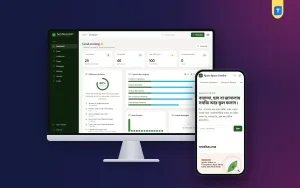
The admin panel is a premium Filament dashboard with its own skin. On a phone, tables turn into labelled cards, so a manager can check payments from the field. It is the part of this ISP billing software Bangladesh owners open every morning. The home screen shows six business cards: active customers, collected this month, unpaid bills, suspended connections, new connection requests and open tickets.
Menus in the dashboard: Customers, Packages, Offers, Coverage zones, Connection requests, Invoices, Payments, Resellers, Tickets, Routers, Router log, Pages, Contact messages, Staff users, Site settings, Demo content and Licence. Site settings has tabs for Company, Colours and fonts, Header and menu, Footer, Modules, Billing, MikroTik, Integrations and SEO.
Design choices are simple: six colour presets (ocean blue, emerald, sunset, royal purple, crimson, graphite) or your own colours, fonts and logo for light and dark mode.
You also get a sticky header, top bar, menu builder, mobile bottom bar, dark and light switch, scroll animations, live chat button with a call link, WhatsApp number, Google Analytics and Facebook Pixel. Modules such as offers, coverage, Quick Pay, reseller sign-up and FTP menu can each be turned off.
You do not need a terminal. Upload the zip to cPanel, open your domain and the web installer walks you through requirements, database, site name, admin account and licence key. On the last step one tick box decides whether to install with or without demo content, so you can start from a full sample ISP or an empty one.
SMS works with three Bangladeshi SMS gateways out of the box, plus any provider that gives a simple send link.
To run the ISP billing software Bangladesh edition you need PHP 8.3 or newer and MySQL (SQLite also works), plus a cron job every minute. Payment gateways and SMS run on your own merchant and SMS accounts, and MikroTik control needs the RouterOS API service open to your server.
The demo is a full sample provider with packages, offers, coverage zones, customers, bills, a reseller and support tickets, reset every 3 hours.
Before going live, enter your real packages and areas, connect one test router, and make one small test payment with your own phone. A clear ISP website template is only half the job; correct prices and fast support are what keep customers paying on time.
Try the ISP Sonjog live demo and sign in to the admin dashboard, Selfcare or reseller panel with one click from the demo page. For more ready business scripts, browse our Laravel projects.
No reviews yet — be the first to share your experience after buying.
Yes. It connects to MikroTik through the RouterOS API, enables or disables PPPoE secrets on payment and suspension, and can import existing PPPoE users.
Yes. Quick Pay asks only for the Customer ID, shows the masked name and amount, and takes payment by bKash, Nagad, SSLCommerz or Send Money.
Yes. Turn on Send Money with Transaction ID. Customers send money to your personal or agent number, and your staff approve the payment in the dashboard.
Yes. Resellers apply with NID and trade licence, and after approval they manage their customers, renew from a wallet and keep their commission.
No. Shared cPanel hosting with PHP 8.3 and a cron job is enough. The web installer sets everything up in the browser.
One domain per licence key. Local test sites do not count.
You get a refund when the product does not work as described and we cannot fix it, when your license will not activate your website, or when a manually delivered product is late and you cancel before delivery. A working license, or a single license already used on a live domain, is not refundable. Approved refunds go back to the number you paid from within one working day, minus the Send Money charge.
−50%
 −47%
 −54%
 −36%
