 −25%
−25%
Tala – Digital Product Marketplace WordPress Theme
✦ Key features
- 17 homepage blocks to switch and re-order
- Device planner picks the cheapest covering plan
- Five-question safety check with score ring
- Quick facts: platform, validity, devices, licence, delivery
- Keys sent by email and WhatsApp with an activation guide
- Checkout with no address and no delivery charge
- bKash, Nagad, SSLCommerz and manual Send Money
- 5 colour palettes and 4 font pairs
- Sign in and register in a popup
- No jQuery, lazy images, web fonts can be turned off
- Invoices, coupons, SMS, OTP and Telegram alerts
- One-click demo with 21 sample products
Overview
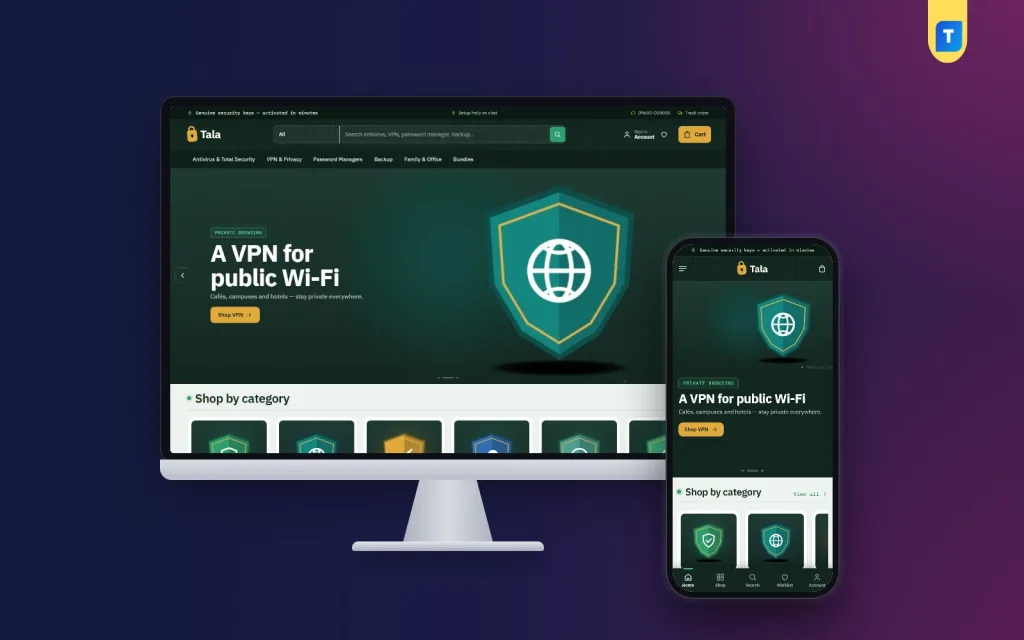
Tala is a digital product marketplace wordpress theme for licence keys, subscriptions, gift cards, ebooks and downloads. It has a device planner, a five-question safety check, address-free checkout and bKash, Nagad and SSLCommerz payments built in.
Tala is a digital product marketplace wordpress theme for shops that sell licences, keys and files online. You can list antivirus and VPN plans, office software, password managers, backup tools, subscriptions, gift cards, ebooks and courses. The buyer pays with bKash, Nagad or a card, and the order reaches them by email and WhatsApp. No address, no parcel.
The theme runs on Themeve Commerce, our own shop plugin. It is bundled and installs in one click, so you do not need WooCommerce. The look is a forest vault: deep green, a fine line grid, mint and amber accents and monospace labels. It suits a seller whose customers want to trust the shop, and you can change every colour if you prefer something lighter.
Who can use this digital product marketplace wordpress theme
The demo sells security software, but the theme is for any seller of products delivered online. Typical users are:
- Resellers of antivirus, VPN, password manager and backup keys.
- Computer shops that sell protection or software with every new laptop.
- Sellers of Windows, Office, PDF and design software licences.
- Sellers of subscriptions, streaming plans and game top-ups.
- Gift card and voucher shops.
- Authors, teachers and designers selling ebooks, courses and templates.
- Agencies who build online shops for clients in Bangladesh.
If you wanted a digital downloads website template, this covers it. You can mix all of these in one shop. Each product has its own details lines, so a key shows platform, validity and devices while an ebook shows format and pages.
Built light for slow connections
Many buyers browse on a phone with a weak signal, so this digital product marketplace wordpress theme keeps pages small. The code in this package keeps pages small:
- The theme script is plain JavaScript. It does not load jQuery.
- Images use native lazy loading.
- Web fonts can be switched off in one setting, and the theme then uses fast system fonts.
- Plugin modules stay off until you switch them on.
Front-end features of the digital product marketplace wordpress theme
Header and menu
- A top bar with up to three short offers and a hotline number.
- An English and Bangla switch you can turn on or off.
- A sticky header and a round search field with a category picker.
- Account and wishlist icons. Sign in and register open in a popup, so the shopper stays on the product.
- A phone bottom bar with Home, Shop, Search, Wishlist and Account.
Device planner
The How many devices? block has four steppers: Windows PCs, Macs, Android phones and iPhones. A family might set two PCs, one Mac and three phones. The theme picks the cheapest plan that covers them all and supports those platforms. It shows the price per device and one button to buy. Nobody pays for a ten-device plan when five will do, and you stop answering the same question in chat all day.
The same idea works for any product sold by seats or devices, such as team licences or multi-user subscriptions.
Safety check
The How safe are you online? block asks five yes or no questions. The answers fill a score ring, and each risky answer comes with a fix. It is a friendly way to start a sale, because the shopper sees the problem before the price. You can switch it off if your shop sells something else.
Homepage: 17 blocks you can switch and re-order
Every block can be turned off and moved. On a computer you drag it, on a phone you use arrows. Each block has its own settings.
- Vault slides open the page.
- Shield tiles lead to each category.
- Device planner and Safety check, as above.
- Best sellers are tabbed by category.
- New and updated shows two rows of the newest products.
- Renewal offers has a countdown with stock bars, handy when yearly plans come up for renewal.
- Protect by need gives four cards for shoppers who start from a worry, not a brand name.
- Three department blocks each carry a banner and eight products.
- Shop by budget, Trending now and Top rated fill the middle of the page.
- Security makers shows brand logos.
- Safety guides lists your latest three posts.
- Promise strip closes the page, led by genuine keys.
Product cards and product page
- A verified-strip card style that stays the same in every grid and sliding row.
- Switches for the star rating, the sold count and the brand line.
- A quick view that opens a product without leaving the list.
- Quick facts at the top of each product page: platform, validity, devices, licence and delivery.
- A clear part on how delivery works, plus an activation guide, so the buyer knows what to do once the key arrives.
- Reviews in a fold, with a popup that invites the first buyer to write one.
- An option for frequently bought items, and a bar that keeps add-to-cart at the bottom of a phone screen.
Checkout and account
- One-page online checkout asking for name, mobile number and a delivery email.
- No address and no delivery charge.
- A Player ID field for top-up products and an optional recipient email for gifts.
- An Order placed popup and a Track Order page.
- A wishlist and an account page with order history.
Footer and contact
- An about text, phone, email, address and opening hours.
- Links for Facebook, Instagram, TikTok, YouTube and WhatsApp. Empty links stay hidden.
- Footer menu columns and an editable copyright line.
Back-end options in the WordPress dashboard
Tala Theme Options
Every look and layout setting is in one screen, and it works on a phone. A search box finds any setting, a sticky save bar stays in view, and you can export, import or reset your settings.
- Homepage layout: switch blocks on or off and set their order.
- Colors: five palettes (Forest vault, Steel blue, Graphite, Night red and Teal) or your own colour for main, ink, highlight, discount, text and background.
- Typography and style: four font pairs (IBM Plex Sans with Plex Mono, Sora with Inter, Archivo, DM Sans), a web fonts switch, button shape, content width from 1,100 to 1,700 pixels and a gentle motion switch.
- Header and menu: top bar offers, hotline, language switch, sticky header, search and the phone bottom bar.
- Product cards: photo shape and which details show.
- Hero slider: slides, text and links.
- Device planner and safety check: titles, texts and the categories and deals used.
- Product sections and product page: section titles and the return text.
- Footer and contact: details and social links.
The logo goes in Appearance, Customize, Site Identity. Menus are edited in the Tala menu screen.
Store dashboard and orders
- A sales overview with today, the last seven days, the month so far and orders waiting for you, plus a two-week chart.
- Orders with a status, a printable invoice and a payments box for advances, dues and refunds.
- Incomplete Orders, listing people who left during checkout.
- Transactions with every payment and refund, and monthly totals.
- A customer list that groups buyers as new, repeat, VIP, inactive or risky.
Products
- A full-page product editor with price, sale price, photos and details lines.
- Options for each product, such as one device for one year or five devices for three years, each with its own price, stock, SKU and photo.
- Categories, brands and tags, each with its own menu.
- Buyer questions and product reviews.
Payments and coupons
- bKash and Nagad payment, and card and mobile payment through SSLCommerz.
- Manual Send Money for bKash, Nagad, Rocket and Upay with a transaction ID.
- Coupons that you create for renewals, launches or festivals.
Alerts, SMS and marketing
- New-order alerts by email, Telegram or WhatsApp.
- SMS updates, phone verification by OTP and fake order protection.
- An automatic review request after delivery.
- SMS campaigns, for example a reminder when yearly plans are due.
- Facebook Pixel with Conversion API, Google Analytics 4, Google Tag Manager and product feeds for Facebook and Google.
- SEO settings for descriptions, sharing previews and Google product results.
- Support tickets, testimonials and offers, each in its own menu.
- A REST API with signed webhooks for developers.
Optional modules
Switch on only what you use: Flash Sale, Combo and Bundle Offers, Loyalty Points with refer a friend, Upsell and Cross-sell, Recently Viewed, Back in Stock Alerts, Pre-orders, Bulk Order and Corporate Quotes, Reseller and Wholesale Prices, Exchange and Returns, Sales and Signup popups, an Affiliate Program and a Marketplace module.
How it helps you run the shop
Used as a digital product marketplace wordpress theme, Tala saves you time in several places.
- Fewer chat messages: the planner answers "which one do I need?" on the page.
- Trust: quick facts, an activation guide and a delivery note tell the buyer what they get.
- Easy renewals: a renewal offer block, review requests and SMS campaigns bring buyers back.
- Fast checkout: three fields on one page.
- Local payments: bKash, Nagad, SSLCommerz and manual Send Money, ready to use.
Set up in six steps
- Install the theme in WordPress and activate it.
- Open Tala, Setup, and install Themeve Commerce with one click.
- Activate your licence in the Themeve Commerce screen.
- Import the one-click demo for sample products, menus and pages.
- Choose a palette and font pair, add your logo and edit the texts.
- Replace the samples with your own products and prices, and set up your payment methods.
The theme needs WordPress 6.0 or newer and PHP 7.4 or newer, and it is tested up to WordPress 7.1.
Why choose it over a plain template
A plain digital downloads website template gives you a front page and leaves the rest to you. You then add a cart, a payment gateway, invoices and coupons from different makers, and hope they agree. Tala is a digital product marketplace wordpress theme built as one piece. The checkout is made for online delivery, the product page explains licences, and the dashboard shows orders, payments and customers together.
What is included
- The Tala theme with 17 homepage blocks.
- The Themeve Commerce plugin, installed from the Setup screen.
- A one-click demo with 21 sample products from six invented makers, with the device planner, safety check, safety guides, menus and every page, including How Delivery Works, Replacement and Refund, Our Stores and Track Order.
- Documentation after purchase and six months of support.
The demo is only an example. Every brand and picture is a sample for you to replace with your own range.
You can see Tala working on the live demo, and browse more ready-made designs in our WordPress themes collection.
Reviews
0.0
Write a review
★★★★★
0 reviews from buyersNo reviews yet — be the first to share your experience after buying.
Frequently Asked Questions
01What can I sell with this digital product marketplace wordpress theme?
Anything delivered online: antivirus and VPN keys, office software, subscriptions, gift cards, game top-ups, ebooks, courses and templates. You can mix them in one shop.
02Is Tala only for antivirus?
No. The demo sells security software as an example. Switch off the planner and safety check if they do not fit your range.
03Do I need WooCommerce for this digital product marketplace wordpress theme?
No. It runs on Themeve Commerce, which is bundled and installs in one click from the Setup screen.
04How does the device planner work?
The buyer sets how many Windows PCs, Macs, Android phones and iPhones they have. The theme picks the cheapest plan that covers them and shows the price per device.
05Does checkout ask for an address?
No. It asks for name, mobile number and a delivery email. There is no delivery charge.
06Which payment methods are supported?
bKash, Nagad, card and mobile payment through SSLCommerz, and manual Send Money for bKash, Nagad, Rocket and Upay with a transaction ID.
07Can I use it as a digital downloads website template?
Yes. Product details lines cover format, pages and language, so ebooks, courses and files fit as well as keys.
08Can I change colours and fonts?
Yes. Choose from five palettes or set each colour yourself, and pick one of four font pairs.
Delivery & Support
1Place your orderAdd to cart, sign in and pay with bKash or Rocket.
2Payment verified automaticallyEnter your Transaction ID — the payment is matched automatically, usually within seconds.
3Get your productYour license key and download appear in My Account → Licenses.
- Secure automatic payment verification
- Delivery to your account & e-mail
- Friendly WhatsApp support
Refund Policy
This policy applies to every product in our store.
You get a refund when the product does not work as described and we cannot fix it, when your license will not activate your website, or when a manually delivered product is late and you cancel before delivery. A working license, or a single license already used on a live domain, is not refundable. Approved refunds go back to the number you paid from within one working day, minus the Send Money charge.
More items
View all →You may also like
−25%
 −15%
−15%
 −20%
−20%
 −34%
−34%
