Good boutique website ideas start with one question: what makes a shopper stop scrolling and tap on your piece? If you run a small clothing boutique in Bangladesh, your site has to do the job of your shop window, your sales assistant and your cashier at the same time.
This guide gives you practical ideas for the homepage, product pages, offers, photos, checkout and mobile experience. Each idea is simple enough to try this month. Use the lists and checklists as a working plan for your own site.
Know your boutique customer first
Ideas only work when they fit the buyer. Spend an hour answering these questions before you change a single page.
- How old are your customers, and where do they live?
- Do they buy on a phone, mostly from Facebook or Instagram links?
- What is a normal budget for one order?
- Do they buy for an occasion, or for everyday wear?
- What makes them hesitate: size, price, delivery or trust?
Write the answers on one page. Look at it whenever you are unsure which idea to use.
Ten homepage boutique website ideas that work
A boutique homepage should feel light and personal, not like a warehouse. These boutique website ideas suit shops with a small or medium range.
- A rounded hero panel with one picture and one offer. Soft shapes feel friendly.
- A moving ticker with short lines: free delivery over a set amount, new drop on Friday.
- Colourful category tiles, with the first tile larger than the rest.
- Trending now tabs that show what people are buying this week.
- A product spotlight that shows one piece big, with its sizes and a bag button.
- Shop by budget tiles for under 500, under 1,000 and under 2,000 taka.
- Flash deals with a countdown for a day or a weekend.
- A photo feed that shows customers wearing your clothes.
- Style notes: short tips on how to wear a piece.
- A clean footer with contact details, policies and payment icons.
You do not need all ten. Start with five and add the rest as you grow.
Modern fashion website design: keep it bright and simple
Modern fashion website design is less about effects and more about clarity. A bright, rounded look suits everyday clothing for young buyers. Quiet, spacious pages suit premium pieces. Either way, follow these rules.

- Use two or three colours and keep them everywhere.
- Leave empty space around photos and buttons.
- Use one font for headings and one for body text.
- Make buttons large and clear, with a short label.
- Keep text short. Say one thing per block.
- Match the mood to your clothes. Weekend outfits want a cheerful page, wedding wear wants a calm one.
Product page boutique website ideas
The product page is where a shopper decides. Treat it as your best sales assistant.
Show enough photos
Give four to six pictures: front, back, detail, fabric and a person wearing it. Add a colour swatch photo for each colour you sell.
Make the size choice easy
- Show size buttons, not a dropdown.
- Open a size guide in a popup, so the shopper does not leave the page.
- State the model's height and size.
Allow a one-tap add to bag
Young shoppers on phones want speed. A quick add button on the product card saves a click. If the item has sizes, a small popup should ask for the size before it goes in the bag.
Add proof
- Reviews with photos.
- A line about your return and exchange policy.
- Stock status, so nobody is disappointed later.
Photo ideas for a small boutique
You do not need a studio. A window with soft light, a clean wall and a phone camera can produce good pictures. What matters is a repeatable method.
- Pick one background colour and keep it for every product.
- Shoot at the same time of day, so the light is the same.
- Use a hanger shot, a flat lay and a worn shot.
- Add a close-up of a button, a print or a hem.
- Edit lightly. Brighten, crop, and keep colours true.
- Compress each file to keep pages quick on mobile data.
Photo work is one of the cheapest boutique website ideas to start with, because better pictures help every other part of the site. Customer photos are even better. Ask buyers to share a picture in return for a small discount, and show the best ones on the homepage.
Offer ideas that suit small shops
A boutique does not need huge sales. Small, clear offers work well.
- Shop by budget: lets a student or a first-time buyer find something affordable.
- Flash deal: one item at a lower price for 24 hours.
- Combo offer: two tops together for a fixed price.
- Free delivery line: free delivery above a certain order value.
- First order coupon: a small discount for new buyers.
- Festival drop: a short collection before Eid or Puja, with a clear date.
Always write the end date. A deal without an end date is easy to ignore.
Boutique website ideas for building trust
People are careful when they pay a small shop online. Remove doubt with plain facts.
- Put your phone number, address and Facebook page in the footer.
- Write a short About page with your name and your story.
- Publish delivery time and charge for Dhaka and outside.
- Write return and exchange rules in simple words.
- Show real customer reviews, not made-up ones.
- Offer cash on delivery for first-time buyers.
- Show the payment methods you really accept.
From Facebook page to website: boutique website ideas for the move
Many Bangladeshi boutiques begin on a Facebook page. Orders arrive in Messenger, and the owner answers the same questions all day: price, size, colour, delivery. A website removes most of that work, but only if you plan the move.
- Copy your best sellers first. Move the twenty pieces that sell most often.
- Turn common questions into page content. Put the size chart, the delivery charge and the exchange rule on the site.
- Keep the same photos and tone. Regular customers should feel at home.
- Add the link everywhere. Pin it on your page, add it to your bio and put it in every reply.
- Offer a small reason to switch. A first website order coupon works well.
- Keep Messenger open. Some customers will still prefer to chat first.
Within a month, count how many orders came from the site and how many came from chat. Use the numbers to decide where to spend your time.
Mobile and speed ideas
Your customers are on phones, and many are on mobile data. These steps make the site feel fast.
- Keep the header simple: menu, logo and bag.
- Show products two to a row on phones, with compact cards.
- Avoid heavy sliders and auto-playing video.
- Use a real link for Load more, so pages stay easy to reach.
- Compress images and use few fonts.
- Test on an older Android phone and on slow data.
Checkout, payment and delivery
If checkout is hard, nothing else matters. Make it short and local.
- One page with name, phone, district, thana and address.
- Cash on delivery, bKash and Nagad as standard options.
- A transaction ID field for manual payment.
- Delivery charge shown before the final button.
- An SMS or email confirmation after the order.
- Courier booking with Steadfast or Pathao from the order screen.
- Parcel tracking, so customers do not need to call you.
A ready-made option for everyday fashion shops
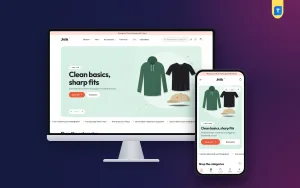
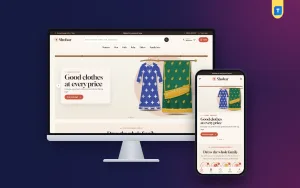
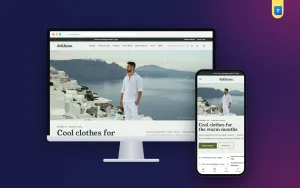
If you want these ideas in place without designing every page, a ready-made theme can help. Jhilik is a bright, modern fashion theme for everyday clothing shops in Bangladesh, such as co-ord sets, dresses, kurtis, tees, shirts, denim, joggers, bags, caps and sneakers.
It includes many of the ideas above.
- 14 homepage blocks to drag, hide or edit.
- A rounded hero panel with up to three slides.
- Five colourful category tiles that link to a category, a tag or any page.
- Shop by budget and flash deals with a countdown.
- Trending now tabs and category bestseller tabs.
- A photo feed and style notes block.
- Six colour sets, from coral to grape.
- A size guide and one-tap add to bag.
- A login popup and a reviews popup on product pages.
- bKash, Nagad, SSLCommerz and cash on delivery.
- Steadfast and Pathao with parcel tracking.
The demo installs in one click with 36 products. The shop plugin, Themeve Commerce, comes with the theme, so you do not need a separate shop plugin. See the full list on the Jhilik page.
A four-week plan to put the ideas to work
Do not try everything at once. Spread the work out, and give each week one clear aim. If a week runs late, move the task to the next week instead of rushing it. A calm launch with fewer features beats a rushed launch with broken pages.
Week 1: foundation
- List your customers and your top ten products.
- Take photos for those ten products.
- Choose a theme and import the demo.
Week 2: content
- Replace demo content with your own products.
- Write product details, sizes and the size guide.
- Set up the homepage blocks you really need.
Week 3: trust and orders
- Write policies and the About page.
- Connect payments and the courier.
- Place two test orders from different phones.
Week 4: launch
- Share the link on Facebook and Instagram.
- Add one offer, such as a flash deal or a first-order coupon.
- Watch orders daily and fix small problems fast.
Measuring results and avoiding mistakes
Ideas are guesses until you measure them. You do not need a complicated report. Check a few numbers once a week.
- Visitors: how many people come, and from where.
- Add-to-bag rate: how many visitors put something in the bag.
- Checkout completion: how many bags turn into orders.
- Average order value: did the combo or free-delivery line help?
- Returns and exchanges: did the size guide reduce them?
- Top pages: which blocks do people click first?
Numbers also tell you when a look is tiring. Modern fashion website design is not fixed.
Colours, banners and tiles can change with each season, and a fresh homepage for each drop keeps returning visitors interested. Review your list of boutique website ideas every month, cross out what did not help and keep what did. Ask five regular customers what they like and what annoys them, because their answers are often more useful than any chart.
Change one thing at a time. If you add a flash deal and a new banner on the same day, you will not know which one worked. Keep a simple notebook with the date, the change and the result.
Mistakes to avoid
- Putting every idea on the homepage at once.
- Using photos with different lights and backgrounds.
- Hiding delivery charges until the last step.
- Leaving demo products on the live site.
- Copying another boutique without checking if it fits your customers.
- Skipping the size guide.
- Never testing the site on a real phone.
If you want to read more on the technical side, the official WordPress documentation is a good, reliable reference.
Frequently asked questions
What are the best boutique website ideas for a beginner?
Start with a clean homepage, strong product photos, a clear size guide, cash on delivery and a short checkout. Add offers and extra blocks once the basics work.
How can I use boutique website ideas without a big budget?
Use a ready-made theme, take your own photos, and add one idea at a time. Most of the ideas in this guide cost time, not money.
How many products does a boutique site need?
Twenty to forty good products are enough for the first launch.
Should I show prices on the homepage?
Yes. Prices on product cards save clicks and build trust, especially for shoppers who have a set budget.
Do I need a separate app?
No. A fast, mobile-friendly website with a one-page checkout is enough for most boutiques at the start.
Which payments should a boutique accept?
Cash on delivery, bKash and Nagad are the minimum. A card gateway helps if your buyers ask for it.
How often should I change the homepage?
Update the hero and offers with each new drop or festival, and refresh the trending section weekly.